สินค้าเกินview
The UBeesize 10" Key Light is designed to provide soft, bright, and even illumination for various applications such as video conferencing, streaming, gaming, podcasting, and video recording. It features advanced side-lighting technology to enhance facial contours and reduce glare, along with a stable and flexible adjustable arm for optimal positioning.
คุณสมบัติที่สำคัญ ได้แก่:
- Side-Lighting Technology: Produces soft, bright illumination, enhancing facial features and reducing glare.
- Stable and Flexible Arm: Multi-position rotation with a control knob for stability and optimal lighting angles.
- Convenient Timer Functions: Includes 2-hour, 4-hour, and 8-hour timer options.
- Stable and Space-Saving Design: Metal C-clamp with adjustable stand and non-slip silicone base.
- การใช้งานที่หลากหลาย: Suitable for home office, gaming setups, live streams, and commercial photography.
มีอะไรอยู่ในกล่อง
กรุณาตรวจสอบเนื้อหาในแพ็คเกจเพื่อให้แน่ใจว่ามีสินค้าครบทั้งหมด:
- 10'' Light
- แขนประกบ
- โต๊ะ Clamp
- อะแดปเตอร์แปลงไฟ
- คู่มือการใช้งาน
คำแนะนำการตั้งค่า
Follow these steps to set up your UBeesize Key Light:
1. Attach the Desk Clamp:
Unscrew the locking bolt counter-clockwise on the metal C-clamp. วางตำแหน่งclamp on your desk (maximum thickness 3 inches) and tighten the screws to secure it firmly. Ensure the non-slip silicone base is in contact with the desk surface to prevent scratches.

Image: The metal C-clamp securely attached to a desk, providing a stable base for the light.
2. Insert the Articulating Arm:
Insert the tripod arm into the desk clamp. Tighten the bolt clockwise to secure the arm in place. The arm's rod length is 13.5 inches, allowing for flexible height adjustments.

Image: The articulating arm being inserted into the desk clamp, ready for the light head attachment.
3. Attach the Light Head:
จัดตำแหน่งลamp's bottom hole to the tripod arm's thread. Tighten the locking screw clockwise to firmly attach the 10" light head to the articulating arm.

Image: The circular light head being screwed onto the top of the articulating arm.
4. Adjust Light Angle and Position:
ปรับลamp to your desired angle using the multi-axis adjustment points on the arm. Tighten the knob clockwise to secure the light head's position. The arm allows for 360° full rotation and various bends for optimal lighting effects.

Image: A diagram illustrating the various articulation points and 360-degree rotation of the light arm.
5. เชื่อมต่อพลังงาน:
Plug the power adapter into the light and then into a standard electrical outlet. The light is now ready for operation.
Note: To detach the tripod arm, first loosen the locking bolt by turning counter-clockwise.
คำแนะนำการใช้งาน
The UBeesize Key Light features intuitive button controls for easy adjustment of light settings.

Image: Close-up of the light's control panel, showing buttons for power, color temperature, brightness, and timer.
- เปิด/ปิดเครื่อง: กดปุ่ม ปุ่มเปิดปิด (usually indicated by a circle with a vertical line) to turn the light on or off.
- ปรับความสว่าง: ใช้ - และ - buttons to increase or decrease the light intensity. There are 10 brightness levels available.
- เปลี่ยนอุณหภูมิสี: กดปุ่ม Color Conversion button (often indicated by a sun or color palette icon) to cycle through three color modes: Warm Light, Natural Light, and Cold Light.
- ตั้งเวลา: กดปุ่ม ปุ่มตั้งเวลา (indicated by a clock icon or 'H' symbols) to set the light to automatically turn off after 2 hours, 4 hours, or 8 hours.
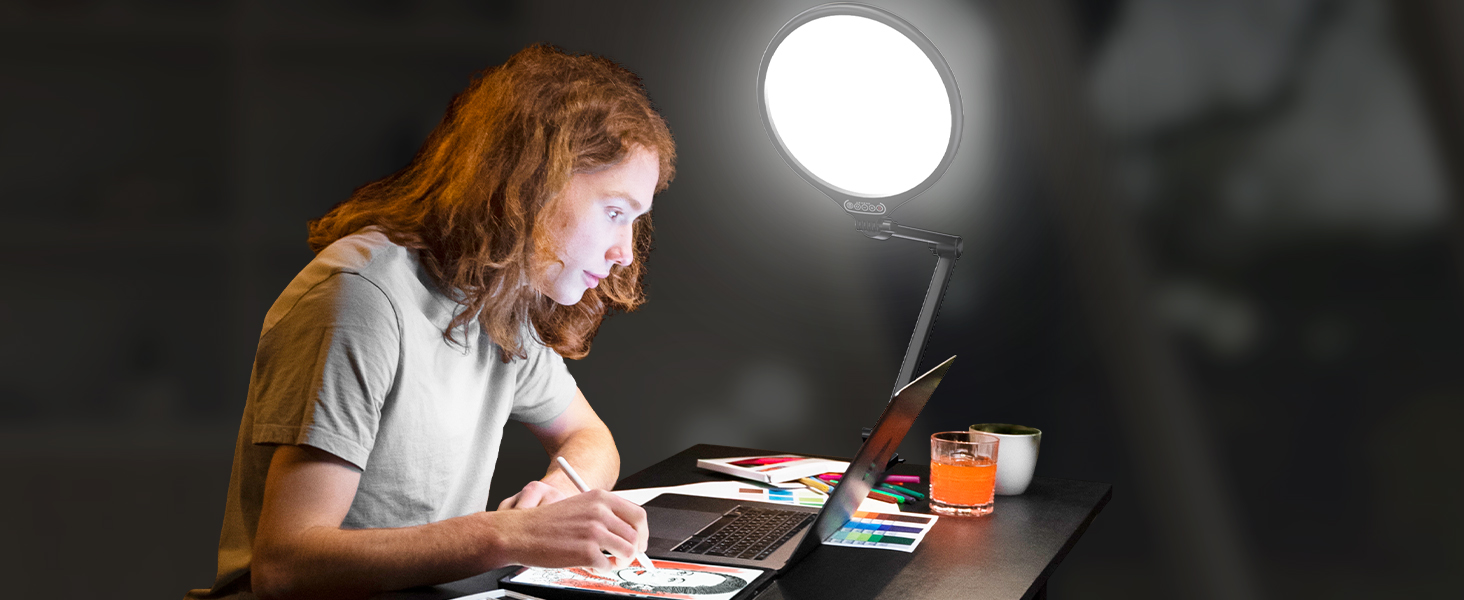
Image: Visual representation of the three distinct color temperature modes: Warm, Natural, and Cold Light.
การซ่อมบำรุง
To ensure the longevity and optimal performance of your UBeesize Key Light, follow these simple maintenance guidelines:
- การทำความสะอาด: Gently wipe the light panel and arm with a soft, dry, or slightly damp cloth. Avoid using abrasive cleaners or solvents, as they may damage the surface.
- พื้นที่จัดเก็บ: When not in use, especially for extended periods, store the light in a cool, dry place away from direct sunlight and extreme temperatures. The light can be folded neatly for space-saving convenience.
- การดูแลสายเคเบิล: Do not bend or crimp the power cable excessively. Ensure it is not placed under heavy objects or in areas where it could be tripped over.
- ข้อต่อและลูกบิด: Periodically check the tightness of all knobs and joints on the articulating arm to maintain stability. Do not overtighten.
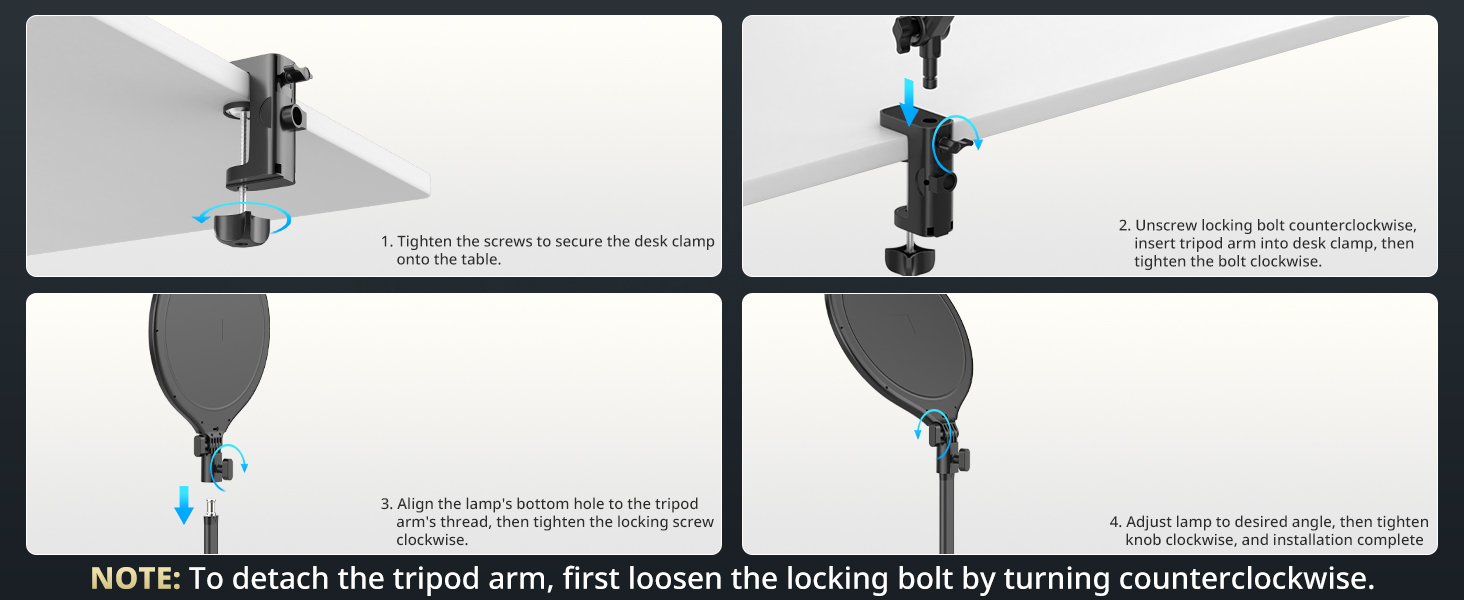
Image: The UBeesize Key Light folded compactly against a desk, demonstrating its space-saving design.
การแก้ไขปัญหา
If you encounter any issues with your UBeesize Key Light, please refer to the following common problems and solutions:
| ปัญหา | สาเหตุที่เป็นไปได้ | สารละลาย |
|---|---|---|
| Light does not turn on or blinks when plugged in. |
|
|
| Light is not bright enough or flickers. |
|
|
| Arm is not stable or sags. |
|
|
Troubleshooting Video Exampเลอ:
Video: A customer demonstrates an issue where the light's power indicator blinks and the light does not turn on, suggesting a potential power or internal fault. (Duration: 1:06)
ข้อมูลจำเพาะ
| คุณสมบัติ | รายละเอียด |
|---|---|
| ขนาดสินค้า | 2 x 12 x 39 นิ้ว |
| น้ำหนักสินค้า | 2.55 ปอนด์ |
| หมายเลขรุ่น | UB-XBD10BK |
| ยี่ห้อ | UBesize |
| เทคโนโลยีการเชื่อมต่อ | Bluetooth (for potential future features or accessories, not directly for light control as per current understanding) |
| คำอธิบายโหมดแฟลช | การให้แสงสว่างอย่างต่อเนื่อง |
| ฮาร์ดแวร์อินเตอร์เฟซ | บลูทูธ 4.0 |
| แบตเตอรี่ | ต้องใช้แบตเตอรี่ลิเธียมโลหะ 1 ก้อน (รวมอยู่ด้วย) |
| วันที่พร้อมใช้งานครั้งแรก | 9 ตุลาคม 2024 |
การรับประกันและการสนับสนุน
For information regarding product warranty, returns, or technical support, please refer to the official UBeesize website or contact their customer service directly. Details are typically provided on the product packaging or through the retailer where the product was purchased.
คุณยังสามารถเยี่ยมชม UBeesize Store on Amazon สำหรับข้อมูลผลิตภัณฑ์เพิ่มเติมและทรัพยากรสนับสนุน


