Chilkey ND75

Chilkey ND75 Aluminum 75% Wireless Mechanical Keyboard User Manual

รุ่น : ND75

1. บทนำ

This manual provides detailed instructions for the setup, operation, and maintenance of your Chilkey ND75 Aluminum 75% Wireless Mechanical Keyboard. Please read this manual thoroughly before using the product to ensure optimal performance and longevity.

The Chilkey ND75 is a high-performance 75% layout mechanical keyboard featuring a full aluminum alloy case, multi-mode connectivity (Bluetooth 5.0, 2.4GHz wireless, USB-C wired), hot-swappable switches, per-key RGB backlighting, and an integrated LCD screen for enhanced functionality.
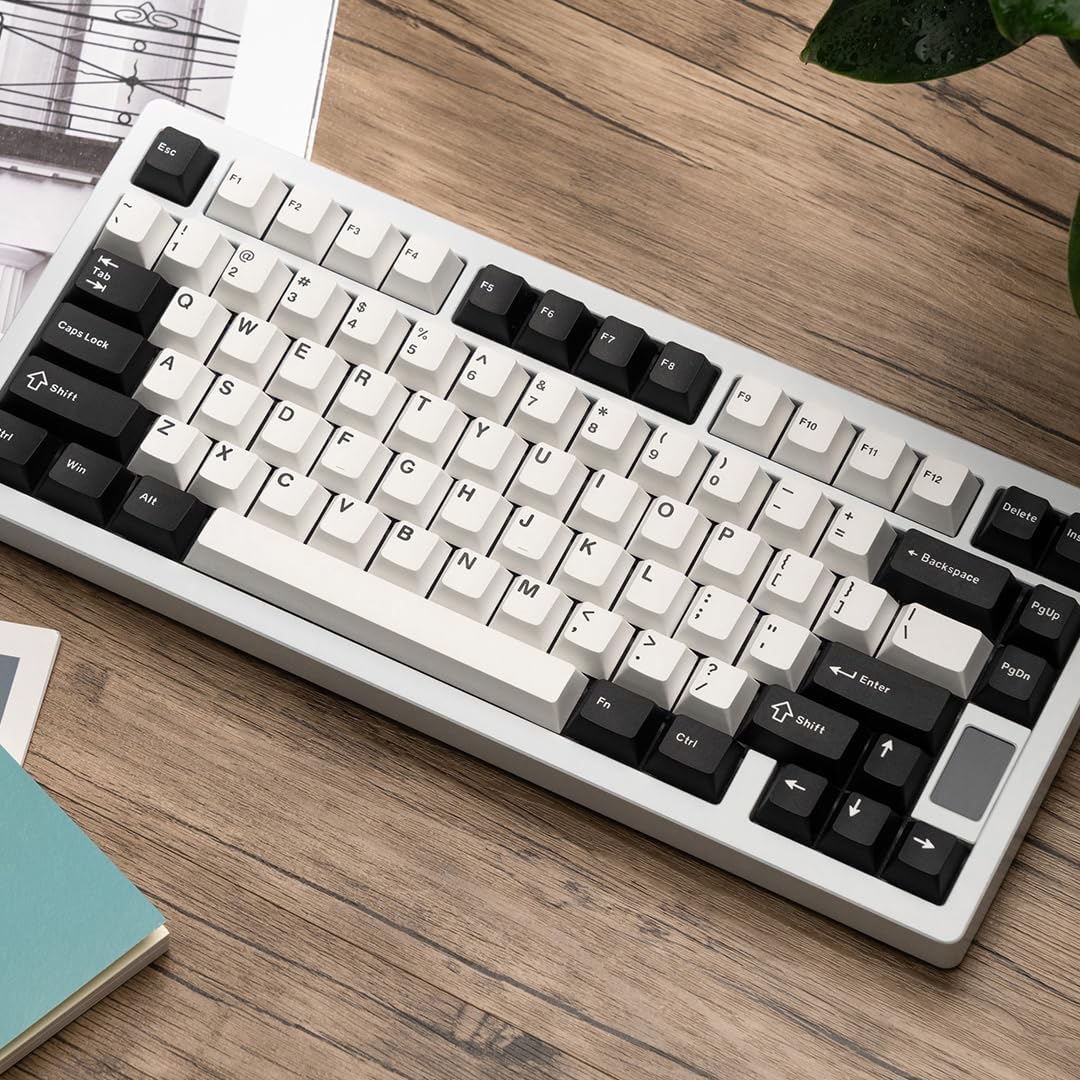
Chilkey ND75 Aluminum 75% Wireless Mechanical Keyboard in white with black and white keycaps, viewed from an angle on a wooden desk.

Image: The Chilkey ND75 keyboard, showcasing its 75% layout and aluminum casing.

2. เนื้อหาบรรจุภัณฑ์

ตรวจสอบว่ามีรายการทั้งหมดอยู่ในแพ็คเกจของคุณ:

  • Chilkey ND75 Aluminum Mechanical Keyboard
  • สาย USB-C
  • Switch Puller / Keycap Puller Tool
  • คู่มือการใช้งาน (เอกสารนี้)
  • Additional hardware (e.g., screwdriver, spare mounting system components if applicable)

Note: The product includes 2 Lithium Polymer batteries (pre-installed).

3. การตั้งค่า

3.1 การเชื่อมต่อเริ่มต้น

The ND75 keyboard supports three connection modes: Bluetooth 5.0, 2.4GHz wireless, and USB-C wired.

3.1.1 Wired Mode (USB-C)

  1. เชื่อมต่อสาย USB-C ที่ให้มาเข้ากับพอร์ต USB-C ของแป้นพิมพ์
  2. เชื่อมต่อปลายอีกด้านหนึ่งของสาย USB-C เข้ากับพอร์ต USB ที่ว่างอยู่บนคอมพิวเตอร์ของคุณ
  3. The keyboard will automatically be detected and ready for use.

โหมดไร้สาย 3.1.2 2.4GHz

  1. Locate the 2.4GHz USB receiver. This is typically stored in a compartment on the keyboard or included separately.
  2. Remove the Right Shift keycap to access the wireless switch. Ensure the switch is in the 2.4GHz position.
  3. เสียบตัวรับสัญญาณ USB 2.4GHz เข้ากับพอร์ต USB ที่ว่างอยู่บนคอมพิวเตอร์ของคุณ
  4. แป้นพิมพ์ควรเชื่อมต่อโดยอัตโนมัติ หากไม่เป็นเช่นนั้น ให้กด fn+4 to activate 2.4GHz pairing mode.

3.1.3 โหมดบลูทูธ 5.0

  1. Remove the Right Shift keycap to access the wireless switch. Ensure the switch is in the Bluetooth position.
  2. บนคอมพิวเตอร์หรืออุปกรณ์ของคุณ เปิดใช้งานบลูทูธและค้นหาอุปกรณ์ใหม่
  3. บนแป้นพิมพ์ให้กดค้างไว้ fn+1, fn+2, หรือ fn+3 for 3-5 seconds to enter pairing mode for one of the three available Bluetooth channels. The LCD screen will indicate pairing status.
  4. Select "Chilkey ND75" from the list of available Bluetooth devices on your computer/device to complete pairing.
  5. You can switch between paired Bluetooth devices using fn+1, fn+2, หรือ fn+3.

3.2 Mounting System Adjustment

The ND75 keyboard features a screwless quick assembly structure and supports three different mounting systems: Split O-Ring Mounting, Silica Gel Particle Mounting, and Top Mounting. These can be adjusted to customize typing feel.

Image showing the three mounting systems: Top Mount, Split O-Ring Mount, and Silica Gel Particle Mount.

ภาพ: ระยะใกล้ view of the keyboard's internal structure highlighting the three mounting systems: Top Mount, Split O-Ring Mount, and Silica Gel Particle Mount. Each system offers a distinct typing experience.

Refer to the detailed instructions provided with the additional hardware for specific guidance on disassembling and reassembling the keyboard to change mounting systems.

4. คู่มือการใช้งาน

4.1 ฟังก์ชั่นหน้าจอ LCD

The integrated LCD screen provides real-time information and allows for quick adjustments without software. Functions include:

Image showing the ND75 keyboard with an exploded view of the LCD screen interface, displaying various settings like connection, RGB, system, volume, and custom GIF options.

Image: The ND75 keyboard with an overlay illustrating the various functions accessible via the LCD screen, including configuration, connection modes, RGB settings, system information, and volume control.

Navigate the LCD screen menu using the dedicated knob or specific key combinations (refer to the quick guide provided with the keyboard).

4.2 RGB แบ็คไลท์

The ND75 keyboard features per-key RGB backlighting with 19 preset lighting effects. Custom light colors can also be defined.

Image of the ND75 keyboard with vibrant per-key RGB backlighting enabled, showcasing various colors.

Image: The ND75 keyboard illuminated with per-key RGB backlighting, demonstrating the range of colors and effects available.

Adjust lighting effects and colors directly via the LCD screen or using specific Fn key combinations. Consult the quick guide for a list of shortcuts.

4.3 สวิตช์แบบ Hot-Swappable

The ND75 keyboard is equipped with a hot-swappable PCB, allowing users to replace switches without soldering. It supports both 3-pin and 5-pin switches.

Image showing a switch being removed from the keyboard PCB using a switch puller tool, demonstrating the hot-swappable feature.

Image: A switch puller tool is used to remove a mechanical switch from the keyboard, illustrating the hot-swappable functionality.

การเปลี่ยนสวิตช์:

  1. Carefully remove the keycap using the keycap puller tool.
  2. Use the switch puller tool to gently grip the top and bottom clips of the switch.
  3. ดึงสวิตช์ขึ้นตรงๆ เพื่อถอดออกจาก PCB
  4. จัดตำแหน่งพินของสวิตช์ใหม่ให้ตรงกับรูบน PCB
  5. กดสวิตช์ใหม่ลงไปให้แน่นจนได้ยินเสียงคลิก ตรวจสอบให้แน่ใจว่าขาของสวิตช์ไม่บิดงอ
  6. เปลี่ยนปุ่มคีย์แคป

Caution: Apply gentle, even pressure when inserting switches to avoid bending pins or damaging the PCB.

4.4 การปรับแต่งซอฟต์แวร์

The ND75 keyboard supports independent driver/software for advanced customization, including key remapping, macro creation, and further RGB lighting control. The software can be downloaded from the official Chilkey webเว็บไซต์.

Note: Some users have reported that the software can be clunky. Refer to the official Chilkey Discord community or support channels for assistance with software usage.

5. การบำรุงรักษา

5.1 การทำความสะอาดแป้นพิมพ์

5.2 การดูแลแบตเตอรี่

The keyboard contains two Lithium Polymer batteries. To prolong battery life:

6 การแก้ไขปัญหา

6.1 แป้นพิมพ์ไม่ตอบสนอง

6.2 คีย์ไม่ลงทะเบียนหรือพิมพ์ซ้ำ

6.3 ปัญหาแสง RGB

6.4 ซอฟต์แวร์ตรวจไม่พบแป้นพิมพ์

7. ข้อมูลจำเพาะ

แบบอย่างเอ็นดี75
เค้าโครง75%
วัสดุตัวเรือนFull Aluminum Alloy (CNC with electrophoretic surface treatment)
การเชื่อมต่อบลูทูธ 5.0, ไร้สาย 2.4GHz, USB-C แบบมีสาย
สวิตซ์Hot-swappable (supports 3-pin/5-pin switches), Pre-lubed Linear Switches
ปุ่มกดDoubleshot PBT, Cherry Profile
การแบ็คไลท์Per-key RGB (19 preset effects, custom colors)
แสดงFunctional LCD Screen (custom GIF, connection mode, battery, RGB, volume, language)
ระบบการติดตั้งSplit O-Ring, Silica Gel Particle, Top Mount
เสียง Dampเอนดิ้งFour layers (Poron plate foam, IXPE switch foam, PET acoustic pad, Poron PCB foam)
แบตเตอรี่2 x Lithium Polymer (included)
ขนาดสินค้าขนาด 12.68 x 5.5 x 1.38 นิ้ว (ยาว 322 มม. x กว้าง 159.8 มม. x สูง 35.2 มม.)
น้ำหนักสินค้า4.6 ปอนด์
ผู้ผลิตOOCTPK
การใช้ที่แนะนำBusiness, Education, Everyday Use, Gaming, Multimedia, Personal, Photo Editing, Programming, Student, Video Editing
Diagram showing the dimensions of the Chilkey ND75 keyboard in millimeters and inches.

Image: Technical drawing illustrating the precise dimensions of the ND75 keyboard.

ระเบิด view diagram of the Chilkey ND75 keyboard components, showing layers like doubleshot PBT keycaps, switches, aluminum top case, plate, various foams, PCB, lithium batteries, and backplate.

ภาพ: ระเบิด view diagram detailing the internal layers and components of the ND75 keyboard, including keycaps, switches, case, and sound dampวัสดุสำหรับตกแต่ง

8. การรับประกันและการสนับสนุน

For warranty information, technical support, or further assistance, please refer to the official Chilkey website or contact their customer service. You may also find helpful resources and community support on the official Chilkey Discord server.

Manufacturer: OOCTPK

เอกสารที่เกี่ยวข้อง - เอ็นดี75

พรีview Chilkey Glacier LW 8K L Master Guide: Setup, Features, and Safety
Comprehensive master guide for the Chilkey Glacier LW 8K L mouse, covering setup, wireless and Bluetooth connectivity, CHILKEY HUB software configuration, safety guidelines, and comfort recommendations.
พรีview Schlage ND-Series Timing Guide: Installation and Operation Instructions
Detailed guide for timing Schlage ND-Series locks, covering installation steps, operation checks, and troubleshooting for various models. Ensures proper lock function and prevents damage.
พรีview ND75 LP Tri-mode Keyboard Operation Manual
Operation manual and FCC compliance statement for the ND75 LP Tri-mode Keyboard by Wuhan Ruobing Technology Co., Ltd. Includes product specifications, key functions, connection instructions, and precautions.
พรีview คำแนะนำในการติดตั้งล็อค Schlage ND-Series
Comprehensive installation guide for Schlage ND-Series cylindrical locks (P517-381). Covers door preparation, lock timing, door thickness adjustments, and step-by-step assembly of exterior and interior components. Includes troubleshooting tips and contact information for Schlage support.
พรีview Schlage ND-Series Service Manual
Comprehensive service manual for Schlage ND-Series Grade 1 cylindrical locks, detailing parts, assemblies, exploded views, and ordering information for models manufactured after November 2003.