1. บทนำ
This manual provides instructions for the Ropwol H15 Digital Camera. Please read this manual thoroughly before using the camera to ensure proper operation and to maximize its features. Keep this manual for future reference.
2. เนื้อหาบรรจุภัณฑ์
ตรวจสอบว่ามีรายการทั้งหมดอยู่ในแพ็คเกจ:
- Ropwol H15 Digital Camera (Black)
- การ์ด SD 32GB
- สายรัด
- แบตเตอรี่
- อะแดปเตอร์
- สายดาต้า USB-C
- คู่มือการใช้งาน (เอกสารนี้)
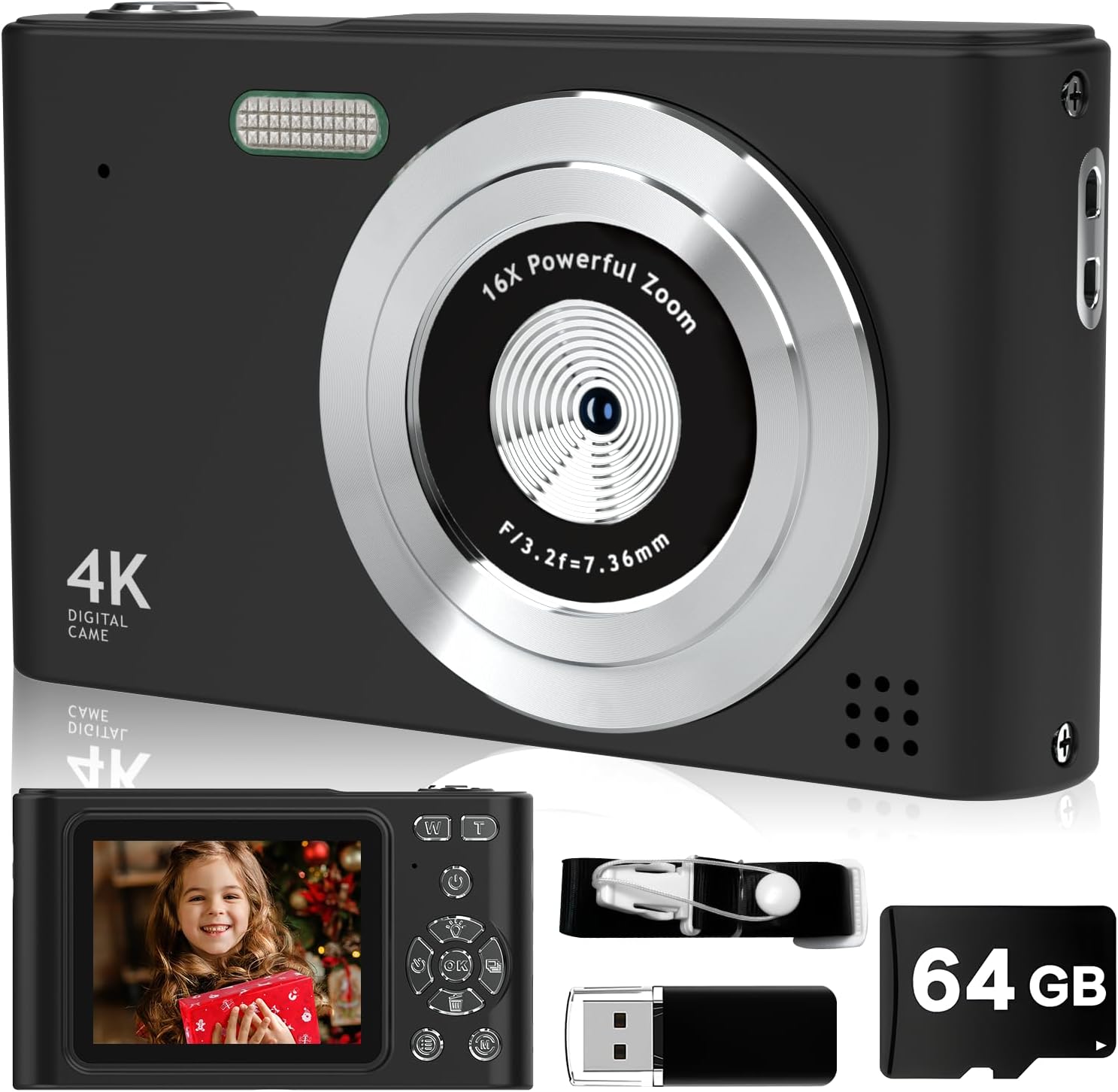
Image: The Ropwol H15 Digital Camera shown with its included accessories: a 32GB SD card, USB cable, and strap.
3. การตั้งค่า
3.1. การชาร์จแบตเตอรี่
- Locate the USB-C port on the camera.
- Connect the provided USB-C data cable to the camera and the adapter.
- เสียบอะแดปเตอร์เข้ากับเต้ารับไฟฟ้า
- The camera's indicator light will show charging status. Once fully charged, the light will change or turn off.
บันทึก: The camera features a built-in rechargeable battery. It is not necessary to remove the battery for charging.
3.2. การใส่การ์ด SD
- ตรวจสอบให้แน่ใจว่ากล้องปิดอยู่
- Locate the SD card slot, typically on the side or bottom of the camera.
- Insert the provided 32GB SD card into the slot with the metal contacts facing the correct direction (refer to the diagram on the camera or slot cover).
- ค่อยๆ ดันการ์ดเข้าไปจนกระทั่งล็อคเข้าที่

Image: The Ropwol H15 Digital Camera displaying its ports for the SD card and USB cable, highlighting connectivity options.
3.3. การติดสายรัด
Thread the camera strap through the designated loop on the camera body to prevent accidental drops.
4. การดำเนินการ
4.1. การเปิด/ปิดเครื่อง
Press and hold the power button (usually marked with ⏻ power symbol) to turn the camera on or off.
4.2.การถ่ายภาพ
- เปิดกล้อง
- จัดกรอบภาพของคุณโดยใช้หน้าจอ LCD
- Press the shutter button (typically on top of the camera) halfway to focus, then press fully to capture the image.

Image: The Ropwol H15 Digital Camera's rear view, showing the LCD screen and control buttons, with a photo of a child displayed.
4.3. บันทึกวิดีโอ
- Switch the camera to video mode (refer to the camera's on-screen menu or a dedicated button).
- Press the record button (often marked with a จุดสีแดง) เพื่อเริ่มการบันทึก
- กดปุ่มบันทึกอีกครั้งเพื่อหยุดการบันทึก
4.4. ฟังก์ชั่นซูม
Use the zoom buttons (often marked 'W' for Wide and 'T' for Telephoto) to adjust the 16x digital zoom. 'T' zooms in, 'W' zooms out.

Image: A visual comparison showing the effect of 2x and 16x digital zoom on the Ropwol H15 Digital Camera, illustrating its magnification capability.
4.5. Using Filters and Special Features
Navigate through the camera's menu to access various functions such as:
- ตัวกรอง: Apply different visual effects (e.g., Black/White, Warm, Cold) to your photos.
- ป้องกันการสั่น: เปิดใช้งานระบบป้องกันภาพสั่นไหวแบบดิจิทัลเพื่อลดความเบลอจากการสั่นไหวของกล้อง
- ตั้งเวลาถ่ายเอง: Set a delay (e.g., 2s, 5s, 10s) before a photo is taken, allowing you to be in the shot.
- ถ่ายภาพต่อเนื่อง: ถ่ายภาพหลายภาพติดต่อกันอย่างรวดเร็ว

Image: The Ropwol H15 Digital Camera showcasing its self-timer options (2s, 5s, 10s), continuous shooting mode, and the anti-shake function for clearer images.
4.6. Connecting to a Computer (Webcam Function)
The camera can function as a webcam. Connect the camera to your computer using the USB-C cable. Select the "Webcam" option on the camera's screen if prompted.
5. การบำรุงรักษา
- การทำความสะอาดเลนส์: ใช้ผ้านุ่มไม่เป็นขุยที่ออกแบบมาสำหรับเลนส์กล้องโดยเฉพาะ ห้ามใช้วัสดุที่มีฤทธิ์กัดกร่อนหรือสารเคมีรุนแรง
- ทำความสะอาดร่างกาย: เช็ดตัวกล้องด้วยผ้านุ่มและแห้ง สำหรับคราบสกปรกฝังแน่น ให้เช็ดเบาๆampเทน้ำลงบนผ้า
- พื้นที่จัดเก็บ: เก็บกล้องไว้ในที่แห้งและเย็น หลีกเลี่ยงแสงแดดโดยตรงและอุณหภูมิที่สูงหรือต่ำเกินไป
- การดูแลแบตเตอรี่ Recharge the battery regularly, even if the camera is not in frequent use, to maintain battery health. Avoid fully discharging the battery for extended periods.
- การจัดการการ์ด SD: Regularly transfer photos and videos to a computer or backup storage to free up space on the SD card and prevent data loss.
6 การแก้ไขปัญหา
| ปัญหา | สาเหตุที่เป็นไปได้ | สารละลาย |
|---|---|---|
| กล้องไม่สามารถเปิดได้ | แบตเตอรี่หมดประจุ | Charge the camera battery using the provided USB-C cable and adapter. |
| ไม่สามารถถ่ายภาพ/วิดีโอได้ | SD card is full or not inserted correctly. | Check if the SD card is properly inserted. Transfer files to free up space or replace the SD card. |
| ภาพมีความเบลอ | Camera shake; lens is dirty; subject is too close. | Ensure Anti-Shake is enabled. Clean the lens. Maintain appropriate distance from the subject. |
| กล้องหยุดนิ่งหรือไม่ตอบสนอง | ซอฟต์แวร์มีปัญหาชั่วคราว | Press and hold the power button for 10 seconds to force a shutdown, then restart the camera. |
| Computer does not recognize camera as webลูกเบี้ยว. | เลือกโหมดการเชื่อมต่อไม่ถูกต้อง | Ensure "Webcam" mode is selected on the camera after connecting to the computer. Try a different USB port. |
7. ข้อมูลจำเพาะ
| คุณสมบัติ | รายละเอียด |
|---|---|
| ชื่อรุ่น | H15 |
| ความละเอียดของภาพนิ่งที่มีประสิทธิภาพ | 44 MP (Maximum Image Size) |
| ความละเอียดวิดีโอ | ความละเอียด 1080p |
| ซูมดิจิตอล | 16 เท่า |
| ระบบป้องกันภาพสั่นไหว | Digital (Anti-Shake) |
| เทคโนโลยีโฟโต้เซนเซอร์ | ซีมอส |
| ขนาดหน้าจอ | 2.4 นิ้ว |
| ประเภทจอภาพ | จอแอลซีดี |
| การเชื่อมต่อ | ไมโคร USB |
| การรองรับการ์ดหน่วยความจำ | SD Card (up to 32GB included) |
| ประเภทแบตเตอรี่ | แบตเตอรี่ลิเธียมไอออน (แบบติดตั้งในตัว) |
| คุณสมบัติพิเศษ | Anti Shake, Self Timer, Filters, Continuous Shooting |
| สี | สีดำ |
8. การรับประกันและการสนับสนุน
การรับประกัน: The Ropwol H15 Digital Camera comes with a 2-year manufacturer's warranty. This warranty covers defects in materials and workmanship under normal use. Please retain your proof of purchase for warranty claims.
สนับสนุน: For technical assistance, troubleshooting beyond this manual, or warranty inquiries, please contact Ropwol customer support through the retailer where the product was purchased or refer to the contact information provided in the product packaging.


