1. บทนำ
This manual provides detailed instructions for the installation, operation, and maintenance of your PNI House WiFi800 NVR and PNI IP840 Outdoor Camera Wireless Surveillance Kit. Please read this manual thoroughly before using the product to ensure proper setup and functionality. Keep this manual for future reference.
2. ข้อมูลด้านความปลอดภัย
- ตรวจสอบให้แน่ใจว่าการเชื่อมต่อสายไฟทั้งหมดแน่นหนาและตรงตามแรงดันไฟฟ้าที่กำหนดtagอี (12V DC)
- Do not expose the NVR to moisture or extreme temperatures.
- The PNI IP840 cameras are IP65 rated for outdoor use; however, avoid submerging them in water.
- Installation should be performed by qualified personnel if you are unsure about electrical connections or mounting procedures.
- เก็บผลิตภัณฑ์ให้ห่างจากสนามแม่เหล็กแรงสูง
- Use only original or certified replacement parts and accessories.
3. เนื้อหาบรรจุภัณฑ์
ตรวจสอบว่ามีสินค้าทั้งหมดที่ระบุไว้ด้านล่างอยู่ในแพ็คเกจของคุณ:
- PNI House WiFi800 NVR (1 unit)
- PNI IP840 Outdoor Cameras (2 units)
- Power Adapters (for NVR and cameras)
- USB Mouse (for NVR)
- Fixing Screws and Wall Plugs (for cameras)
- User Manuals (for NVR and cameras)

Image: PNI House WiFi800 NVR with included USB mouse and power adapter.

Image: PNI IP840 Outdoor Camera with its power adapter and mounting hardware.
4. สินค้าหมดview
4.1 PNI IP840 Outdoor Camera
The PNI IP840 camera is a high-resolution wireless outdoor surveillance camera featuring 8MP 4K video, pan/tilt functionality, and advanced night vision. It is designed for robust performance in various weather conditions.
- เซ็นเซอร์: 1/2.7" CMOS, 8MP
- ปณิธาน: 3840x2160 (4K)
- เลนส์: 3.6mm, 90° viewมุมเอียง
- แพน/เอียง: แนวนอน 355°, แนวตั้ง 90°
- การมองเห็นตอนกลางคืน: 4 IR LEDs and 4 White LEDs, up to 15m
- พื้นที่จัดเก็บ: ช่องเสียบการ์ด microSD (สูงสุด 256GB, ไม่รวมการ์ด)
- การเชื่อมต่อ: WiFi 2.4GHz, ONVIF support
- คุณสมบัติ: Motion Detection, Human Shape Detection, Rotation after movement, ICSee app support
- ความทนทานต่อสภาพอากาศ: ระดับการป้องกัน IP65

ภาพ: ด้านหน้า view of the PNI IP840 outdoor camera, showing the lens, LEDs, and antennas.

Image: Close-up of the PNI IP840 camera's connection cables for power and wired network.
4.2 PNI House WiFi800 NVR
The PNI House WiFi800 NVR (Network Video Recorder) is the central unit for managing and recording video from your surveillance cameras. It supports up to 8 channels at 5MP or 4 channels at 4K (8MP) resolution.
- Video Channels: 8 channels (5MP) / 4 channels (4K/8MP)
- การบีบอัดวิดีโอ: H.265AI/H.265+
- ความละเอียดในการเล่น: 1080P (HDMI output)
- พื้นที่จัดเก็บ: Supports 1x 2.5" HDD (up to 14TB) or 1x MicroSD card (up to 128GB)
- อินเทอร์เฟซเครือข่าย: RJ45 10/100/1000 Mbit/s
- ความถี่ไร้สาย: 2.4 GHz (for NVR-camera communication)
- เอาท์พุต: 1x HDMI, 1x USB 2.0
- คุณสมบัติ: Mobile/PC viewing (Android, iOS, Windows), ICSee/XMEye app support, Integrated voice prompt speaker

Image: Rear panel of the PNI House WiFi800 NVR, displaying its various ports including power, HDMI, Ethernet, USB, and reset button.

ภาพ: ด้านข้าง view of the PNI House WiFi800 NVR, showing its antennas and port layout.
5. การตั้งค่า
5.1 การตั้งค่าเริ่มต้นของ NVR
- เชื่อมต่อพลังงาน: Connect the NVR to its power adapter and plug it into an electrical outlet.
- เชื่อมต่อจอแสดงผล: Connect the NVR to a monitor or TV using an HDMI cable.
- เชื่อมต่อเมาส์: เสียบเมาส์ USB เข้ากับพอร์ต USB ของ NVR เพื่อใช้ในการนำทาง
- การเชื่อมต่อเครือข่าย (ทางเลือก): For remote access and firmware updates, connect the NVR to your router using an Ethernet cable.
- Storage Installation (Optional): If using an HDD, open the NVR casing and install a 2.5" SATA HDD. Alternatively, insert a MicroSD card into the designated slot.
5.2 การติดตั้งกล้อง
- เลือกสถานที่: Select a suitable outdoor location for each camera, ensuring good Wi-Fi signal strength and an unobstructed view. The IP65 rating allows for outdoor exposure.
- ขาตั้งกล้อง: Use the provided screws and wall plugs to securely mount the camera to a wall or ceiling.
- เชื่อมต่อพลังงาน: Connect the camera to its power adapter and plug it into an electrical outlet. Ensure the power cable is protected from the elements.
5.3 Pairing Cameras with NVR
The cameras are typically pre-paired with the NVR in the kit. If not, or if adding new cameras:
- Ensure both the NVR and cameras are powered on.
- On the NVR interface (connected to a monitor), navigate to the camera management or channel settings.
- Select the option to add or search for wireless cameras. The NVR will scan for available PNI IP840 cameras.
- ทำตามคำแนะนำบนหน้าจอเพื่อดำเนินการจับคู่ให้เสร็จสมบูรณ์
5.4 Mobile App Configuration (ICSee / XMEye)
- ดาวน์โหลดแอพ: Download the ICSee or XMEye app from your smartphone's app store (Android or iOS).
- ลงทะเบียนบัญชี: สร้างบัญชีผู้ใช้ใหม่ หรือเข้าสู่ระบบหากคุณมีบัญชีอยู่แล้ว
- เพิ่มอุปกรณ์: In the app, select "Add Device" or scan the QR code displayed on the NVR's monitor (if available) or the NVR itself.
- ปฏิบัติตามคำแนะนำ: Follow the in-app instructions to connect your NVR and cameras to your mobile device for remote viewไอเอ็นจีและการควบคุม
6. คู่มือการใช้งาน
6.1 สด View
Access live video feeds from your cameras via the NVR's connected monitor or through the ICSee/XMEye mobile application. The NVR interface allows for multi-channel display.
6.2 การบันทึก
- การบันทึกต่อเนื่อง: Configure the NVR to record continuously to the installed HDD or MicroSD card.
- การบันทึกเมื่อมีการเคลื่อนไหว: Set up recording to trigger only when motion is detected by the cameras.
- การบันทึกตามกำหนดเวลา: กำหนดช่วงเวลาที่เฉพาะเจาะจงสำหรับการบันทึก
6.3 การเล่นซ้ำ
เพื่อview บันทึกเสียงฟูtage:
- On the NVR interface, select the "Playback" option.
- Choose the desired camera, date, and time range.
- Use the controls to play, pause, fast forward, or rewind footage.
- Mobile app playback functions similarly, allowing remote access to recorded video.
6.4 Motion Detection and AI Functions
The PNI IP840 cameras feature advanced detection capabilities:
- การตรวจจับการเคลื่อนไหว: Configurable sensitivity to detect movement within the camera's field of view.
- การตรวจจับรูปร่างมนุษย์: Intelligent analysis to differentiate human figures from other moving objects, reducing false alarms.
- Rotation After Movement: The camera can be set to automatically track detected movement within its pan/tilt range.
- การแจ้งเตือนภัย: Enable push notifications to your mobile phone when an alarm event (e.g., motion detection) occurs.
Access these settings through the NVR menu or the mobile application to customize detection zones, sensitivity, and notification preferences.
6.5 การควบคุมการแพน/เอียง/ซูม (PTZ)
For PNI IP840 cameras, you can remotely control the camera's orientation:
- Use the PTZ controls available in the NVR interface or the ICSee/XMEye mobile app.
- Drag your finger on the live view screen in the app to pan (horizontal 355°) and tilt (vertical 90°) the camera.
- Digital zoom functionality may be available through the app.
7. การบำรุงรักษา
- การทำความสะอาด: Regularly clean the camera lenses with a soft, dry cloth to ensure clear image quality. Do not use harsh chemicals.
- อัพเดตเฟิร์มแวร์: Periodically check for firmware updates for both the NVR and cameras through the mobile app or NVR interface. Updates can improve performance and add new features.
- ตรวจสอบการเชื่อมต่อ: ตรวจสอบให้แน่ใจว่าสายไฟและสายเครือข่ายทั้งหมดเชื่อมต่อแน่นหนาและไม่มีความเสียหาย
- การจัดการพื้นที่เก็บข้อมูล: Regularly back up important recordings and manage storage space on your HDD or MicroSD card.
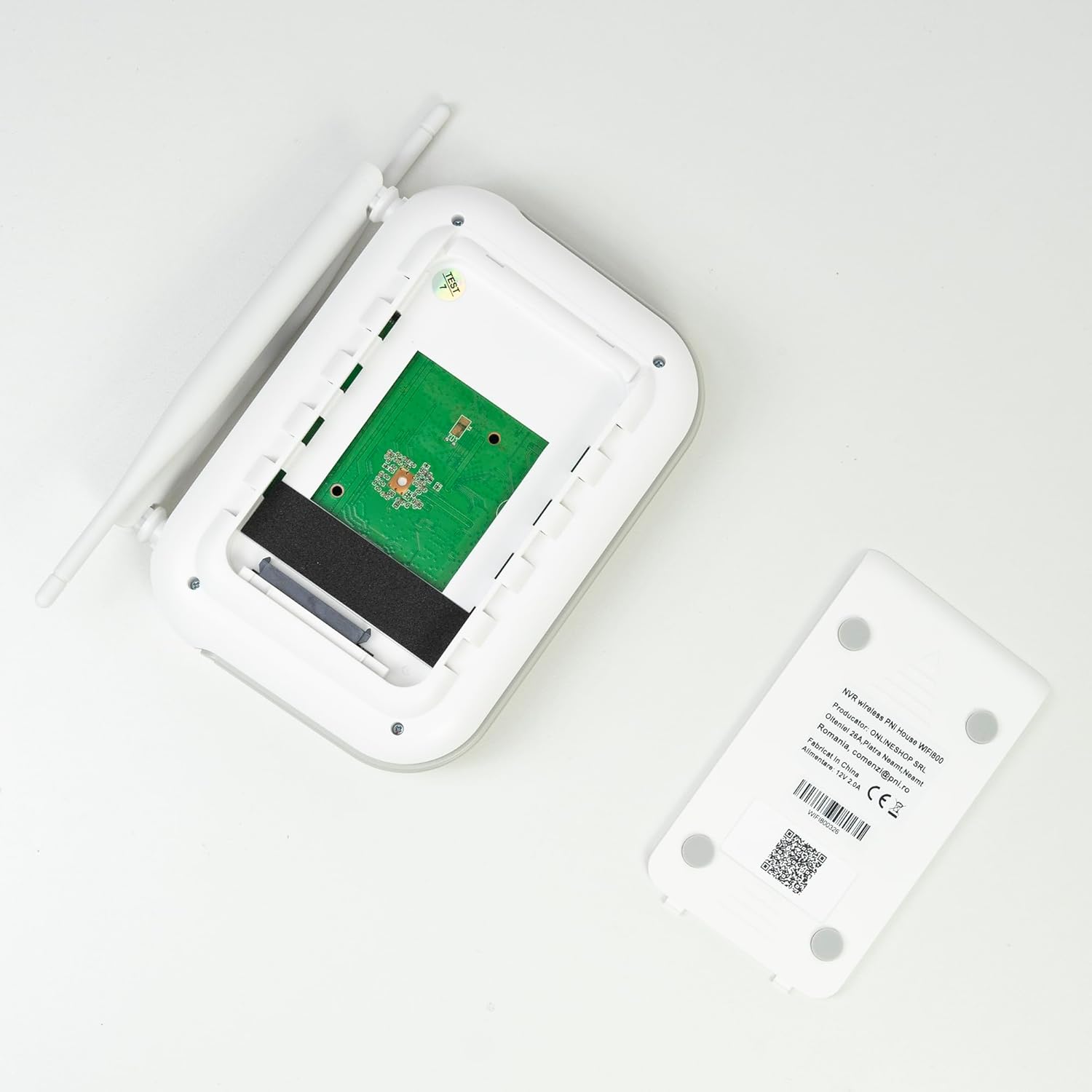
ภาพ: ภายใน view of the PNI House WiFi800 NVR, illustrating the circuit board and the bay for HDD installation.
8 การแก้ไขปัญหา
- ไม่มีภาพปรากฏบนจอภาพ:
- Check NVR power supply and HDMI cable connection to the monitor.
- ตรวจสอบให้แน่ใจว่าจอภาพถูกตั้งค่าให้เป็นแหล่งอินพุตที่ถูกต้อง
- กล้องเชื่อมต่อไม่ได้:
- Verify cameras are powered on.
- Check Wi-Fi signal strength at camera locations.
- Re-pair cameras with the NVR if necessary (refer to Section 5.3).
- ไม่สามารถเข้าถึงระยะไกลผ่านแอปได้:
- Ensure the NVR is connected to the internet via Ethernet.
- ตรวจสอบการเชื่อมต่ออินเทอร์เน็ตของสมาร์ทโฟนของคุณ
- Verify NVR is correctly added to the ICSee/XMEye app.
- คุณภาพของภาพต่ำ:
- ทำความสะอาดเลนส์กล้อง
- ตรวจสอบสิ่งกีดขวางในสนามของกล้อง view.
- Ensure adequate lighting for night vision.
- ปัญหาการบันทึก:
- Check if an HDD or MicroSD card is properly installed and formatted.
- ตรวจสอบตารางการบันทึกและตั้งค่าการตรวจจับการเคลื่อนไหว
- ให้แน่ใจว่ามีพื้นที่เก็บข้อมูลเพียงพอ
9. ข้อมูลจำเพาะ
9.1 PNI IP840 Outdoor Camera Specifications
| คุณสมบัติ | รายละเอียด |
|---|---|
| เซ็นเซอร์รับภาพ | 1/2.7" CMOS |
| ความละเอียดเซนเซอร์ | 8MP |
| ความละเอียดวิดีโอ | 3840x2160 (4K) |
| ประเภทเลนส์ | 3.6มม. |
| Viewอิงแองเกิล | 90° |
| แพน/เอียง | แนวนอน: 355°, แนวตั้ง: 90° |
| การส่องสว่างด้วยอินฟราเรด | 4x IR LEDs, 4x White LEDs |
| ระยะอินฟราเรด | สูงถึง 15 เมตร |
| การบีบอัดวิดีโอ | H.265X (compatible with H.264+/H.264) |
| เสียง | ไมโครโฟนและลำโพงในตัว |
| ความถี่ไร้สาย | 2.4 กิกะเฮิรตซ์ |
| โปรโตคอลที่รองรับ | ออนวิฟ |
| พื้นที่จัดเก็บ | ช่องเสียบการ์ด MicroSD (สูงสุด 256GB) |
| แหล่งจ่ายไฟ | 12V/1A |
| ระดับการป้องกัน | IP65 |
| อุณหภูมิในการทำงาน | -26°C ~ +80°C |
| ขนาด | 86x135x146มม. |
| น้ำหนัก | 371 กรัม |
9.2 PNI House WiFi800 NVR Specifications
| คุณสมบัติ | รายละเอียด |
|---|---|
| ช่องวิดีโอ | 8 ช่อง 5MP / 4 ช่อง 4K (8MP) |
| การบีบอัดวิดีโอ | H.265AI/H.265+ |
| ความละเอียดในการเล่น | 1080P (HDMI) |
| ความจุในการเก็บข้อมูล | 1x 2.5" HDD (max 14TB) / 1x MicroSD card (max 128GB) |
| เชื่อมต่อเครือข่าย | RJ45 - 10/100/1000 Mbit/s |
| เอาท์พุตวิดีโอ | 1x HDMI |
| อินเทอร์เฟซ USB | USB 1 2.0 ช่อง |
| โปรเซสเซอร์ | MSR621Q |
| แหล่งจ่ายไฟ | 12V/2A |
| ขนาด | 170x120x35มม. |
| น้ำหนัก | 245 กรัม |
| Wi-Fi Frequency (NVR-Camera) | 2.4 กิกะเฮิรตซ์ |
| การแจ้งเตือนด้วยเสียง | Yes, integrated speaker |
10. การรับประกันและการสนับสนุน
For warranty information, please refer to the documentation provided at the time of purchase or contact your retailer. For technical support, product inquiries, or assistance with troubleshooting, please visit the official PNI website or contact PNI customer service directly. Keep your purchase receipt as proof of purchase.
ผู้ผลิต: ร้านค้าออนไลน์ SRL
หมายเลขรุ่น: PNI-WF8-840-2


