1. บทนำ
This manual provides essential instructions for the safe and efficient use of your Meizu Note 21 Pro smartphone. Please read this manual thoroughly before operating the device and retain it for future reference.
2. อะไรอยู่ในกล่อง
- Meizu Note 21 Pro Smartphone
- อะแดปเตอร์แปลงไฟ
- (Other accessories such as USB cable, SIM ejector tool, and documentation may vary by region.)
3. เค้าโครงอุปกรณ์
Familiarize yourself with the physical components of your Meizu Note 21 Pro.
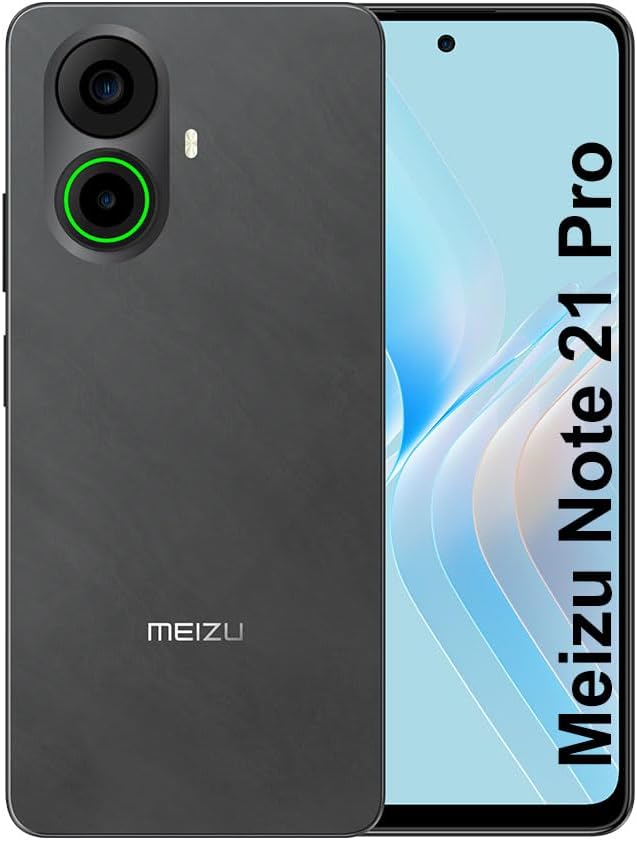
ภาพที่ 3.1: ด้านหน้าและด้านหลัง view of the Meizu Note 21 Pro. The front displays the screen with a punch-hole camera. The rear shows the dual camera module with a green accent ring on one lens, a flash, and the "MEIZU" logo at the bottom.
- จอแสดงผลด้านหน้า: 6.78-inch FHD+ screen with a 120Hz refresh rate.
- กล้องหน้า: ตั้งอยู่บริเวณตรงกลางด้านบนของจอแสดงผล
- กล้องหลัง: Dual camera system, including a 64MP main camera.
- เซ็นเซอร์ลายนิ้วมือด้านข้าง: Integrated for secure access.
- พอร์ต USB: สำหรับการชาร์จและถ่ายโอนข้อมูล
- แจ็คเสียงขนาด 3.5 มม.: สำหรับหูฟัง.
- ถาดใส่ซิมการ์ด/ไมโคร SD: Supports Dual Nano SIM and MicroSD cards.
4. การตั้งค่า
4.1. การใส่ซิมการ์ดและ MicroSD
- ค้นหาถาดใส่การ์ด SIM ที่ด้านข้างอุปกรณ์ของคุณ
- ใส่เครื่องมือถอดซิมเข้าไปในรูเล็ก ๆ ข้างถาดและกดเบา ๆ จนถาดหลุดออกมา
- Place your Nano SIM card(s) and/or MicroSD card into the designated slots on the tray. Ensure the gold contacts face downwards.
- ใส่ถาดกลับเข้าไปในอุปกรณ์อย่างระมัดระวังจนกระทั่งล็อคเข้าที่
4.2. การเปิดเครื่องครั้งแรกและการตั้งค่า
- กดปุ่มเปิด/ปิดค้างไว้จนกว่าโลโก้ Meizu จะปรากฏขึ้น
- ทำตามคำแนะนำบนหน้าจอเพื่อเลือกภาษา เชื่อมต่อกับเครือข่าย Wi-Fi และตั้งค่าบัญชี Google ของคุณ
- During setup, you will be guided to configure security features such as a PIN, pattern, or password.
4.3. Fingerprint Recognition Setup
- นำทางไปที่ การตั้งค่า > ความปลอดภัยและความเป็นส่วนตัว > ปลดล็อคด้วยลายนิ้วมือ.
- Follow the on-screen instructions to register your fingerprint by repeatedly touching the side-mounted sensor.
- เพื่อให้ได้ประสิทธิภาพสูงสุดในการลงทะเบียน โปรดตรวจสอบให้แน่ใจว่านิ้วของคุณครอบคลุมพื้นที่เซ็นเซอร์ทั้งหมด
5. การใช้งานอุปกรณ์ของคุณ
5.1. การแสดงผลและการนำทาง
- The 6.78-inch FHD+ display operates at a 120Hz refresh rate for smooth visuals.
- Navigate the Android 14 operating system using touch gestures: tap, swipe, pinch-to-zoom.
- เข้าถึงการตั้งค่าด่วนได้โดยการปัดลงจากด้านบนของหน้าจอ
5.2. ฟังก์ชันของกล้อง
- เปิดแอปพลิเคชันกล้องจากหน้าจอหลักหรือลิ้นชักแอป
- The rear camera system features a 64MP main sensor for high-resolution photos and a 2MP depth-of-field camera for portrait effects.
- กล้องหน้าความละเอียด 13MP เหมาะสำหรับการถ่ายเซลฟี่และการสนทนาทางวิดีโอ
- Tap on the screen to focus, and use the on-screen shutter button to capture images. Explore various modes like Portrait, Night, and Pro within the camera app.
5.3. ประสิทธิภาพและการจัดเก็บ
- The MediaTek G99 Octa Core processor ensures efficient performance for applications and multitasking.
- The device comes with 256GB of internal storage and 8GB of RAM.
- Storage can be expanded using a MicroSD card (sold separately).
5.4. แบตเตอรี่และการชาร์จ
- The Meizu Note 21 Pro is equipped with a 5000mAh battery.
- Use the provided Power Adapter for 30W fast charging.
- To charge, connect the USB cable to the phone's USB port and the power adapter, then plug the adapter into a wall outlet.
5.5. การเชื่อมต่อ
- 4G แอลทีอี: Supports various LTE FDD and TDD bands for cellular data. Note: This international version works on T-Mobile in the USA and globally with other carriers.
- ไวไฟ 5: เชื่อมต่อกับเครือข่ายไร้สายเพื่อการเข้าถึงอินเทอร์เน็ต
- บลูทูธ: จับคู่กับอุปกรณ์เสริมไร้สายเช่นหูฟังและลำโพง
- NFC: สำหรับการชำระเงินแบบไร้สัมผัสและการจับคู่ที่รวดเร็วกับอุปกรณ์ที่รองรับ
- จีพีเอส: สำหรับบริการระบุตำแหน่งและการนำทาง
6. การบำรุงรักษา
- การทำความสะอาด: ใช้ผ้านุ่มที่ไม่เป็นขุยทำความสะอาดหน้าจอและตัวเครื่อง หลีกเลี่ยงสารเคมีรุนแรงหรือวัสดุที่มีฤทธิ์กัดกร่อน
- การดูแลแบตเตอรี่ Avoid extreme temperatures. Do not fully discharge the battery frequently. For optimal battery longevity, keep the charge between 20% and 80%.
- การอัปเดตซอฟต์แวร์: ตรวจสอบและติดตั้งการอัปเดตระบบเป็นประจำเพื่อให้มั่นใจถึงประสิทธิภาพและความปลอดภัยที่เหมาะสมที่สุด ไปที่ การตั้งค่า > ระบบ > การอัพเดทระบบ.
7 การแก้ไขปัญหา
| ปัญหา | วิธีแก้ปัญหาที่เป็นไปได้ |
|---|---|
| อุปกรณ์ไม่เปิดเครื่อง | Ensure the battery is charged. Connect the device to the power adapter and try again. If unresponsive, press and hold the Power button for 10-15 seconds to force a restart. |
| สัญญาณเครือข่ายไม่ดี | Check if the SIM card is correctly inserted. Move to an area with better network coverage. Restart the device. Verify with your carrier that your plan is active. |
| แอปทำงานช้าหรือขัดข้อง | ปิดแอปพลิเคชันเบื้องหลัง ล้างแคชแอปพลิเคชัน (การตั้งค่า > แอปพลิเคชั่น > เลือกแอป > การจัดเก็บและแคช > ล้างแคช) รีสตาร์ทอุปกรณ์ ตรวจสอบให้แน่ใจว่ามีพื้นที่จัดเก็บข้อมูลเพียงพอ |
| เซ็นเซอร์ลายนิ้วมือไม่ทำงาน | Ensure your finger and the sensor are clean and dry. Re-register your fingerprint in settings. |
8. ข้อมูลจำเพาะ
- แบบอย่าง: Meizu Note 21 Pro
- ระบบปฏิบัติการ: แอนดรอยด์ 14
- โปรเซสเซอร์: MediaTek G99 Octa Core (2.2GHz)
- แสดง: 6.78 inches FHD+ (1080 x 2160 resolution), 120Hz Refresh Rate
- แรม : 8GB
- พื้นที่เก็บข้อมูลภายใน: 256GB
- กล้องหลัง: 64MP หลัก + 2MP ความลึก
- กล้องหน้า: 13MP
- แบตเตอรี่: แบตเตอรี่ 5000mAh, ชาร์จเร็ว 30W
- การเชื่อมต่อ: 4G LTE (FDD:1,2,3,4,5,7,8,12,17,18,19,20,26,28,66; TDD:38,40,41), 3G WCDMA, 2G Quad Band, Wi-Fi 5, Bluetooth, NFC, GPS
- แจ็คเสียง: 3.5 มม.
- ขนาด : 6.64 x 2.96 x 0.33 นิ้ว
- น้ำหนัก: 1.1 ปอนด์
9. การรับประกันและการสนับสนุน
For warranty information and technical support, please refer to the warranty card included with your product or visit the official Meizu webไซต์นี้ โปรดเก็บหลักฐานการซื้อไว้เพื่อใช้ยืนยันการรับประกัน
For further assistance, you may contact Meizu customer service through their official channels.


