1. คำแนะนำด้านความปลอดภัยที่สำคัญ
Always read and understand all safety warnings and instructions before operating this welding machine. Failure to follow these instructions may result in electric shock, fire, serious injury, or death.
- ไฟฟ้าช็อตสามารถฆ่าคนได้: Do not touch live electrical parts. Wear dry welding gloves and protective clothing. Insulate yourself from work and ground.
- Fumes and Gases Can Be Dangerous: Keep your head out of the fumes. Use ventilation or exhaust to remove fumes from the breathing zone.
- รังสีอาร์คสามารถเผาไหม้ดวงตาและผิวหนังได้: Wear a welding helmet with a proper shade of filter to protect your face and eyes when welding or watching. Wear appropriate protective clothing to protect your skin.
- อันตรายจากไฟไหม้และการระเบิด: Protect yourself and others from flying sparks and hot metal. Remove all flammables within 35 feet (10 meters) of the welding area.
- ชิ้นส่วนที่ร้อนจัดอาจทำให้เกิดแผลไหม้รุนแรงได้: Allow cooling period before touching welded material.
- กระแสเกิน, ปริมาตรเกินtage, Overheating Protection: The machine is equipped with built-in protection. If activated, allow the machine to cool down before resuming operation.
For detailed safety information, refer to relevant industry standards and local regulations.
2. เนื้อหาบรรจุภัณฑ์
Carefully unpack the welding machine and check for any damage. Ensure all items listed below are present:

Figure 2.1: HVM140 Welder and Included Accessories
This image displays the HZXVOGEN HVM140 welding machine along with its complete set of accessories, including the MIG torch, electrode holder, earth clamp, flux core wire, brush hammer, and welding rods.
- HZXVOGEN HVM140 Welding Machine (1 unit)
- MIG Torch (1 unit)
- Electrode Holder (1 unit)
- เอิร์ธ คลอamp (1 หน่วย)
- Flux Core Wire (0.8mm or 1.0mm, 1 spool)
- Brush Hammer (1 unit)
- Welding Rods (5 pieces)
- คู่มือผู้ใช้ (1 สำเนา)
3. สินค้าหมดview
The HZXVOGEN HVM140 is a versatile 3-in-1 multi-process inverter welding machine designed for various welding applications. It supports Gasless MIG, MMA (Stick), and Lift TIG welding modes.
3.1 คุณสมบัติหลัก

Figure 3.1: 3-in-1 Multi-Process Capabilities
This image highlights the HVM140's ability to perform Gasless MIG, MMA (Stick), and Lift TIG welding, showcasing its versatility for different welding tasks.
- 3-in-1 Multi-Process: Supports Gasless MIG, MMA (Stick), and Lift TIG welding modes.
- เทคโนโลยีอินเวอร์เตอร์ IGBT: Provides stable arc, high efficiency, and energy saving.
- Digital Rotating Screen: Intuitive one-button control for easy and quick adjustment of welding parameters.
- VRD (ฉบับที่tage อุปกรณ์ลด): Enhances safety, especially in MMA mode, by reducing open-circuit voltage.
- เริ่มร้อน: Improves arc ignition in MMA mode, preventing electrode sticking.
- Anti-Stick: Automatically reduces current if the electrode sticks, making it easier to remove.
- แรงอาร์ค: Provides additional current during short arc length, preventing the arc from extinguishing.
- Efficient Cooling Fan: Reduces internal dust accumulation and prolongs machine lifespan.
- พกพาสะดวกและกะทัดรัด: Lightweight design (approx. 3.7 kg) with a convenient handle for easy transport.
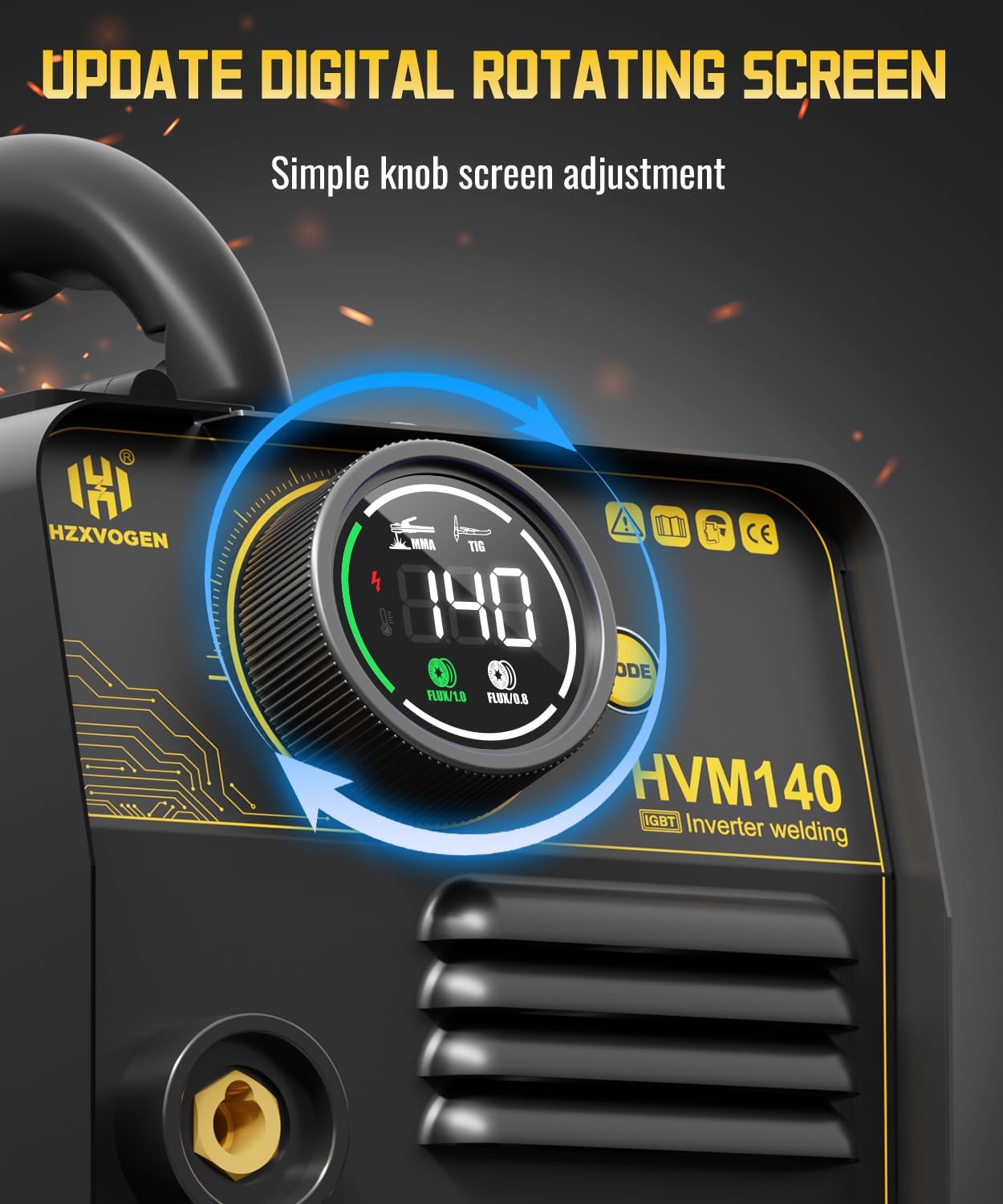
Figure 3.2: Digital Control Interface
This image shows the digital display and single knob control of the HVM140, allowing for precise and easy adjustment of welding parameters.

Figure 3.3: Professional Welder Features
This image visually represents the advanced features of the HVM140, including IGBT technology, VRD, Hot Start, efficient cooling, Anti-Stick, and Arc Force, contributing to professional welding performance.
4. การตั้งค่า
4.1 การตรวจสอบเบื้องต้น
Before connecting the machine, inspect all cables, connections, and the machine casing for any signs of damage. Ensure the work area is clean, dry, and well-ventilated, free from flammable materials.
4.2 การเชื่อมต่อสายไฟ
- Ensure the power switch on the machine is in the "OFF" position.
- Connect the power cord to a suitable power outlet. The HVM140 supports a range of input voltages (refer to specifications for details).
4.3 Gasless MIG Setup
- เปิดฝาครอบตัวป้อนลวด
- Install the flux core wire spool onto the spindle. Ensure the wire unwinds smoothly.
- Thread the wire through the wire feeder mechanism and into the MIG torch liner.
- Close the wire feeder cover.
- Connect the MIG torch to the designated MIG output terminal on the front panel.
- เชื่อมต่อสายดินamp to the work piece. Ensure a good electrical connection.
- Turn on the machine. Press and hold the wire feed button (usually on the front panel or torch trigger) for approximately 5 seconds to feed the wire through the torch until it exits the contact tip.

รูปที่ 4.1: กลไกการป้อนลวด
This diagram illustrates the internal wire feeding system of the HVM140, detailing how to install the flux core wire spool and feed the wire into the MIG torch for operation.
4.4 MMA (Stick) Setup
- Connect the electrode holder cable to the positive (+) terminal on the front panel.
- เชื่อมต่อสายดินamp cable to the negative (-) terminal on the front panel.
- Securely insert the welding electrode into the electrode holder.
- เชื่อมต่อสายดินamp สู่ชิ้นงาน
4.5 Lift TIG Setup
- Connect the TIG torch (not included) to the negative (-) terminal on the front panel.
- เชื่อมต่อสายดินamp cable to the positive (+) terminal on the front panel.
- Ensure a suitable tungsten electrode is installed in the TIG torch.
- เชื่อมต่อสายดินamp สู่ชิ้นงาน
- Note: This machine supports Lift TIG, which means arc initiation is done by touching the tungsten to the workpiece and lifting it slightly. No high-frequency start.
5. คู่มือการใช้งาน
การเลือกโหมด 5.1
Turn on the machine. Use the mode selection button (usually near the digital display) to cycle through MIG, MMA, and Lift TIG modes. The selected mode will be indicated on the digital screen.
5.2 การปรับปัจจุบัน
Once the desired mode is selected, use the single control knob to adjust the welding current (Amperage). The digital display will show the current setting. Refer to welding charts for recommended current settings based on material thickness and welding process.
5.3 เทคนิคการเชื่อม
Proper welding technique is crucial for quality welds. Practice on scrap material before welding critical components.
- การเชื่อม MIG: Maintain a consistent stick-out and travel speed. Use a slight push or pull angle depending on the application.
- การเชื่อม MMA: Maintain a short arc length. Use a slight weaving motion for wider beads.
- การเชื่อม TIG แบบยกสูง: Touch the tungsten to the workpiece to initiate the arc, then quickly lift it a small distance (1-3mm) to establish the arc. Maintain a consistent arc length and travel speed.
5.4 รอบการทำงาน
The HVM140 has a 60% duty cycle at its maximum output. This means it can operate continuously for 6 minutes out of every 10-minute period at maximum current before requiring a 4-minute cooling period. Exceeding the duty cycle can damage the machine. The machine's built-in thermal protection will activate if it overheats.

Figure 5.1: Duty Cycle Explanation
This graphic explains the 60% duty cycle of the HVM140, indicating that for every 10 minutes of operation at maximum output, the machine can work for 6 minutes and requires a 4-minute break to cool down.
6. การบำรุงรักษา
การบำรุงรักษาตามปกติจะช่วยให้เครื่องเชื่อมของคุณมีอายุการใช้งานยาวนานและมีประสิทธิภาพเหมาะสมที่สุด
- การทำความสะอาด: Regularly clean the machine's exterior with a dry cloth. Use compressed air to blow out dust from the cooling vents. Ensure the machine is unplugged before cleaning.
- การตรวจสอบสายเคเบิล: Periodically inspect all cables (power, MIG torch, electrode holder, earth clamp) for cuts, abrasions, or loose connections. Replace damaged cables immediately.
- การบำรุงรักษาหัวเชื่อม MIG: Clean the contact tip and gas nozzle regularly. Replace worn contact tips and diffusers.
- ตัวป้อนลวด: Keep the wire feeder rollers clean and free of debris. Ensure proper tension on the wire spool.
- พื้นที่จัดเก็บ: Store the machine in a clean, dry, and dust-free environment when not in use.
7 การแก้ไขปัญหา
ส่วนนี้มีวิธีแก้ปัญหาทั่วไปที่คุณอาจพบเจอ สำหรับปัญหาที่ไม่ได้ระบุไว้ในส่วนนี้ โปรดติดต่อฝ่ายบริการลูกค้า
| ปัญหา | สาเหตุที่เป็นไปได้ | สารละลาย |
|---|---|---|
| เครื่องไม่สามารถเปิดได้ | ไม่มีแหล่งจ่ายไฟ; สวิตช์ไฟปิดอยู่; ฟิวส์ภายในขาด | Check power outlet and cord; Turn on power switch; Contact service for fuse replacement. |
| ไม่มีส่วนโค้ง | Poor earth clamp connection; Incorrect mode selected; Wire feed issue (MIG); Electrode not making contact (MMA/TIG). | Ensure good earth connection; Select correct mode; Check wire feed path; Ensure electrode/tungsten touches workpiece. |
| ลวดไม่ป้อน (งานเชื่อม MIG) | Wire tangled; Rollers not tensioned correctly; Contact tip blocked; Liner clogged. | Untangle wire; Adjust roller tension; Clean/replace contact tip; Clean/replace liner. |
| Machine overheats / Thermal protection activates. | Exceeded duty cycle; Poor ventilation; Fan blocked. | Allow machine to cool down; Ensure adequate airflow around machine; Clear fan vents. |
8. ข้อมูลจำเพาะ
Technical specifications for the HZXVOGEN HVM140 welding machine:
| หมายเลขรุ่น | เอชวีเอ็ม140 |
| ผู้ผลิต | H HZXVOGEN |
| ขนาด (กว้าง x ยาว x สูง) | ขนาดโดยประมาณ 22 x 23 x 33 ซม. (8.7 x 9.1 x 13 นิ้ว) |
| ขนาดแพ็คเกจ | 37.9 x 27.3 x 19.9 ซม. (14.9 x 10.7 x 7.8 นิ้ว) |
| น้ำหนัก | Approx. 3.7 kg (8.16 lbs) - Machine only |
| น้ำหนักแพ็คเกจ | 6.18 กก. (13.62 ปอนด์) |
| ช่วงกระแสไฟฟ้า | 30 - 140 A |
| Supported Wire Diameter (MIG) | 0.8 mm, 1.0 mm Flux Core Wire |
| ประเภทพลังงาน | Gasless (Flux Core) for MIG |
| ASIN | B0DBL932XG |

Figure 8.1: Portable and Compact Design
This image provides a visual representation of the HVM140's compact dimensions and lightweight design, emphasizing its portability for various work environments.
9. การรับประกันและการสนับสนุน
HZXVOGEN is committed to providing high-quality products and excellent customer service.
- การรับประกัน: This product comes with a 3-Year Extended Warranty. Please retain your proof of purchase for warranty claims.
- การสนับสนุนลูกค้า: For any questions, technical assistance, or warranty inquiries, please contact HZXVOGEN customer support. Our team is available 24/7 to assist you.
- ข้อมูลติดต่อ: Refer to the contact details provided on the product packaging or the official HZXVOGEN webเว็บไซต์.

รูปที่ 9.1: ข้อมูลการรับประกันและการสนับสนุน
This image confirms the product's certifications (DEELAY, UL), the availability of a 3-Year Extended Warranty, and 24/7 customer support, ensuring reliability and assistance.


