1. ข้อมูลด้านความปลอดภัยที่สำคัญ
Please read all instructions carefully before using the SANSUI ES-24C1 monitor. Keep this manual for future reference.
- ห้ามให้จอภาพโดนฝนหรือความชื้น เพื่อป้องกันอันตรายจากไฟไหม้หรือไฟฟ้าช็อต
- อย่าเปิดจอภาพcasinก. ไม่มีชิ้นส่วนใดที่ผู้ใช้สามารถซ่อมบำรุงเองได้ภายใน แนะนำให้ช่างผู้ชำนาญการซ่อมบำรุงเป็นผู้รับผิดชอบ
- วางจอภาพบนพื้นผิวที่มั่นคงและเรียบเพื่อป้องกันไม่ให้ตก
- ตรวจสอบให้แน่ใจว่ามีการระบายอากาศที่เหมาะสมรอบ ๆ จอภาพ อย่าปิดกั้นช่องระบายอากาศ
- ใช้เฉพาะอะแดปเตอร์ไฟฟ้าที่ให้มาพร้อมกับจอภาพเท่านั้น
- ถอดปลั๊กจอภาพออกจากเต้าเสียบไฟฟ้าในระหว่างที่มีพายุฝนฟ้าคะนองหรือเมื่อไม่ได้ใช้งานเป็นเวลานาน
2. เนื้อหาบรรจุภัณฑ์
ตรวจสอบว่ามีรายการทั้งหมดอยู่ในแพ็คเกจ:
- SANSUI ES-24C1 24-inch Curved Monitor
- ขาตั้งจอมอนิเตอร์ (ฐานและคอ)
- อะแดปเตอร์แปลงไฟ
- สาย HDMI
- คู่มือการใช้งาน
3. สินค้าหมดview
The SANSUI ES-24C1 is a 24-inch Full HD (1920x1080) curved monitor featuring a 100Hz refresh rate, 1ms MPRT response time, and built-in speakers. It is designed for both home and office use, offering a 1500R curvature for an immersive viewการสร้างประสบการณ์

ภาพ: เหนือview of the SANSUI ES-24C1 monitor highlighting its key features and curved design.

Image: Summary of the monitor's main features including 100Hz, 1ms MPRT, USB Type-C, HDR, 100% sRGB, 3000:1 contrast, 250 Nits, built-in speakers, and VESA mount.
พอร์ตและการควบคุม

ภาพ: ระยะใกล้ view of the monitor's rear ports, including HDMI, USB Type-C, and Audio Out.
- USB Type-C: 1 port for video input (does not support charging).
- HDMI1.4: 1 port for video input.
- แจ็คเสียงขนาด 3.5 มม.: สำหรับเชื่อมต่อหูฟังหรือลำโพงภายนอก
- DC IN: พอร์ตอินพุตไฟ
- Five-Way Joystick: Located on the back for OSD menu navigation.
4. การตั้งค่า
4.1 การประกอบจอภาพ
ปฏิบัติตามขั้นตอนเหล่านี้เพื่อประกอบขาตั้งจอภาพ:
- ติดส่วนคอของขาตั้งเข้ากับแผงจอภาพ
- Secure the stand base to the neck.
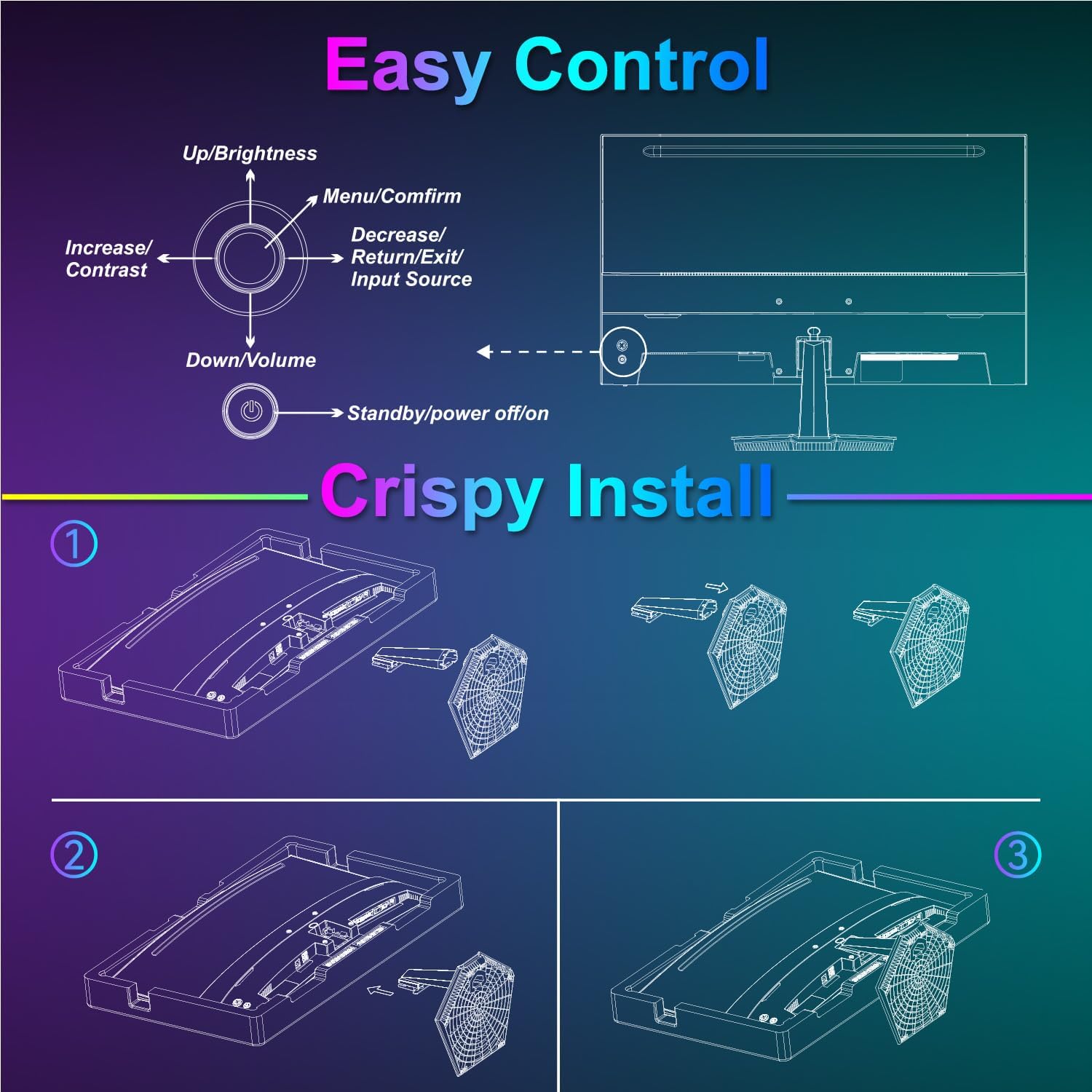
Image: Diagram illustrating the step-by-step assembly of the monitor stand.
4.2 การเชื่อมต่อกับอุปกรณ์
Connect your monitor to a computer or other video source using the appropriate cable.
- ช่องต่อ HDMI: Connect one end of the HDMI cable to the monitor's HDMI port and the other end to your device's HDMI output.
- USB Type-C: Connect one end of the USB Type-C cable to the monitor's USB Type-C port and the other end to your device's compatible USB Type-C output.
- เสียง: If using external audio devices, connect them to the 3.5mm audio jack.

Image: Visual representation of various devices connecting to the monitor via HDMI and USB Type-C.
4.3 เปิด/ปิดเครื่อง
Connect the power adapter to the monitor's DC IN port and then plug it into a power outlet. Press the power button located on the back of the monitor to turn it on or off.
5. คู่มือการใช้งาน
5.1 การนำทางเมนู OSD
The On-Screen Display (OSD) menu is controlled using the five-way joystick on the back of the monitor. Press the joystick to open the menu, then move it up/down/left/right to navigate and select options.

Image: Diagram showing the five-way joystick and its functions for OSD menu navigation.
5.2 การตั้งค่าการแสดงผล
ปรับพารามิเตอร์การแสดงผลต่างๆ เพื่อให้ได้ผลลัพธ์ที่ดีที่สุด viewการสร้างประสบการณ์
- ความสว่าง/คอนทราสต์: Adjust the overall luminance and contrast levels.
- การตั้งค่าสี: ปรับอุณหภูมิสี เฉดสี และความอิ่มตัวของสีให้เหมาะสม
- เอชดีอาร์: เปิดหรือปิดใช้งาน High Dynamic Range เพื่อเพิ่มความคมชัดและสีสันให้ดียิ่งขึ้น
- Low Blue Light/Anti-Flicker: ลดอาการเมื่อยล้าดวงตาขณะใช้งานเป็นเวลานาน
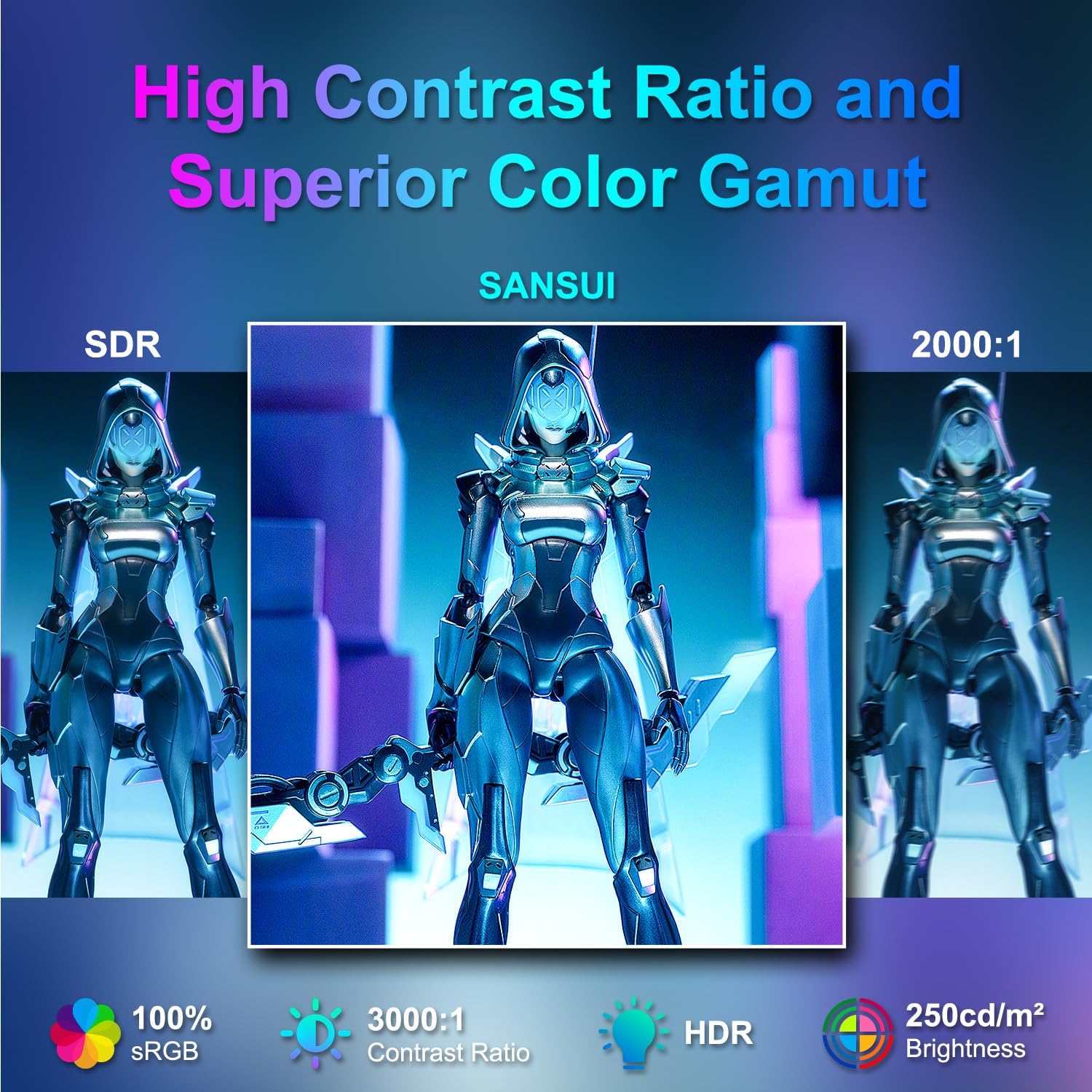
Image: Visual comparison demonstrating high contrast ratio and superior color gamut of the SANSUI monitor.

Image: Highlights of display features like 3000:1 contrast ratio, 100% sRGB, and 250 Nits brightness.

Image: Comparison of display quality with and without HDR enabled.

Image: Illustration of Low Blue Light and Flicker-Free technologies for reduced visual fatigue.
5.3 คุณสมบัติการเล่นเกม
The ES-24C1 monitor includes features optimized for gaming performance.
- อัตราการรีเฟรช 100Hz: ช่วยให้การเคลื่อนไหวราบรื่นยิ่งขึ้นและลดความหน่วงในการป้อนข้อมูล
- เวลาตอบสนอง MPRT 1ms: ช่วยลดการเบลอจากการเคลื่อนไหวและภาพซ้อน
- การซิงโครไนซ์แบบปรับได้: ปรับอัตราการรีเฟรชของจอภาพให้ตรงกับอัตราเฟรมของ GPU เพื่อขจัดปัญหาภาพฉีกขาดและกระตุก
- โหมดเกม: Pre-set display modes optimized for different game genres (e.g., FPS, RTS, RPG).
- เป้าเล็ง AI: An on-screen crosshair overlay for improved aiming accuracy.
- ตัวจับเวลาเกม: ตัวจับเวลาบนหน้าจอสำหรับติดตามเหตุการณ์ในเกม

Image: Demonstrates the difference in smoothness between 60Hz, 75Hz, and 100Hz refresh rates, highlighting low blue light and Adaptive FreeSync.

Image: Illustrates the benefits of 100Hz refresh rate and 1ms MPRT response time in reducing screen tearing and improving fluidity.
5.4 Multi-Window Modes (PIP/PBP)
The monitor supports Picture-in-Picture (PIP) and Picture-by-Picture (PBP) modes, allowing you to view content from multiple input sources simultaneously.
- PBP (Picture-by-Picture): Divides the screen into two halves, displaying content from two different sources side-by-side.
- PIP (การแสดงภาพซ้อนภาพ): Displays content from a secondary source in a smaller window overlaid on the main display.

ภาพ: อดีตamples of Duplicated Mode, Second Screen Mode, and Single Display Screen Mode for enhanced productivity.
6. การบำรุงรักษา
6.1 การทำความสะอาด
- ถอดปลั๊กจอภาพทุกครั้งก่อนทำความสะอาด
- ใช้ผ้านุ่มไม่เป็นขุยค่อยๆ งampล้างด้วยน้ำหรือน้ำยาทำความสะอาดอ่อนๆ ที่ไม่ทำให้เกิดรอยขีดข่วน ซึ่งออกแบบมาสำหรับอุปกรณ์อิเล็กทรอนิกส์โดยเฉพาะ
- ห้ามฉีดน้ำยาทำความสะอาดลงบนหน้าจอโดยตรง
6.2 การดูแล
- หลีกเลี่ยงการวางวัตถุหนักบนจอภาพหรือสายเคเบิล
- เก็บจอภาพให้ห่างจากแสงแดดโดยตรง แหล่งความร้อน และอุณหภูมิที่สูงหรือต่ำมาก
- Do not expose the monitor to strong magnetic fields.
7 การแก้ไขปัญหา
If you encounter issues with your SANSUI ES-24C1 monitor, refer to the following common problems and solutions:
- ไม่มีไฟฟ้า: ตรวจสอบให้แน่ใจว่าอะแดปเตอร์ไฟฟ้าเชื่อมต่อกับทั้งจอภาพและเต้ารับไฟฟ้าที่ใช้งานได้แน่นหนา ตรวจสอบว่าไฟแสดงสถานะเปิดอยู่หรือไม่
- ไม่มีสัญญาณ: Verify that the video cable (HDMI or USB Type-C) is correctly connected to both the monitor and your device. Ensure the correct input source is selected in the OSD menu.
- หน้าจอกระพริบ: Check the video cable for damage or loose connections. Try a different video cable or port. Ensure your graphics card drivers are up to date.
- คุณภาพของภาพต่ำ: Adjust brightness, contrast, and color settings in the OSD menu. Ensure the display resolution and refresh rate are set correctly in your device's display settings.
- ไม่มีเสียงจากลำโพง: Check the volume settings on both the monitor and your connected device. Ensure the audio cable (if used) is properly connected.
8. ข้อมูลจำเพาะ
Detailed technical specifications for the SANSUI ES-24C1 24-inch Curved Monitor:
| คุณสมบัติ | ข้อมูลจำเพาะ |
|---|---|
| หมายเลขรุ่น | ES-24C1 |
| ขนาดหน้าจอ | 24 นิ้ว |
| ประเภทแผง | โค้ง (1500R) |
| ปณิธาน | ความละเอียด 1920 x 1080 (FHD) |
| อัตราการรีเฟรช | 100เฮิรตซ์ |
| เวลาตอบสนอง | 1 มิลลิวินาที (MPRT) |
| อัตราส่วนคอนทราสต์ | 3000:1 น. |
| ความสว่าง | 250 นิต |
| สีที่แสดง | 16.7 ล้าน |
| ช่วงสี | 100% sRGB |
| Viewอิงแองเกิล | 178° (สูง/วี) |
| อินพุตวิดีโอ | 1x HDMI 1.4, 1x USB Type-C |
| เอาท์พุตเสียง | แจ็คเสียง 1x 3.5 มม. |
| ลำโพง | 2x 2W Built-in Speakers |
| แท่นยึด VESA | 75 x 75มม. |
| การปรับความเอียง | -5° ถึง 15° |
| ขนาดสินค้า | 21 x 38 x 49 นิ้ว |
| น้ำหนักสินค้า | 7.78 ปอนด์ |

Image: Detailed dimensions and ergonomic features like 178° wide viewing angle and -5°~15° tilt.

Image: Visual representation of the 178° wide viewมุมอิง

Image: Tips for VESA mounting (75x75mm, M4*8mm screw size) and tilt adjustment.

ภาพ: ด้านหลัง view of the monitor detailing port locations and key specifications.
9. การรับประกันและการสนับสนุน
SANSUI provides a limited warranty for this product. For detailed warranty information, please refer to the warranty card included in your package or visit the official SANSUI website. For technical support or service inquiries, please contact SANSUI customer service.
การสนับสนุนทางออนไลน์: Visit the SANSUI Store on Amazon
10. วิดีโอผลิตภัณฑ์อย่างเป็นทางการ
Watch the official product video for a visual guide to the SANSUI ES-24C1 monitor's features and benefits.
Video: SANSUI 24" 100Hz Curved Monitor USB C with Speakers. This video provides an overview of the monitor's design, key features, and connectivity options.


