คู่มือผู้ใช้เมาส์เกมมิ่งไร้สาย CHERRY XTRFY M64 Pro 8K
Model: CX-M64W-PRO-BLACK
การแนะนำ
The CHERRY XTRFY M64 Pro 8K Wireless Gaming Mouse is engineered for competitive gaming, offering ultra-fast 8000 Hz polling rate technology and an ergonomic design. This manual provides comprehensive instructions for setting up, operating, maintaining, and troubleshooting your M64 Pro 8K mouse to ensure optimal performance.
คุณสมบัติที่สำคัญ ได้แก่:
- Ultra-fast 8000 Hz polling rate for extremely low click latency.
- Reinvented ergonomic shape for enhanced grip and control.
- Lightweight design at approximately 55 grams.
- High-performance Pixart 3395 sensor.
- Up to 90 hours of battery life in Standard Gaming Mode.
- Flexible CHERRY XTRFY EZcord charging cable for unhindered play during charging.
การตั้งค่า
Follow these steps to set up your CHERRY XTRFY M64 Pro 8K Wireless Gaming Mouse:
- แกะกล่อง: Carefully remove the mouse, wireless dongle, and charging cable from the packaging.

Image: The M64 Pro 8K mouse's wireless dongle and USB-C charging cable.
- การชาร์จเมาส์:
- Connect the USB-C end of the EZcord charging cable to the mouse's charging port (located at the front).
- Connect the USB-A end of the cable to an available USB port on your computer or a USB wall adapter.
- Allow the mouse to charge fully before first use. The LED indicator on the mouse will show charging status.
- Connecting the Wireless Dongle:
- Plug the wireless USB dongle into an available USB port on your computer. For optimal performance, use a USB 2.0 or 3.0 port directly on your motherboard or a powered USB hub.
- The mouse should automatically connect to the dongle. If not, ensure the mouse is powered on.
- การติดตั้งซอฟต์แวร์ (ทางเลือกแต่แนะนำ):
- Visit the official CHERRY XTRFY webงาน (cherryxtrfy.com) to download the latest software/drivers for the M64 Pro 8K.
- This software allows for customization of DPI settings, button assignments, polling rate, and other advanced features.
คำแนะนำการใช้งาน
Understanding the functions and controls of your M64 Pro 8K mouse:
Mouse Layout and Buttons
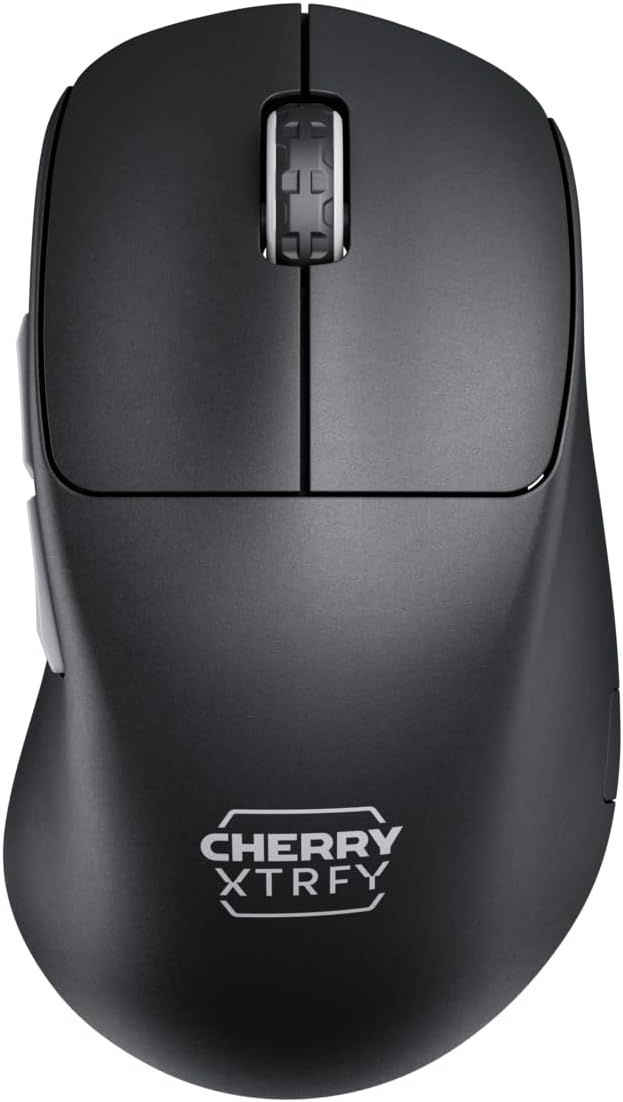
ภาพ: ด้านบน view of the M64 Pro 8K mouse, showing the left and right click buttons and scroll wheel.
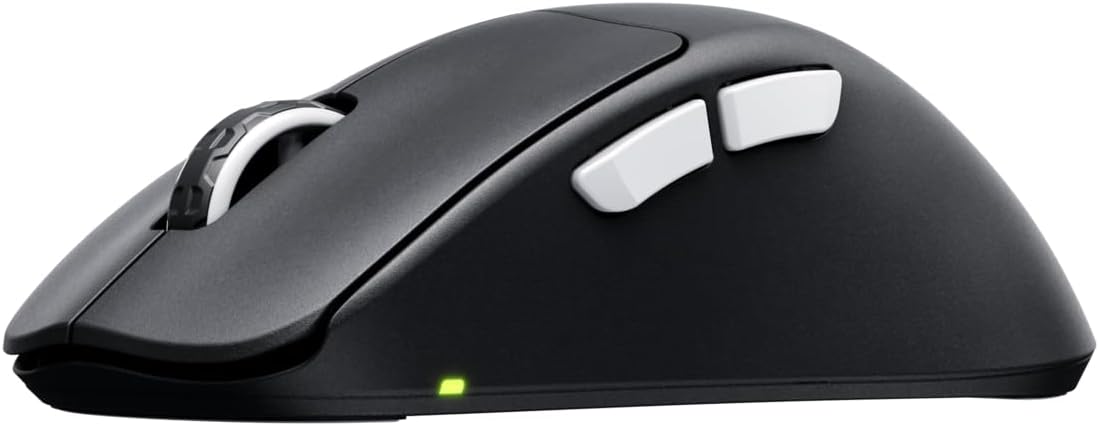
ภาพ: ด้านข้าง view of the M64 Pro 8K mouse, highlighting the two side buttons.
- ปุ่มคลิกซ้าย: ปุ่มการดำเนินการหลัก
- ปุ่มคลิกขวา: ปุ่มการดำเนินการรอง
- ล้อเลื่อน: For scrolling through content. Also functions as a middle click button.
- ปุ่มด้านข้าง (เดินหน้า/ถอยหลัง): โดยทั่วไปใช้สำหรับการนำทางใน web เบราว์เซอร์หรือกำหนดให้กับการกระทำในเกม
- DPI Button (Bottom of mouse): Allows for on-the-fly adjustment of DPI settings.
- Polling Rate Switch (Bottom of mouse): Adjusts the polling rate (e.g., 1000 Hz, 8000 Hz).
- Power Switch (Bottom of mouse): เปิดหรือปิดเมาส์

ภาพ: ด้านล่าง view of the M64 Pro 8K mouse, showing the DPI, polling rate, and power switches.
การปรับ DPI
The M64 Pro 8K allows for quick DPI (Dots Per Inch) adjustments. Press the dedicated DPI button on the bottom of the mouse to cycle through preset DPI levels. The LED indicator will change color to indicate the current DPI setting. For custom DPI steps, use the CHERRY XTRFY software.
Polling Rate (8K Hz Technology)
The M64 Pro 8K features an 8000 Hz polling rate, meaning it reports its position to your computer 8000 times per second. This significantly reduces input lag and provides smoother cursor movement, especially on high refresh rate monitors. Use the polling rate switch on the bottom of the mouse to select your desired rate. Note that higher polling rates may consume more battery and require more system resources.
วิดีโอ: วิดีโอแสดงผลิตภัณฑ์อย่างเป็นทางการasing the M64 Pro Wireless 8K mouse, highlighting its ergonomic shape and ultra-fast 8K polling rate technology.
การจัดการแบตเตอรี่
The M64 Pro 8K is equipped with a 350-mA battery, offering up to 90 hours of playtime in Standard Gaming Mode. The mouse can be charged using the included EZcord cable. You can continue to use the mouse while it is charging, providing uninterrupted gameplay. Monitor the battery indicator light for low battery warnings.
การซ่อมบำรุง
Proper maintenance ensures the longevity and optimal performance of your M64 Pro 8K mouse:
- การทำความสะอาด: ใช้ผ้านุ่ม แห้ง และไม่เป็นขุย เช็ดเมาส์ สำหรับคราบสกปรกฝังแน่น ให้เช็ดเบาๆampชุบผ้าด้วยน้ำหรือน้ำยาทำความสะอาดอ่อนๆ หลีกเลี่ยงสารเคมีรุนแรงหรือสารกัดกร่อน
- การดูแลเซ็นเซอร์: รักษาเซ็นเซอร์ออปติคัลที่ด้านล่างของเมาส์ให้สะอาด ปราศจากฝุ่นหรือเศษผง ใช้สำลีก้านหรือลมอัดหากจำเป็น
- Mouse Feet (Skates): The mouse feet are designed for smooth gliding. If they become worn, replacements may be available from CHERRY XTRFY.
- พื้นที่จัดเก็บ: เมื่อไม่ได้ใช้งานเป็นเวลานาน ควรเก็บเมาส์ไว้ในที่แห้งและเย็น หลีกเลี่ยงแสงแดดโดยตรงและอุณหภูมิที่สูงหรือต่ำเกินไป
การแก้ไขปัญหา
หากคุณพบปัญหาเกี่ยวกับเมาส์ M64 Pro 8K โปรดลองวิธีแก้ปัญหาต่อไปนี้:
| ปัญหา | วิธีแก้ปัญหาที่เป็นไปได้ |
|---|---|
| Mouse not responding/connecting wirelessly. |
|
| การเคลื่อนไหวของเคอร์เซอร์ไม่แน่นอนหรือกระตุก |
|
| Mouse disconnects frequently (especially at 8K Hz). |
|
| ปุ่มกดหรือล้อเลื่อนทำงานผิดปกติ |
|
| อายุการใช้งานแบตเตอรี่สั้นกว่าที่คาดไว้ |
|
ข้อมูลจำเพาะ
| คุณสมบัติ | รายละเอียด |
|---|---|
| หมายเลขรุ่น | CX-M64W-PRO-BLACK |
| ยี่ห้อ | เชอร์รี่ เอ็กซ์เทรฟี่ |
| สี | สีดำ |
| เทคโนโลยีการเชื่อมต่อ | Wireless (USB Dongle), USB (for charging/wired use) |
| เทคโนโลยีตรวจจับการเคลื่อนไหว | Laser (Pixart 3395 sensor) |
| อัตราการสำรวจความคิดเห็น | สูงถึง 8000 เฮิรตซ์ |
| น้ำหนักสินค้า | ประมาณ 55 กรัม (1.94 ออนซ์) |
| ประเภทแบตเตอรี่ | แบตเตอรี่ลิเธียมไอออน 1 ก้อน (รวมอยู่ด้วย) |
| อายุการใช้งานแบตเตอรี่ | ใช้งานได้นานสูงสุด 90 ชั่วโมง (โหมดเล่นเกมมาตรฐาน) |
| ขนาดแพ็คเกจ | 4.7 x 2.5 x 1.5 นิ้ว |
| ประเทศต้นกำเนิด | จีน |
การรับประกันและการสนับสนุน
CHERRY XTRFY products are built to high standards. For warranty information and technical support, please refer to the official CHERRY XTRFY webหรือติดต่อฝ่ายบริการลูกค้าโดยตรง
- เป็นทางการ Webเว็บไซต์: For drivers, software, FAQs, and support resources, visit cherryxtrfy.com.
- บริการลูกค้า: Contact information for support can typically be found on the official webในเว็บไซต์ ภายใต้หัวข้อ "การสนับสนุน" หรือ "ติดต่อเรา"
- การรับประกัน: The product comes with a standard manufacturer's warranty. Please retain your proof of purchase for warranty claims. Specific warranty terms and duration may vary by region.


