1. สินค้าหมดview
The Iceman Commercial Ice Maker Machine is designed to provide a consistent supply of ice for commercial and home use. It features a high daily ice production capacity and a substantial storage bin, making it suitable for restaurants, bars, offices, and large households. The unit is equipped with an intuitive control panel and a self-cleaning function for ease of use and maintenance.
คุณสมบัติหลัก:
- Produces up to 100 lbs of ice daily.
- 30 lbs ice storage bin capacity.
- Three selectable ice cube sizes.
- Intuitive control panel with LED alerts.
- ฟังก์ชั่นทำความสะอาดตัวเอง
- Durable stainless-steel finish.
- Includes ice scoop with interior mount.

2. คำแนะนำด้านความปลอดภัย
Please read all safety instructions carefully before operating the ice maker. Failure to follow these instructions may result in electric shock, fire, or property damage.
- ความปลอดภัยทางไฟฟ้า: Ensure the unit is connected to a grounded 120V/270W power outlet. Do not use extension cords.
- แหล่งจ่ายน้ำ: A dedicated cold water supply line is required. Ensure all water connections are secure to prevent leaks.
- การระบายน้ำ: The unit requires a gravity (floor) drain. Ensure the drain hose is properly connected and positioned to allow for continuous drainage.
- การติดตั้ง: Professional installation is required for this appliance to ensure proper water and drain connections and electrical safety.
- การระบายอากาศ : Ensure adequate clearance around the unit for proper ventilation to prevent overheating.
- การทำความสะอาด: ถอดปลั๊กเครื่องทุกครั้งก่อนทำความสะอาดหรือดำเนินการบำรุงรักษาใดๆ
- เด็กและสัตว์เลี้ยง: ควรกันเด็กและสัตว์เลี้ยงให้ห่างจากเครื่องใช้ไฟฟ้าขณะใช้งานและบำรุงรักษา
3. อะไรอยู่ในกล่อง
เมื่อแกะกล่อง โปรดตรวจสอบว่าส่วนประกอบทั้งหมดที่ระบุไว้ด้านล่างครบถ้วนและไม่เสียหาย:
- Iceman Commercial Ice Maker Machine
- คู่มือการใช้งาน (เอกสารนี้)
- Ice Scoop with Mount
- ท่อระบาย
4. การตั้งค่า
The Iceman Commercial Ice Maker Machine is designed for freestanding or undercounter installation. Due to the water and drain requirements, professional installation is recommended.
ข้อกำหนดในการติดตั้ง:
- ที่ตั้ง: Choose a stable, level surface capable of supporting the unit's weight. Ensure the location allows for proper ventilation and access to power, water, and drain connections.
- แหล่งจ่ายน้ำ: A dedicated cold water supply line with a shut-off valve must be available within close proximity to the installation site.
- การระบายน้ำ: A gravity (floor) drain is essential for continuous operation. The included drain hose connects the ice maker to this drain.
- ไฟฟ้า: A grounded 120V/270W electrical outlet is required.
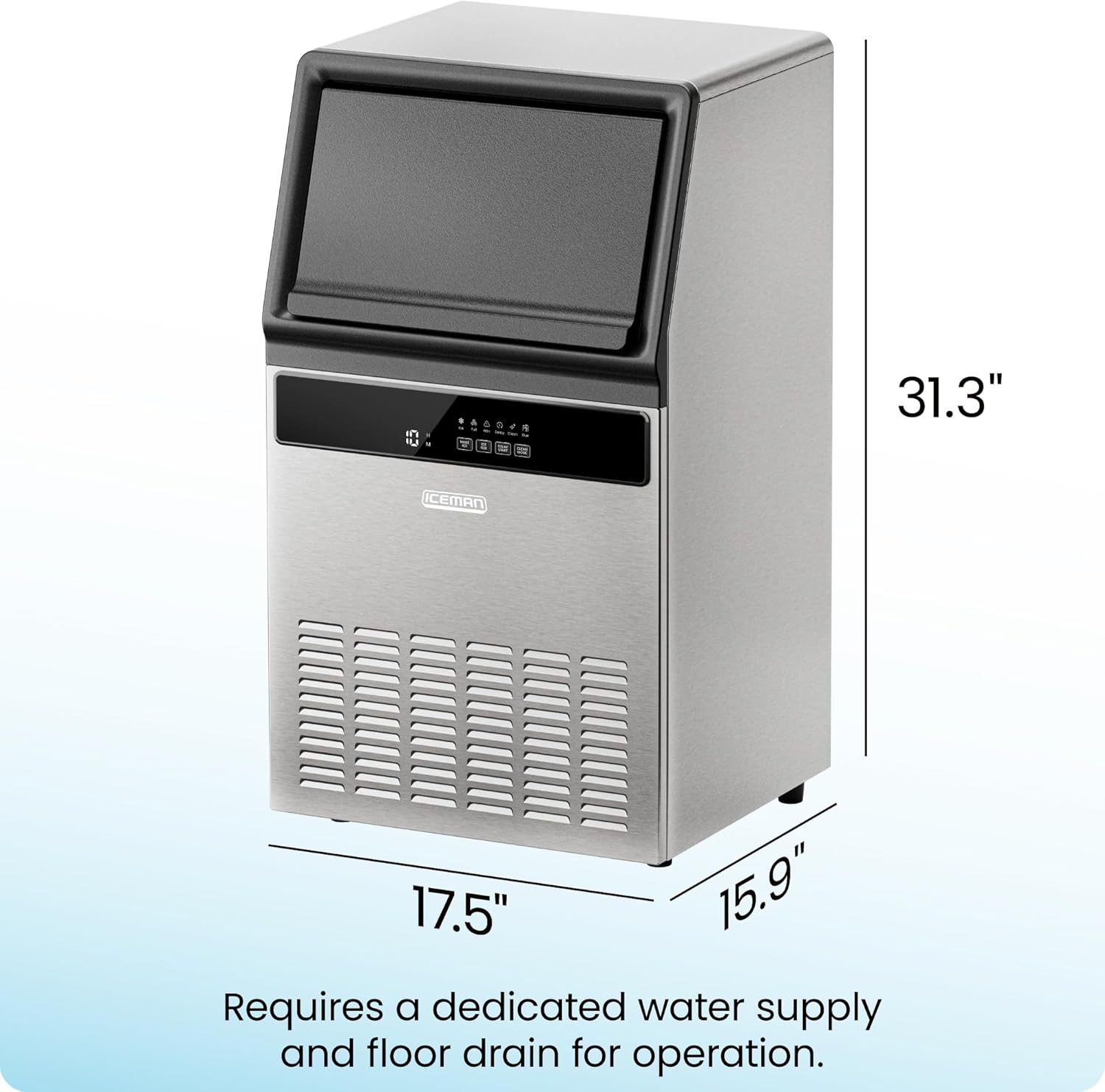
5. คู่มือการใช้งาน
Once properly installed and connected, the Iceman Commercial Ice Maker is ready for operation.
การผลิตน้ำแข็ง:
- The machine can produce up to 100 pounds of ice per day.
- The internal storage bin can hold up to 30 pounds of ice.
- Ice is produced approximately every 10-15 minutes.

ฟังก์ชั่นแผงควบคุม:
The control panel features an LED display and several buttons for easy operation.

- MAKE ICE: Starts or stops the ice-making cycle.
- ICE SIZE: Allows selection from three different ice cube sizes (small, medium, large).
- ความล่าช้าในการเริ่มต้น: Initiates a timer before the ice-making process begins.
- โหมดทำความสะอาด: เปิดใช้งานฟังก์ชั่นทำความสะอาดตัวเอง
ไฟ LED แสดงสถานะ: The control panel includes LED alerts for various statuses:
- น้ำแข็ง: Indicates ice production is active.
- เต็ม: Alerts when the ice storage bin is full.
- เรียน General attention/warning indicator.
- ล่าช้า: Indicates Delay Start mode is active.
- ทำความสะอาด: แสดงว่าเครื่องอยู่ในโหมดทำความสะอาด
- เนื่องจาก: Alerts when cleaning is due.
การเลือกขนาดน้ำแข็ง:
Press the "ICE SIZE" button to cycle through the available ice cube sizes. The selected size will be indicated on the display.

6. การบำรุงรักษา
การบำรุงรักษาตามปกติจะช่วยให้เครื่องทำน้ำแข็งของคุณมีประสิทธิภาพสูงสุดและมีอายุการใช้งานยาวนาน
ฟังก์ชั่นทำความสะอาดตัวเอง:
- The unit features a one-touch self-cleaning function. Press the "CLEAN MODE" button to initiate the cleaning cycle.
- The machine will provide automatic notifications when cleaning is due, indicated by the "Due" LED alert.
- Refer to the detailed cleaning instructions in the full PDF User Guide for specific steps and recommended cleaning solutions.
การทำความสะอาดทั่วไป:
- Regularly wipe down the exterior stainless-steel finish with a soft, damp ผ้า.
- Clean the ice storage bin periodically to ensure hygiene.
7 การแก้ไขปัญหา
If you encounter issues with your Iceman Commercial Ice Maker, refer to the following basic troubleshooting steps. For more complex problems, consult the full PDF User Guide or contact customer support.
- ไม่มีการผลิตน้ำแข็ง: Check if the unit is plugged in and powered on. Ensure the water supply is connected and the water valve is open. Verify that the ice bin is not full.
- การผลิตน้ำแข็งต่ำ: Ensure proper ventilation around the unit. Check that the ambient temperature is within the recommended operating range.
- การรั่วไหลของน้ำ: Inspect all water connections (inlet and drain hose) for proper sealing. Ensure the drain hose is not kinked or blocked.
- Error Codes/LED Alerts: Refer to the "Control Panel Functions" section for common LED alerts. For specific error codes, consult the detailed troubleshooting section in the PDF User Guide.
8. ข้อมูลจำเพาะ
| คุณลักษณะ | ค่า |
|---|---|
| ยี่ห้อ | ไอซ์แมน |
| ชื่อรุ่น | เครื่องทำน้ำแข็งเชิงพาณิชย์ |
| หมายเลขรุ่น | RJ56-CU-100 |
| ขนาดสินค้า (ลึก x กว้าง x สูง) | ลึก 15.9 นิ้ว x กว้าง 17.5 นิ้ว x สูง 31.29 นิ้ว |
| การผลิตน้ำแข็งรายวัน | 100 ปอนด์ |
| ความจุน้ำแข็ง | 30 ปอนด์ |
| วัดtage | 270 วัตต์ |
| เล่มที่tage | 120โวลต์ |
| สารทำความเย็น | R290a |
| วัสดุ | สแตนเลส |
| ประเภทการติดตั้ง | ตั้งพื้น, ติดตั้งใต้เคาน์เตอร์ |
| การรับรอง | ETL Certified, CETL Approved |
| น้ำหนักสินค้า | 55.1 ปอนด์ |
9. การรับประกันและการสนับสนุน
Iceman provides a 1-year assurance for this product, covering manufacturing defects and malfunctions under normal use.
การสนับสนุนลูกค้า:
For technical assistance, warranty claims, or further inquiries, please refer to the official Iceman webเว็บไซต์หรือติดต่อฝ่ายบริการลูกค้าของพวกเขา
A comprehensive User Guide in PDF format is available for download, providing detailed instructions and troubleshooting information:


