1. บทนำ
Thank you for choosing the SHARP 55GL4060E 55-inch 4K Ultra HD Google TV. This manual provides essential information for setting up, operating, and maintaining your new television. Please read this manual thoroughly before using the product to ensure safe and optimal performance. This television features a 4K Ultra HD display, Google TV operating system, HDMI 2.1 with eARC, Dolby Vision HDR, Dolby Atmos immersive sound, integrated Google Assistant, and Chromecast built-in.
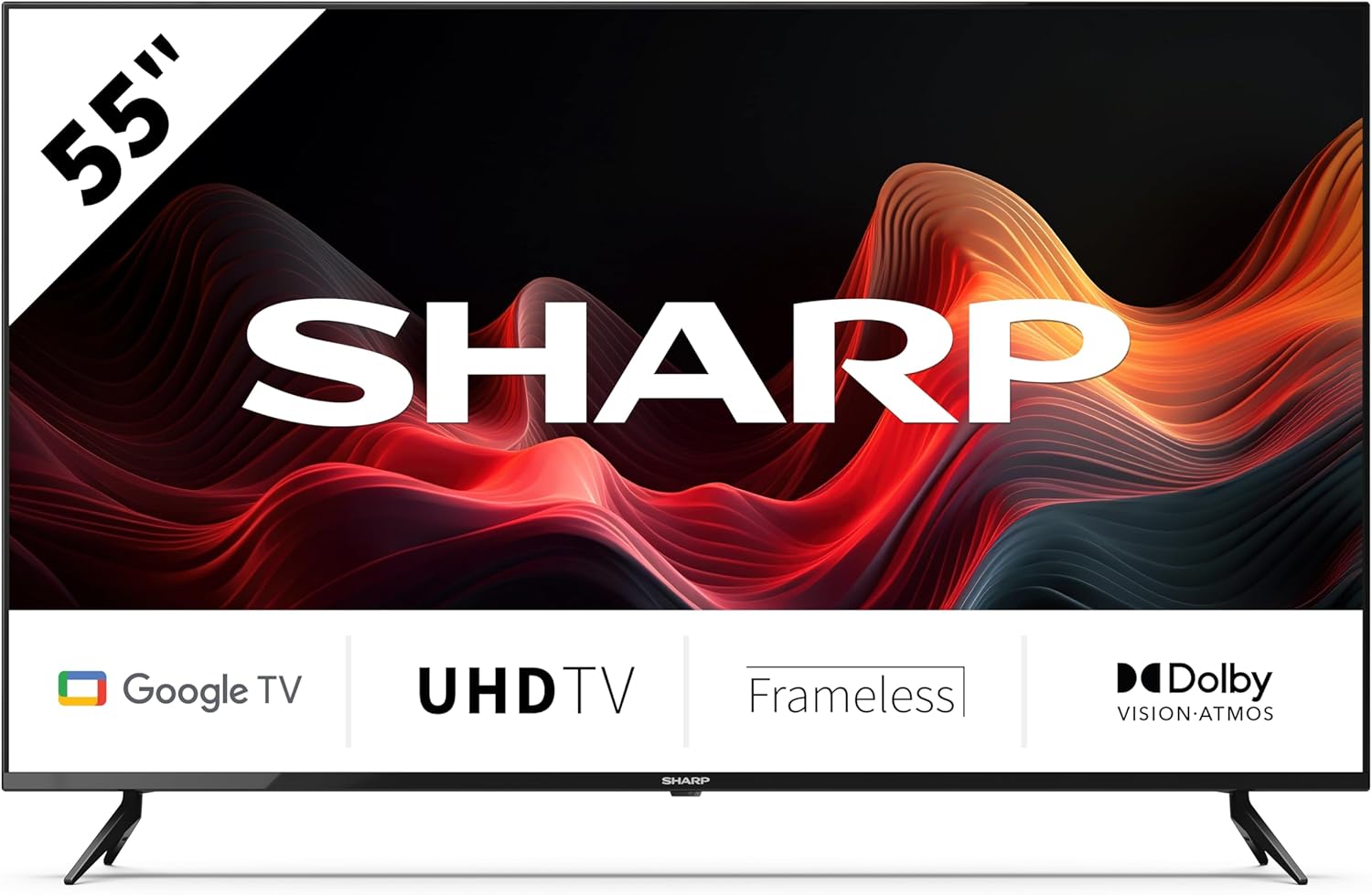
This image displays the SHARP 55GL4060E television from the front, showcasing its 55-inch frameless screen, the SHARP logo at the bottom center, and the two V-shaped stands. The screen shows a vibrant abstract red and orange waveform design. Below the screen, icons indicate 'Google TV', 'UHD TV', 'Frameless', and 'Dolby Vision Atmos'.
2. ข้อมูลด้านความปลอดภัย
โปรดปฏิบัติตามข้อควรระวังด้านความปลอดภัยต่อไปนี้เพื่อป้องกันความเสียหายและเพื่อให้การใช้งานปลอดภัย:
- แหล่งจ่ายไฟ: เชื่อมต่อทีวีเข้ากับเต้ารับไฟฟ้ากระแสสลับที่มีแรงดันไฟฟ้าที่ถูกต้องเท่านั้นtagง. ห้ามใช้ไฟเกินพิกัดเต้าเสียบ
- การระบายอากาศ : ตรวจสอบให้แน่ใจว่ามีการระบายอากาศที่เพียงพอรอบๆ โทรทัศน์ อย่าปิดกั้นช่องระบายอากาศ หลีกเลี่ยงการวางโทรทัศน์บนพื้นผิวที่อ่อนนุ่มหรือในที่ปิดทึบ
- การทำความสะอาด: ถอดปลั๊กทีวีก่อนทำความสะอาด ใช้ผ้าแห้งนุ่มๆ เช็ดทำความสะอาด ห้ามใช้น้ำยาทำความสะอาดหรือสเปรย์กระป๋อง
- น้ำและความชื้น: อย่าให้ทีวีโดนฝนหรือความชื้น อย่าวางสิ่งของที่บรรจุของเหลว เช่น แจกัน บนทีวี
- การจัดวาง: Place the TV on a stable, level surface. If wall-mounting, use a VESA-compatible mount and ensure it is securely installed. Keep the TV away from direct sunlight, heat sources, and strong magnetic fields.
- เด็ก: ดูแลเด็กๆ อย่างใกล้ชิดเพื่อป้องกันไม่ให้พวกเขาปีนป่ายขึ้นไปบนทีวีหรือขาตั้ง
3. เนื้อหาบรรจุภัณฑ์
ตรวจสอบว่ามีสินค้าทั้งหมดอยู่ในบรรจุภัณฑ์:
- SHARP 55GL4060E 55-inch 4K Ultra HD Google TV
- รีโมทคอนโทรล
- แบตเตอรี่ AAA (x2)
- คู่มือเริ่มต้นอย่างรวดเร็ว
- TV Stands (x2) and Screws
4. การตั้งค่า
4.1 การติดตั้งขาตั้งทีวี
- วางหน้าจอทีวีลงบนพื้นผิวที่นุ่มและเรียบอย่างระมัดระวังเพื่อป้องกันความเสียหาย
- จัดขาตั้งแต่ละอันให้ตรงกับรูสกรูที่ตรงกันที่ด้านล่างของทีวี
- ยึดขาตั้งด้วยสกรูที่ให้มา ตรวจสอบให้แน่ใจว่าขันแน่นสนิท
4.2 การติดตั้งบนผนัง
If you choose to wall-mount your TV, ensure you use a VESA-compatible wall mount. The VESA mounting dimensions for this model are 400 x 300 mm. Consult a professional for wall mounting installation to ensure safety and proper attachment.
4.3 การเชื่อมต่ออุปกรณ์ภายนอก
- ช่องต่อ HDMI: Connect devices such as Blu-ray players, game consoles, or set-top boxes to the HDMI ports. This TV features 4 HDMI 2.1 ports with eARC support.
- ยูเอสบี: Connect USB storage devices for media playback or software updates to the 2 USB ports.
- อีเธอร์เน็ต: เพื่อให้การเชื่อมต่ออินเทอร์เน็ตเสถียรยิ่งขึ้น ให้เชื่อมต่อสายอีเธอร์เน็ตจากเราเตอร์ไปยังพอร์ต LAN ของทีวี
- ไวไฟ : Connect to your wireless network for internet access and smart TV features.
- บลูทูธ: เชื่อมต่ออุปกรณ์ที่รองรับบลูทูธ เช่น หูฟังหรือลำโพงซาวด์บาร์
4.4 การตั้งค่าเริ่มต้น
- เสียบสายไฟเข้ากับเต้ารับไฟฟ้า
- กดปุ่มเปิด/ปิดบนรีโมทคอนโทรลเพื่อเปิดทีวี
- ปฏิบัติตามคำแนะนำบนหน้าจอเพื่อทำการตั้งค่าเบื้องต้นให้เสร็จสมบูรณ์ รวมถึงการเลือกภาษา การเชื่อมต่อเครือข่าย และการลงชื่อเข้าใช้บัญชี Google
5. การใช้งานทีวี
5.1 การควบคุมระยะไกลจบลงview
The remote control allows you to navigate the Google TV interface, adjust settings, and control playback. Insert the two AAA batteries into the remote control, ensuring correct polarity.
5.2 ฟังก์ชั่นพื้นฐาน
- พลัง: กดเพื่อเปิดหรือปิดทีวี
- ปริมาณ: ใช้ปุ่มปรับระดับเสียงเพื่อปรับระดับเสียง
- ป้อนข้อมูล: Select the desired input source (HDMI 1, HDMI 2, USB, etc.).
- การนำทาง: Use the directional pad and OK button to move through menus and make selections.
- บ้าน: Return to the Google TV home screen.
5.3 คุณสมบัติของ Google TV
- ผู้ช่วย Google: กดปุ่ม Google Assistant บนรีโมทของคุณ แล้วพูดใส่ไมโครโฟนเพื่อค้นหาเนื้อหา ควบคุมอุปกรณ์สมาร์ทโฮม หรือรับข้อมูล
- Chromecast ในตัว: Cast content from your compatible smartphone, tablet, or computer directly to your TV.
- แอป: Access a wide range of streaming services and applications from the Google Play Store.
6. การบำรุงรักษา
6.1 การทำความสะอาดทีวี
- หน้าจอ: เช็ดหน้าจอเบาๆ ด้วยผ้านุ่มที่ไม่เป็นขุย สำหรับรอยฝังแน่น ให้เช็ดเบาๆampเช็ดผ้าชุบน้ำให้สะอาด (อย่าฉีดน้ำลงบนหน้าจอโดยตรง)
- ร่างกาย: เช็ดกรอบทีวีและขาตั้งด้วยผ้าแห้งนุ่ม
- คำเตือน: ห้ามใช้สารทำความสะอาดที่มีฤทธิ์กัดกร่อน แอลกอฮอล์ เบนซีน หรือทินเนอร์ เพราะสารเหล่านี้อาจทำให้พื้นผิวทีวีเสียหายได้
6.2 การอัปเดตซอฟต์แวร์
Your Google TV may receive automatic software updates. You can also manually check for updates through the TV's settings menu to ensure you have the latest features and security patches.
7 การแก้ไขปัญหา
หากคุณประสบปัญหาเกี่ยวกับทีวี โปรดดูปัญหาทั่วไปและวิธีแก้ไขต่อไปนี้:
- ไม่มีไฟฟ้า: Ensure the power cord is securely plugged into both the TV and the electrical outlet. Try a different outlet.
- ไม่มีภาพ/เสียง: ตรวจสอบว่าได้เลือกแหล่งสัญญาณเข้าที่ถูกต้อง ตรวจสอบการเชื่อมต่อสายเคเบิลทั้งหมด (HDMI เป็นต้น) รีสตาร์ทอุปกรณ์ที่เชื่อมต่อ
- รีโมทคอนโทรลไม่ทำงาน: ตรวจสอบแบตเตอรี่และเปลี่ยนหากจำเป็น ตรวจสอบให้แน่ใจว่าไม่มีสิ่งกีดขวางระหว่างรีโมทและเซ็นเซอร์อินฟราเรดของทีวี
- ปัญหาการเชื่อมต่อเครือข่าย: รีสตาร์ทเราเตอร์และโมเด็มของคุณ ตรวจสอบรหัสผ่าน Wi-Fi หากใช้อีเทอร์เน็ต โปรดตรวจสอบให้แน่ใจว่าเชื่อมต่อสายเคเบิลอย่างถูกต้อง
- ปัญหาคุณภาพของภาพ: ปรับการตั้งค่าภาพ (ความสว่าง ความคมชัด สี) ตรวจสอบให้แน่ใจว่าแหล่งที่มาของเนื้อหามีคุณภาพสูง
For persistent issues, consult the online support resources or contact customer service.
8. ข้อมูลจำเพาะ
| คุณสมบัติ | ข้อมูลจำเพาะ |
|---|---|
| ยี่ห้อ | คม |
| หมายเลขรุ่น | 55GL4060E |
| ขนาดหน้าจอ | 55 นิ้ว |
| เทคโนโลยีการแสดงผล | นำ |
| ปณิธาน | 4K อุลตราเอชดี |
| อัตราการรีเฟรช | 60 เฮิรตซ์ |
| ระบบปฏิบัติการ | กูเกิลทีวี |
| คุณสมบัติพิเศษ | Google Assistant and Chromecast built-in, Dolby Vision, Dolby Atmos |
| เทคโนโลยีการเชื่อมต่อ | Bluetooth, Ethernet, HDMI (4x HDMI 2.1 with eARC), USB (2x), Wi-Fi |
| สี | สีดำ |
| ขนาดสินค้า (รวมขาตั้ง) | 1116.4 x 692.9 x 264.7 มม. (กว้าง x สูง x ลึก) |
| ขนาดสินค้า (ไม่รวมขาตั้ง) | 1116.4 x 651.3 x 91.5 มม. (กว้าง x สูง x ลึก) |
| Distance between stands | 1095 มม. |
| น้ำหนักสุทธิ | 11 กก. |
| ขาตั้งยึดติดผนัง VESA | 400 x 300 มม. |
| อุปกรณ์ที่รองรับ | Laptop, smartphone, tablet, game console |
| องค์ประกอบของแบตเตอรี่ | Alkaline (2 AAA included) |
9. การรับประกันและการสนับสนุน
สำหรับข้อมูลการรับประกัน โปรดดูบัตรรับประกันที่รวมอยู่ในผลิตภัณฑ์ของคุณหรือเยี่ยมชมเว็บไซต์อย่างเป็นทางการของ Sharp website. For technical support, troubleshooting assistance, or service inquiries, please contact Sharp customer support through their official channels. Keep your purchase receipt as proof of purchase.


