การแนะนำ
This manual provides comprehensive instructions for the assembly, operation, maintenance, and troubleshooting of your FLEXISPOT 79 x 32 Inch Large Standing Desk. Please read this manual thoroughly before use to ensure proper function and safety. Keep this manual for future reference.

Image: The FLEXISPOT standing desk in an office setting, showcasing its large surface area with multiple monitors and accessories.
ข้อมูลด้านความปลอดภัย
Always follow assembly instructions carefully. Do not exceed the maximum weight recommendation of 132 pounds to ensure stability and safety. Ensure all connections are secure before operating the desk. Keep children and pets away from the desk during operation.
เนื้อหาแพ็คเกจ
Verify that all components are present before beginning assembly. Your FLEXISPOT standing desk package typically includes:
- Desktop (79 x 32 inches, may be a splice board design)
- Desk Frame (legs, crossbar, motor)
- แผงควบคุม
- อะแดปเตอร์แปลงไฟและสายเคเบิล
- ที่วางแก้ว
- ที่แขวนหูฟัง
- อุปกรณ์ประกอบ (สกรู, เครื่องมือ)
- คู่มือการใช้งาน
Note: Due to the size and weight, your desk may arrive in multiple packages that could ship and arrive separately.

Image: Illustration showing two separate boxes for the desktop and desk frame, indicating that components may arrive in multiple shipments.
การติดตั้งและการประกอบ
Assembly of the FLEXISPOT standing desk is designed to be straightforward. A power drill may be needed for some steps (not included). Follow the detailed instructions provided in the included assembly guide. Ensure all screws are tightened securely, but do not overtighten.
เคล็ดลับการประกอบ:
- จัดวางชิ้นส่วนและอุปกรณ์ทั้งหมดให้เรียบร้อยก่อนเริ่มลงมือ
- Ensure the desktop halves (if applicable) are correctly aligned before securing.
- When installing the transmission rod, ensure it slides smoothly into the motor. Tolerances can be tight.
- It is recommended to have a second person assist when flipping the desk over after assembly.
คำแนะนำการใช้งาน
Your FLEXISPOT standing desk features an electric height adjustment system with a multifunctional controller.
การปรับความสูง:
- The desk height can be adjusted smoothly and quietly from 28.9 inches to 46.5 inches.
- ใช้ UP และ ลง buttons on the control panel to manually adjust the desk to your desired height.
การตั้งค่าหน่วยความจำ:
The control panel includes 4 programmable memory presets, allowing you to save and recall your preferred sitting and standing heights with a single touch.
- ปรับความสูงของโต๊ะตามต้องการโดยใช้ปุ่มขึ้น/ลง
- กดปุ่ม M button (or similar memory set button) followed by one of the numbered preset buttons (1, 2, 3, or 4) to save the current height.
- หากต้องการเรียกใช้ความสูงที่บันทึกไว้ เพียงกดปุ่มตั้งค่าล่วงหน้าที่มีหมายเลขตรงกัน
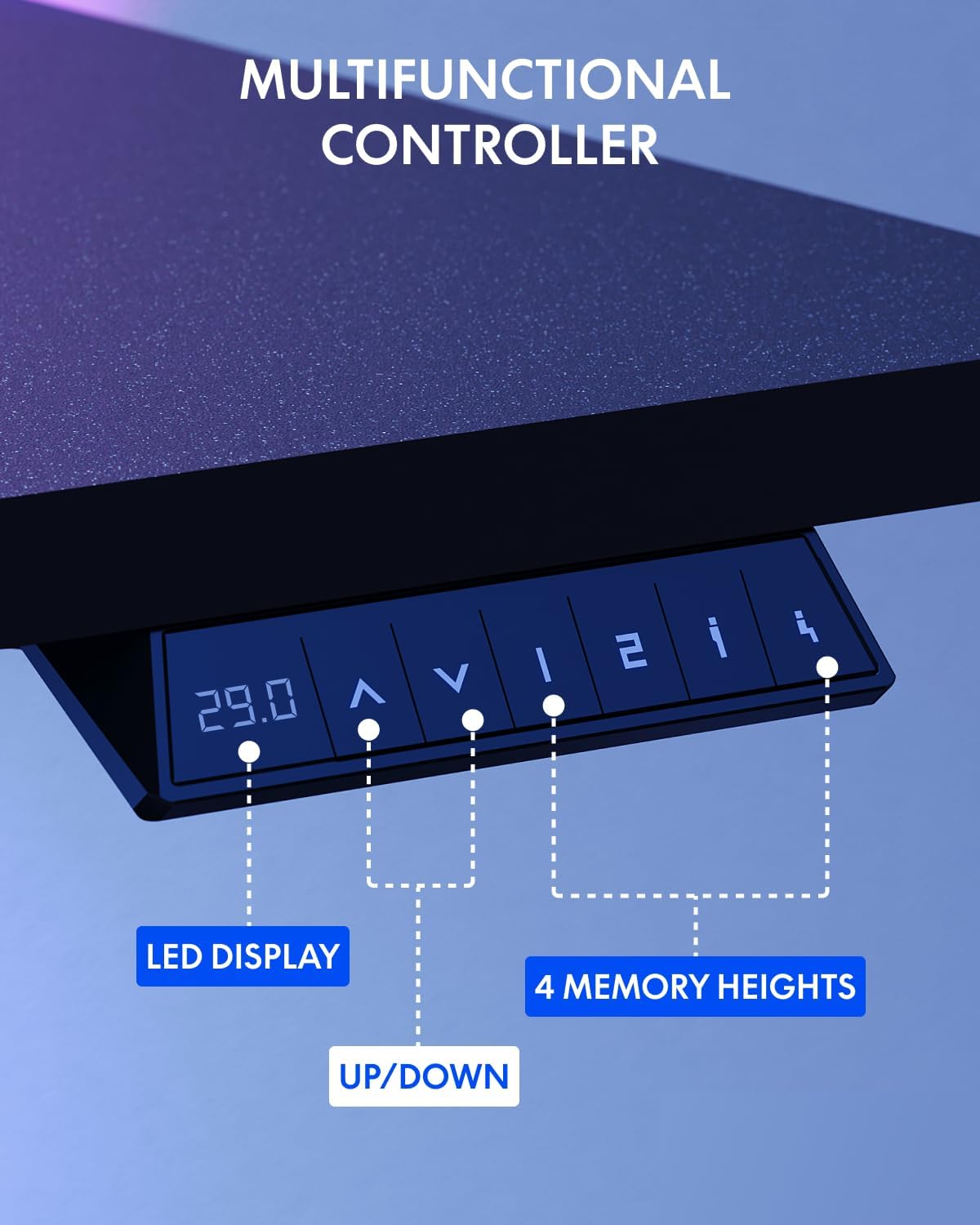
Image: The multifunctional control panel with an LED display and buttons for height adjustment and four memory presets.
การใช้อุปกรณ์เสริม:
- The included cup holder can be attached to the side of the desk for convenient beverage access.
- The headphone hook provides a dedicated storage spot for your headphones, keeping your workspace tidy.

Image: Details of the integrated cup holder and headphone hook accessories.
การซ่อมบำรุง
การบำรุงรักษาอย่างสม่ำเสมอจะช่วยให้โต๊ะทำงานแบบยืนของคุณมีอายุการใช้งานยาวนานและทำงานได้อย่างมีประสิทธิภาพสูงสุด
- การทำความสะอาด: เช็ดพื้นเดสก์ท็อปและกรอบด้วยผ้าเนื้อนุ่มamp ผ้า หลีกเลี่ยงน้ำยาทำความสะอาดที่มีฤทธิ์กัดกร่อนหรือสารเคมีรุนแรง
- ตรวจสอบการเชื่อมต่อ: ตรวจสอบสกรูและน็อตทั้งหมดเป็นระยะเพื่อให้แน่ใจว่ายังแน่นอยู่ ขันให้แน่นอีกครั้งหากจำเป็น
- การจัดการสายเคเบิล: Organize cables to prevent snagging during height adjustments.
การแก้ไขปัญหา
If you encounter issues with your FLEXISPOT standing desk, refer to the following common solutions:
| ปัญหา | สาเหตุที่เป็นไปได้ | สารละลาย |
|---|---|---|
| โต๊ะไม่ขยับ | Power cable disconnected, motor error | Check power connections. Unplug and replug the desk. If an error code is displayed, consult customer support. |
| ปรับความสูงไม่เท่ากัน | Obstruction, uneven load | Ensure no obstructions are present. Distribute weight evenly on the desktop. Perform a reset if available (refer to specific controller instructions). |
| โต๊ะโยกเยก | Loose connections, uneven floor | Tighten all assembly screws. Ensure the desk is on a level surface. Adjust foot pads if necessary. |
For persistent issues or error codes not listed, please contact FLEXISPOT customer support.
ข้อมูลจำเพาะ
Key specifications for the FLEXISPOT 79 x 32 Inch Large Standing Desk:
- ยี่ห้อ: เฟล็กซิสพอท
- แบบอย่าง: 79 x 32 Inch Large Standing Desk
- ขนาดสินค้า : 32"D x 79"W x 29"H (at minimum height)
- สี: กรอบสีดำ + ฝาบนสีดำ
- สไตล์: ทันสมัย
- วัสดุฐาน: เหล็กอัลลอยด์
- ประเภทวัสดุด้านบน: ไม้แปรรูป
- เสร็จสิ้นประเภท: เคลือบผง
- ช่วงความสูง: 28.9" ถึง 46.5"
- คำแนะนำน้ำหนักสูงสุด: 132 ปอนด์
- คุณสมบัติพิเศษ: 79" x 32" Large Tabletop, Splice Board, Cup Holder, Headphone Hook, Electric Height Adjustment, 4 Memory Presets
- การประกอบ: ที่จำเป็น
- ยูพีซี: 810072869357

Image: Visual representation of the desk's dimensions and adjustable height range.
การรับประกันและการสนับสนุน
FLEXISPOT provides the following warranty for your standing desk:
- Frame and Mechanical Parts: รับประกันจำกัด 5 ปี
- อิเล็กทรอนิกส์: รับประกันจำกัด 2 ปี
For warranty claims, technical assistance, or any questions regarding your product, please contact FLEXISPOT customer support. You can find contact information on the official FLEXISPOT webเว็บไซต์หรือผ่านแพลตฟอร์มการซื้อของคุณ
Visit the official FLEXISPOT Store for more information and products: ร้านเฟล็กซิสพอท


