1. บทนำ
This manual provides detailed instructions for the setup, operation, maintenance, and troubleshooting of your Lamzu Atlantis Mini Champion Edition Wireless Gaming Mouse. Please read this manual thoroughly to ensure proper use and to maximize the performance of your device.
2. เนื้อหาบรรจุภัณฑ์
ตรวจสอบว่ามีรายการทั้งหมดอยู่ในแพ็คเกจ:
- ลัมซู แอตแลนติส มินิ ชampion Edition Wireless Gaming Mouse
- ตัวรับสัญญาณ USB ไร้สาย
- สายชาร์จ USB-C
- คู่มือการใช้งาน (เอกสารนี้)
3. สินค้าหมดview
The Lamzu Atlantis Mini Champion Edition is an ultra-lightweight wireless gaming mouse designed for high-performance gaming. It features an optical switch, a 30,000 DPI PAW3950 sensor, and a Nordic 52840 MCU for responsive and precise control.
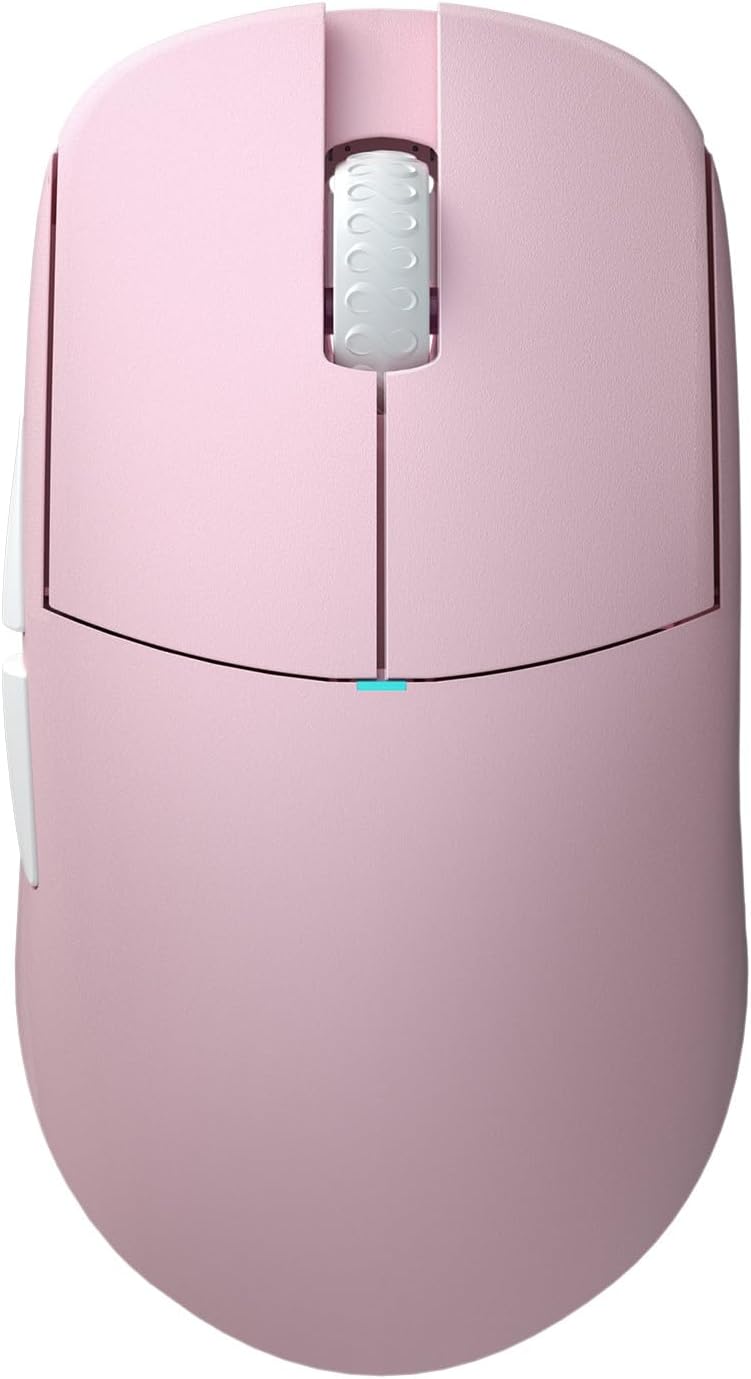
รูปที่ 3.1: ด้านบน view of the Lamzu Atlantis Mini Champion Edition Wireless Gaming Mouse, showcasing its symmetrical design and main buttons.

รูปที่ 3.2: ด้านล่าง view of the mouse, revealing the transparent chassis, sensor, and PTFE feet.

Figure 3.3: Diagram illustrating the various buttons and their functions: Left Click, Right Click, Scroll Wheel, Forward Button, Back Button, On/Off Switch, and DPI Button.
4. การตั้งค่า
4.1 การเชื่อมต่อไร้สาย (2.4G)
- Locate the Wireless USB Receiver in the package.
- เสียบตัวรับสัญญาณ USB เข้ากับพอร์ต USB ที่พร้อมใช้งานบนคอมพิวเตอร์ของคุณ
- เปิดใช้งานเมาส์โดยใช้สวิตช์เปิด/ปิดที่อยู่ด้านล่างของเมาส์
- The mouse should automatically connect to the receiver. If not, press the pairing button (if available, refer to specific product details) or try re-plugging the receiver.
4.2 การเชื่อมต่อแบบมีสาย
- ต่อปลายสายชาร์จ USB-C เข้ากับเมาส์
- เสียบปลายสายชาร์จด้าน USB-A เข้ากับพอร์ต USB ที่ว่างอยู่บนคอมพิวเตอร์ของคุณ
- เมาส์จะทำงานในโหมดมีสายและชาร์จพร้อมกัน

Figure 4.1: The mouse supports both wired (USB-C) and 2.4G wireless connectivity.
5. คู่มือการใช้งาน
5.1 ฟังก์ชั่นพื้นฐาน
- คลิกซ้าย: ปุ่มการดำเนินการหลัก
- คลิกขวา: ปุ่มการดำเนินการรอง
- ล้อเลื่อน: Scroll up/down, and click for middle-button functionality.
- ปุ่มเดินหน้า/ถอยหลัง: ตั้งอยู่ด้านข้าง โดยทั่วไปใช้สำหรับการนำทางใน web browsers or in-game commands.
5.2 การปรับ DPI
The mouse features a dedicated DPI button, usually located on the bottom or top of the mouse, to cycle through preset DPI (Dots Per Inch) sensitivity levels. Refer to the software section for custom DPI settings.
5.3 การปรับแต่งซอฟต์แวร์
For advanced customization, including button remapping, macro creation, and precise DPI adjustments, download the official Lamzu software from the Lamzu website. The software allows you to personalize your mouse settings to suit your preferences.

รูปที่ 5.1: อดีตample of the Lamzu customization software interface, showing options for button assignment and performance settings.
5.4 รูปแบบการจับ
The symmetrical design of the Atlantis Mini is suitable for various grip styles, particularly optimized for claw grip due to its broad back and curved top, which helps prevent finger cramps.

Figure 5.2: Visual representation of common mouse grip styles: Palm Grip, Claw Grip, and Fingertip Grip.
6. การชาร์จและแบตเตอรี่
The Lamzu Atlantis Mini Champion Edition is equipped with a rechargeable Lithium Ion battery. To charge the mouse, connect it to your computer using the provided USB-C cable. The mouse can be used while charging in wired mode. An indicator light on the mouse will typically show charging status (e.g., solid light for charging, off or different color for fully charged).
7. การบำรุงรักษา
7.1 การทำความสะอาด
- โปรดตรวจสอบให้แน่ใจว่าได้ปิดเมาส์และถอดสายออกจากคอมพิวเตอร์ก่อนทำการทำความสะอาด
- ใช้ผ้านุ่มไม่เป็นขุยค่อยๆ งampชุบน้ำหรือน้ำยาทำความสะอาดอ่อนๆ เพื่อเช็ดพื้นผิวของเมาส์
- หลีกเลี่ยงการใช้สารเคมีรุนแรง น้ำยาทำความสะอาดที่มีฤทธิ์กัดกร่อน หรือตัวทำละลาย
- Use a can of compressed air to clear dust and debris from crevices and around the scroll wheel.
7.2 พื้นที่จัดเก็บ
Store the mouse in a cool, dry place away from direct sunlight and extreme temperatures. When not in use for extended periods, ensure the mouse is fully charged before storage to maintain battery health.
8 การแก้ไขปัญหา
หากคุณพบปัญหาเกี่ยวกับเมาส์ โปรดดูตารางด้านล่างเพื่อดูปัญหาทั่วไปและวิธีแก้ไข
| ปัญหา | สาเหตุที่เป็นไปได้ | สารละลาย |
|---|---|---|
| เมาส์ไม่ตอบสนอง (ไร้สาย) | Low battery, receiver disconnected, pairing issue | Charge the mouse, ensure receiver is securely plugged in, try re-pairing. |
| เมาส์ไม่ตอบสนอง (แบบมีสาย) | Cable not connected properly, faulty USB port | Check cable connection, try a different USB port. |
| เคอร์เซอร์เคลื่อนที่ผิดปกติหรือกระโดดไปมา | Dirty sensor, unsuitable surface | Clean the optical sensor, use a clean mouse pad or suitable surface. |
| ปุ่มไม่คลิกหรือดับเบิ้ลคลิก | Software issue, physical obstruction | Update mouse firmware/software, check for physical debris. |
| Poor wireless range or lag | Interference, receiver too far | Move receiver closer to mouse, reduce interference from other wireless devices. |
9. ข้อมูลจำเพาะ
Detailed technical specifications for the Lamzu Atlantis Mini Champion Edition Wireless Gaming Mouse:
| คุณสมบัติ | ข้อมูลจำเพาะ |
|---|---|
| แบบอย่าง | ลัมซู แอตแลนติส มินิ ชampไอออนอิดิชั่น |
| การเชื่อมต่อ | 2.4G Wireless, USB Wired (Type-C) |
| เซ็นเซอร์ | เซ็นเซอร์ออปติคัล Pixart PAW 3950 |
| ช่วง DPI | สูงถึง 30,000 DPI |
| ไอพีเอส | 750 IPS |
| อัตราการสำรวจความคิดเห็น | Up to 8K Hz (with 8K Dongle, sold separately) |
| มหาเทพ | Nordic 52840 |
| สวิตซ์ | Optical Switches (70 million click lifespan) |
| ตัวเข้ารหัส | Lamzu Dust-Proof Encoder |
| น้ำหนัก | น้ำหนักประมาณ 51 กรัม |
| ขนาด | 4.61 x 2.48 x 0.04 inches (117 x 63 x 37 mm, approx.) |
| แบตเตอรี่ | แบตเตอรี่ลิเธียมไอออน 1 ก้อน (รวมอยู่ด้วย) |

Figure 9.1: Dimensional diagram of the mouse, indicating length, width, and height measurements.
10. ข้อมูลด้านความปลอดภัย
To prevent damage to the device or injury to yourself, please observe the following safety precautions:
- อย่าถอดแยกชิ้นส่วนหรือพยายามซ่อมแซมอุปกรณ์ด้วยตนเอง
- เก็บอุปกรณ์ให้ห่างจากน้ำ ความชื้น และอุณหภูมิที่สูงเกินไป
- หลีกเลี่ยงการทำอุปกรณ์หล่นหรือกระแทกอย่างรุนแรง
- ทิ้งแบตเตอรี่ตามระเบียบข้อบังคับในท้องถิ่น
11. การรับประกันและการสนับสนุน
Lamzu is committed to providing high-quality products. For warranty information, technical support, or service inquiries, please visit the official Lamzu webหรือติดต่อฝ่ายสนับสนุนลูกค้า เก็บหลักฐานการซื้อไว้เพื่อใช้ในการเคลมประกัน
เยี่ยมชม Lamzu Store on Amazon สำหรับข้อมูลและผลิตภัณฑ์เพิ่มเติม


