1. บทนำ
This manual provides essential instructions for the setup, operation, maintenance, and troubleshooting of your Moultrie Edge Pro Cellular Trail Camera with Rechargeable Lithium-Ion Battery. Please read this manual thoroughly before using your device to ensure optimal performance and longevity.

Image: The Moultrie Edge Pro Cellular Trail Camera shown alongside its rechargeable lithium-ion battery pack.
2. เนื้อหาบรรจุภัณฑ์
- Moultrie Edge Pro Cellular Trail Camera
- Cellboost antenna
- ชุดแบตเตอรี่ลิเธียมไอออนแบบชาร์จได้
- สายชาร์จ USB-C
- สายรัดยึด
3. การตั้งค่า
3.1. การติดตั้งและการชาร์จแบตเตอรี่
- Ensure the rechargeable Lithium-Ion battery pack is fully charged using the provided USB-C cable. The battery pack is rated for approximately 1,000 charge cycles.
- เปิดช่องใส่แบตเตอรี่ของกล้อง
- Insert the charged Lithium-Ion battery pack into the compartment, ensuring correct orientation as indicated on the battery and camera.
- ปิดช่องใส่แบตเตอรี่ให้แน่น

Image: A diagram illustrating the correct method for inserting the rechargeable battery pack into the Moultrie Edge Pro camera.
3.2. Moultrie Mobile App Activation
- Download the Moultrie Mobile app on your smartphone.
- Follow the in-app instructions for account creation and camera activation using the included QR code.
- Once activated, the camera will utilize its Auto Connect feature to automatically detect and connect to the strongest nationwide cellular network in your area.

Image: The Moultrie Edge Pro camera displaying its Auto Connect Technology, which automatically selects the strongest cellular network.
3.3. Initial Test and Placement
- After activation, press the connect button on the camera to capture a test image. Verify successful image transmission via the Moultrie Mobile app.
- Mount the camera using the provided strap or optional accessories in your desired location. Ensure the camera has a clear line of sight to the area you wish to monitor.
- Consider optional solar-power accessories (not included) for extended field deployment.

Image: A Moultrie Edge Pro camera securely mounted to a tree trunk with a strap, positioned for optimal field of view.
4. คู่มือการใช้งาน
4.1. การบันทึกภาพและวิดีโอ
- The camera captures 36MP still images and 1080p video with HD audio.
- A rapid 0.5-second trigger speed ensures quick capture of detected activity.
- The detection and infrared flash range extends up to 100 feet.
- For nighttime captures, the low-glow infrared flash illuminates the area without alarming wildlife.
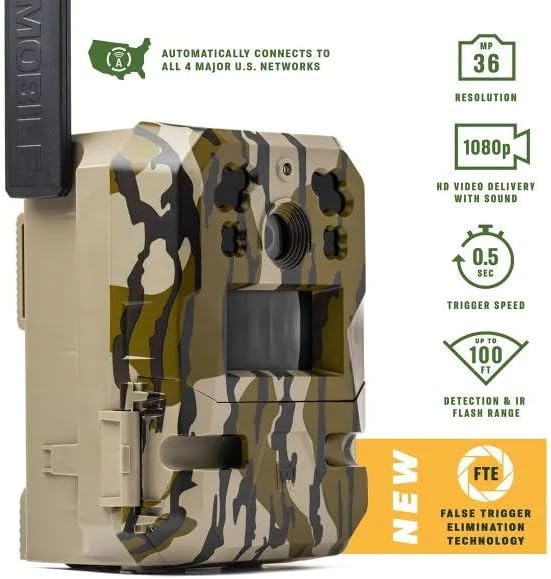
Image: The Moultrie Edge Pro camera highlighting its key performance specifications, including 36MP resolution, 1080p HD video, 0.5-second trigger speed, and 100ft detection range.
4.2. Advanced Detection Technologies
- False Trigger Elimination Technology (FTE): This feature minimizes unwanted captures from environmental factors like swaying branches.
- Smart Zones: Within the Moultrie Mobile app, you can define specific areas in the camera's field of view where triggers should be ignored.
- Smart Trigger: Intelligently identifies and captures only target species, reducing irrelevant images.
- Nyxel® NIR Technology: Enhances low-light image clarity while optimizing power consumption.

Image: A visual comparison demonstrating how Moultrie's False Trigger Elimination (FTE) technology significantly reduces false triggers compared to other trail cameras.

Image: A screenshot of the Moultrie Mobile app interface showing how users can customize Smart Zones to define specific areas for motion detection, preventing unwanted triggers.
4.3. Moultrie Mobile App Features
The Moultrie Mobile app serves as your central hub for managing your camera and captured data. Key features include:
- การตั้งค่าระยะไกล: Adjust camera settings from your smartphone.
- Activity Charting: Analyze animal movement patterns and activity times.
- พื้นที่เก็บข้อมูลบนคลาวด์ไม่จำกัด: All captured images and videos are securely stored in the cloud.
- Interactive Maps: Mark and track hunting property, camera locations, and other points of interest.
- Species Recognition: AI-powered recognition to identify deer, turkey, people, and vehicles.
- ข้อมูลสภาพอากาศ: Access current and forecasted weather conditions for your camera locations.

Image: A collage of smartphone screens showcasing the diverse functionalities of the Moultrie Mobile App, including remote settings, activity charting, and interactive maps.
5. การบำรุงรักษา
5.1. การดูแลแบตเตอรี่
- The included Lithium-Ion battery pack offers extended runtime and improved performance in cold weather compared to alkaline AA batteries.
- Regularly charge the battery pack to maintain optimal performance.
- Avoid exposing the battery to extreme temperatures outside its operating range.
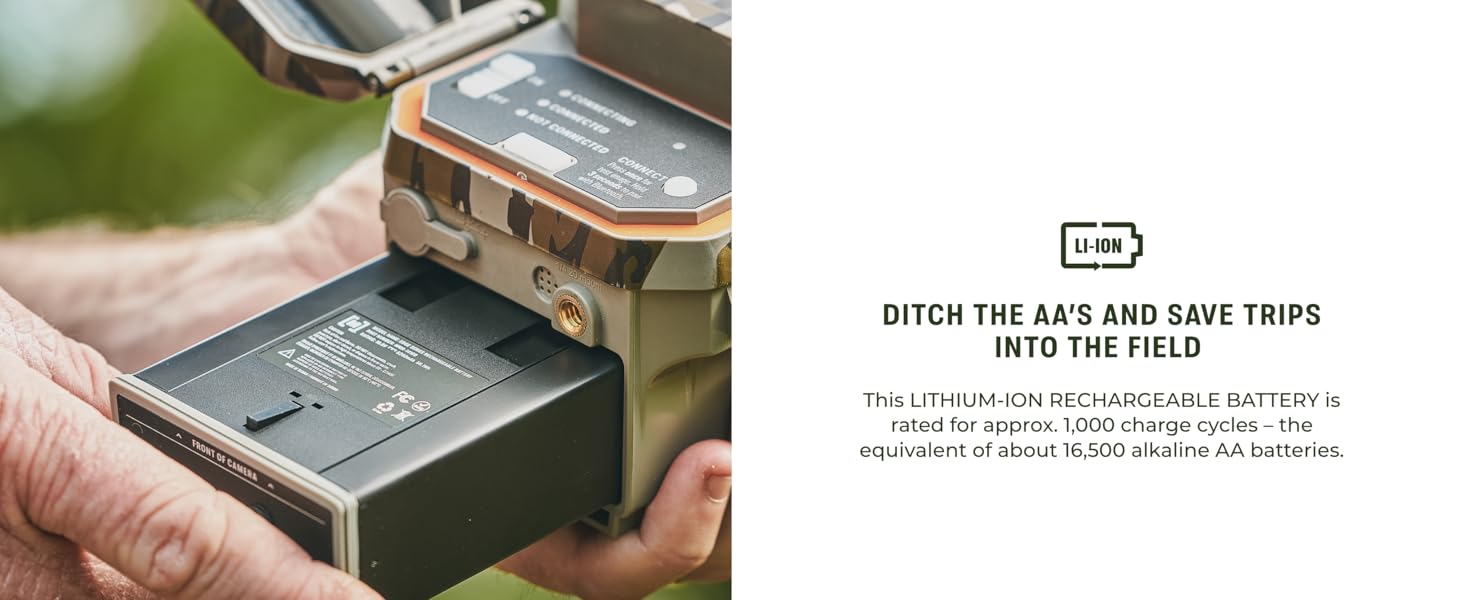
Image: A close-up of a hand inserting the rechargeable Lithium-Ion battery into the Moultrie Edge Pro camera, emphasizing the ease of installation and the benefits of extended runtime.
5.2. การทำความสะอาดกล้อง
- The camera is weatherproof with an IP54 rating, but regular cleaning is recommended.
- Gently wipe the lens and sensor area with a soft, clean cloth to remove dirt, dust, or moisture.
- Ensure the camera housing and seals are free from debris to maintain weather resistance.
6 การแก้ไขปัญหา
If you encounter issues with your Moultrie Edge Pro camera, consider the following:
- ไม่มีรูปภาพ/วิดีโอ: Check battery charge level. Ensure the camera is powered on and the detection settings are configured correctly in the Moultrie Mobile app.
- สัญญาณ/การเชื่อมต่อไม่ดี: Verify the Cellboost antenna is securely attached. Relocate the camera to an area with better cellular coverage. The Auto Connect feature should automatically find the strongest network.
- การแจ้งเตือนผิดพลาดมากเกินไป: Utilize the Smart Zones feature in the Moultrie Mobile app to exclude areas with frequent unwanted motion (e.g., swaying branches). Adjust camera sensitivity settings.
- ปัญหาคุณภาพของภาพ: Ensure the lens is clean and free from obstructions. Check for condensation inside the lens.
- ปัญหาเกี่ยวกับแอป: Ensure your Moultrie Mobile app is updated to the latest version. Check your smartphone's internet connection.
สำหรับปัญหาที่ยังคงอยู่ โปรดดูข้อมูลการติดต่อได้ในส่วนการสนับสนุน
7. ข้อมูลจำเพาะ
| คุณสมบัติ | ข้อมูลจำเพาะ |
|---|---|
| หมายเลขรุ่น | MMC-14154 |
| ความละเอียดของภาพนิ่งที่มีประสิทธิภาพ | 36 MP |
| ความละเอียดในการจับภาพวิดีโอ | 1080p with HD Audio |
| ความเร็วในการเรียก | 0.5 วินาที |
| ระยะการตรวจจับ | 100 ฟุต |
| ช่วงการมองเห็นตอนกลางคืน | 100 Feet (Low-Glow Infrared) |
| แหล่งพลังงาน | Rechargeable Lithium-Ion Battery Pack (included) |
| Battery Life (Li-Ion) | Up to 25% longer runtime than 16 alkaline AAs |
| การเชื่อมต่อ | Cellular (Auto Connect to major U.S. networks), Wi-Fi |
| พื้นที่จัดเก็บ | Built-in memory, Unlimited Cloud Storage via Moultrie Mobile app |
| ทนทานต่อสภาพอากาศ | IP54 |
| ขนาด (กว้าง x ยาว x สูง) | 10 x 4 x 9 นิ้ว |
| น้ำหนัก | 2.77 ปอนด์ |
| ส่วนประกอบที่รวมอยู่ | Trail Camera, Cellboost antenna, Rechargeable Battery Pack, USB-C charging cable |
8. ข้อมูลการรับประกัน
The Moultrie Edge Pro Cellular Trail Camera is covered by a การรับประกันจากผู้ผลิต 2 ปีการรับประกันนี้ครอบคลุมข้อบกพร่องด้านวัสดุและฝีมือการผลิตภายใต้การใช้งานปกติ โปรดเก็บหลักฐานการซื้อไว้เพื่อขอรับสิทธิ์การรับประกัน
9. การสนับสนุน
For further assistance, technical support, or warranty inquiries, please contact Moultrie customer support. Our team is available 7 days a week via phone, chat, and email to provide personalized support.
- Visit the official Moultrie webไซต์สำหรับทรัพยากรสนับสนุนและคำถามที่พบบ่อย
- Utilize the help section within the Moultrie Mobile app for in-app assistance.


