1. บทนำ
The ALLmeter OBD2 Scanner is a professional diagnostic tool designed to help you quickly and accurately identify and resolve vehicle issues. This device supports 9 major OBD2/EOBD protocols, ensuring broad compatibility with most vehicles manufactured after 1996. It features a 2.4-inch color screen for clear display of diagnostic data and offers a range of functions including reading and clearing fault codes, real-time data streaming, battery voltage testing, and more.

Figure 1.1: The ALLmeter OBD2 Scanner assists in diagnosing and resolving common vehicle problems, such as engine issues, flat tires, and general maintenance.
2. ข้อมูลด้านความปลอดภัย
Always observe the following safety precautions when using the ALLmeter OBD2 Scanner:
- Ensure the vehicle is in a safe, well-ventilated area.
- Do not operate the scanner while driving.
- ควรเก็บเครื่องสแกนให้ห่างจากน้ำ น้ำมัน และอุณหภูมิที่สูงหรือต่ำเกินไป
- Avoid touching hot engine components when connecting or disconnecting the scanner.
- Refer to your vehicle's service manual for specific diagnostic procedures.
3. อะไรอยู่ในกล่อง
เมื่อเปิดบรรจุภัณฑ์ ตรวจสอบว่ามีสิ่งของครบทั้งหมด:
- ALLmeter OBD2 Scanner Unit
- คู่มือการใช้งาน
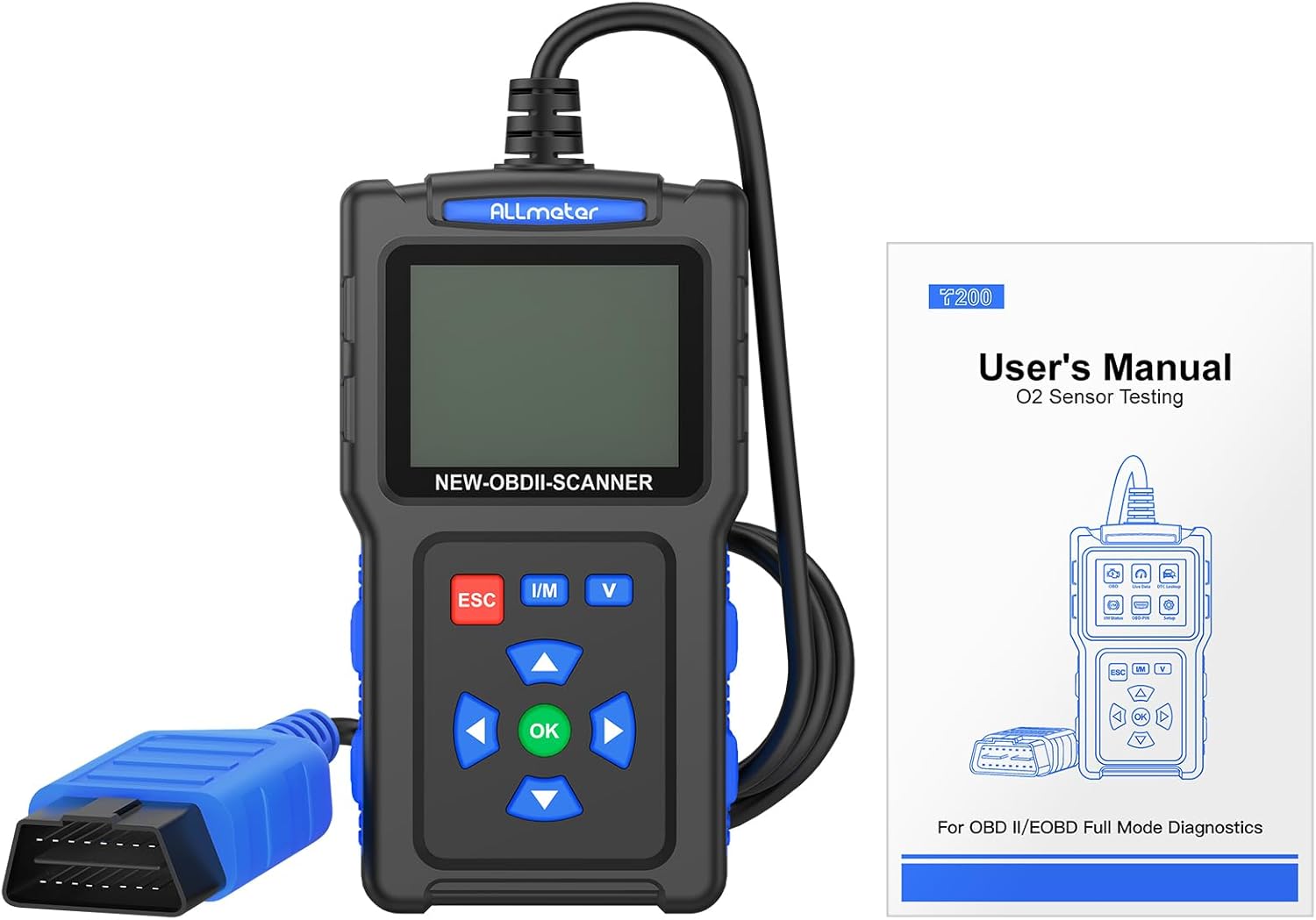
Figure 3.1: The package includes the ALLmeter OBD2 Scanner and a user manual for detailed instructions.
4. สินค้าหมดview
The ALLmeter OBD2 Scanner features a compact design with a 2.4-inch color screen and intuitive button layout for easy operation.

Figure 4.1: The ALLmeter OBD2 Scanner, showing its 2.4-inch color screen, navigation buttons, and OBD2 connector cable.
4.1. ส่วนประกอบและการควบคุม
- หน้าจอสีขนาด 2.4 นิ้ว: Displays diagnostic data and menu options.
- ขั้วต่อ OBD II: Connects the scanner to the vehicle's OBD2 port.
- ปุ่ม ESC: ออกจากเมนูปัจจุบันหรือยกเลิกการดำเนินการ
- ปุ่ม I/M: เข้าถึงสถานะความพร้อมของ I/M ได้อย่างรวดเร็ว
- ปุ่มวี: Quick access to Battery Voltagอี ทดสอบ
- ปุ่มลูกศร (ขึ้น, ลง, ซ้าย, ขวา): นำทางผ่านเมนูและตัวเลือก
- ปุ่มตกลง: ยืนยันการเลือกหรือเข้าสู่เมนู

รูปที่ 4.2: รายละเอียด view of the scanner's screen and control panel, highlighting the independent shortcut buttons for quick access to key functions.
5. การตั้งค่า
5.1. ความเข้ากันได้ของยานพาหนะ
The ALLmeter OBD2 Scanner is compatible with most US vehicles manufactured after 1996, and most European and Asian vehicles manufactured after 2000. It supports the following protocols:
- ISO9141-2 (เริ่มต้น 5 บอด, 10.4 Kbaud)
- SAE J1850 PWM (41.6 กิโลไบต์)
- SAE J1850 VPW (10.4 กิโลไบต์)
- ISO14230-4 KWP (ค่าเริ่มต้น 5, 10.4 Kbaud)
- ISO14230-4 KWP (เริ่มต้นอย่างรวดเร็ว 10.4 Kbaud)
- ISO15765-4 CAN (11bit ID, 500 Kbaud)
- ISO15765-4 CAN (29bit ID, 500 Kbaud)
- ISO15765-4 CAN (11bit ID, 250 Kbaud)
- ISO15765-4 CAN (29bit ID, 250 Kbaud)
Note: This scanner does not support SRS, ABS, or advanced system diagnostics.

รูปที่ 5.1: ความเข้ากันได้เหนือview for US, EU, and Asian vehicles, detailing the 9 supported OBD2 protocols and multilingual support.
5.2. การเชื่อมต่อสแกนเนอร์
- ค้นหาขั้วต่อข้อมูล (DLC) 16 พินของรถยนต์ โดยปกติจะอยู่ใต้แผงหน้าปัดด้านคนขับ
- หมุนกุญแจรถไปที่ตำแหน่ง 'เปิด' (เครื่องยนต์ดับ)
- Plug the ALLmeter OBD2 Scanner's connector into the vehicle's DLC. The scanner will power on automatically.
- The main menu will appear on the screen.
5.3. การเลือกภาษา
The scanner supports 9 languages. To change the language:
- From the main menu, navigate to 'Settings' or 'Language' (exact menu name may vary).
- Use the Arrow buttons to select your desired language (English, French, Spanish, German, Italian, Russian, Chinese, Portuguese, Polish).
- กดปุ่ม 'ตกลง' เพื่อยืนยันการเลือกของคุณ
6. คู่มือการใช้งาน
The ALLmeter OBD2 Scanner provides a comprehensive suite of diagnostic functions. Navigate through the menus using the Arrow buttons and confirm selections with the 'OK' button. Use 'ESC' to go back.

รูปที่ 6.1: เกินview of the comprehensive diagnostic functions, including Read Codes, Erase Codes, Live Data, and more.
6.1. การอ่านและการล้างรหัสปัญหาการวินิจฉัย (DTC)
- From the main menu, select 'Read DTC' to view current, pending, and historic trouble codes.
- To clear codes and turn off the Check Engine Light, select 'Clear DTC'. Confirm the action when prompted.

Figure 6.2: The scanner can read and then clear diagnostic trouble codes, effectively turning off the Check Engine Light after a repair.
6.2. Viewการนำข้อมูลสดมาใช้
This function displays real-time operational parameters from the vehicle's sensors and modules.
- เลือก 'ข้อมูลแบบเรียลไทม์' จากเมนูหลัก
- Choose the parameters you wish to monitor. The scanner can record and playback data streams.
6.3. I/M Readiness Check
The I/M Readiness function indicates whether the various emissions-related systems on the vehicle are operating correctly and are ready for Inspection and Maintenance testing.
- Press the 'I/M' shortcut button or select 'I/M Status' from the menu.
- Monitors will display as 'OK' (complete), 'INC' (incomplete), or 'N/A' (not applicable).
6.4. การค้นหา DTC
The built-in DTC library allows you to look up the meaning of over 7000 diagnostic trouble codes directly on the device.
- Select 'DTC Lookup' from the menu.
- Enter the DTC code using the navigation buttons to view คำจำกัดความของมัน
6.5. ปริมาณแบตเตอรี่tage ทดสอบ
Monitor your vehicle's battery health and voltagอีในเวลาจริง
- Press the 'V' shortcut button or select 'Battery Voltage Test' from the menu.
- The screen will display the current battery voltage and a voltagเส้นโค้งอี
6.6. ฟังก์ชั่นอื่นๆ
- การทดสอบเซ็นเซอร์ O2: Monitors the performance of vehicle oxygen sensors.
- การทดสอบ EVAP: Performs a test on the evaporative emission system.
- ดึงข้อมูลหมายเลข VIN: Reads vehicle identification number and other vehicle information.
- ตรึงข้อมูลเฟรม: Displays a snapshot of vehicle conditions at the time a fault code was set.

รูปที่ 6.3: อดีตamples of multiple test data functions, including I/M Status, Live Data, and Waveform Testing for battery voltage.
7. การบำรุงรักษา
7.1. การทำความสะอาดอุปกรณ์
To maintain the scanner's performance and appearance:
- ใช้แบบนุ่มๆamp cloth to clean the exterior of the scanner.
- ห้ามใช้น้ำยาทำความสะอาดที่มีฤทธิ์กัดกร่อนหรือตัวทำละลาย
- ตรวจสอบให้แน่ใจว่าอุปกรณ์แห้งสนิทก่อนจัดเก็บ
7.2. การอัปเดตซอฟต์แวร์
The ALLmeter OBD2 Scanner supports free lifetime updates to ensure compatibility with new vehicle models and diagnostic protocols.
- Visit the official ALLmeter webเว็บไซต์นี้เป็นแหล่งรวมซอฟต์แวร์เวอร์ชั่นล่าสุดและคำแนะนำในการอัปเดต
- Typically, updates involve connecting the scanner to a computer via a USB cable (not included) and running the update tool.
8 การแก้ไขปัญหา
| ปัญหา | สาเหตุที่เป็นไปได้ | สารละลาย |
|---|---|---|
| เครื่องสแกนเนอร์ไม่สามารถเปิดเครื่องได้ | Loose connection to DLC; vehicle ignition not ON; vehicle battery low. | Ensure secure connection. Turn ignition ON. Check vehicle battery. |
| "Failed to Connect" message. | Vehicle not OBD2 compliant; incorrect protocol; faulty DLC. | Verify vehicle year/model for OBD2 compliance. Try on another vehicle. Consult a mechanic if DLC is suspected faulty. |
| ไม่สามารถล้างโค้ดได้ | Fault causing the code is still present; ignition not ON. | Ensure the underlying vehicle fault has been repaired. Turn ignition ON (engine off). |
| หน้าจอมืดหรือไม่สามารถอ่านได้ | Low light conditions; screen brightness setting. | The 2.4-inch TFT backlit color screen is designed for clarity. Check if there's a brightness setting in the menu (refer to manual if available). |
9. ข้อมูลจำเพาะ
- ยี่ห้อ: ออลมิเตอร์
- แบบอย่าง: เครื่องอ่านโค้ดสแกนเนอร์ OBD2
- น้ำหนักสินค้า: 8.2 ออนซ์
- ขนาดสินค้า : 5.12 x 1.42 x 6.89 นิ้ว
- หน้าจอ: 2.4-inch TFT backlit color screen (320*240 resolution)
- โปรโตคอลที่รองรับ: ISO9141-2, SAE J1850 PWM, SAE J1850 VPW, ISO14230-4 KWP, ISO15765-4 CAN (9 protocols total)
- ระบบปฏิบัติการ: No external operating system required (standalone device)
- ภาษาที่รองรับ: English, French, Spanish, German, Italian, Russian, Chinese, Portuguese, Polish
10. การรับประกันและการสนับสนุน
ALLmeter provides free lifetime software updates for this OBD2 scanner. For technical support, warranty claims, or further assistance, please refer to the contact information provided in the original product packaging or visit the official ALLmeter webเว็บไซต์.
Official ALLmeter Store: Visit the ALLmeter Store on Amazon


