LAUNCH Original Adapter for DBSCar VII and SmartLink C VCI Connector User Manual
1. สูงกว่าview
The LAUNCH Original Adapter is a replacement connector designed to facilitate communication between your LAUNCH diagnostic tool and a vehicle's OBD2 port. This adapter converts a DR15 male connection from your DBSCar VII or SmartLink C VCI Device Cable to a standard OBD2 16-pin male connector. It is constructed from zinc-plated copper to ensure reliable and corrosion-resistant connections.
หมายเหตุสำคัญ: This product is solely a connector and does not possess any diagnostic functions on its own. It requires a compatible LAUNCH diagnostic device for operation. Please confirm your specific device model before purchase to ensure compatibility.
2. ส่วนประกอบผลิตภัณฑ์
แพ็คเกจประกอบด้วยรายการต่อไปนี้:
- 1 x DR15 Male to OBD2 16 Pin Male Replacement Adapter
2.1 อะแดปเตอร์ Views

รูปที่ 1: ด้านหน้าและด้านหลัง views of the LAUNCH adapter, highlighting both connector types.

รูปที่ 2: รายละเอียด view of the 3-Row DR15 Male Connector.

รูปที่ 3: รายละเอียด view of the OBD2 16-Pin Male Connector.
3. ความเข้ากันได้
This diagnostic adapter is specifically designed for use with DBSCar VII (DBSCar 7) or SmartLink C Device Cables from LAUNCH. It is compatible with a wide range of LAUNCH X431 diagnostic scanners, including but not limited to:
- CRP919XBT
- CRP919EBT
- CRP919MAX
- PRO3 ACE
- PROS V/V+5.0
- PRO3S+ V5.0
- PRO TT Elite
- PRO Dyno
- X431 V+ HD
- โปร 5
- PAD VII
- PAD V
Ensure your diagnostic device utilizes a DBSCar VII or SmartLink C Device Cable for proper connection with this adapter.
4. การตั้งค่าและการเชื่อมต่อ
Follow these steps to properly connect the adapter for diagnostic use:
- Connect to VCI Device: Plug the DR15 male end of the adapter into the corresponding DR15 female port on your LAUNCH DBSCar VII or SmartLink C VCI Device Cable. Ensure a secure and firm connection.
- เชื่อมต่อกับยานพาหนะ: Locate your vehicle's OBD2 diagnostic port (typically found under the dashboard on the driver's side). Plug the OBD2 16-pin male end of the adapter into the vehicle's OBD2 port.
- ตรวจสอบการเชื่อมต่อ: Once both ends are connected, ensure all connections are snug. The adapter is now ready to facilitate communication between your diagnostic tool and the vehicle.
4.1 แผนภาพการเชื่อมต่อ
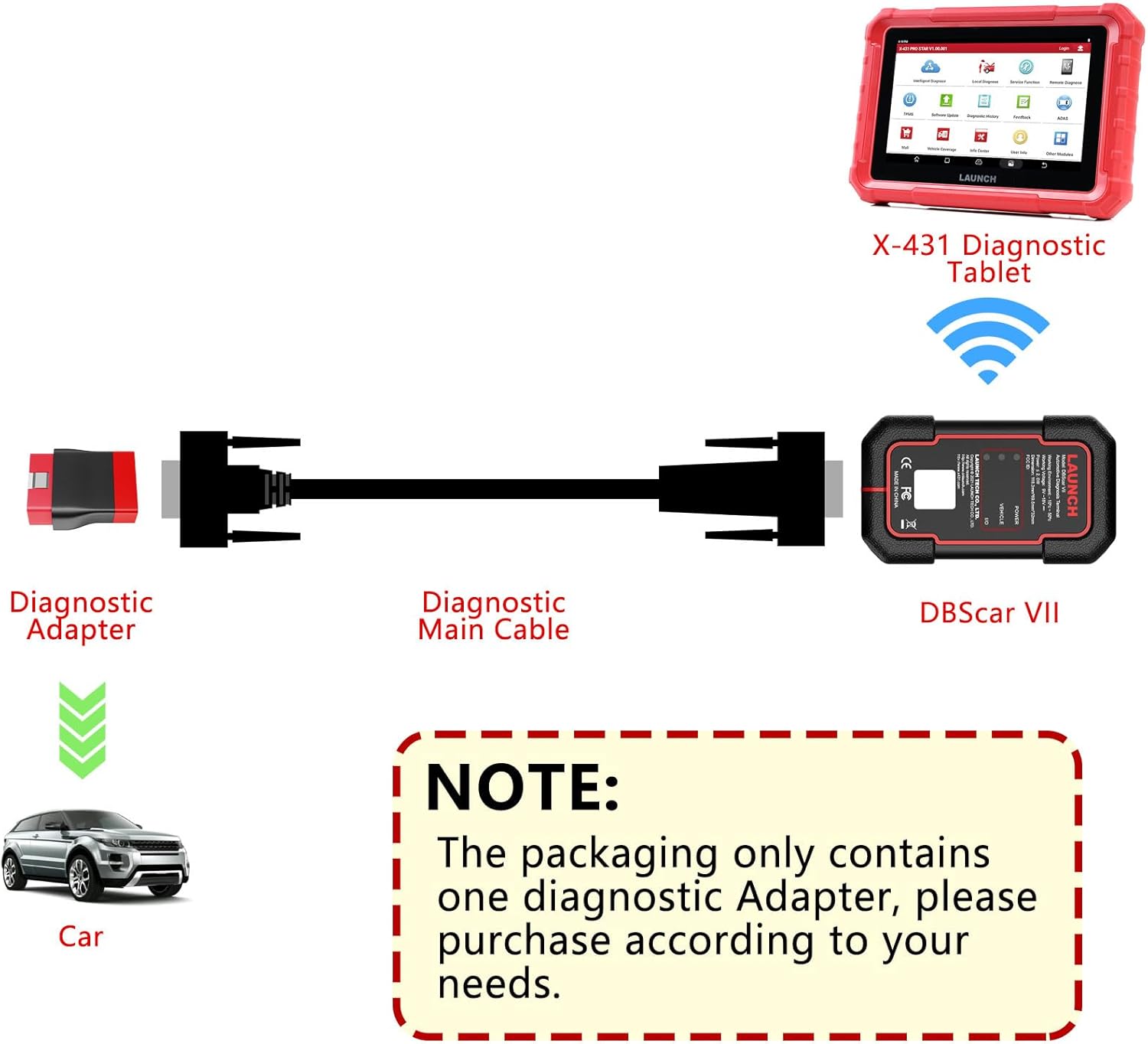
Figure 4: Connection diagram for DBSCar VII with the diagnostic adapter.

Figure 5: Connection diagram for SmartLink C with the diagnostic adapter.
5. คู่มือการใช้งาน
The LAUNCH Original Adapter serves as a passive connector. Its primary function is to establish a physical link between your LAUNCH diagnostic tool and the vehicle. All diagnostic operations, data reading, and fault code analysis are performed directly through your compatible LAUNCH diagnostic scanner.
Refer to the user manual of your specific LAUNCH diagnostic tool (e.g., X431 CRP919EBT, PRO3 ACE, PAD VII) for detailed instructions on how to perform vehicle diagnostics, access functions, and interpret results.
6. การบำรุงรักษา
เพื่อให้มั่นใจว่าอะแดปเตอร์ของคุณจะมีอายุการใช้งานยาวนานและทำงานได้อย่างมีประสิทธิภาพสูงสุด โปรดปฏิบัติตามคำแนะนำในการบำรุงรักษาดังต่อไปนี้:
- การทำความสะอาด: Regularly wipe the adapter's exterior with a soft, dry cloth. Avoid using harsh chemicals or abrasive materials that could damage the zinc-plated copper finish.
- พื้นที่จัดเก็บ: Store the adapter in a clean, dry environment away from extreme temperatures, direct sunlight, and moisture. Keep it protected from physical impact to prevent damage to the connectors.
- การตรวจสอบ: Periodically inspect the connectors for any signs of wear, corrosion, or damage. Ensure the pins are straight and free from debris. The zinc-plated copper construction is designed to resist corrosion and oxidation, but proper care is still recommended.
7 การแก้ไขปัญหา
If you encounter issues while using the adapter, consider the following:
- ไม่มีการเชื่อมต่อ: Ensure both the DR15 and OBD2 connections are fully seated and secure. A loose connection can prevent communication.
- อุปกรณ์ไม่รองรับ: Verify that your LAUNCH diagnostic tool uses a DBSCar VII or SmartLink C Device Cable. This adapter is not universally compatible with all LAUNCH products.
- ความเสียหายทางกายภาพ: Inspect the adapter for any visible signs of damage to the cable or connectors. If damaged, replace the adapter.
- Adapter Size Mismatch: Some users have reported issues with the adapter not fitting certain DBScan VII cables, describing it as 'too small'. Always confirm your device model and connector type before purchasing to avoid compatibility problems.
For further assistance, refer to the troubleshooting section of your LAUNCH diagnostic tool's manual or contact LAUNCH customer support.
8. ข้อมูลจำเพาะ
| คุณสมบัติ | ข้อมูลจำเพาะ |
|---|---|
| หมายเลขรุ่นสินค้า | Adapter for DBSCar VII |
| ขนาดแพ็คเกจ | 4.29 x 2.48 x 1.42 นิ้ว |
| น้ำหนักสินค้า | 2.46 ออนซ์ |
| ผู้ผลิต | ปล่อย |
| ประเภทขั้วต่อ | DR15 Male to OBD2 16-Pin Male |
| ประเภทการเสร็จสิ้น | สังกะสี |
| สี | สีแดง |
| ASIN | B0D8PPVD5D |
| วันที่พร้อมใช้งานครั้งแรก | 3 กรกฎาคม 2024 |
9. การรับประกันและการสนับสนุน
This LAUNCH Original Adapter comes with a รับประกัน 2 ปี นับจากวันที่ซื้อ การรับประกันนี้ครอบคลุมถึงข้อบกพร่องจากการผลิตและรับรองว่าผลิตภัณฑ์มีคุณภาพตามมาตรฐาน
For any questions, technical assistance, or warranty claims, please feel free to contact LAUNCH customer support. Refer to your product packaging or the official LAUNCH webเว็บไซต์สำหรับข้อมูลการติดต่อล่าสุด


