การแนะนำ
This manual provides essential information for the safe and effective use of your Vangoa 61-Key Light-Up Keyboard Piano and Kids Electric Guitar. Please read these instructions thoroughly before operating the instruments and retain them for future reference.
ข้อมูลด้านความปลอดภัย
- แหล่งจ่ายไฟ: ใช้เฉพาะอะแดปเตอร์ไฟฟ้าที่ระบุเท่านั้น ตรวจสอบให้แน่ใจว่าระดับเสียงtage matches your local power supply. Unplug the instruments during lightning storms or when unused for extended periods.
- น้ำและความชื้น: Do not expose the instruments to water or excessive moisture. Avoid placing liquid-filled containers near them.
- การระบายอากาศ : Do not block ventilation openings. Ensure adequate airflow around the instruments.
- การจัดวาง: Place the instruments on a stable, flat surface. Avoid extreme temperatures, direct sunlight, or heat sources.
- การทำความสะอาด: ทำความสะอาดด้วยผ้าแห้งและนุ่มเท่านั้น ห้ามใช้น้ำยาทำความสะอาดหรือสเปรย์กระป๋อง
- เด็ก: Adult supervision is recommended for young children operating these instruments. Small parts may pose a choking hazard.
เนื้อหาแพ็คเกจ
กรุณาตรวจสอบว่ามีรายการทั้งหมดอยู่ในแพ็คเกจของคุณ:
Vangoa 61-Key Light-Up Keyboard Piano
- 61-Key Light-Up Keyboard Piano
- ไมโครโฟน
- อะแดปเตอร์ไฟฟ้า (AC)
- สายสัญญาณเสียง
- คู่มือของเจ้าของ
Vangoa Kids Electric Guitar
- 30-inch Electric Guitar
- มินิ Ampเครื่องฟอก (Amp)
- กระเป๋าใส่กีต้าร์
- จูนเนอร์
- คาโป้
- สายรัด
- หยิบ
- สายเครื่องมือ
- คู่มือการใช้งาน

Image: Vangoa 61-Key Light-Up Keyboard Piano with included microphone, power adapter, audio cable, and owner's manual.

Image: Vangoa 30-inch Kids Electric Guitar in blue with included guitar bag, mini amplifier, tuner, capo, strap, picks, and cable.
การตั้งค่า
Keyboard Piano Setup
- การเชื่อมต่อไฟฟ้า: Connect the AC power adapter to the DC 9V input jack on the back of the keyboard. Plug the adapter into a standard wall outlet. Alternatively, the keyboard can be powered via USB.
- การเชื่อมต่อไมโครโฟน: Insert the microphone plug into the designated microphone input jack.
- การเชื่อมต่อหูฟัง: For private practice, connect headphones to the headphone output jack.
- เปิดเครื่อง: Press the 'Power' button to turn on the keyboard. The LED display will illuminate.

Image: Close-up of the Vangoa 61-Key Light-Up Keyboard Piano's control panel and lighted keys, showing the LED display and various function buttons.
Electric Guitar Setup
- สายรัด: Attach the guitar strap to the strap buttons located on the body of the guitar.
- Ampการเชื่อมต่อลิฟเวอร์: Connect one end of the instrument cable to the output jack on the guitar and the other end to the input jack on the mini ampชีวิต.
- Ampพลังงาน lifier: ให้แน่ใจว่า amplifier has batteries installed or is connected to its power source (if applicable) and turn it on.
- จูน: Use the included tuner to accurately tune the guitar strings. Pluck each string individually and adjust the tuning pegs until the tuner indicates the correct pitch.
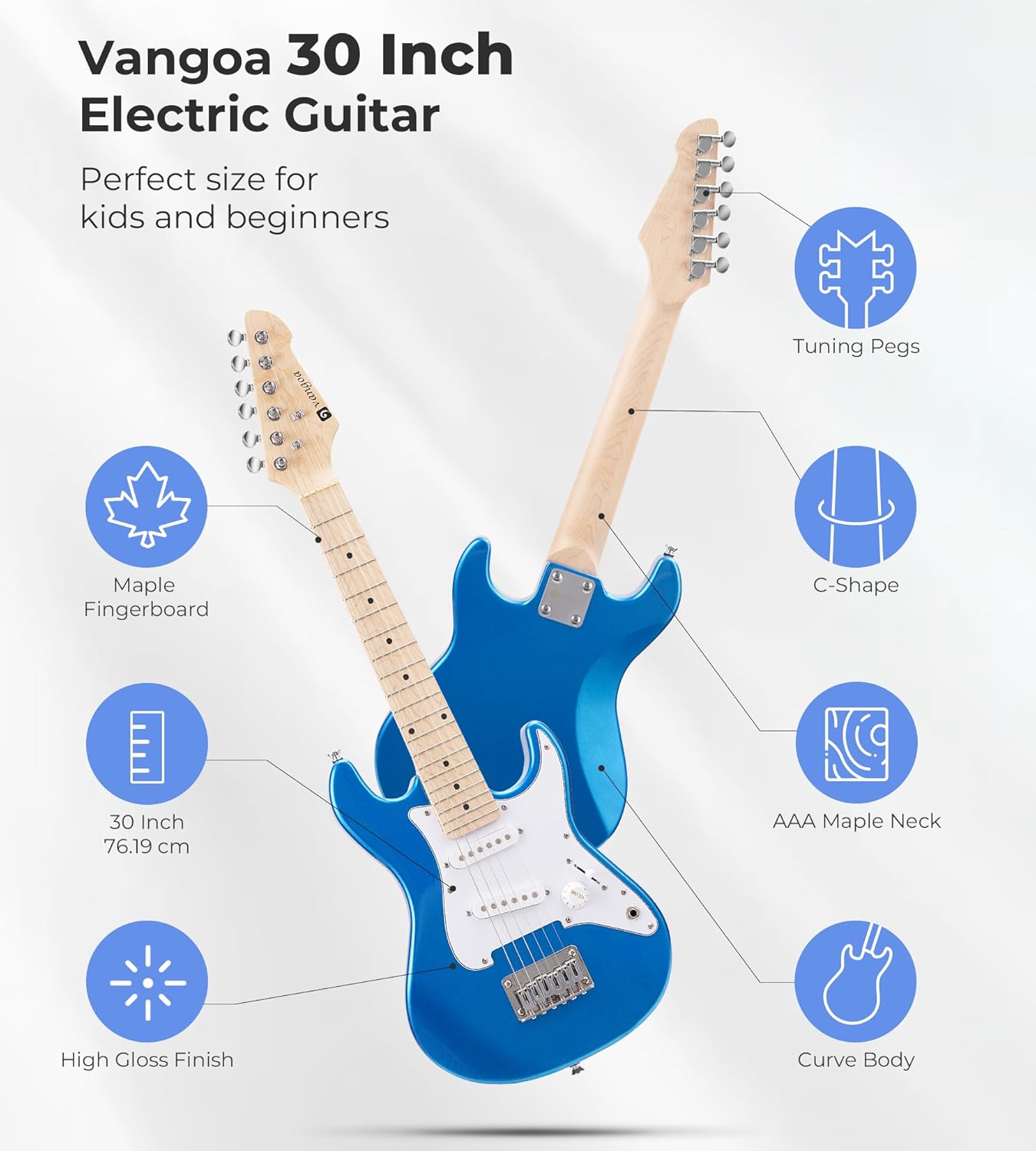
Image: Diagram illustrating the features of the Vangoa 30-inch Electric Guitar, including tuning pegs, maple fingerboard, C-shape neck, AAA maple neck, 30-inch size, and high gloss finish.
คำแนะนำการใช้งาน
Keyboard Piano Operation
- เปิด/ปิดเครื่อง: กดปุ่ม พลัง ปุ่มสำหรับเปิดหรือปิดแป้นพิมพ์
- การควบคุมระดับเสียง: ใช้ ปริมาณ knob or buttons to adjust the overall sound level.
- กุญแจไฟ: The keyboard features lighted keys to assist beginners in learning melodies. Follow the illuminated keys during demo songs or learning modes.
- Timbres (Voices): Select from 350 built-in timbres to change the instrument sound. Refer to the keyboard's panel for timbre selection buttons or number input.
- จังหวะ: Choose from 350 rhythms to add a backing track to your playing. Adjust the tempo as desired.
- เพลงเดโม่: Play one of the 30 demo songs to hear examples or practice along.
- เครื่องเคาะจังหวะ: Access 61 percussion sounds for rhythmic accompaniment.
- Vibrato & Sustain: ใช้แบบเฉพาะ ไวบราโต้ และ ยังชีพประคับประคอง buttons to add effects to your sound.
- การบันทึกและการเล่นซ้ำ: The keyboard allows you to record your performances and play them back. Consult the manual for specific recording and playback button functions.

Image: Diagram showing the rich functions of the Vangoa keyboard, including 350 Timbres, 350 Rhythms, 30 Demo Songs, 8 Percussions, Sustain & Vibrato, Dual Keyboard, Microphone Gift, Headphone Connectable, and Recording & Playback.
Electric Guitar Operation
- ปุ่มปรับระดับเสียง: Adjust the output volume of the guitar using the ปริมาณ knob on the guitar body.
- 3-Way Switch (Pickup Selector): The guitar features S-S (Single-Single) pickups. Use the 3-way switch to select different pickup configurations, which alters the tonal quality of the sound. Experiment with positions to find your preferred tone.
- กำลังเล่น: Hold the guitar comfortably. Use a pick or your fingers to pluck or strum the strings. Practice basic chords and scales.

Image: Close-up of the Vangoa Electric Guitar's S-S pickups, stable bridge, volume knob, and 3-way switch, highlighting the controls for tone adjustment.
การซ่อมบำรุง
- การทำความสะอาด: Wipe down the instruments regularly with a soft, dry, lint-free cloth. For the guitar, clean the strings after each use to prolong their life.
- พื้นที่จัดเก็บ: Store the instruments in a cool, dry place away from direct sunlight, extreme temperatures, and humidity. Use the provided guitar bag for protection.
- String Replacement (Guitar): Guitar strings will eventually wear out and break. Replace them with appropriate gauge strings when necessary.
- Battery Replacement (Amp/Tuner): If the mini amplifier or tuner uses batteries, replace them when power is low.
การแก้ไขปัญหา
คีย์บอร์ดเปียโน
- ไม่มีเสียง:
- Ensure the power adapter is securely connected and the keyboard is turned on.
- ตรวจสอบระดับเสียง
- If headphones are connected, sound will only come through them. Disconnect headphones if you want sound from the speakers.
- ปุ่มต่างๆ ไม่ติดไฟ:
- Ensure the lighted key feature is enabled (if applicable, refer to specific button on keyboard).
- This feature typically works during learning modes or demo songs.
กีตาร์ไฟฟ้า
- ไม่มีเสียงจาก Ampเครื่องฟอก:
- Ensure the guitar and amplifier are both turned on.
- Check that the instrument cable is securely connected to both the guitar and the ampชีวิต.
- ตรวจสอบความถูกต้อง amplifier's volume is turned up.
- ตรวจสอบ amplifier's power source (batteries or power adapter).
- Poor Sound Quality/Buzzing:
- Ensure all cable connections are tight.
- Check the guitar's volume and tone knobs.
- Try a different instrument cable to rule out a faulty cable.
- Ensure the guitar is properly tuned.
ข้อมูลจำเพาะ
| คุณสมบัติ | คำอธิบาย |
|---|---|
| ยี่ห้อ | วังโกอา |
| หมายเลขรุ่น | a26993f1-5e81-430c-9ad0-9f6e39259b0c |
| Keyboard Number of Keys | 61 |
| คุณสมบัติพิเศษของแป้นพิมพ์ | Lighted Keys, Weighted Keys |
| Keyboard Timbres | 350 |
| Keyboard Rhythms | 350 |
| Keyboard Demo Songs | 30 |
| คีย์บอร์ดเพอร์คัสชั่น | 61 |
| การเชื่อมต่อแป้นพิมพ์ | ยูเอสบี |
| แหล่งจ่ายไฟคีย์บอร์ด | Corded Electric (AC, USB) |
| Guitar Size | 30 นิ้ว |
| Guitar Neck Material | Canadian C-shaped Maple |
| Guitar Fingerboard Material | เมเปิ้ล |
| ปิ๊กอัพสำหรับกีตาร์ | SS (ซิงเกิล-ซิงเกิล) |
| ระดับทักษะ | ผู้เริ่มต้น |
| ช่วงอายุ | เด็ก |
ข้อมูลการรับประกัน
Vangoa products are designed and manufactured to high-quality standards. This product is covered by a manufacturer's warranty against defects in materials and workmanship. Please refer to the specific warranty terms provided with your purchase documentation or contact Vangoa customer support for details. Keep your proof of purchase for warranty claims.
การสนับสนุนลูกค้า
For technical assistance, troubleshooting, or warranty inquiries, please contact Vangoa customer support. You can typically find contact information on the Vangoa official webเว็บไซต์หรือผ่านทางร้านค้าปลีกที่คุณซื้อผลิตภัณฑ์
เยี่ยมชม Vangoa Store on Amazon สำหรับข้อมูลเพิ่มเติมและทรัพยากรสนับสนุน


