1. บทนำ
Welcome to the user manual for your new Blackstar IDCORE V4 Super Wide Stereo 10W Ampเครื่องฟอก นี้ amplifier is designed to provide an immersive and versatile playing experience for guitarists, featuring dual 3-inch speakers, a wide range of voices, and patented ISF (Infinite Shape Feature) technology. This manual will guide you through the setup, operation, maintenance, and troubleshooting of your IDCORE V4 amplifier, ensuring you get the most out of its advanced features.

Figure 1.1: Blackstar IDCORE V4 Super Wide Stereo 10W Amp (Double Cream)
2. ข้อมูลด้านความปลอดภัย
โปรดอ่านและทำความเข้าใจคำแนะนำด้านความปลอดภัยทั้งหมดก่อนใช้งาน ampเครื่องขยายเสียง เก็บคู่มือนี้ไว้เพื่อใช้อ้างอิงในอนาคต
- แหล่งจ่ายไฟ: Use only the specified power adapter provided with your ampเครื่องขยายเสียง ตรวจสอบให้แน่ใจว่าระดับเสียงถูกต้องtage ตรงกับแหล่งจ่ายไฟในพื้นที่ของคุณ
- การระบายอากาศ : อย่าปิดกั้นช่องระบายอากาศใดๆ ตรวจสอบให้แน่ใจว่ามีอากาศถ่ายเทเพียงพอรอบๆ amplifier เพื่อป้องกันความร้อนสูงเกินไป
- น้ำและความชื้น: อย่าเปิดเผย amplifier to rain, moisture, or any liquids. Do not place objects filled with liquids on or near the ampชีวิต.
- แหล่งความร้อน: เก็บรักษาไว้ ampควรวางเครื่องขยายเสียงให้ห่างจากแหล่งความร้อน เช่น เครื่องทำความร้อน ช่องระบายความร้อน เตา หรืออุปกรณ์อื่นๆ (รวมถึง) ampเครื่องให้ความร้อน) ที่ผลิตความร้อน
- การทำความสะอาด: ถอดปลั๊ก amplifier from the power outlet before cleaning. Use a dry cloth only.
- การบริการ: ห้ามพยายามซ่อมแซมผลิตภัณฑ์นี้ด้วยตนเอง โปรดติดต่อช่างผู้ชำนาญการเพื่อขอรับบริการ การซ่อมแซมเป็นสิ่งจำเป็นเมื่ออุปกรณ์ได้รับความเสียหายไม่ว่าในกรณีใดๆ เช่น สายไฟหรือปลั๊กเสียหาย ของเหลวหกหรือมีวัตถุตกใส่อุปกรณ์ อุปกรณ์ถูกฝนหรือความชื้น ทำงานผิดปกติ หรือตกหล่น
3. สินค้าหมดview
The Blackstar IDCORE V4 is a compact yet powerful 10-watt stereo amplifier designed for practice, recording, and streaming.
คุณสมบัติหลัก:
- 10W Super Wide Stereo Output: Two 3-inch speakers provide a broad, immersive soundstage.
- 6 Amp เสียง: Offers a versatile range from pristine cleans to high-gain distortion.
- ระบบควบคุม ISF ที่ได้รับการจดสิทธิบัตร: Infinite Shape Feature allows for precise tone shaping, from British to American amp ลักษณะเฉพาะ.
- เอฟเฟกต์ในตัว: Studio-quality modulation, delay, and reverb effects.
- จูนเนอร์ในตัว: Convenient chromatic tuner for quick tuning.
- การเชื่อมต่อ USB-C: Direct recording to computer and access to Blackstar Architect software.
- CabRig Lite: Advanced cabinet simulator with user-configurable mic and cabinet placement.
- Line-in & Streaming Input: Jam along with backing tracks or stream audio.
- การลดพลังงาน: Switchable 1W/10W output for quiet practice or full volume.
เค้าโครงแผงควบคุม:
รูปที่ 3.1: แผงควบคุมด้านบน
The top panel of your IDCORE V4 features all the essential controls for shaping your sound.
- แจ็คอินพุต: เชื่อมต่อกีตาร์ของคุณที่นี่
- อินพุตแบบ Line In / Streaming Input: เชื่อมต่ออุปกรณ์เสียงภายนอก
- เอาต์พุต CabRig และโทรศัพท์: Headphone output with CabRig speaker simulation.
- ตัวเลือกเสียง: Rotary switch to choose between 6 distinct amp เสียงเอฟเฟ็กต์ (Clean Warm, Clean Bright, Crunch, Super Crunch, OD 1, OD 2)
- Gain Control: ปรับระดับเสียงโอเวอร์ไดรฟ์หรือเสียงแตกพร่า
- การควบคุมระดับเสียง: Master volume for the ampชีวิต.
- ISF (คุณสมบัติรูปทรงไร้ขีดจำกัด): Patented Infinite Shape Feature for tone character adjustment.
- ส่วนเอฟเฟกต์:
- ประเภทปุ่มหมุน: Selects between Modulation, Delay, and Reverb effects.
- ลูกบิดระดับ: ปรับระดับความเข้มของเอฟเฟ็กต์ที่เลือก
- ปุ่มแตะ: Sets the tempo for time-based effects.
- สวิตช์ไฟ: เปลี่ยนเป็น amplifier เปิดหรือปิด
- พอร์ต USB: USB-C connection for recording and Architect software.
- 1W/10W Power Switch: Reduces output power for quieter practice.
- ปุ่มแมนนวล: Toggles between manual mode and stored patches.

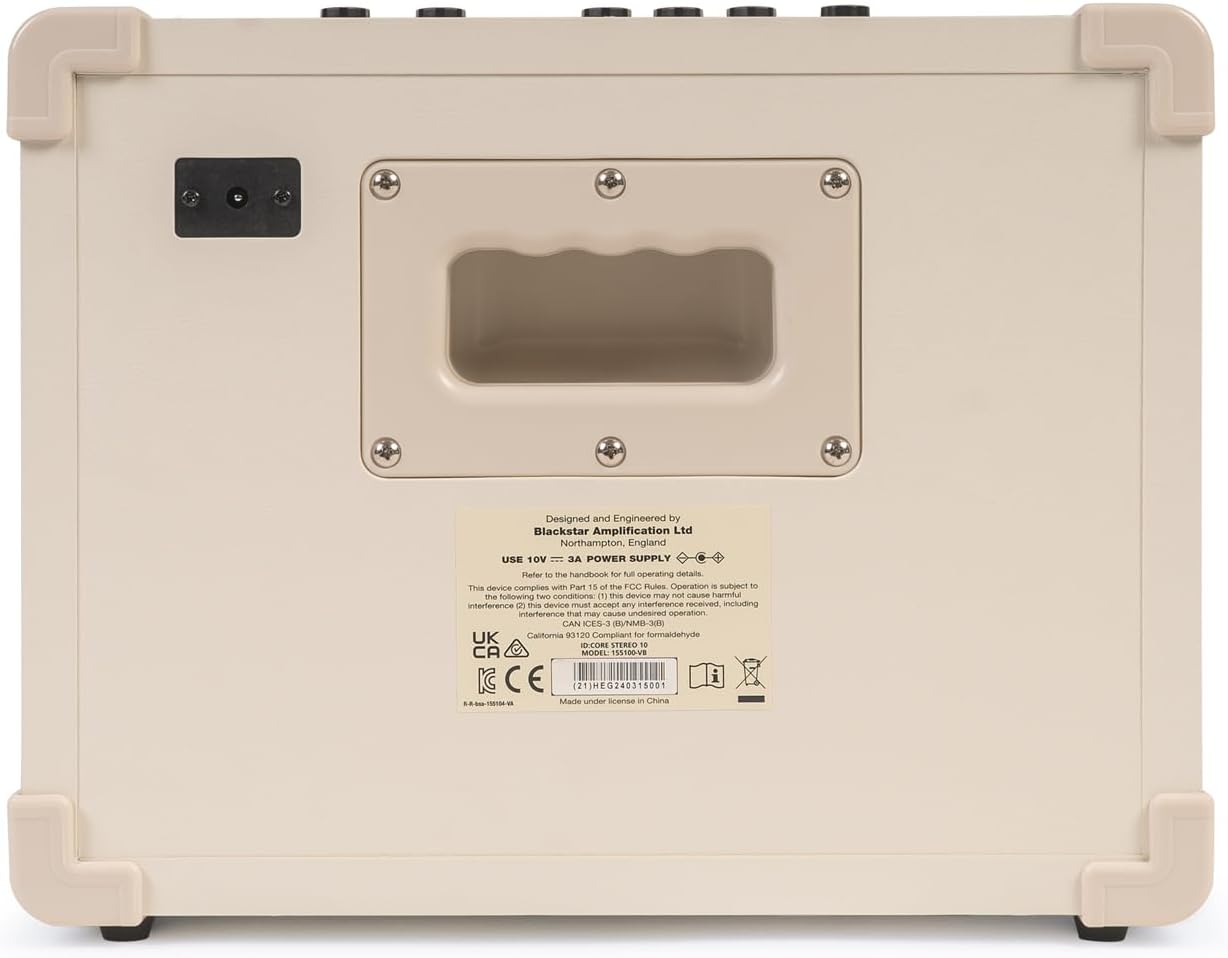
รูปที่ 3.2: แผงด้านหลัง
The rear panel primarily houses the power input. Ensure you use the correct power supply as indicated on the label.
4. การตั้งค่า
Follow these steps to set up your Blackstar IDCORE V4 ampชีวิต.
- แกะกล่อง: นำไฟล์ amplifier and all accessories from the packaging. Check for any signs of damage.
- การจัดวาง: วาง amplifier on a stable, flat surface, ensuring adequate ventilation around the unit.
- การเชื่อมต่อไฟฟ้า: Connect the supplied power adapter to the DC input on the rear of the amplifier. Plug the adapter into a suitable wall outlet. ห้ามเปิดเครื่อง ampเครื่องฟอกยัง
- การเชื่อมต่อกีตาร์: เชื่อมต่อกีตาร์ของคุณกับ ป้อนข้อมูล เสียบแจ็คที่แผงด้านบนโดยใช้สายเคเบิลเครื่องดนตรีขนาดมาตรฐาน 1/4 นิ้ว
- หูฟัง (ไม่จำเป็น): หากใช้หูฟัง ให้เชื่อมต่อหูฟังเข้ากับ... CabRig & Phones output. This output features Blackstar's CabRig Lite speaker simulation.
- อุปกรณ์เสียงภายนอก (ไม่บังคับ): To play along with music, connect your audio device (phone, tablet, MP3 player) to the Line In / สตรีมมิ่ง input using a 3.5mm stereo cable.
- การเชื่อมต่อ USB (ทางเลือก): For recording or using the Blackstar Architect software, connect a USB-C cable from the ampพอร์ต USB ของเครื่องขยายเสียงเข้ากับคอมพิวเตอร์ของคุณ
5. คู่มือการใช้งาน
This section details how to operate your IDCORE V4 amplifier and utilize its various features.
5.1 การเปิด/ปิดเครื่อง
- ตรวจสอบให้แน่ใจว่าการเชื่อมต่อทั้งหมดมีความปลอดภัย
- หมุน ปริมาณ knob down to its minimum setting.
- พลิกกลับ พลัง switch to the 'ON' position. The power indicator LED will illuminate.
- หากต้องการปิดเครื่อง ให้หมุน... ปริมาณ knob down and flip the พลัง เปลี่ยนเป็น 'ปิด'
5.2 Selecting Amp เสียงพูด
The IDCORE V4 offers six distinct amp voices. Rotate the เสียง knob to select:
- สะอาด อบอุ่น: โทนเสียงที่นุ่มนวล มีชีวิตชีวา และสะอาดตา
- สะอาด สว่างสดใส: Brighter, more articulate clean tone.
- กระทืบ: Classic rock crunch.
- ซูเปอร์ครันช์: Higher gain crunch.
- OD 1: Overdrive with a modern character.
- OD 2: High-gain lead tone.
5.3 Gain, Volume, and ISF Controls
- ได้รับ: ปรับปริมาณพรีamp gain, affecting the level of distortion.
- ปริมาณ: ควบคุมปริมาณการส่งออกโดยรวมของ ampชีวิต.
- ISF (คุณสมบัติรูปทรงไร้ขีดจำกัด): This unique control shifts the tone stack from a 'British' characteristic (counter-clockwise) with a more aggressive mid-range, to an 'American' characteristic (clockwise) with a tighter low-end and more scooped mids.
5.4 ส่วนผลกระทบ
The effects section provides three types of effects: Modulation, Delay, and Reverb.
- ประเภทปุ่มหมุน: Rotate to select the desired effect type. Each type has multiple variations accessible via the Architect software.
- ลูกบิดระดับ: Adjusts the wet/dry mix or intensity of the selected effect.
- ปุ่มแตะ: Press this button repeatedly to set the tempo for time-based effects (Delay, Tremolo, etc.).
5.5 Power Reduction (1W/10W)
การ 1W/10W Power switch allows you to reduce the amplifier's output power for quieter practice sessions without sacrificing tone. This is ideal for home use.
5.6 USB-C Recording and Architect Software
The USB-C port enables direct recording to your computer and provides access to the Blackstar Architect software.
- การบันทึก: เชื่อมต่อ amplifier to your computer via USB-C. The amplifier will appear as an audio interface. You can record your guitar directly into your DAW (Digital Audio Workstation).
- Blackstar Architect: ดาวน์โหลดและติดตั้งซอฟต์แวร์ Blackstar Architect จากเว็บไซต์ทางการของ Blackstar website. This software allows for deep editing of patches, access to more effect variations, firmware updates, and sharing patches online.
- CabRig Lite: Within Architect, you can customize the CabRig Lite emulated output, adjusting virtual cabinet types, microphone models, and mic placement for a professional direct sound.

Figure 5.1: USB-C connection for recording and software control.

รูป 5.2: การใช้ amplifier for streaming audio.
6. การบำรุงรักษา
Proper care and maintenance will ensure the longevity and optimal performance of your Blackstar IDCORE V4 ampชีวิต.
- การทำความสะอาด:
- ถอดปลั๊ก .เสมอ ampเครื่องพ่นไฟก่อนการทำความสะอาด
- ใช้ผ้าแห้งนุ่มๆ ที่ไม่มีขนเช็ดทำความสะอาดพื้นผิวด้านนอก
- ห้ามใช้สารทำความสะอาดที่มีฤทธิ์กัดกร่อน ตัวทำละลาย หรือขี้ผึ้ง เพราะอาจทำให้พื้นผิวเสียหายได้
- พื้นที่จัดเก็บ:
- เมื่อไม่ใช้งาน ให้เก็บ ampเก็บเครื่องขยายเสียงไว้ในที่แห้งและเย็น หลีกเลี่ยงแสงแดดโดยตรงและอุณหภูมิที่สูงหรือต่ำเกินไป
- Avoid storing in areas with high humidity.
- การขนส่ง:
- เมื่อทำการขนย้าย ampสำหรับเครื่องขยายเสียง โปรดตรวจสอบให้แน่ใจว่าได้บรรจุอย่างแน่นหนาเพื่อป้องกันความเสียหายทางกายภาพ
- Use the integrated carry handle for easy portability.
7 การแก้ไขปัญหา
If you encounter issues with your IDCORE V4, refer to the table below for common problems and solutions.
| ปัญหา | สาเหตุที่เป็นไปได้ | สารละลาย |
|---|---|---|
| ไม่มีเสียงจาก ampชีวิต. |
|
|
| คุณภาพเสียงผิดเพี้ยนหรือไม่ดี |
|
|
| ไม่พบการเชื่อมต่อ USB |
|
|
| เอฟเฟกต์ไม่ทำงาน |
|
|
8. ข้อมูลจำเพาะ
Detailed specifications for the Blackstar IDCORE V4 Super Wide Stereo 10W Amp (Model: IDCV410CREAM2).
| คุณสมบัติ | รายละเอียด |
|---|---|
| หมายเลขรุ่น | IDCV410CREAM2 |
| เอาท์พุต วัดtage | 10 วัตต์ (สามารถปรับลดเหลือ 1 วัตต์ได้) |
| ลำโพง | 2 x 3-inch Stereo Speakers |
| Amp เสียงพูด | 6 (Clean Warm, Clean Bright, Crunch, Super Crunch, OD 1, OD 2) |
| การควบคุม | Voice, Gain, Volume, ISF, Effects Type, Effects Level, Tap, 1W/10W Power, Manual, Power Switch |
| ผลกระทบ | Modulation, Delay, Reverb (multiple variations via Architect) |
| การเชื่อมต่อ | 1/4" Guitar Input, 3.5mm Line In/Streaming, 3.5mm CabRig & Phones Output, USB-C |
| ความเข้ากันได้ของซอฟต์แวร์ | Blackstar Architect (PC/Mac) |
| ขนาด (D x W x H) | 12 x 6 x 12 นิ้ว (ประมาณ 30.5 x 15.2 x 30.5 ซม.) |
| น้ำหนักสินค้า | 11 ปอนด์ (ประมาณ 5 กก.) |
| สี | Double Cream |
| แหล่งพลังงาน | Corded Electric (10V DC, 3A) |
9. การรับประกันและการสนับสนุน
Your Blackstar IDCORE V4 amplifier is covered by a manufacturer's warranty. For specific warranty terms and conditions, please refer to the warranty card included with your product or visit the official Blackstar Ampการทำให้บริสุทธิ์ webเว็บไซต์.
For technical support, product registration, or to download the latest version of the Blackstar Architect software and firmware updates, please visit:
www.แบล็คสตาร์amps.com/support
You can also find FAQs and community forums on the Blackstar webเว็บไซต์สำหรับความช่วยเหลือเพิ่มเติม


