1. บทนำ
This manual provides essential instructions for the safe and efficient use of your GT POWER 200W AC/DC Adapter, Model 475. This adapter is designed to provide power to compatible portable power stations, such as the Anker Powerhouse II 400 and Anker 533. Please read this manual thoroughly before using the product and retain it for future reference.
2. คำแนะนำด้านความปลอดภัย
WARNING: Failure to follow these safety instructions may result in fire, electric shock, or other injury.
- สำหรับใช้ภายในอาคารเท่านั้น: This adapter is designed for indoor use in dry locations. Do not expose it to rain, moisture, or extreme temperatures.
- ฉบับที่เหมาะสมtage: ตรวจสอบให้แน่ใจปริมาณอินพุตtage (AC 100-240V) matches your local power supply.
- การระบายอากาศ : Do not cover the adapter or place it in an enclosed space during operation. Ensure adequate ventilation to prevent overheating.
- ความสมบูรณ์ของสายเคเบิล: Regularly inspect the power cord and adapter for any damage. Do not use if the cord is frayed or the adapter casinจีแตกแล้ว
- ตัดการเชื่อมต่อไฟฟ้า: Always unplug the adapter from the power outlet before cleaning or when not in use for extended periods.
- ไม่มีการถอดชิ้นส่วน: Do not attempt to open or repair the adapter. It contains no user-serviceable parts. Unauthorized disassembly voids the warranty and poses a safety risk.
- เด็กและสัตว์เลี้ยง: Keep the adapter and its cables out of reach of children and pets.
- ความเข้ากันได้: Use this adapter only with compatible devices as specified. Using it with incompatible devices may cause damage or malfunction.
- คุณสมบัติการป้องกัน: This adapter includes Over Voltage Protection (OVP), Over Current Protection (OCP), and Short Circuit Protection (SCP) to safeguard your devices.
ข้อควรระวัง: ความเสี่ยงจากไฟฟ้าช็อต อย่าเปิด.
3. เนื้อหาบรรจุภัณฑ์
ตรวจสอบว่ามีรายการทั้งหมดอยู่ในแพ็คเกจของคุณ:
- GT POWER 200W AC/DC Adapter (Model 475)
- สายไฟอินพุต AC
4. สินค้าหมดview
The GT POWER 200W AC/DC Adapter is a robust power supply designed for efficient charging of your portable power station.

รูปที่ 4.1: ด้านหน้า view of the GT POWER 200W AC/DC Adapter, showing the model number (H-200-24), input (AC 100-240V, 1.8A, 50-60Hz), and output (DC 24V, 8A) specifications, along with safety certifications and a "Risk of Electric Shock" warning.

รูปที่ 4.2: สูงสุด view of the GT POWER 200W AC/DC Adapter, highlighting the LED indicator light which shows the operational status of the adapter.

รูปที่ 4.3: Close-up of the DC output barrel connector, which connects to the portable power station.
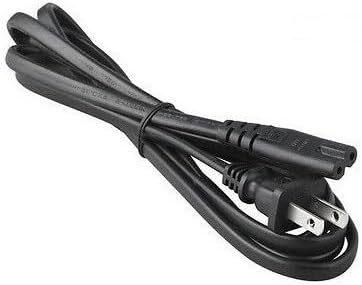
รูปที่ 4.4: The AC input power cord, featuring a standard US plug for connecting the adapter to a wall outlet.
ส่วนประกอบหลัก:
- Adapter Unit: The main body containing the power conversion circuitry.
- พอร์ตอินพุต AC: Where the AC power cord connects to the adapter.
- สายเคเบิลเอาต์พุต DC พร้อมขั้วต่อแบบบาร์เรล: Permanently attached cable that delivers power to your device.
- ไฟแสดงสถานะ LED: Illuminates when the adapter is receiving power and operating correctly.
- สายไฟ AC: Connects the adapter to a wall outlet.
5. คำแนะนำในการตั้งค่า
Follow these steps to set up your GT POWER AC/DC Adapter:
- แกะ: Carefully remove the adapter and AC power cord from the packaging.
- Connect AC Cord: Insert the female end of the AC power cord firmly into the AC input port on the adapter unit.
- เชื่อมต่อกับสถานีไฟฟ้า: Plug the DC barrel connector from the adapter's output cable into the DC input port of your compatible portable power station (e.g., Anker Powerhouse II 400/533). Ensure a secure connection.
- เชื่อมต่อกับเต้ารับไฟฟ้า: Plug the male end of the AC power cord into a standard wall outlet (AC 100-240V).
- ตรวจสอบพลังงาน: The LED indicator on the adapter should illuminate, indicating that it is receiving power and ready to charge.
บันทึก: Always connect the adapter to the device first, then to the wall outlet, and disconnect from the wall outlet first, then from the device.
6. คู่มือการใช้งาน
Once set up, the adapter operates automatically:
- When connected to a power outlet and a compatible power station, the adapter will begin supplying power for charging.
- The LED indicator will remain lit during operation.
- The adapter features an "Automatic Off" special feature, which implies it will cease charging or power delivery once the connected device is fully charged or if an overload/fault condition is detected. Refer to your power station's manual for specific charging indicators.
- To stop operation, first unplug the AC power cord from the wall outlet, then disconnect the DC barrel connector from your power station.
7. การบำรุงรักษา
Proper maintenance ensures the longevity and safe operation of your adapter:
- การทำความสะอาด: Disconnect the adapter from all power sources before cleaning. Use a soft, dry cloth to wipe the exterior. Do not use liquid cleaners or solvents.
- พื้นที่จัดเก็บ: When not in use, store the adapter in a cool, dry place, away from direct sunlight and moisture. Coil the cables loosely to prevent damage.
- การตรวจสอบ: Periodically inspect the adapter casing, cables, and connectors for any signs of wear, cuts, or damage. If damage is found, discontinue use immediately and replace the adapter.
8 การแก้ไขปัญหา
หากคุณพบปัญหาเกี่ยวกับอะแดปเตอร์ โปรดดูปัญหาและวิธีแก้ไขที่พบบ่อยต่อไปนี้:
| ปัญหา | สาเหตุที่เป็นไปได้ | สารละลาย |
|---|---|---|
| Adapter LED is off, no power output. |
|
|
| Power station not charging. |
|
|
| อะแดปเตอร์ร้อนจัดเกินไป |
|
|
หากปัญหายังคงมีอยู่หลังจากลองวิธีแก้ไขเหล่านี้แล้ว โปรดติดต่อฝ่ายสนับสนุนลูกค้า
9. ข้อมูลจำเพาะ
| หมายเลขรุ่น | 475 (H-200-24) |
| อินพุต Voltage | ไฟฟ้ากระแสสลับ 100-240V, 1.8A, 50-60Hz |
| ปริมาณการส่งออกtage | กระแสตรง 24 โวลต์ |
| กระแสไฟขาออก | 8A |
| วัดtage | 200วัตต์ |
| ประเภทขั้วต่อ | ขั้วต่อบาร์เรล |
| คุณสมบัติการป้องกัน | OVP (มากกว่าVoltage Protection), OCP (Over Current Protection), SCP (Short Circuit Protection) |
| คุณสมบัติพิเศษ | ปิดอัตโนมัติ |
| อุปกรณ์ที่รองรับ | Anker Powerhouse II 400, Anker 533 Portable Power Stations (and other devices requiring 24V, 8A DC input with compatible barrel connector) |
| ขนาด (โดยประมาณ) | 7 x 5 x 3 นิ้ว (ขนาดบรรจุภัณฑ์) |
| น้ำหนัก (โดยประมาณ) | 14 ออนซ์ |
10. การบริการลูกค้าและการรับประกัน
For technical assistance, warranty information, or to report any issues with your GT POWER 200W AC/DC Adapter, please contact your retailer or the manufacturer directly.
โปรดเตรียมหมายเลขรุ่นผลิตภัณฑ์ (475) และข้อมูลการสั่งซื้อให้พร้อมเมื่อติดต่อฝ่ายสนับสนุน
Warranty details are typically provided at the point of purchase or on the manufacturer's official webเว็บไซต์.


