1. สินค้าหมดview
The Itel Buds Ace 2 are True Wireless Stereo (TWS) earbuds designed to deliver a premium audio experience with advanced features for daily use. These earbuds offer extended battery life, clear call quality, and a durable, comfortable design.

Image: Itel Buds Ace 2 TWS Earbuds in their open white charging case.
2. อะไรอยู่ในกล่อง
กรุณาตรวจสอบเนื้อหาในแพ็คเกจเพื่อให้แน่ใจว่ามีสินค้าครบทั้งหมด:
- Itel Buds Ace 2 TWS Earbuds (Left and Right)
- เคสชาร์จไฟ
- สายชาร์จแบบ USB Type-C
- จุกหูฟังเสริม (หลายขนาด)
- คู่มือการใช้งาน (เอกสารนี้)
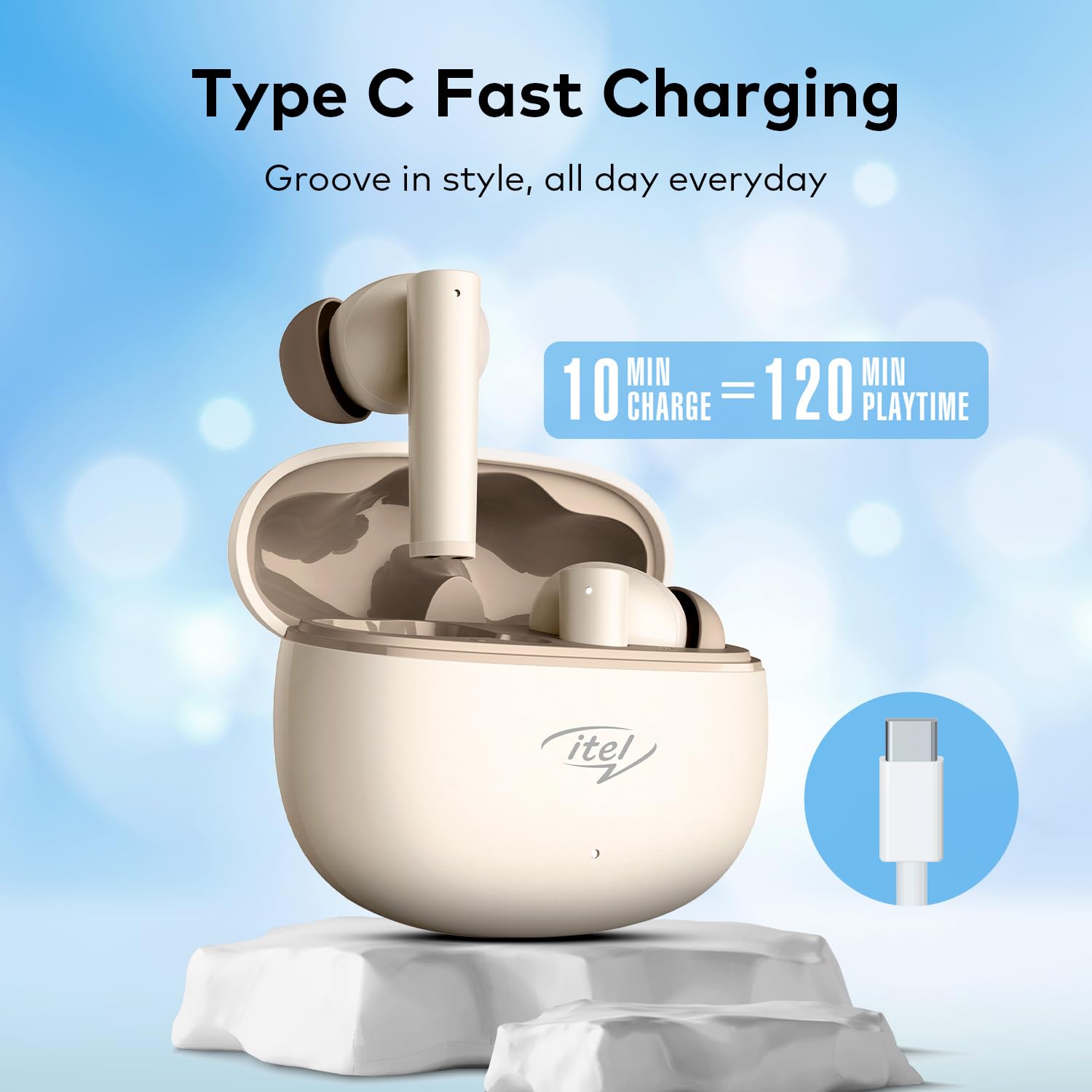
Image: The Itel Buds Ace 2 earbuds, charging case, and USB Type-C cable laid out.
3. คุณสมบัติของผลิตภัณฑ์
- 13mm Bass Boost Drivers: Experience rich and powerful audio with enhanced bass for an immersive listening experience.
- 360° Deep Bass with DSP: Digital Signal Processing (DSP) technology optimizes sound for a comprehensive deep bass effect.
- ระบบตัดเสียงรบกวนแบบไมโครโฟนสี่ตัว (Quad Mic ENC): Environmental Noise Cancellation (ENC) with four microphones ensures crystal-clear call quality by reducing background noise.
- เวลาเล่น 50 ชั่วโมง: Enjoy extended listening sessions with up to 50 hours of total playtime (including charges from the case).
- ชาร์จเร็ว: A quick 10-minute charge provides up to 120 minutes of playback.
- การชาร์จ Type-C: Convenient and universal Type-C port for charging the case.
- ความต้านทานน้ำ IPX5: ออกแบบมาให้ทนทานต่อการกระเด็นของน้ำและเหงื่อ จึงเหมาะสำหรับการออกกำลังกายและกิจกรรมกลางแจ้ง
- การเชื่อมต่อบลูทูธ 5.3: Provides a stable, reliable, and efficient wireless connection with compatible devices.
- การควบคุมแบบสัมผัส: Intuitive touch sensors on the earbuds allow for easy management of music playback, calls, and voice assistant activation.
- การออกแบบตามหลักสรีรศาสตร์: Secure and comfortable fit for prolonged wear during various activities.

ภาพ: ภาพระยะใกล้ view of an earbud, emphasizing the 13mm Bass Boost Drivers for premium audio.

Image: The Itel Buds Ace 2 charging case with a Type-C cable, illustrating the fast charging capability: 10 minutes charge for 120 minutes playtime.

Image: The Itel Buds Ace 2 charging case being splashed with water, indicating its IPX5 water resistance.
4. การตั้งค่าและการจับคู่
4.1 การชาร์จเริ่มต้น
- Open the charging case and place both earbuds inside.
- เชื่อมต่อสาย USB Type-C ที่ให้มากับพอร์ตชาร์จบนเคสและแหล่งจ่ายไฟ
- The indicator light on the case will show charging status. Ensure the earbuds and case are fully charged before first use.
4.2 เปิด/ปิดเครื่อง
- เปิดเครื่อง: เปิดกล่องชาร์จ หูฟังจะเปิดใช้งานโดยอัตโนมัติ หรืออีกวิธีหนึ่งคือ กดบริเวณสัมผัสบนหูฟังทั้งสองข้างค้างไว้ 3 วินาที
- หมดแรง: วางหูฟังกลับเข้าไปในกล่องชาร์จและปิดฝา หูฟังจะปิดเครื่องและเริ่มชาร์จโดยอัตโนมัติ หรืออีกวิธีหนึ่งคือ กดบริเวณสัมผัสบนหูฟังทั้งสองข้างค้างไว้ 5 วินาที
4.3 การจับคู่บลูทูธ
- ตรวจสอบให้แน่ใจว่าหูฟังชาร์จและเปิดอยู่
- Open the charging case. The earbuds will enter pairing mode, indicated by a flashing LED light on one of the earbuds.
- เปิดใช้งาน Bluetooth บนอุปกรณ์ของคุณ (สมาร์ทโฟน แท็บเล็ต ฯลฯ)
- ค้นหา available Bluetooth devices and select "Itel Buds Ace 2" from the list.
- เมื่อเชื่อมต่อแล้ว ไฟ LED บนหูฟังจะหยุดกะพริบ และอุปกรณ์ของคุณจะยืนยันการเชื่อมต่อ
- หากการจับคู่ล้มเหลว ให้ปิดหูฟัง ปิดใช้งานบลูทูธบนอุปกรณ์ของคุณ และทำตามขั้นตอนซ้ำอีกครั้ง
วิดีโอ: ผลิตภัณฑ์โดยย่อview demonstrating unboxing, pairing, and key features of the Itel Buds Ace 2.
5. คู่มือการใช้งาน
5.1 การสวมหูฟัง
Gently insert the earbuds into your ears and rotate them slightly to find a comfortable and secure fit. Ensure the ear tips create a good seal for optimal sound quality and bass response.
5.2 ระบบควบคุมแบบสัมผัส
The Itel Buds Ace 2 feature intuitive touch controls on each earbud. The specific functions may vary slightly, but common controls include:
- เล่น/หยุดชั่วคราว: แตะที่หูฟังข้างใดข้างหนึ่งเพียงครั้งเดียว
- เพลงถัดไป: แตะสองครั้งที่หูฟังด้านขวา
- แทร็กก่อนหน้า: แตะสองครั้งที่หูฟังด้านซ้าย
- รับ/วางสาย: แตะเพียงครั้งเดียวที่หูฟังข้างใดข้างหนึ่งในระหว่างที่มีสายเรียกเข้า
- ปฏิเสธสาย: กดหูฟังข้างใดข้างหนึ่งค้างไว้ขณะมีสายเรียกเข้า
- เปิดใช้งาน Voice Assistant: แตะสามครั้งที่หูฟังข้างใดข้างหนึ่ง
6. การบำรุงรักษาและการดูแล
To ensure the longevity and optimal performance of your Itel Buds Ace 2 earbuds, follow these maintenance guidelines:
- การทำความสะอาด: ทำความสะอาดหูฟังและกล่องชาร์จเป็นประจำด้วยผ้านุ่ม แห้ง และไม่เป็นขุย ห้ามใช้สารเคมีรุนแรงหรือวัสดุที่มีฤทธิ์กัดกร่อน
- เคล็ดลับหู: ถอดจุกหูฟังออกแล้วทำความสะอาดด้วยสบู่และน้ำอ่อนๆ ตรวจสอบให้แน่ใจว่าแห้งสนิทก่อนติดกลับเข้าไปใหม่
- พอร์ตชาร์จ: รักษาพอร์ตชาร์จ Type-C ให้ปราศจากฝุ่นและสิ่งสกปรก
- พื้นที่จัดเก็บ: When not in use, store the earbuds in their charging case to protect them from damage and keep them charged.
- ความต้านทานน้ำ: แม้ว่าหูฟังจะได้รับการจัดอันดับ IPX5 แต่ควรหลีกเลี่ยงการจุ่มหูฟังลงในน้ำหรือโดนฝนตกหนัก หากเปียกน้ำควรเช็ดให้แห้งสนิท
- อุณหภูมิ: หลีกเลี่ยงการวางหูฟังไว้ในที่ที่มีอุณหภูมิร้อนจัด (ร้อนหรือเย็นจัด) หรือโดนแสงแดดโดยตรงเป็นเวลานาน
7 การแก้ไขปัญหา
If you encounter any issues with your Itel Buds Ace 2, try the following solutions:
| ปัญหา | สารละลาย |
|---|---|
| หูฟังไม่จับคู่กับอุปกรณ์ |
|
| ไม่มีเสียงจากหูฟังข้างหนึ่งหรือทั้งสองข้าง |
|
| ปัญหาการชาร์จ |
|
| หูฟังหลุดบ่อยมาก |
|
7.1 การรีเซ็ตหูฟัง
หากคุณประสบปัญหาอย่างต่อเนื่อง การรีเซ็ตเป็นค่าเริ่มต้นจากโรงงานอาจช่วยแก้ไขปัญหาได้:
- ใส่หูฟังเอียร์บัดทั้งสองข้างลงในกล่องชาร์จ
- โปรดเปิดฝาเอาไว้
- Press and hold the reset button (usually a small button inside the case or a touch area on the earbuds) for approximately 10-15 seconds until the indicator lights flash, indicating a successful reset.
- Remove the earbuds and try pairing them again with your device.
8. ข้อมูลจำเพาะ
| คุณสมบัติ | รายละเอียด |
|---|---|
| ชื่อรุ่น | Buds Ace 2 |
| เทคโนโลยีการเชื่อมต่อ | บลูทูธ |
| เวอร์ชันบลูทูธ | 5.3 |
| ขนาดไดร์เวอร์เสียง | 13มม. |
| อายุการใช้งานแบตเตอรี่ (รวม) | นานถึง 50 ชั่วโมง |
| ชาร์จเร็ว | 10 min charge = 120 min playtime |
| พอร์ตชาร์จ | ยูเอสบี ไทป์ ซี |
| ความต้านทานต่อน้ำ | IPX5 |
| ไมโครโฟน | ไมโครโฟนสี่ตัวพร้อมระบบตัดเสียงรบกวน (ENC) |
| ประเภทการควบคุม | การควบคุมแบบสัมผัส |
| วัสดุ | พลาสติก |
| น้ำหนักสินค้า | 22 กรัม |
9. การรับประกันและการสนับสนุน
For warranty information, technical support, or service inquiries, please refer to the warranty card included in your product packaging or visit the official Itel webไซต์นี้ โปรดเก็บหลักฐานการซื้อไว้เพื่อใช้ยืนยันการรับประกัน


