1. บทนำ
ขอบคุณสำหรับการซื้อasing the AceGamer RGB Charging Dock for PlayStation Portal. This portable charging station is designed to provide a stable and efficient charging solution for your PlayStation Portal console, featuring customizable RGB lighting and essential protection features. Please read this manual carefully before use to ensure proper operation and maintenance.
2. เนื้อหาบรรจุภัณฑ์
- AceGamer RGB Charging Dock (1 unit)
- สายชาร์จ Type-C (1 เส้น)
- คู่มือผู้ใช้ (เอกสารนี้)
3. คุณสมบัติของผลิตภัณฑ์
- Dedicated Charging: Specifically designed for the PlayStation Portal console.
- แสงไฟ RGB: Features 7 distinct lighting modes for personalized aesthetics.
- การชาร์จด่วน: Efficient power delivery for fast charging.
- การป้องกันความปลอดภัย: มีระบบป้องกันกระแสเกินและแรงดันไฟเกินในตัวtage และต่ำกว่าปริมาตรtagการป้องกันอี
- การออกแบบตามหลักสรีรศาสตร์: 30-degree comfortable viewing angle for the PlayStation Portal.
- ฐานที่มั่นคง: Equipped with anti-slip mats for secure placement.
- การเชื่อมต่อ: USB Type-C input for power.
4. คำแนะนำในการตั้งค่า
- เชื่อมต่อพลังงาน: Insert the provided Type-C charging cable into the charging dock's input port and connect the other end to a suitable USB power adapter (not included).

Figure 4.1: Connecting the Type-C power cable to the charging dock.
- Place PlayStation Portal: Carefully align your PlayStation Portal console with the charging connector on the dock and gently place it into position. Ensure a secure connection for charging. The dock is designed to hold the Portal at a 30-degree angle for optimal viewการไอเอ็นจี

Figure 4.2: PlayStation Portal placed on the charging dock at a 30-degree angle.
- Anti-slip Stability: The base of the charging dock is equipped with anti-slip mats to prevent accidental movement. Ensure the dock is placed on a flat, stable surface.
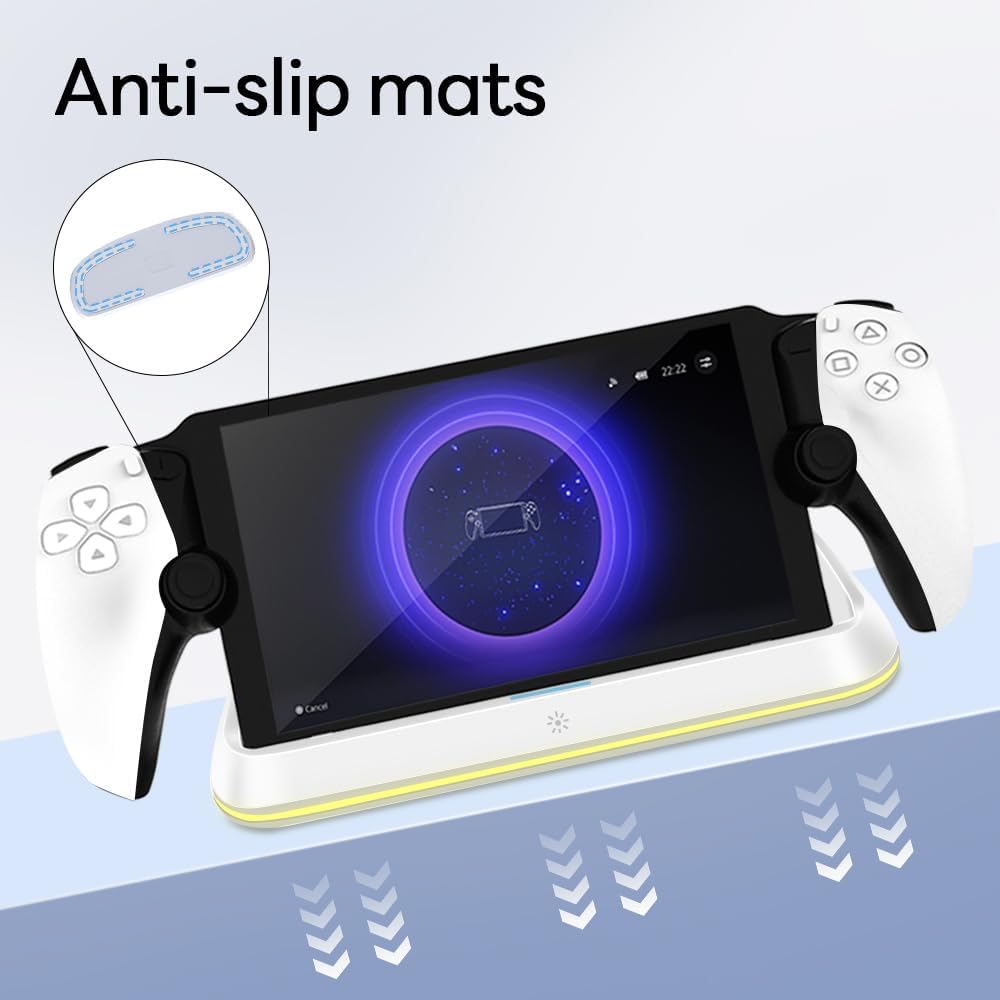
Figure 4.3: Anti-slip mats on the charging dock for enhanced stability.
- คู่มือภาพ: For a visual demonstration of the setup process, please refer to the video below.
Video 4.1: Demonstration of connecting the power supply and placing the PlayStation Portal onto the charging dock.
5. คู่มือการใช้งาน
- Charging the PlayStation Portal: Once the PlayStation Portal is correctly seated on the dock and the dock is powered, charging will begin automatically. A full charge typically takes approximately 3.5 hours. The dock includes protection against over-current, over-voltage และต่ำกว่าปริมาตรtage to safeguard your device.

Figure 5.1: Charging indicators and safety protection features.
- การควบคุมแสง RGB: The charging dock features a touch-sensitive button to control the RGB lighting. Press the button to cycle through 7 different lighting modes or to turn the lights off.

Figure 5.2: RGB lighting modes and touch control button.
6. การบำรุงรักษา
- Keep the charging dock clean and free from dust. Use a soft, dry cloth for cleaning.
- หลีกเลี่ยงการให้อุปกรณ์สัมผัสกับอุณหภูมิ ความชื้น หรือแสงแดดโดยตรง
- ห้ามใช้น้ำยาทำความสะอาดที่มีฤทธิ์กัดกร่อนหรือตัวทำละลาย เนื่องจากอาจทำให้พื้นผิวเสียหายได้
- Ensure the charging port and connector are free of debris before placing the PlayStation Portal.
7 การแก้ไขปัญหา
- อุปกรณ์ไม่ชาร์จ:
- Ensure the Type-C cable is securely connected to both the dock and the power adapter.
- ตรวจสอบให้แน่ใจว่าอะแดปเตอร์แปลงไฟทำงานได้อย่างถูกต้องและเสียบเข้ากับเต้ารับที่มีกระแสไฟอยู่
- Check if the PlayStation Portal is properly seated on the charging connector.
- ลองใช้สาย Type-C หรืออะแดปเตอร์แปลงไฟตัวอื่นดู
- ไฟ RGB ไม่ทำงาน:
- ตรวจสอบให้แน่ใจว่าแท่นชาร์จเปิดใช้งานอยู่
- Press the touch light button to cycle through modes or turn the lights on.
- Unstable placement:
- Ensure the dock is placed on a flat, level surface.
- Check if the anti-slip mats are clean and intact.
8. ข้อมูลจำเพาะ
| ยี่ห้อ | เอซเกมเมอร์ |
| หมายเลขรุ่น | PS-P-White |
| อุปกรณ์ที่รองรับ | พอร์ทัลเพลย์สเตชัน |
| อินพุต Voltage | 5 โวลต์ |
| วัดtage | 7 วัตต์ |
| ประเภทขั้วต่อ | พอร์ต USB Type-C (สำหรับป้อนไฟ) |
| คุณสมบัติพิเศษ | RGB Lighting, Fast Charging, Over-current Protection, Over-voltage Protection, Under-voltagการป้องกันอี |
| ขนาด | ขนาดประมาณ 22.5 x 8.9 x 8.4 ซม |
| น้ำหนัก | ประมาณ 290 กรัม |
9. การรับประกันและการสนับสนุน
AceGamer products are designed and manufactured to the highest quality standards. For warranty information or technical support, please contact the retailer where you purchased the product or visit the official AceGamer website for customer service contact details. Please retain your proof of purchase for warranty claims.