1. สินค้าหมดview
The FLEXISPOT Classic Ergonomic Office Chair is designed to provide optimal comfort and support for prolonged sitting. Its ergonomic features, including adjustable lumbar support, a 2D headrest, and a lockable tilt mechanism, ensure a customizable seating experience. The chair is constructed with a breathable mesh back and a high-density foam seat cushion for durability and comfort.
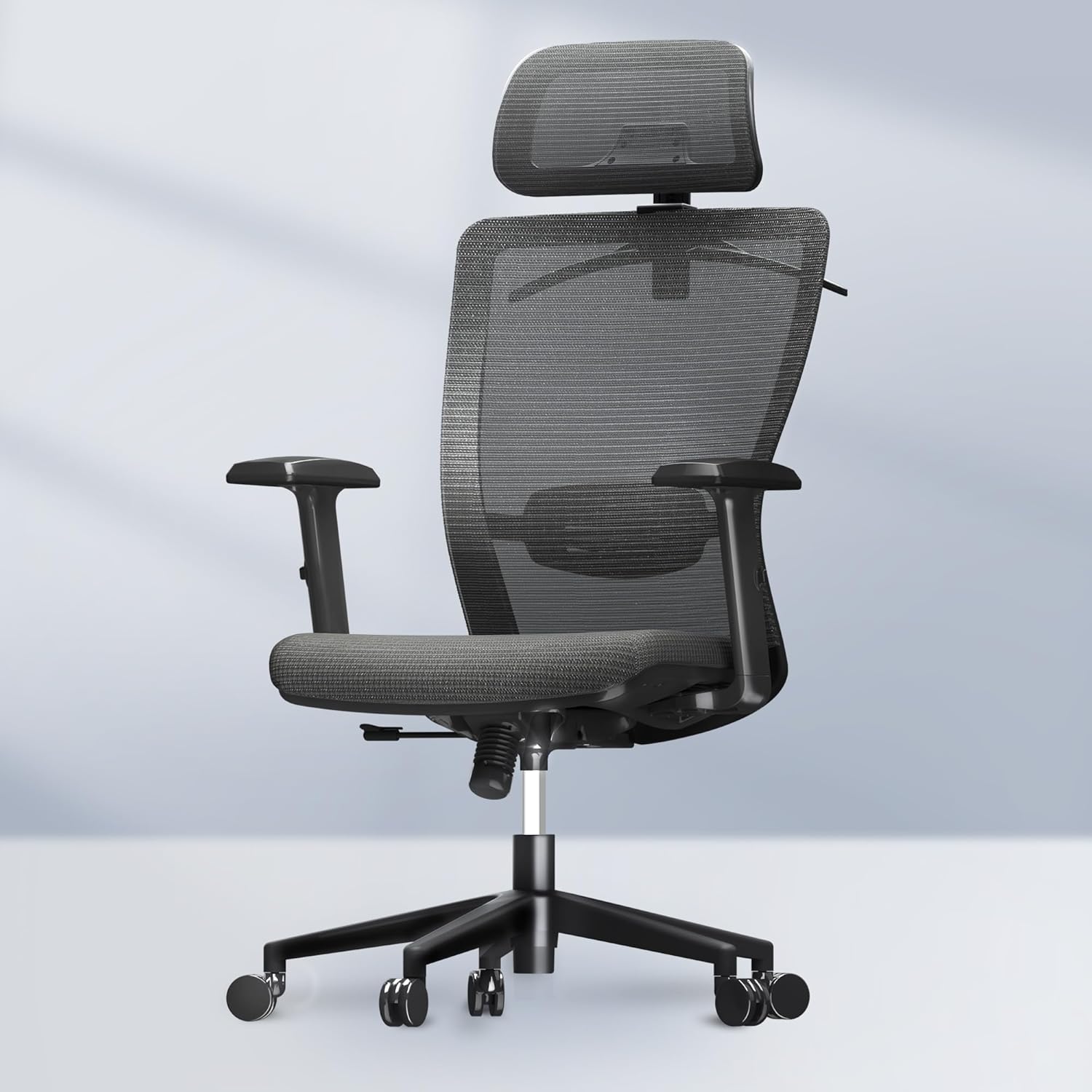
รูปที่ 1.1 : ด้านหน้า view of the FLEXISPOT Classic Ergonomic Office Chair.
คุณสมบัติหลัก:
- การออกแบบตามหลักสรีรศาสตร์: Provides reliable back support and alleviates body pressure.
- Multi-use Functionality: Suitable for office, computer, gaming, reading, and living room environments.
- โครงสร้างแข็งแรงทนทาน: Sturdy base structure supports up to 300 pounds.
- Breathable Mesh Back: High-density mesh ensures airflow and resists wear.
- ส่วนประกอบที่สามารถปรับได้: Seat height, headrest, backrest, and armrests are easily adjustable.
- ราวแขวนเสื้อแบบในตัว: Conveniently located on the headrest for clothing storage.

Figure 1.2: Detailed dimensions of the FLEXISPOT Classic Ergonomic Office Chair.
2. การติดตั้งและการประกอบ
This section provides general guidelines for assembling your FLEXISPOT office chair. For detailed, step-by-step instructions, please refer to the assembly guide included in your product packaging. Ensure all components are present before beginning assembly.
เครื่องมือที่จำเป็น (ไม่รวม):
- Phillips head screwdriver (if not provided)
- ประแจอัลเลน (โดยปกติมีมาให้)
Assembly Steps (General):
- แกะส่วนประกอบ: Carefully remove all parts from the packaging and lay them out on a clean, flat surface. Verify all parts are present against the packing list.
- ติดล้อเข้ากับฐาน: ใส่ล้อเลื่อนเข้าไปในรูที่ปลายขาแต่ละข้างของฐานเก้าอี้ ดันให้แน่นจนกระทั่งได้ยินเสียงคลิกเข้าที่
- ใส่แก๊สยก: Place the larger end of the gas lift cylinder into the center hole of the chair base.
- ติดตั้งกลไกเข้ากับที่นั่ง: ยึดกลไกควบคุมเข้ากับด้านล่างของเบาะนั่งโดยใช้สกรูที่ให้มา ตรวจสอบให้แน่ใจว่าด้านหน้าของกลไกอยู่ในแนวเดียวกับด้านหน้าของเบาะนั่ง
- ติดพนักพิงเข้ากับที่นั่ง: Connect the backrest to the seat assembly. This may involve sliding a bracket into a slot or securing with screws.
- ติดที่วางแขน: Secure the armrests to the seat or backrest assembly using the designated screws.
- เชื่อมต่อชุดเบาะนั่งเข้ากับระบบแก๊สลิฟท์: Carefully place the assembled seat and backrest onto the gas lift cylinder, ensuring it is centered. Apply gentle downward pressure to secure.
- ติดตั้งพนักพิงศีรษะ: Slide the headrest into its designated slot at the top of the backrest. Adjust as needed.
After assembly, test all adjustable functions to ensure proper operation and stability before regular use.
3. คู่มือการใช้งาน
Your FLEXISPOT office chair offers multiple adjustment options to customize your seating experience for optimal comfort and ergonomic support.
3.1. การปรับความสูงของเบาะนั่ง
To adjust the seat height, locate the lever on the right side, beneath the seat. While seated, pull the lever up to lower the seat. To raise the seat, stand up and pull the lever up. Release the lever at your desired height.
3.2. Backrest Tilt and Lock Function
The chair features a lockable tilt function, allowing you to recline and lock the backrest at various angles (90-130 degrees).
- หากต้องการเอนกาย: Lean back into the chair.
- วิธีล็อกการเอียง: Once at your desired angle, push the tilt lever (usually on the left side, or a knob under the seat) inwards or downwards to lock the position.
- วิธีปลดล็อกการเอียง: Pull the tilt lever outwards or upwards. The backrest will return to its upright position or allow free reclining.

Figure 3.1: Illustration of the chair's tilt angles (90°, 110°, 130°).
3.3. การปรับการรองรับส่วนหลัง
The lumbar support can be adjusted vertically to align with the natural curve of your lower back. Locate the adjustment mechanism on the backrest. Gently push the lumbar support up or down to find your preferred position.
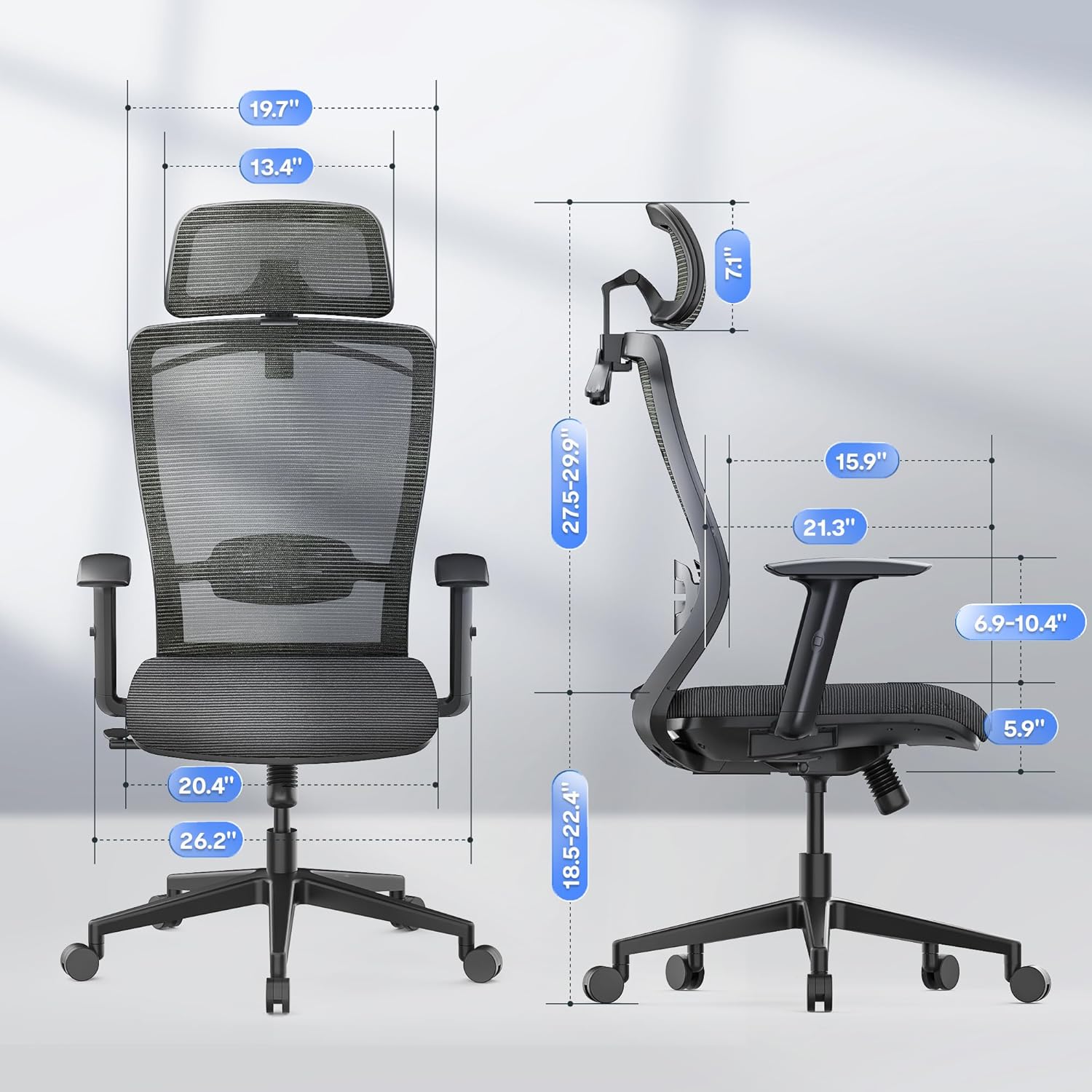
Figure 3.2: Adjusting the lumbar support for precise waist support.
3.4 การปรับพนักพิงศีรษะ
The 2D headrest can be adjusted in multiple dimensions to provide precise support for your head and neck. It can be moved up and down, and also rotated to achieve the optimal angle.

Figure 3.3: Adjustments for the 2D headrest, including vertical and rotational movement.
3.5 การปรับที่วางแขน
The armrests are adjustable to provide comfortable support for your arms and shoulders. Typically, they can be moved up and down. Locate the button or lever on the side of each armrest to unlock and adjust its height. Release the button/lever to lock it in place.

Figure 3.4: Adjustable armrests for personalized comfort.
3.6. Integrated Coat Hanger
The headrest features a built-in coat hanger for convenient storage of jackets or other clothing items, keeping them wrinkle-free and within reach.

Figure 3.5: The integrated coat hanger on the headrest.
4. การบำรุงรักษาและการดูแล
Regular maintenance helps prolong the life and appearance of your FLEXISPOT office chair.
- Cleaning Mesh and Fabric: สำหรับการทำความสะอาดทั่วไป ให้ใช้ผ้าเนื้อนุ่มampened with mild soap and water. Gently wipe the mesh backrest and foam seat cushion. Avoid abrasive cleaners or harsh chemicals, as they may damage the material. Allow to air dry completely.
- Cleaning Base and Casters: Wipe the chair base and casters with a damp cloth. For casters, periodically remove any accumulated dust, hair, or debris to ensure smooth rolling.
- การตรวจสอบฮาร์ดแวร์: Periodically check all screws and bolts to ensure they are tight. Retighten if necessary to maintain stability and prevent squeaking.
- ลิฟท์แก๊ส: The gas lift is a sealed unit and requires no maintenance. Do not attempt to disassemble it.
5 การแก้ไขปัญหา
ส่วนนี้จะกล่าวถึงปัญหาทั่วไปที่คุณอาจพบเจอเกี่ยวกับเก้าอี้สำนักงานของคุณ
| ปัญหา | สาเหตุที่เป็นไปได้ | สารละลาย |
|---|---|---|
| Chair Squeaks or Wobbles | Loose hardware; friction between components. | Check and tighten all screws and bolts. Apply a small amount of silicone lubricant to moving parts if necessary. |
| Difficulty Adjusting Height | Gas lift malfunction; obstruction. | Ensure the height adjustment lever is fully engaged. Check for any obstructions around the gas lift. If the issue persists, contact customer support. |
| ล้อเลื่อนไม่หมุนอย่างราบรื่น | Debris caught in casters; worn casters. | Remove any hair, dust, or debris from the caster wheels. Clean the wheels thoroughly. If casters are worn, replacement may be necessary. |
| Backrest Does Not Lock in Position | Tilt mechanism issue; lever not fully engaged. | Ensure the tilt lock lever is fully engaged. Check for any obstructions preventing the mechanism from locking. |
6. ข้อมูลจำเพาะ
Detailed specifications for the FLEXISPOT Classic Ergonomic Office Chair (Model: OC3 CLOUD).
| คุณลักษณะ | รายละเอียด |
|---|---|
| ยี่ห้อ | เฟล็กซิสพอท |
| ชื่อรุ่น | Office Chair OC3 FOAM |
| สี | สีเทา |
| ขนาดสินค้า (ลึก x กว้าง x สูง) | ลึก 21.3 นิ้ว x กว้าง 26.2 นิ้ว x สูง 52.3 นิ้ว |
| น้ำหนักสินค้า | 51 ปอนด์ |
| สไตล์ด้านหลัง | ด้านหลังเป็นตาข่าย |
| วัสดุที่นั่ง | โฟม |
| Recommended Weight Capacity | สูงสุด 300 ปอนด์ |
| ฟังก์ชันเอียง | Yes, 90-130 degrees lockable |
| ที่รองศีรษะ | ปรับได้ 2 มิติ |
| สไตล์แขน | Adjustable, Rounded |
| ล้อเลื่อน | Silent and Smooth |
| ยูพีซี | 810072869159 |
| ASIN | B0D83B8Y25 |
7. ข้อมูลด้านความปลอดภัย
Please read and adhere to the following safety guidelines to ensure safe operation and prevent injury.
- Ensure the chair is used for individuals within the recommended weight limit of 300 lbs.
- Be cautious when operating adjustable components, such as the backrest angle, to prevent injury.
- ห้ามยืนบนเก้าอี้หรือใช้เก้าอี้เป็นบันได
- ควรหลีกเลี่ยงการวางสิ่งของหนักๆ บนเก้าอี้ที่รับน้ำหนักเกินพิกัด
- Keep fingers and clothing clear of moving parts during adjustment.
- ควรวางเก้าอี้บนพื้นผิวเรียบและมั่นคงเพื่อป้องกันการล้ม
- Do not expose the chair to extreme temperatures or direct sunlight for prolonged periods, as this may damage materials.
8. การรับประกันและการสนับสนุนลูกค้า
FLEXISPOT is committed to providing high-quality products. For information regarding product warranty, please refer to the warranty card included with your purchase or visit the official FLEXISPOT webเว็บไซต์.
If you encounter any issues or have questions about your FLEXISPOT Classic Ergonomic Office Chair, please contact FLEXISPOT customer support. Contact details can typically be found on the manufacturer's webไซต์หรือในเอกสารผลิตภัณฑ์ของคุณ
สำหรับทรัพยากรเพิ่มเติมและข้อมูลผลิตภัณฑ์ คุณสามารถเยี่ยมชมได้ที่ ร้าน FLEXISPOT บน Amazon.


