1. บทนำ
The LAUNCH X431 PRO Star is an advanced automotive intelligent diagnostic tool designed for comprehensive vehicle analysis. This device features an 8-inch touch screen, runs on Android 10.0, and is powered by a 2.0GHz 4-Core processor with 4GB RAM and 64GB ROM. It includes a 6000mAh battery for extended operation. The PRO Star supports fault diagnosis for a wide range of vehicle models and systems, offering functions such as code reading, code clearing, data stream analysis, reset functions, action testing, coding, and matching.

Figure 1.1: LAUNCH X431 PRO Star Diagnostic Scanner with key features highlighted.
2. การตั้งค่าและการใช้งานครั้งแรก
2.1 การแกะกล่องและเนื้อหาภายในบรรจุภัณฑ์
Carefully unpack all items from the carrying box. Verify that all components listed below are present.

Figure 2.1: Contents of the LAUNCH X431 PRO Star package.
- LAUNCH X-431 PRO STAR Tablet
- กล่องใส่ของ
- Diagnostic Cable (OBDII)
- สาย USB Type-C
- อะแดปเตอร์ AC
- US Plug, UK Plug, EU Plug
- คู่มือการใช้งาน
- คู่มือแนะนำ
- รายการบรรจุภัณฑ์
- PIN Envelope
2.2 การกำหนดค่าอุปกรณ์เริ่มต้น
- ชาร์จอุปกรณ์: Fully charge the LAUNCH X431 PRO Star tablet using the provided AC adapter and Type-C USB cable before first use.
- เปิดเครื่อง: กดปุ่มเปิดปิดค้างไว้เพื่อเปิดอุปกรณ์
- ภาษาและเขตเวลา: ทำตามคำแนะนำบนหน้าจอเพื่อเลือกภาษาและเขตเวลาที่คุณต้องการ
- เชื่อมต่อกับ Wi-Fi: Connect the device to a stable Wi-Fi network (supports 2.4GHz and 5.0GHz). Internet access is required for registration and software updates.
- ลงทะเบียนบัญชี: Register an account on the manufacturer's website using the serial number provided with your device.
- อัพเดตซอฟต์แวร์: After registration, you will be prompted to update the software. Perform all available updates to ensure optimal functionality and access to the latest vehicle data. This process may take some time.
3. คู่มือการใช้งาน
3.1 การเชื่อมต่อกับยานพาหนะ
- ค้นหาพอร์ต OBDII ของรถยนต์ ซึ่งโดยทั่วไปจะอยู่ใต้แผงหน้าปัดด้านคนขับ
- Connect the diagnostic cable to the LAUNCH X431 PRO Star tablet.
- Connect the other end of the diagnostic cable to the vehicle's OBDII port.
- Turn the vehicle's ignition to the 'ON' position (do not start the engine).
3.2 Basic Diagnostic Functions
Once connected, the device will attempt to auto-detect the vehicle's VIN. If auto-detection fails, you can manually enter the vehicle information.
- รายงานสุขภาพ: After identifying the vehicle, the system can generate a comprehensive health report.
- การสแกนระบบแบบเต็มรูปแบบ: Perform a complete scan of all available vehicle systems.
- อ่าน/ล้างรหัส: View diagnostic trouble codes (DTCs) and clear them after repairs.
- ข้อมูลสด: ตรวจสอบกระแสข้อมูลแบบเรียลไทม์จากเซ็นเซอร์และส่วนประกอบต่างๆ
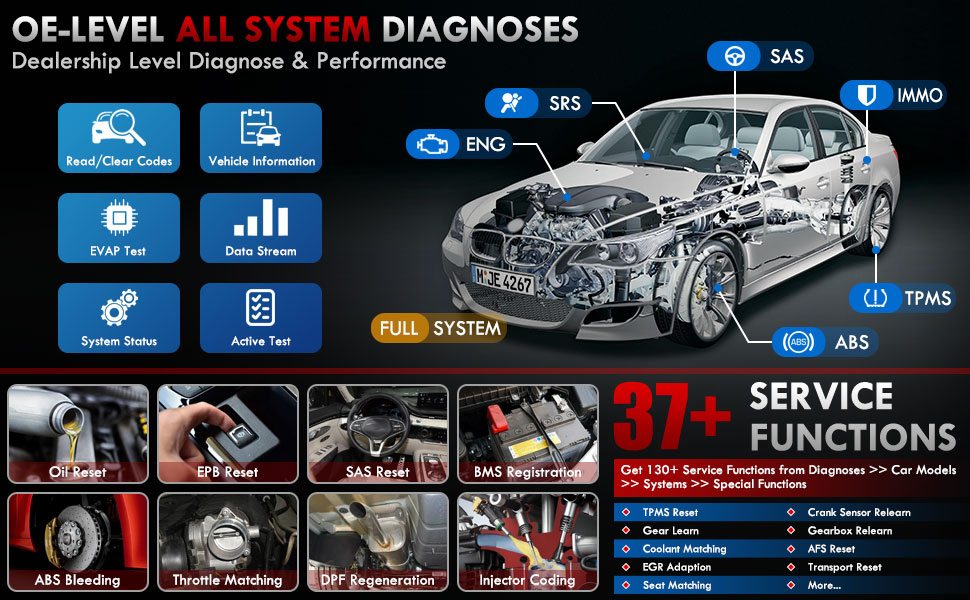
รูปที่ 3.1: เกินview of OE-level all system diagnostic capabilities.
3.3 Advanced Maintenance Services (37+)
The LAUNCH X431 PRO Star offers over 37 advanced maintenance and reset functions, with the potential to expand to over 130 types depending on the vehicle's make, model, and year. These services include:
- รีเซ็ตน้ำมัน
- ABS เลือดออก
- การลงทะเบียนแบตเตอรี่
- รีเซ็ต EPB (ระบบเบรกมือไฟฟ้า)
- DPF Regeneration (Diesel Particulate Filter)
- การเข้ารหัสหัวฉีด
- รีเซ็ต SAS (เซ็นเซอร์มุมพวงมาลัย)
- การจับคู่คันเร่ง
- การรีเซ็ต TPMS (ระบบตรวจสอบแรงดันลมยาง)
- รีเซ็ตเกียร์
- รีเซ็ตระบบกันสะเทือน
- หัวหน้า AFSamp รีเซ็ต

รูปที่ 3.2: อดีตamples of the 37+ maintenance service functions.
3.4 การควบคุมแบบสองทิศทาง (การทดสอบเชิงรุก)
This feature allows the technician to send commands to vehicle systems and components to test their functionality. This helps in quickly identifying faulty components without manual disassembly. Exampรวมถึง:
- Turning the radiator fan on/off
- Testing door lock actuators
- Energizing injectors
- Operating mirrors
- การเปิด/ปิดหน้าต่าง

Figure 3.3: Illustration of bi-directional control capabilities.
3.5 การเขียนโค้ด ECU
ECU Coding enables the matching, relearning, and coding of newly installed ECU modules after repairs or replacements. It also allows for the activation of higher-level vehicle functions. This includes:
- Flash/Match/Calibration
- Recode and Relearn
- Alter Configuration
- Reprogram Adaptive Data
- Recognize New CPU
- Match Current Settings
- Customize Car Features (e.g., automatic lock, reverse rearview mirror down, windows close when rain)

รูปที่ 3.4: อดีตamples of ECU coding applications.
3.6 FCA SGW Vehicle Access & Quick Guided Functions
- FCA SGW: The X431 PRO Star is AutoAuth certified, allowing secure diagnosis of SGW (Security Gateway) vehicles without limitations.
- Quick Guided: Provides step-by-step guidance for Volkswagen group vehicles, simplifying complex diagnostic procedures.
3.7 Extension Modules
The device supports various optional add-on tools to expand its capabilities, including:
- Battery Tester (e.g., BST360)
- Videoscope (e.g., VSP-600)
- Oscilloscope (e.g., O2-2)
- TPMS Detector (e.g., TSGUN, i-TPMS)
- WiFi Thermal Printer (e.g., X-431)
- เครื่องมือสอบเทียบ ADAS
- XPROG 3 (Immobilizer Programmer)

Figure 3.5: Various optional extension modules for the X431 PRO Star.
4. การบำรุงรักษา
4.1 การอัปเดตซอฟต์แวร์
The LAUNCH X431 PRO Star includes 2 years of free software updates. After this period, the device will continue to function, but new software releases and vehicle data updates will require a subscription. Regular updates ensure compatibility with new vehicle models and access to the latest diagnostic features.
4.2 การดูแลทั่วไป
- รักษาอุปกรณ์ให้สะอาดและปราศจากฝุ่นละอองและความชื้น
- ควรเก็บอุปกรณ์ไว้ในกล่องพกพาป้องกันเมื่อไม่ได้ใช้งาน
- หลีกเลี่ยงการวางอุปกรณ์ไว้ในอุณหภูมิที่สูงหรือต่ำเกินไปหรือถูกแสงแดดโดยตรงเป็นเวลานาน
- Use only the provided charging accessories to prevent damage.
5 การแก้ไขปัญหา
If you encounter issues with your LAUNCH X431 PRO Star, consider the following:
- ปัญหาการเชื่อมต่อ: Ensure the diagnostic cable is securely connected to both the scanner and the vehicle's OBDII port. Verify the vehicle's ignition is in the 'ON' position.
- ความผิดพลาดของซอฟต์แวร์: Ensure the device's software is up to date. A factory reset may resolve persistent software issues (note: this will erase user data).
- ความเข้ากันได้ของยานพาหนะ: While the device covers over 99% of vehicles, specific advanced functions may vary by make, model, and year. Consult the vehicle coverage list or contact support for details.
- ประสิทธิภาพของอุปกรณ์: If the device is slow or unresponsive, try restarting it. Ensure sufficient battery charge.
6. ข้อมูลจำเพาะ
| คุณสมบัติ | ข้อมูลจำเพาะ |
|---|---|
| แบบอย่าง | LAUNCH X-431 PRO STAR |
| ระบบปฏิบัติการ | แอนดรอยด์ 10.0 |
| โปรเซสเซอร์ | 4 คอร์ 2.0 GHz |
| แรม | 4GB |
| ROM (หน่วยความจำ) | 64GB |
| แสดง | 8-inch Touch Screen (1280x800 resolution) |
| แบตเตอรี่ | 6000mAh |
| การเชื่อมต่อ | Wi-Fi (2.4/5.0 GHz), CANFD, DoIP |
| กล้อง | 8.0 MP Rear-facing |
| น้ำหนักสินค้า | 8.4 ปอนด์ |
| ขนาดแพ็คเกจ | 13.6 x 13.2 x 6.1 นิ้ว |
| ประเภทความพอดีของยานยนต์ | พอดีทุกประการ |
7. การรับประกันและการสนับสนุน
7.1 ข้อมูลการรับประกัน
The LAUNCH X431 PRO Star comes with a รับประกัน 2 ปี covering manufacturing defects and hardware malfunctions.
7.2 การสนับสนุนด้านเทคนิค
LAUNCH provides บริการสนับสนุนทางเทคนิค 7*24 ชั่วโมง for any post-sales issues or technical assistance. For support, please refer to the contact information provided in your product packaging or visit the official LAUNCH webเว็บไซต์.


