การแนะนำ
The Mytrix Tac Master Wireless Gaming Headset is designed to provide a high-quality audio experience for gaming across multiple platforms. Featuring 2.4GHz lossless wireless technology, Bluetooth 5.3, and a 3.5mm wired connection, this headset offers versatile connectivity, low latency, and immersive surround sound. The detachable noise-canceling microphone ensures clear communication, while the ergonomic design and long battery life provide comfort for extended use.
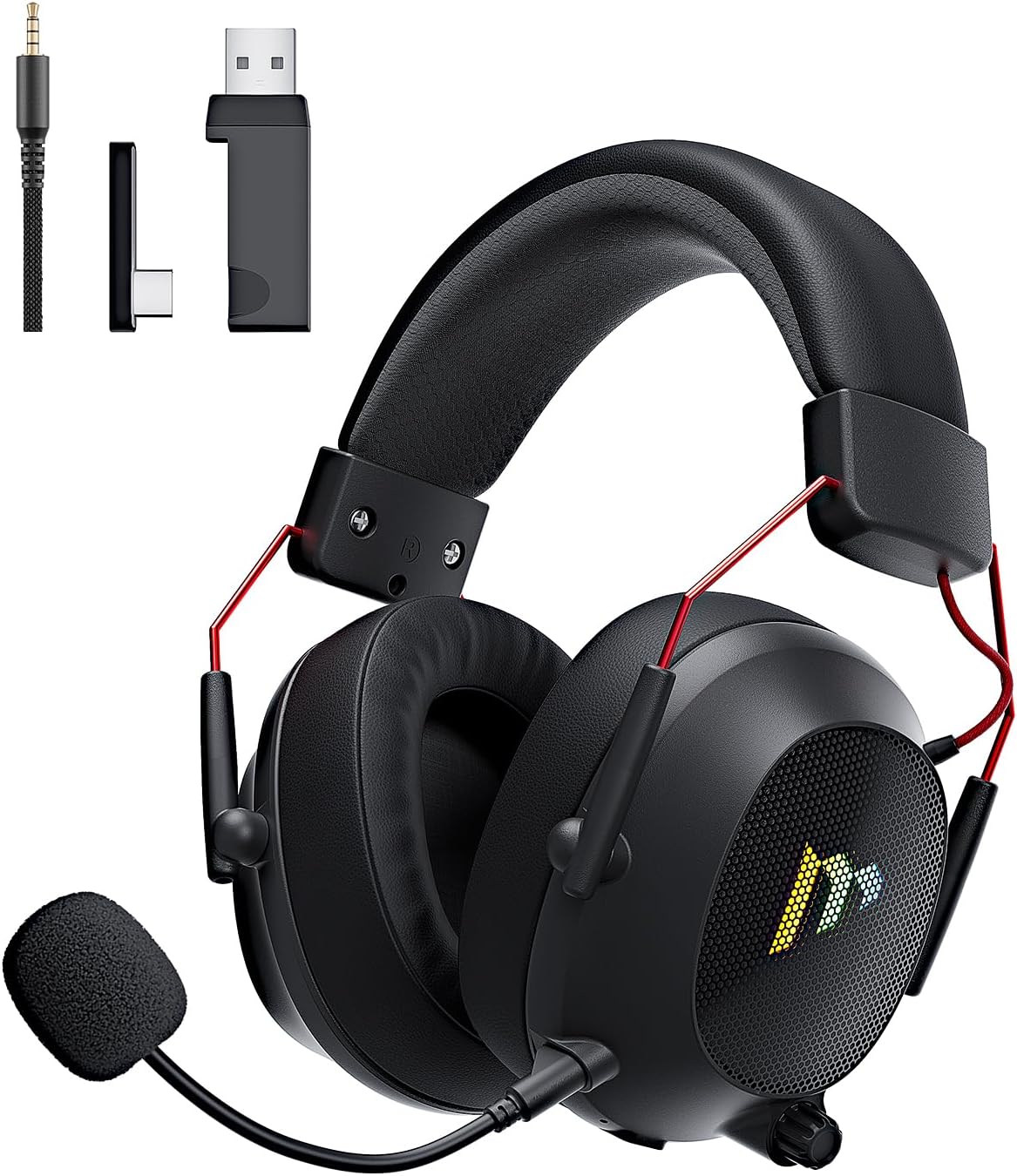
Image: The Mytrix Tac Master Wireless Gaming Headset, showcasing its sleek black design with red accents, detachable microphone, and included USB dongle and Type-C adapter.
เนื้อหาแพ็คเกจ
โปรดตรวจสอบว่ารายการทั้งหมดที่ระบุไว้ด้านล่างมีอยู่ในแพ็คเกจของคุณหรือไม่:
- Mytrix Tac Master Wireless Gaming Headset
- ไมโครโฟนตัดเสียงรบกวนแบบถอดออกได้
- ดองเกิลไร้สาย USB-A 2.4GHz
- USB Type-C Transmitter
- สายสัญญาณเสียงขนาด 3.5 มม.
- สายชาร์จ USB (USB-A เป็น USB-C)
- คู่มือการใช้งาน (เอกสารนี้)
Headset Controls and Components
Familiarize yourself with the various controls and components of your Mytrix Tac Master headset:

Image: Diagram illustrating the location and function of controls on the Mytrix Tac Master headset, including power button, volume wheel, microphone mute button, and mode switch.
- ปุ่มเปิด/ปิด: Press and hold for 3 seconds to turn on/off. Single press to pause/play audio.
- ปุ่มโหมด (M): Single press to toggle microphone on/off. Double press to switch between Bluetooth and 2.4G wireless modes. Press and hold for 3 seconds to turn RGB lights on/off.
- ล้อระดับเสียง: Rotate up to increase volume, rotate down to decrease volume.
- พอร์ตไมโครโฟน: สำหรับติดตั้งไมโครโฟนแบบถอดได้
- แจ็คเสียงขนาด 3.5 มม.: สำหรับการเชื่อมต่อแบบมีสาย
- พอร์ตชาร์จ USB-C: สำหรับการชาร์จชุดหูฟัง
- แสงไฟ RGB: Located on the earcups.
การตั้งค่า
1. การชาร์จชุดหูฟัง
Before first use, fully charge the headset. Connect the USB charging cable to the headset's USB-C port and the other end to a USB power source (e.g., computer USB port, USB wall adapter). The LED indicator will show charging status and turn off when fully charged. A full charge takes approximately 3 hours and provides up to 48 hours of battery life.

Image: Visual representation of the headset's long-lasting battery life, indicating approximately 50 hours of use and a 3-hour charging time.
2. การติดตั้งไมโครโฟน
Insert the detachable microphone into the microphone port on the left earcup. Ensure it is securely seated. The microphone is flexible and omni-directional, allowing for angle adjustment.
3. ตัวเลือกการเชื่อมต่อ
The Mytrix Tac Master headset offers multiple connection methods for broad compatibility:

Image: Diagram illustrating the four connection modes: 2.4GHz Dongle (USB-A and USB-C), Bluetooth 5.3, and 3.5mm Wired, along with compatible devices for each mode.
3.1. 2.4GHz Wireless Connection (Recommended for PC, PS4, PS5, Switch Docked Mode)
- Identify the appropriate dongle for your device:
- For devices with a USB-A port (PC, PS4, PS5, Switch Docked): Use the 2.4GHz USB-A dongle.
- For devices with a USB-C port (Switch Handheld, Laptops, Tablets): Use the USB Type-C transmitter.
- Plug the selected 2.4GHz dongle/transmitter into an available USB port on your device.
- Power on the headset by pressing and holding the Power button for 3 seconds.
- Ensure the headset is in 2.4GHz mode. If not, double-press the 'M' button to switch modes until the headset connects to the dongle. The headset will automatically pair with the dongle.
- On your device, select the headset as the audio output and input device.
3.2. Bluetooth 5.3 Connection (Recommended for Mobile Phones, Tablets, Laptops)
- Power on the headset by pressing and holding the Power button for 3 seconds.
- Double-press the 'M' button to switch the headset to Bluetooth pairing mode. The LED indicator will flash, indicating it's ready to pair.
- On your device, enable Bluetooth and search for "Mytrix Tac Master" in the list of available devices.
- Select "Mytrix Tac Master" to connect. Once connected, the LED indicator will stop flashing.
3.3. 3.5mm Wired Connection (Recommended for Xbox, Game Console Controllers, Devices without USB/Bluetooth)
- ต่อปลายด้านหนึ่งของสายสัญญาณเสียงขนาด 3.5 มม. เข้ากับแจ็คขนาด 3.5 มม. ของหูฟัง
- Connect the other end of the 3.5mm audio cable to the audio jack on your device (e.g., Xbox controller, phone).
- In wired mode, the headset's microphone and RGB lighting functions are not active.
คำแนะนำการใช้งาน
เปิด/ปิดเครื่อง
- การเปิดเครื่อง: Press and hold the Power button for approximately 3 seconds until the headset powers on.
- วิธีปิดเครื่อง: Press and hold the Power button for approximately 3 seconds until the headset powers off.
การควบคุมระดับเสียง
- เพิ่มปริมาณ: Rotate the Volume wheel upwards.
- ลดระดับเสียง: Rotate the Volume wheel downwards.
การควบคุมไมโครโฟน
- ปิดเสียง/เปิดเสียงไมโครโฟน: Single press the 'M' button.
- The detachable microphone features noise cancellation for clear voice chat.
การควบคุมแสง RGB
- Turn RGB Lights On/Off: Press and hold the 'M' button for approximately 3 seconds.
การควบคุมการเล่นเสียง
- เล่น/หยุดชั่วคราวเสียง: กดปุ่มเปิด/ปิดเพียงครั้งเดียว
ระบบเสียงรอบทิศทาง
The headset features 7.1 stereo surround sound for an immersive audio experience, allowing for precise positioning of sound details in games.

ภาพ: ระเบิด view of the headset's 50mm drivers, illustrating the components that contribute to its 7.1 stereo surround sound capability.
การซ่อมบำรุง
- การทำความสะอาด: ใช้ผ้าแห้งนุ่มๆ เช็ดทำความสะอาดหูฟัง ห้ามใช้สารทำความสะอาดที่มีฤทธิ์กัดกร่อนหรือตัวทำละลาย สำหรับส่วนที่ครอบหู ให้เช็ดเบาๆ ด้วยผ้าสะอาดamp ผ้าและปล่อยให้แห้งสนิทก่อนใช้งาน
- พื้นที่จัดเก็บ: Store the headset in a cool, dry place away from direct sunlight and extreme temperatures. If storing for an extended period, ensure the battery is partially charged (around 50%) to preserve battery health.
- การดูแลแบตเตอรี่ Avoid fully discharging the battery frequently. Charge the headset regularly, even if not in constant use, to maintain battery longevity.
- การดูแลไมโครโฟน: Handle the detachable microphone gently. Avoid excessive bending or twisting.
การแก้ไขปัญหา
| ปัญหา | สาเหตุที่เป็นไปได้ | สารละลาย |
|---|---|---|
| ไม่มีเสียงจากหูฟัง | Headset not powered on, low battery, incorrect audio output selected, connection issue. | Ensure headset is powered on and charged. Check device's audio settings to confirm "Mytrix Tac Master" is selected as output. Re-establish 2.4GHz or Bluetooth connection. For wired mode, ensure cable is fully inserted. |
| ไมโครโฟนไม่ทำงาน | Microphone muted, not properly attached, incorrect audio input selected, wired mode limitation. | Single press the 'M' button to unmute. Ensure microphone is securely attached. Check device's audio settings to confirm "Mytrix Tac Master" is selected as input. Note: Microphone does not function in 3.5mm wired mode. |
| ไม่สามารถเชื่อมต่อผ่านระบบไร้สาย 2.4GHz ได้ | Dongle not recognized, headset not in 2.4GHz mode, interference. | Ensure dongle is fully inserted into a working USB port. Double-press 'M' button to switch headset to 2.4GHz mode. Try a different USB port. Move closer to the dongle to reduce interference. |
| ไม่สามารถเชื่อมต่อผ่านบลูทูธได้ | Headset not in pairing mode, Bluetooth disabled on device, already connected to another device. | Double-press 'M' button to enter Bluetooth pairing mode (LED flashes). Ensure Bluetooth is enabled on your device. Disconnect from other Bluetooth devices if necessary. |
| ไฟ RGB ไม่ทำงาน | Lights turned off, low battery, wired mode limitation. | Press and hold the 'M' button for 3 seconds to toggle RGB lights. Ensure headset has sufficient battery. Note: RGB lights do not function in 3.5mm wired mode. |
ข้อมูลจำเพาะ
| คุณสมบัติ | รายละเอียด |
|---|---|
| ชื่อรุ่น | Gaming Headset (G901) |
| เทคโนโลยีการเชื่อมต่อ | ไร้สาย 2.4GHz, บลูทูธ 5.3, แบบมีสาย 3.5 มม. |
| แจ็คหูฟัง | แจ็ค 3.5 มม. |
| ช่วงสาย | Up to 50 feet (in open spaces) |
| ความหน่วงเวลา | ≤20ms (2.4GHz) |
| ประเภทไดร์เวอร์เสียง | ไดรเวอร์ไดนามิกขนาด 50 มม. |
| คุณสมบัติเสียง | 7.1 Stereo Surround Sound |
| ไมโครโฟน | Detachable, Omni-directional, Noise-Canceling |
| อายุการใช้งานแบตเตอรี่ | นานถึง 48 ชั่วโมง |
| เวลาในการชาร์จ | ประมาณ 3 ชั่วโมง |
| ประเภทแบตเตอรี่ | แบตเตอรี่ลิเธียมไอออน 1 ก้อน (รวมอยู่ด้วย) |
| รูปทรงของหูฟัง | ครอบหู |
| คุณสมบัติพิเศษ | Ergonomic Design, RGB Lighting, Foldable & Portable |
| ขนาดสินค้า | 5.91 x 3.94 x 5.91 นิ้ว |
| น้ำหนักสินค้า | 13.4 ออนซ์ |
| ผู้ผลิต | ไมทริกซ์ |
การรับประกันและการสนับสนุน
Mytrix products are manufactured to high quality standards. For information regarding warranty coverage, technical support, or service inquiries, please refer to the warranty card included with your product or visit the official Mytrix website. You may also contact Mytrix customer support directly for assistance with your Tac Master Gaming Headset.
หากต้องการความช่วยเหลือเพิ่มเติม โปรดไปที่ ร้านค้า Mytrix บน Amazon.
ข้อมูลด้านความปลอดภัยที่สำคัญ
- อย่าให้ชุดหูฟังสัมผัสกับอุณหภูมิที่สูงจัด ความชื้นสูง หรือของเหลว
- หลีกเลี่ยงการทำหูฟังตกหรือได้รับแรงกระแทกรุนแรง
- Do not attempt to disassemble or repair the headset yourself. This will void the warranty.
- ควรฟังในระดับเสียงที่พอเหมาะเพื่อป้องกันความเสียหายต่อการได้ยิน การสัมผัสกับเสียงดังเป็นเวลานานอาจทำให้สูญเสียการได้ยินอย่างถาวร
- เก็บให้พ้นจากมือเด็ก


