การแนะนำ
This instruction manual provides essential information for the setup, operation, and maintenance of your LOUTOC Replacement Remote Control, model URMT26CND002. This remote is designed as a universal replacement for various Philips Android and Google Smart TV models. Please read this manual thoroughly before use to ensure optimal performance and longevity of your device.
การตั้งค่า
1. การติดตั้งแบตเตอรี่
รีโมทคอนโทรลต้องใช้แบตเตอรี่ AAA จำนวนสอง (2) ก้อน (ไม่ได้รวมมาให้) โปรดทำตามขั้นตอนต่อไปนี้เพื่อติดตั้งแบตเตอรี่:
- ค้นหาฝาปิดช่องใส่แบตเตอรี่ที่ด้านหลังของรีโมทคอนโทรล
- เลื่อนฝาลงเพื่อเปิดช่อง
- ใส่แบตเตอรี่ AAA สองก้อน โดยตรวจสอบให้แน่ใจว่าขั้วบวก (+) และขั้วลบ (-) ตรงกับเครื่องหมายภายในช่อง
- เลื่อนฝาปิดช่องใส่แบตเตอรี่กลับเข้าที่จนกระทั่งล็อคเข้าที่อย่างแน่นหนา
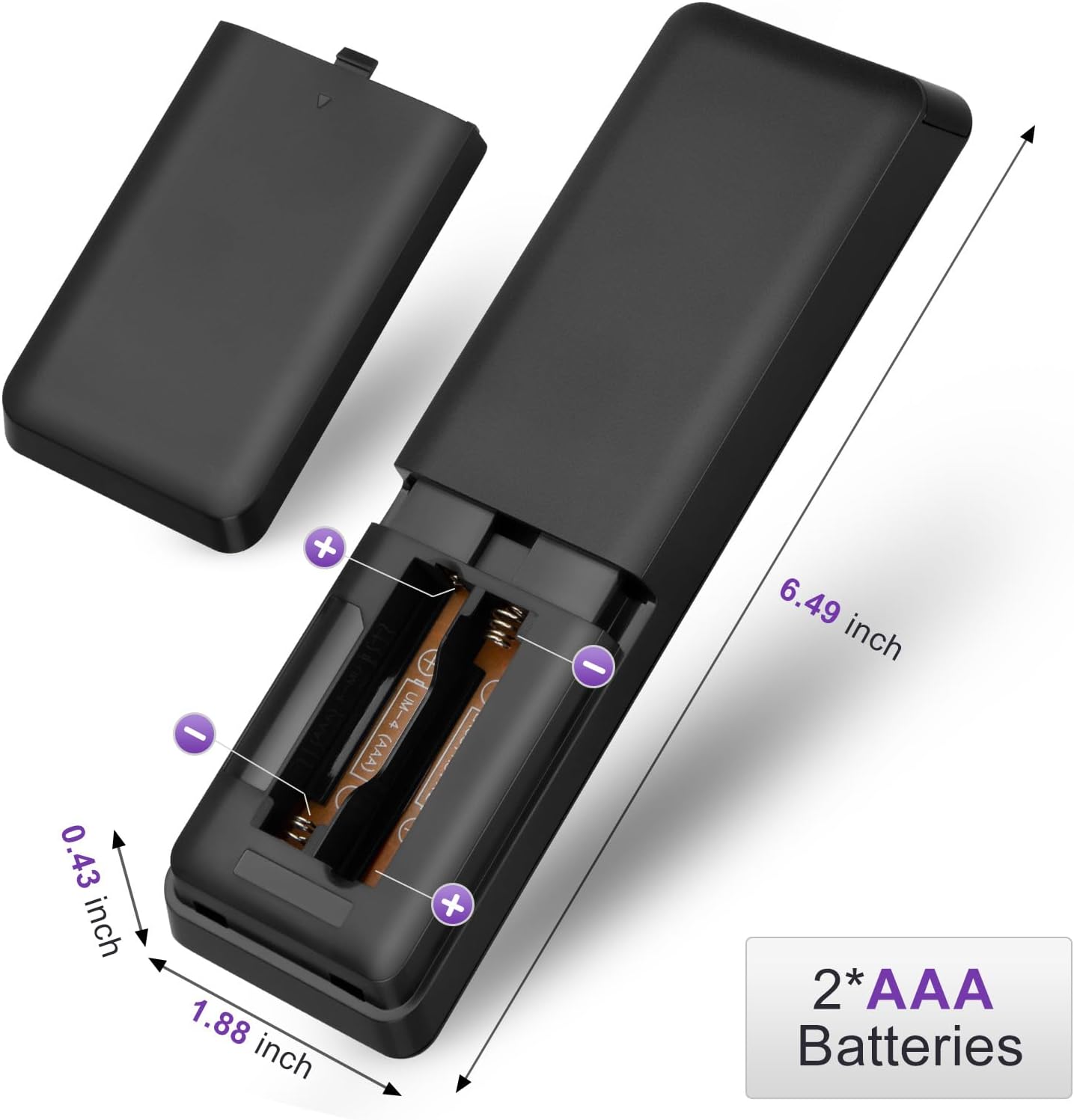
Figure 1: Battery installation for the LOUTOC remote control.
2. การใช้งานครั้งแรก
This LOUTOC remote control is pre-programmed and designed to work immediately with compatible Philips Smart TVs. No additional setup or pairing is required. Simply install the batteries, point the remote at your TV, and begin use.

Figure 2: Key features including no setup required and fast response time.
คำแนะนำการใช้งาน
The LOUTOC remote control features a standard layout for easy navigation and control of your Philips Smart TV. Below is a detailed description of each button's function.
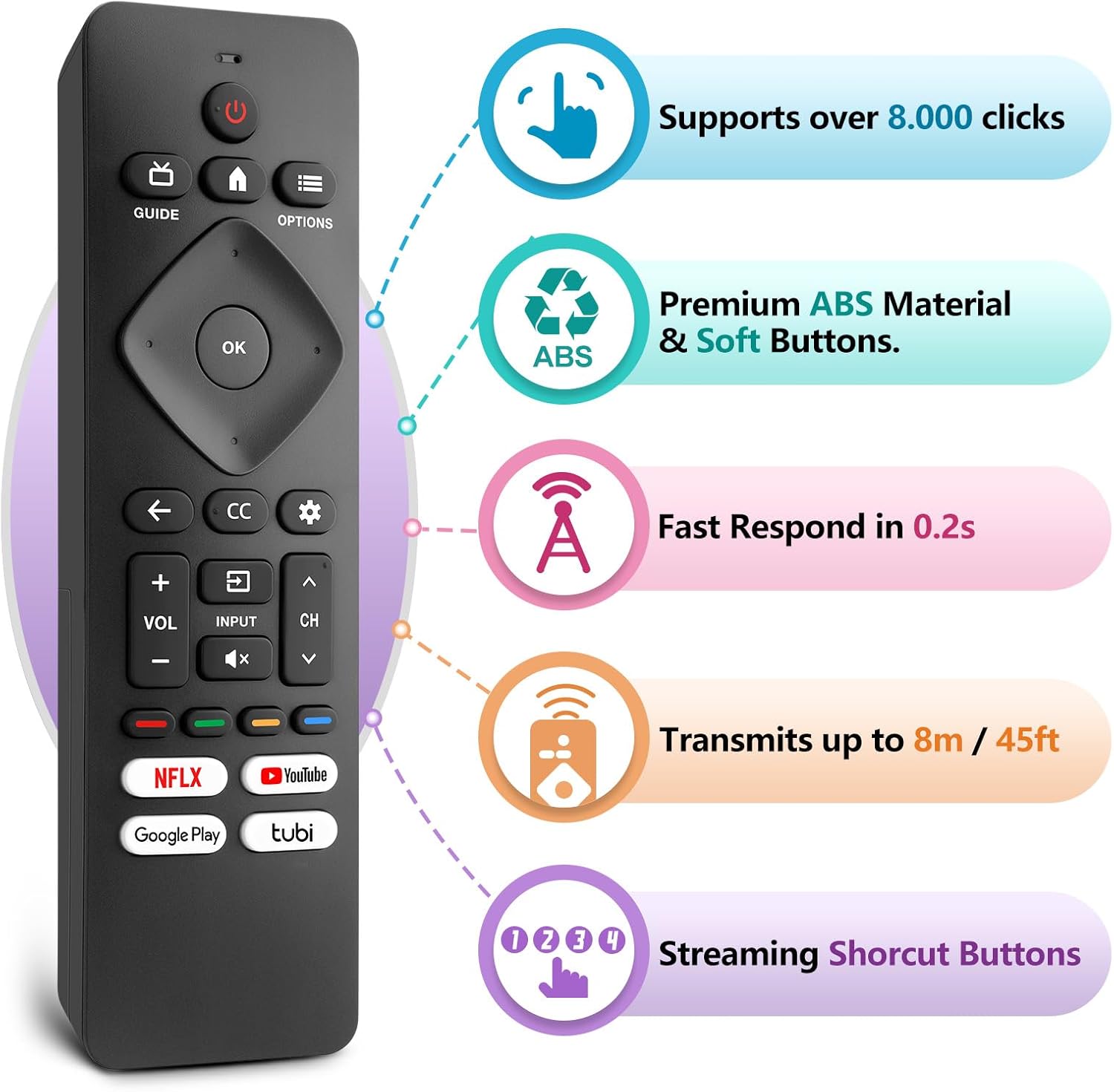
Figure 3: LOUTOC Remote Control Button Layout and Functions.
- พลัง: Turns the TV on or off. Press for less than 1 second for Quick Start Standby. Hold for 1 second or more for Low Power Standby.
- แนะนำ: Displays the TV program guide (availability may vary by service provider and region).
- บ้าน: Accesses your apps, Live TV, input devices, settings, and the Google Play Store.
- ตัวเลือก: Provides quick access to TV settings (settings vary depending on active screen).
- CURSOR (Up, Down, Left, Right) & OK: Moves to select an item and confirms selections on the menu.
- กลับ: กลับไปที่หน้าจอก่อนหน้า
- CC (คำบรรยายปิด): Selects closed caption settings.
- แผงควบคุม: Accesses the Google TV dashboard for user settings, notifications, and kids mode.
- ป้อนข้อมูล: Selects the input source for connected devices.
- MUTE: Toggles the sound on and off.
- ฉบับ +/-: ปรับระดับเสียง
- ช +/-: Selects the next or previous channel.
- COLOR BUTTONS (Red, Green, Yellow, Blue): Works as direct access to user-specified net apps or functions.
ปุ่มลัด
The remote includes dedicated shortcut buttons for popular streaming services:
- เน็ตฟลิกซ์
- YouTube
- Google Play
- ทูบี้

Figure 4: Dedicated streaming service shortcut buttons.
ความเข้ากันได้
This LOUTOC remote control is compatible with a wide range of Philips Android and Google Smart TV models. It is designed to replace various original Philips remote controls.
Compatible Philips Google TV Models:
- 70PUL7553/F7, 75PUL7552/F7, 65PUL7552/F7, 55PUL7552/F7, 50PUL7552/F7
- 43PUL7672/F7, 43PUL7652/F7, 65PUL7672/F7, 55PUL7672/F7, 50PUL7672/F7
- Generally compatible with Philips Google TV 7000 and 7600 Series.
Compatible Philips Android TV Models:
- 65PFL5766/F7, 55PFL5766/F7, 50PFL5766/F7, 43PFL5766/F7, 50PFL5806/F7
- 75PFL5604/F7, 75PFL5604/F7A, 75PFL5604/F7E, 75PFL5704/F7A, 75PFL5704/F7
- 32PFL5505/F7, 65PFL5604/F7, 55PFL5604/F7, 50PFL5604/F7, 43PFL5604/F7
- 50PFL5604/F7A, 43PFL5766/F6, 50PFL5766/F6, 65PFL5766/F6, 55PFL5766/F6
- 55PFL5704/F7, 65PFL5704/F7, 50PFL5704/F7, 43PFL5704/F7, 65PFL5504/F7
- 65PFL5604/F7A, 55PFL5604/F7A, 55PFL5766/F7E
- Generally compatible with Philips Android TV 5000, 5500, 5700, 5704, and 5800 Series.

Figure 5: Compatibility with Philips Google TV and Android TV series.
ข้อมูลจำเพาะ
| คุณสมบัติ | รายละเอียด |
|---|---|
| หมายเลขรุ่น | URMT26CND002 |
| ขนาด | 6 x 1.2 x 0.8 นิ้ว (15.24 x 3.05 x 2.03 ซม.) |
| น้ำหนักสินค้า | 1.76 ออนซ์ (50 กรัม) |
| แบตเตอรี่ที่จำเป็น | แบตเตอรี่ AAA 2 ก้อน (ไม่รวม) |
| ระยะการส่งข้อมูล | Approximately 6-8 meters (19-26 feet) |
| เวลาตอบสนอง | ภายใน 0.5 วินาที |
| วัสดุ | Premium ABS Material |
| คุณสมบัติพิเศษ | ออกแบบตามหลักสรีรศาสตร์ น้ำหนักเบา ไม่ต้องตั้งโปรแกรม มีโปรแกรมสำเร็จรูป ใช้งานได้กับทุกอุปกรณ์ |
การแก้ไขปัญหา
- รีโมตไม่ตอบสนอง:
- ตรวจสอบให้แน่ใจว่าได้ใส่แบตเตอรี่อย่างถูกต้อง โดยให้ขั้ว (+/-) ถูกต้อง
- เปลี่ยนแบตเตอรี่เก่าด้วยแบตเตอรี่ AAA ใหม่
- ตรวจสอบว่ามีสิ่งกีดขวางใดๆ ระหว่างรีโมทและตัวรับสัญญาณอินฟราเรดของทีวีหรือไม่
- Ensure you are within the effective operating range (6-8 meters) of the TV.
- ปุ่มเฉพาะไม่ทำงาน:
- Verify that the button is clean and not stuck.
- Some functions may be specific to certain TV models or require the TV to be in a particular mode (e.g., input selection).
- No Voice Control:
- This remote control does not support voice control functionality.
การซ่อมบำรุง
เพื่อให้รีโมทคอนโทรลของคุณใช้งานได้ยาวนานและทำงานได้อย่างถูกต้อง โปรดปฏิบัติตามคำแนะนำในการบำรุงรักษาเหล่านี้:
- การทำความสะอาด: Use a soft, dry cloth to clean the remote. Avoid using liquid cleaners or abrasive materials.
- พื้นที่จัดเก็บ: เก็บรีโมทไว้ในที่แห้งและเย็น ห่างจากแสงแดดโดยตรงและอุณหภูมิที่สูงหรือต่ำมาก
- การดูแลแบตเตอรี่ ถอดแบตเตอรี่ออกหากจะไม่ได้ใช้รีโมทเป็นเวลานาน เพื่อป้องกันการรั่วไหล
- หลีกเลี่ยงการหยด: ปกป้องรีโมตจากแรงกระแทก เนื่องจากอาจทำให้ส่วนประกอบภายในเสียหายได้
การรับประกันและการสนับสนุน
LOUTOC offers a 60-day replacement policy for this product. If you encounter any issues or have questions regarding your order, please contact LOUTOC customer support directly. Our team aims to respond within 12 hours during the work week to assist you.
For further assistance, please refer to the contact information provided with your purchase or visit the official LOUTOC store on Amazon: LOUTOC Store