การแนะนำ
The KEYCOOL K19 Wireless Numeric Keyboard is a versatile and ergonomic peripheral designed for enhanced productivity across various operating systems. Featuring triple mode connectivity, hot-swappable switches, and a multi-function knob, this keypad offers a customizable and efficient user experience. This manual provides detailed instructions for setup, operation, maintenance, and troubleshooting to ensure optimal performance of your K19 numeric keyboard.
คุณสมบัติหลัก
- การเชื่อมต่อแบบสามโหมด: Seamlessly switch between wired (USB-C), Bluetooth 5.0, and 2.4GHz wireless connections for maximum flexibility.
- สวิตช์แบบ Hot-Swappable: Customize your typing experience by easily changing 3-pin or 5-pin mechanical switches without soldering.
- ปุ่มปรับมัลติฟังก์ชั่น: Control RGB lighting effects, adjust volume, and manage media functions with a versatile rotary knob.
- ไฟแบ็คไลท์ RGB: Enjoy dynamic and customizable RGB lighting modes to personalize your setup.
- โครงสร้างแบบติดตั้งด้วยปะเก็น: Designed with imported PORON foam tape for a pleasant and satisfying typing sound.
- การออกแบบตามหลักสรีรศาสตร์: Features a sloped keyboard and durable PBT keycaps for comfortable and long-lasting use.
- ความเข้ากันได้กว้าง: Compatible with Windows, Mac, Linux, Android, and iOS systems.

ภาพ: เหนือview of the K19 Mechanical Numeric Keypad's core features.
เนื้อหาแพ็คเกจ
Upon opening your KEYCOOL K19 package, please verify that all the following items are included:
- แป้นพิมพ์ตัวเลขไร้สาย K19
- สาย USB-C
- ตัวดึงกุญแจ
- ตัวดึงสวิตช์
- Additional Keycaps (e.g., Esc, Fan icon)
- Additional Switches
- คู่มือผู้ใช้ / คู่มือการเริ่มต้นฉบับย่อ
Video: Unboxing the Keycool K19 numeric keyboard and its included accessories.
การตั้งค่า
การชาร์จคีย์บอร์ด
Before initial use, ensure the K19 numeric keyboard is fully charged. Connect the provided USB-C cable to the keyboard's USB-C port and the other end to a power source (e.g., computer USB port, wall adapter). The charging indicator light will show the charging status.
โหมดการเชื่อมต่อ
The K19 supports three connection modes: Wired, 2.4GHz Wireless, and Bluetooth. Use the switch located on the keyboard to select your desired mode.
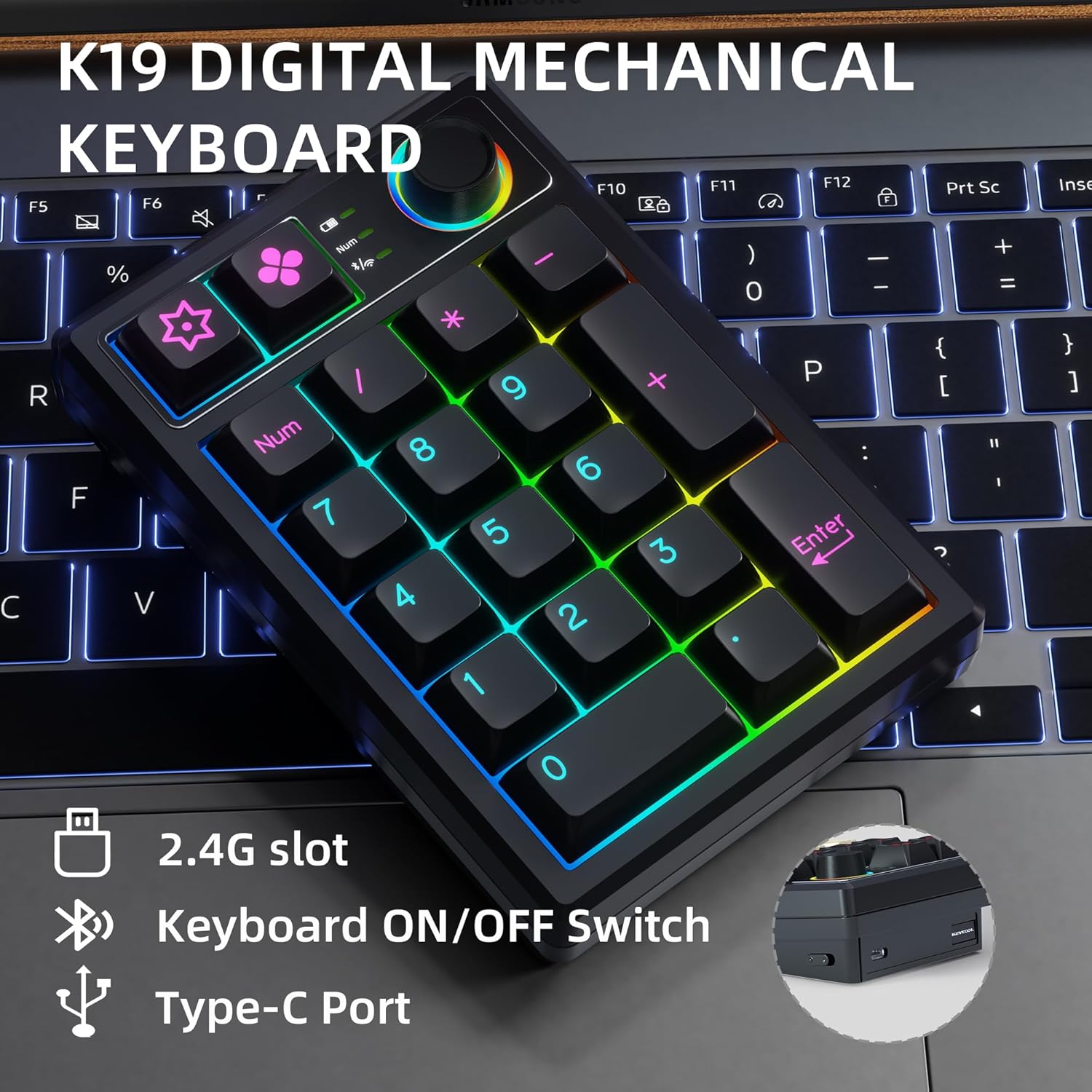
Image: Key connection points on the K19 numeric keyboard.
1. การเชื่อมต่อแบบมีสาย
- Ensure the keyboard's mode switch is set to the wired (USB) position.
- เชื่อมต่อสาย USB-C จากแป้นพิมพ์เข้ากับพอร์ต USB ของคอมพิวเตอร์ของคุณ
- แป้นพิมพ์จะถูกจดจำโดยอัตโนมัติและพร้อมใช้งาน
2. การเชื่อมต่อไร้สาย 2.4GHz
- Locate the 2.4G USB receiver, usually stored in a slot on the keyboard.
- เสียบตัวรับสัญญาณ USB เข้ากับพอร์ต USB ที่พร้อมใช้งานบนคอมพิวเตอร์ของคุณ
- Set the keyboard's mode switch to the 2.4G wireless position.
- แป้นพิมพ์ควรเชื่อมต่อโดยอัตโนมัติ
3. การเชื่อมต่อบลูทู ธ
- Set the keyboard's mode switch to the Bluetooth position.
- บนอุปกรณ์ของคุณ (คอมพิวเตอร์ แท็บเล็ต สมาร์ทโฟน) เปิดใช้งาน Bluetooth และค้นหาอุปกรณ์ใหม่
- Select "KEYCOOL K19" from the list of available devices to pair.
- ปฏิบัติตามคำแนะนำบนหน้าจอเพื่อดำเนินการจับคู่ให้เสร็จสมบูรณ์
การติดตั้งไดร์เวอร์และซอฟต์แวร์
For advanced customization, including key remapping and macro settings, you may download the official driver software from the KEYCOOL webเว็บไซต์: www.kc-keycool.com. Install the software according to the instructions provided on the webเว็บไซต์.

Image: Driver download site for KEYCOOL products.
คำแนะนำการใช้งาน
ปุ่มมัลติฟังก์ชั่น
The rotary knob on the K19 numeric keyboard provides quick access to various functions:
- การปรับแสง RGB: Rotate the knob to cycle through different RGB lighting effects or adjust brightness. Press the knob to switch between lighting modes or turn lighting on/off.
- การควบคุมสื่อ: The knob can also be configured via software to control media functions such as volume adjustment (rotate) or play/pause (press).
ไฟแบ็คไลท์ RGB
The K19 features vibrant RGB backlighting with multiple effects. Use the multi-function knob or specific key combinations (refer to the Quick Start Guide or software) to customize the lighting to your preference.
Video: Demonstration of the RGB backlit effects on the K19 numeric keyboard.

Image: The K19 numeric keyboard showcasing แสงไฟ RGB ของมัน
สวิตช์แบบ Hot-Swappable
The K19 allows you to easily change mechanical switches without soldering. This feature enables you to customize the feel and sound of your keypad. Use the included switch puller to carefully remove existing switches and insert new 3-pin or 5-pin compatible switches.

ภาพ: ระยะใกล้ view of the K19's hot-swappable switch sockets.
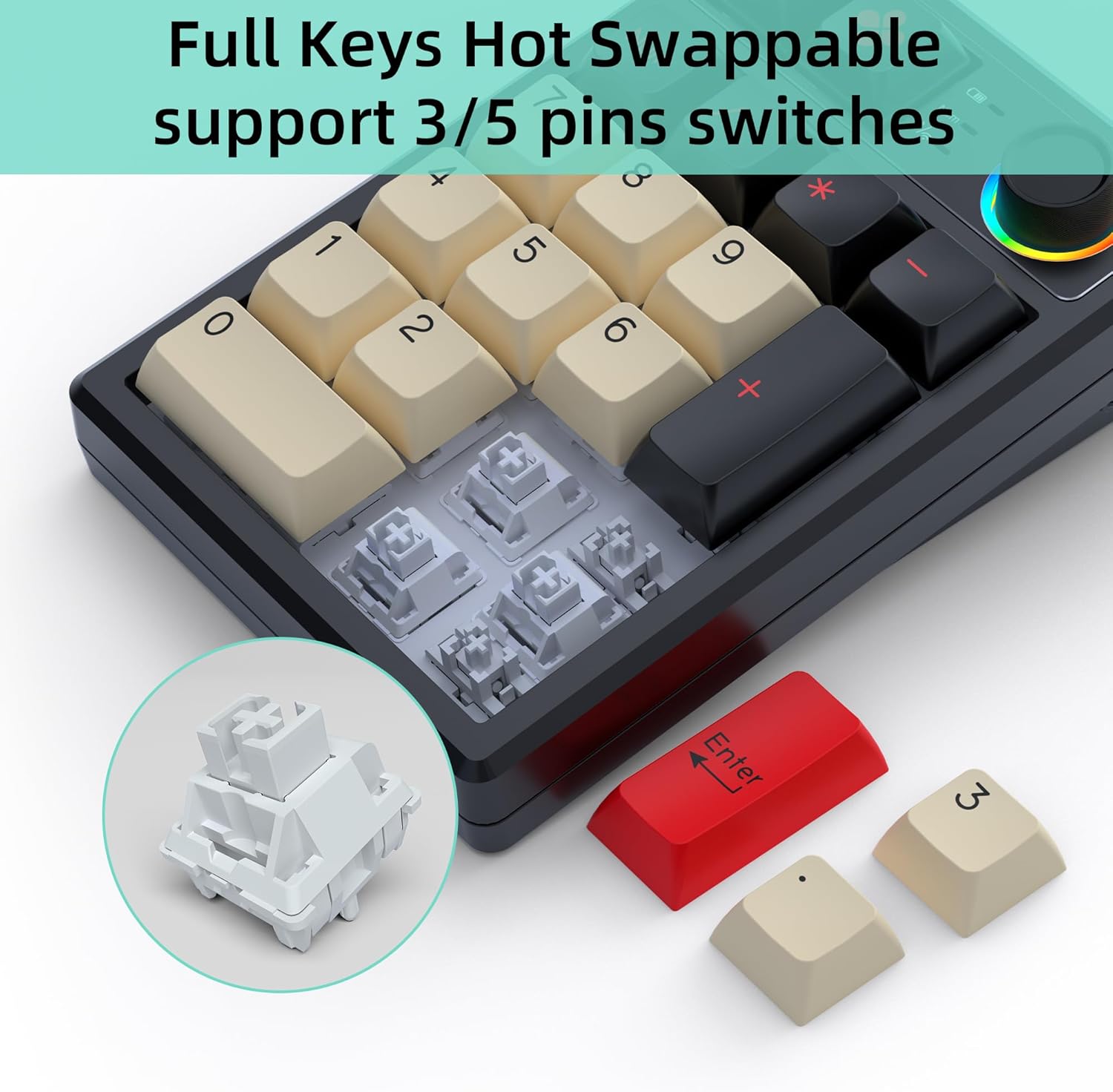
Image: Illustration of replacing keycaps and switches on the K19.
Personalized Programmable Keys
Utilize the dedicated software (downloadable from www.kc-keycool.com) to customize key functions, create macros, and fine-tune lighting effects according to your workflow and preferences. The custom settings are stored directly on the keypad, allowing you to use your personalized layout across different devices without needing the software running in the background.

Image: Software interface for customizing the K19 numeric keyboard.
การซ่อมบำรุง
- การทำความสะอาด: Use a soft, dry cloth to wipe the surface of the keyboard. For deeper cleaning, gently remove keycaps with the provided keycap puller and use compressed air to clear dust and debris from between the switches.
- หลีกเลี่ยงของเหลว: อย่าให้แป้นพิมพ์โดนของเหลว หากเกิดการหก ให้ถอดแป้นพิมพ์ออกทันทีและปล่อยให้แห้งสนิทก่อนเชื่อมต่อกลับ
- พื้นที่จัดเก็บ: เก็บแป้นพิมพ์ไว้ในที่แห้งและเย็น หลีกเลี่ยงแสงแดดโดยตรงและอุณหภูมิที่สูงหรือต่ำเกินไป
การแก้ไขปัญหา
| ปัญหา | วิธีแก้ปัญหาที่เป็นไปได้ |
|---|---|
| แป้นพิมพ์ไม่ตอบสนองในโหมดไร้สาย | Ensure the keyboard is charged, the mode switch is set correctly (2.4G or Bluetooth), and the receiver is properly plugged in (for 2.4G) or Bluetooth is paired (for Bluetooth). Try re-pairing or reconnecting. |
| กุญแจไม่ลงทะเบียนหรือพิมพ์ซ้ำ | This may indicate a loose or faulty switch. Use the switch puller to remove the affected switch and re-insert it firmly. If the issue persists, try replacing the switch with one of the spares. |
| ไฟ RGB ไม่ทำงานหรือค้าง | Check the multi-function knob settings. Ensure the keyboard is not in power-saving mode. Refer to the user manual or software for specific lighting control key combinations. |
| การเชื่อมต่อบลูทูธไม่เสถียร | Ensure no strong interference sources are nearby. Try moving the keyboard closer to your device. Disconnect and re-pair the Bluetooth connection. |
| Software not recognizing the keyboard. | Ensure the keyboard is connected via wired mode when using the software. Reinstall the software if necessary. |
ข้อมูลจำเพาะ
| คุณลักษณะ | รายละเอียด |
|---|---|
| หมายเลขรุ่น | K19+1Knob |
| ขนาดสินค้า | 5.2 x 3.5 x 1.25 นิ้ว (13.2 x 8.9 x 3.2 ซม.) |
| น้ำหนักสินค้า | 11.7 ออนซ์ (331.7 กรัม) |
| เทคโนโลยีการเชื่อมต่อ | Bluetooth, Wi-Fi 2.4G, USB-C (Triple Mode) |
| คำอธิบายแป้นพิมพ์ | เครื่องจักรกล |
| จำนวนคีย์ | 21 (19 keys + 1 knob) |
| คุณสมบัติพิเศษ | Portable, Volume Roller, Backlit, Hot-Swappable |
| อุปกรณ์ที่รองรับ | แล็ปท็อป, พีซี, เครื่องเล่นเกม, แท็บเล็ต, สมาร์ทโฟน |
| สี | สีดำ |
| ความจุของแบตเตอรี่ | 1500mAh (as per feature bullets) |
| ประเทศต้นกำเนิด | จีน |
การรับประกันและการสนับสนุน
KEYCOOL products are manufactured to high-quality standards. For warranty information, technical support, or any inquiries regarding your K19 Wireless Numeric Keyboard, please refer to the contact details provided on the official KEYCOOL webงาน (www.kc-keycool.com) หรือติดต่อผู้ค้าปลีกของคุณ


