การแนะนำ
Thank you for choosing the Edifier STAX Spirit S5 Wireless Planar Magnetic Headphones. These headphones are engineered to deliver an exceptional audio experience, featuring advanced planar magnetic drivers with EqualMass diaphragms for precise sound reproduction and minimal distortion. With Qualcomm Snapdragon Sound technology, LDAC, and LHDC codec support, the S5 provides high-resolution wireless audio. This manual provides detailed instructions for setup, operation, maintenance, and troubleshooting to ensure you get the most out of your new headphones.
เนื้อหาแพ็คเกจ
โปรดตรวจสอบว่ารายการทั้งหมดที่ระบุไว้ด้านล่างมีอยู่ในแพ็คเกจของคุณหรือไม่:
- 1 x Edifier STAX Spirit S5 Headset
- 2 x Cooling Mesh Earpads (pre-installed or spare)
- สายชาร์จ 1 x USB Type-C
- 1 x Earpad Pick Tool
- สายสัญญาณเสียง AUX ขนาด 3.5 มม. จำนวน 1 เส้น
- อะแดปเตอร์ 1 x 3.5 มม. ถึง 6.35 มม.
- 1 x Headphone Carrying Case
- 2 x Earpad Pouches
- 1 x คู่มือผู้ใช้
สินค้าเกินview
Familiarize yourself with the components and controls of your Edifier STAX Spirit S5 headphones.

ด้านหน้า view of the Edifier STAX Spirit S5 headphones, showcasing their sleek black design and over-ear cups.

A user wearing the Edifier STAX Spirit S5 headphones, demonstrating their comfortable fit and profile ระหว่างการใช้งาน
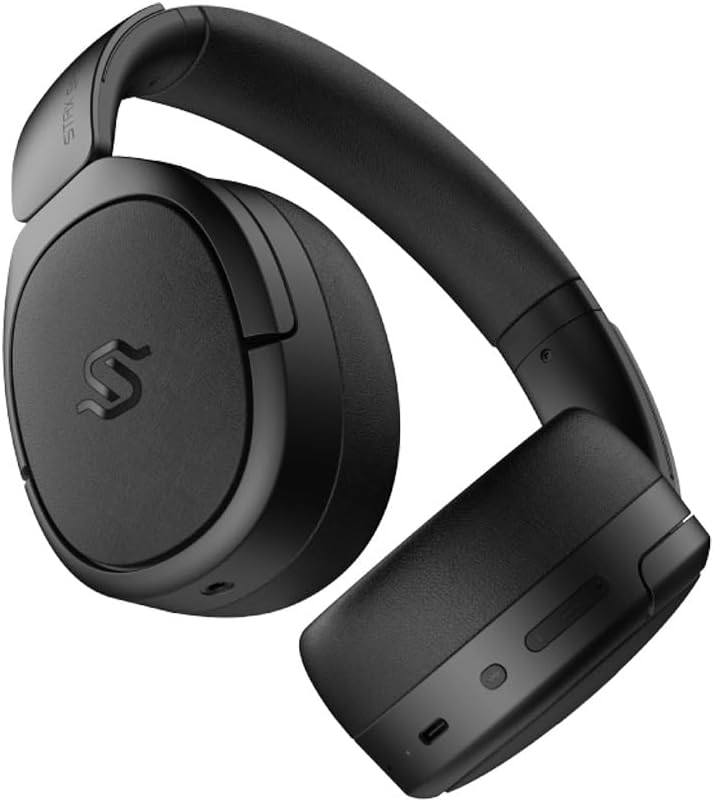
ด้านข้าง view of the headphones, highlighting the control buttons and ports located on the right earcup, including the USB-C port.

A detailed close-up of the control buttons on the earcup, showing the power button, volume controls, and the USB-C charging port.

The Edifier STAX Spirit S5 headphones folded compactly, illustrating their portability and ease of storage in the included carrying case.
การตั้งค่า
การชาร์จหูฟัง
Before first use, fully charge your Edifier STAX Spirit S5 headphones.
- Connect the supplied USB Type-C cable to the charging port on the headphones and the other end to a USB power adapter (not included) or a computer's USB port.
- The LED indicator will show charging status. It typically takes approximately 10 minutes for a quick charge, providing extended playback. A full charge can provide up to 80 hours of battery life.
- Once fully charged, the LED indicator will change (refer to the specific indicator behavior in your quick start guide, if available).
การเปิด/ปิดเครื่อง
- เปิดเครื่อง: กดปุ่มเปิด/ปิดค้างไว้ประมาณ 3 วินาที จนกว่าไฟแสดงสถานะจะสว่างขึ้น
- หมดแรง: กดปุ่มเปิด/ปิดค้างไว้ประมาณ 5 วินาที จนกระทั่งไฟแสดงสถานะดับ
จับคู่บลูทู ธ
The STAX Spirit S5 uses Bluetooth V5.4 for stable and fast transmission.
- ตรวจสอบให้แน่ใจว่าหูฟังปิดอยู่
- กดปุ่มเปิด/ปิดค้างไว้ประมาณ 5-7 วินาที จนกว่าไฟแสดงสถานะจะกะพริบเร็ว ซึ่งแสดงว่าเข้าสู่โหมดจับคู่แล้ว
- บนอุปกรณ์ของคุณ (สมาร์ทโฟน แท็บเล็ต คอมพิวเตอร์) เปิดใช้งานบลูทูธ และค้นหา "Edifier STAX Spirit S5" ในรายการอุปกรณ์ที่ใช้งานได้
- Select the headphones to connect. Once successfully paired, the indicator light will stop flashing and remain solid or turn off, depending on the model's specific behavior.
- การจับคู่อย่างรวดเร็วของ Google: For Android devices, the headphones support Google Fast Pair for quick and seamless connection. Simply power on the headphones near your Android device, and a pairing prompt will appear.
- การเชื่อมต่อหลายอุปกรณ์: The S5 can connect to two audio devices simultaneously. After pairing with the first device, put the headphones back into pairing mode and connect to the second device. The headphones will intelligently switch between the two.
การเชื่อมต่อแบบใช้สาย
The headphones support both USB-C and 3.5mm AUX wired connections.
- เสียงผ่าน USB-C: Connect the USB Type-C cable from the headphones to a compatible USB-C port on your device for digital audio playback and charging.
- 3.5mm AUX Audio: Connect the 3.5mm AUX cable to the audio input port on the headphones and the other end to your audio source's 3.5mm output. Use the included 3.5mm to 6.35mm adapter for devices with a 6.35mm jack. Note that the headphones must be powered on for passive wired mode.
คำแนะนำการใช้งาน
การควบคุมพื้นฐาน
The main controls are located on the earcup:
- ปุ่มเปิด/ปิด:
- Press and hold for 3 seconds to Power On.
- Press and hold for 5 seconds to Power Off.
- Press and hold for 5-7 seconds (from off) to enter Bluetooth pairing mode.
- เพิ่มระดับเสียง (+): กดสั้นเพื่อเพิ่มระดับเสียง
- ลดเสียงลง (-): กดสั้น ๆ เพื่อลดระดับเสียง
- Multi-function Button (often between volume buttons):
- กดสั้นๆ: เล่น/หยุดเพลง
- Short press: Answer/End call.
- กดค้าง: ปฏิเสธสายเรียกเข้า
- กดสองครั้ง: เพลงถัดไป
- กดสามครั้ง: เพลงก่อนหน้า.
เทคโนโลยีเสียง
The STAX Spirit S5 supports various high-fidelity audio codecs for an optimal listening experience:
- Qualcomm Snapdragon Sound: Ensures stable RF connection and efficient power consumption for extended listening.
- LDAC & LHDC: Compatible with Hi-Res Audio and Wireless Hi-Res Audio, delivering exceptional detail and clarity.
- aptX HD, aptX Adaptive, aptX Lossless: Part of the Snapdragon Audio technology, providing high-resolution audio with ultra-low latency (as low as 89ms with aptX Adaptive).
ฟังก์ชั่นการโทร
The headphones are equipped with dual microphones and Qualcomm cVc technology for clear calls.
- ตัดเสียงรบกวน: Integrated Qualcomm cVc actively suppresses ambient noise, enhancing voice clarity during calls.
- ความเป็นส่วนตัว: The closed-back design helps ensure conversation privacy.
การซ่อมบำรุง
การดูแลรักษาอย่างถูกวิธีจะช่วยให้หูฟังของคุณมีอายุการใช้งานยาวนานและรักษาประสิทธิภาพการทำงานได้ดี
- การทำความสะอาด:
- เช็ดหูฟังด้วยผ้าแห้งและนุ่ม
- For earpads, use a slightly damp ใช้ผ้าเช็ดทำความสะอาดหากจำเป็น แต่ควรหลีกเลี่ยงความชื้นมากเกินไป
- ห้ามใช้สารเคมีรุนแรง น้ำยาทำความสะอาด หรือสารซักฟอกชนิดเข้มข้น
- การเปลี่ยนแผ่นรองหูฟัง:
- The STAX Spirit S5 comes with two sets of earpads (mesh and leather).
- To replace, gently pull off the existing earpad. Use the included earpad pick tool if needed to carefully detach it from the earcup.
- Align the new earpad with the earcup and press firmly around the edges until it clicks securely into place.
- พื้นที่จัดเก็บ:
- When not in use, store the headphones in the provided carrying case to protect them from dust, scratches, and impacts.
- หลีกเลี่ยงการเก็บในที่ที่มีอุณหภูมิที่สูงหรือที่มีความชื้นสูง
- การดูแลแบตเตอรี่
- เพื่อรักษาอายุการใช้งานของแบตเตอรี่ ควรหลีกเลี่ยงการปล่อยให้หูฟังแบตหมดจนเกลี้ยงบ่อยๆ
- หากจะเก็บรักษาเป็นเวลานาน ควรชาร์จแบตเตอรี่ให้ได้ประมาณ 50% ก่อนเก็บรักษา
การแก้ไขปัญหา
หากคุณประสบปัญหาเกี่ยวกับหูฟังของคุณ โปรดดูปัญหาทั่วไปและวิธีแก้ไขต่อไปนี้:
| ปัญหา | สาเหตุที่เป็นไปได้ | สารละลาย |
|---|---|---|
| หูฟังไม่สามารถเปิดเครื่องได้ | แบตเตอรี่อ่อน | ชาร์จหูฟังโดยใช้สาย USB-C |
| ไม่สามารถจับคู่ผ่านบลูทูธได้ | หูฟังไม่ได้อยู่ในโหมดจับคู่ อุปกรณ์ Bluetooth ปิดอยู่ มีสัญญาณรบกวน | Ensure headphones are in pairing mode (flashing light). Turn Bluetooth off/on on your device. Move closer to the device. Clear previous pairings on your device. |
| ไม่มีเสียงหรือเสียงเบา | ระดับเสียงต่ำเกินไป แหล่งเสียงไม่ถูกต้อง สายเคเบิลหลวม (โหมดมีสาย) | Increase volume on headphones and source device. Ensure correct audio output is selected on your device. Check wired connections. |
| Poor audio quality (wireless). | Distance from device; interference; low-quality audio source. | Reduce distance to your device. Avoid strong electromagnetic interference. Use high-quality audio files/streaming services. |
| ไมโครโฟนไม่ทำงานในระหว่างการโทร | Incorrect input device selected; microphone muted. | Ensure the headphones are selected as the input device in your call application settings. Check if the microphone is muted. |
หากปัญหายังคงมีอยู่ โปรดติดต่อฝ่ายสนับสนุนลูกค้า Edifier
ข้อมูลจำเพาะ
Key technical specifications for the Edifier STAX Spirit S5 headphones:
| ยี่ห้อ | เครื่องช่วยสอน |
| ชื่อรุ่น | S5 |
| หมายเลขรุ่น | S5spaceblack |
| สี | สีดำ |
| เทคโนโลยีการเชื่อมต่อ | แบบมีสาย, ไร้สาย (บลูทูธ) |
| เทคโนโลยีการสื่อสารไร้สาย | บลูทูธ |
| เวอร์ชันบลูทูธ | V5.4 (implied from feature bullets) |
| แจ็คหูฟัง | 3.5mm Jack, USB-C |
| อิมพีแดนซ์ | 120 โอห์ม |
| การวางตำแหน่งหู | ครอบหู |
| ฟอร์มแฟกเตอร์ | รอบหู |
| น้ำหนักสินค้า | 420 กรัม |
| องค์ประกอบของแบตเตอรี่ | ลิเธียมไอออน |
| แบตเตอรี่แบบชาร์จไฟได้ | ใช่ |
| เวลาในการชาร์จ | Approx. 10 minutes (for quick charge) |
| คุณสมบัติพิเศษ | ชาร์จเร็ว |
| อุปกรณ์ที่รองรับ | Computer, Laptop, Mobile Phone |
| การใช้งานเฉพาะของผลิตภัณฑ์ | Music, Professional, Studio Listening |
การรับประกันและการสนับสนุน
The Edifier STAX Spirit S5 headphones come with a two-year warranty, ensuring reliable performance and support.
For technical assistance, warranty claims, or further inquiries, please contact Edifier customer support through their official webเว็บไซต์หรือร้านค้าที่คุณซื้อสินค้า โปรดเก็บหลักฐานการซื้อไว้เพื่อใช้ในการตรวจสอบสิทธิ์การรับประกัน


