1. บทนำ
This user manual provides comprehensive instructions for the installation, operation, and maintenance of your COCOCAM AOV 4G LTE Security Camera. Please read this manual thoroughly before using the product to ensure proper functionality and safety.
1.1 เนื้อหาบรรจุภัณฑ์
- 1x COCOCAM AOV 4G LTE Security Camera
- 1x แผงโซลาร์เซลล์
- 1x Screw Package (for mounting)
- สายเคเบิลข้อมูล 1x
- 1x คู่มือการใช้งาน (เอกสารนี้)
- ขายึดแผงโซล่าเซลล์ 1x
- 2x AA Batteries (pre-installed or included for initial setup)

Figure 1.1: COCOCAM AOV 4G LTE Security Camera and Solar Panel. The image displays the main camera unit with two antennas, a lens, and four LED lights, alongside a rectangular solar panel connected by a cable.
2. ข้อมูลด้านความปลอดภัย
- Ensure the camera and solar panel are installed securely to prevent falling.
- ห้ามให้กล้องสัมผัสกับอุณหภูมิที่สูงเกินขอบเขตการใช้งาน
- เก็บอุปกรณ์ให้ห่างจากสนามแม่เหล็กแรงสูง
- อย่าพยายามถอดประกอบหรือซ่อมกล้องด้วยตนเอง โปรดติดต่อฝ่ายสนับสนุนเพื่อขอความช่วยเหลือ
- Ensure all cables are properly connected and protected from environmental damage.
- This device is IP66 rated for water and dust resistance, but avoid submerging it in water.
3. สินค้าหมดview
3.1 คุณสมบัติหลัก
- 24/7 Recording & Fast Alarm Trigger: Continuous recording with quick alarm activation.
- Intelligent Sound and Light Alarm: Customizable alarm areas with real-time notifications.
- 30 Meters Night Vision: Clear visibility in low-light conditions with white light and infrared options.
- AI Detection/Tracking: Human form detection and movement tracking up to 30 meters.
- ตัวเลือกการจัดเก็บที่ยืดหยุ่น: Supports TF card (up to 128GB) and cloud storage.
- เสียงสองทาง: มีไมโครโฟนและลำโพงในตัวสำหรับใช้ในการสื่อสาร
- Long-lasting Battery with Solar Panel: 15000mAh rechargeable battery with 8W solar panel for continuous power.
- กันฝนระดับ IP66: Designed for outdoor use, resistant to water and dust.
- 3MP High Definition Video: 2304*1296 resolution for clear footage.
- 355° Pan/90° Tilt: Wide area coverage with remote adjustable viewมุมการเอียง
- Remote Monitoring and Mobile Compatibility: Access via COCOCAM app on Android/iOS devices.
- การเชื่อมต่อ 4G LTE: Operates without Wi-Fi, includes a built-in SIM card with trial data.
4. การตั้งค่า
4.1 การติดตั้งกล้องและแผงโซลาร์เซลล์
The camera and solar panel can be mounted on walls or ceilings. Choose a location that provides optimal sunlight exposure for the solar panel and a clear view เพื่อกล้องถ่ายรูป
- Identify a suitable mounting surface.
- Use the provided screw package to secure the camera bracket and solar panel bracket.
- Attach the camera to its bracket and the solar panel to its bracket.
- Connect the solar panel cable to the camera's charging port. Ensure the connection is secure and waterproof.

Figure 4.1: Easy installation of the COCOCAM camera and solar panel. The image shows a person installing the camera and solar panel unit under an eave, demonstrating the ease of setup.

Figure 4.2: Self-sustaining power setup with solar panel and battery. This image illustrates the camera and solar panel mounted on a building, highlighting the 8W solar panel and 15000mAh rechargeable battery for continuous power.
4.2 การติดตั้งซิมการ์ดและเมมโมรี่การ์ด
The camera comes with a built-in SIM card for initial use. You can also install an external SIM card or a TF (microSD) card for local storage.
- Locate the SIM card slot and TF card slot on the camera (refer to the product diagram in the quick start guide).
- Insert the TF card (up to 128GB) into the TF card slot with the contacts facing down.
- If using an external SIM card, insert it into the designated slot. Ensure it is properly seated.
- Close the protective cover to maintain IP66 rating.

Figure 4.3: 3G/4G LTE Connection without Wi-Fi. This image highlights the camera's ability to operate using 3G or 4G LTE networks, making it suitable for locations without Wi-Fi, such as farms, construction sites, or RVs.
4.4 การดาวน์โหลดแอปและการตั้งค่าเริ่มต้น
Download the COCOCAM app from your device's app store (Android or iOS).
- ค้นหา "COCOCAM" in the Google Play Store or Apple App Store.
- ติดตั้งแอพและสร้างบัญชี
- ทำตามคำแนะนำในแอปเพื่อเพิ่มกล้องของคุณ ซึ่งโดยทั่วไปจะเกี่ยวข้องกับการสแกนคิวอาร์โค้ดบนกล้องหรือป้อนรหัสประจำตัวด้วยตนเอง
- Once connected, you can configure network settings, recording preferences, and alarm settings.

Figure 4.4: COCOCAM app for 24/7 continuous recording. This image shows a smartphone displaying the COCOCAM app interface, with the security camera mounted on a wall in the background, indicating continuous monitoring capabilities.
5. คู่มือการใช้งาน
5.1 24/7 Recording and Alarm Features
The camera supports continuous recording. When an alarm is triggered, the camera quickly switches to full-frame recording.
- การบันทึกต่อเนื่อง: The camera records 2 seconds per frame during non-alarm periods.
- Fast Alarm Trigger: Upon detection, the camera initiates full-frame recording within 0.2 seconds.
- Customizable Alarm Areas: กำหนดโซนเฉพาะภายในกล้อง view สำหรับการตรวจจับความเคลื่อนไหว
- Intelligent Sound and Light Alarm: The camera can emit sound and light warnings upon detecting suspicious activity.
- การแจ้งเตือนแบบเรียลไทม์: Receive instant alerts on your mobile device when an alarm is triggered.
5.2 PTZ Control (Pan, Tilt, Zoom)
The camera offers extensive pan and tilt capabilities, allowing you to adjust the viewing angle remotely via the COCOCAM app.
- แพน: หมุนกล้องในแนวนอนได้สูงสุดถึง 355°
- เอียง: Adjust the camera vertically up to 90°.
- ซูมดิจิตอล: Use the app to digitally zoom into the live feed or recorded footage.

Figure 5.1: 355° Pan and 90° Tilt with AI Tracking. This image illustrates the camera's wide range of motion and its ability to track subjects, with icons for two-way audio, AI detection, and AI tracking.
5.3 AI Detection and Tracking
The camera's advanced AI capabilities allow for precise detection and tracking of human forms and vehicles.
- การตรวจจับของมนุษย์: Identifies human shapes, reducing false alarms from animals or swaying branches.
- Vehicle Recognition: Distinguishes vehicles for specific alerts.
- การติดตาม AI: The camera can automatically follow detected subjects within its field of view สูงสุดถึง 30 เมตร.
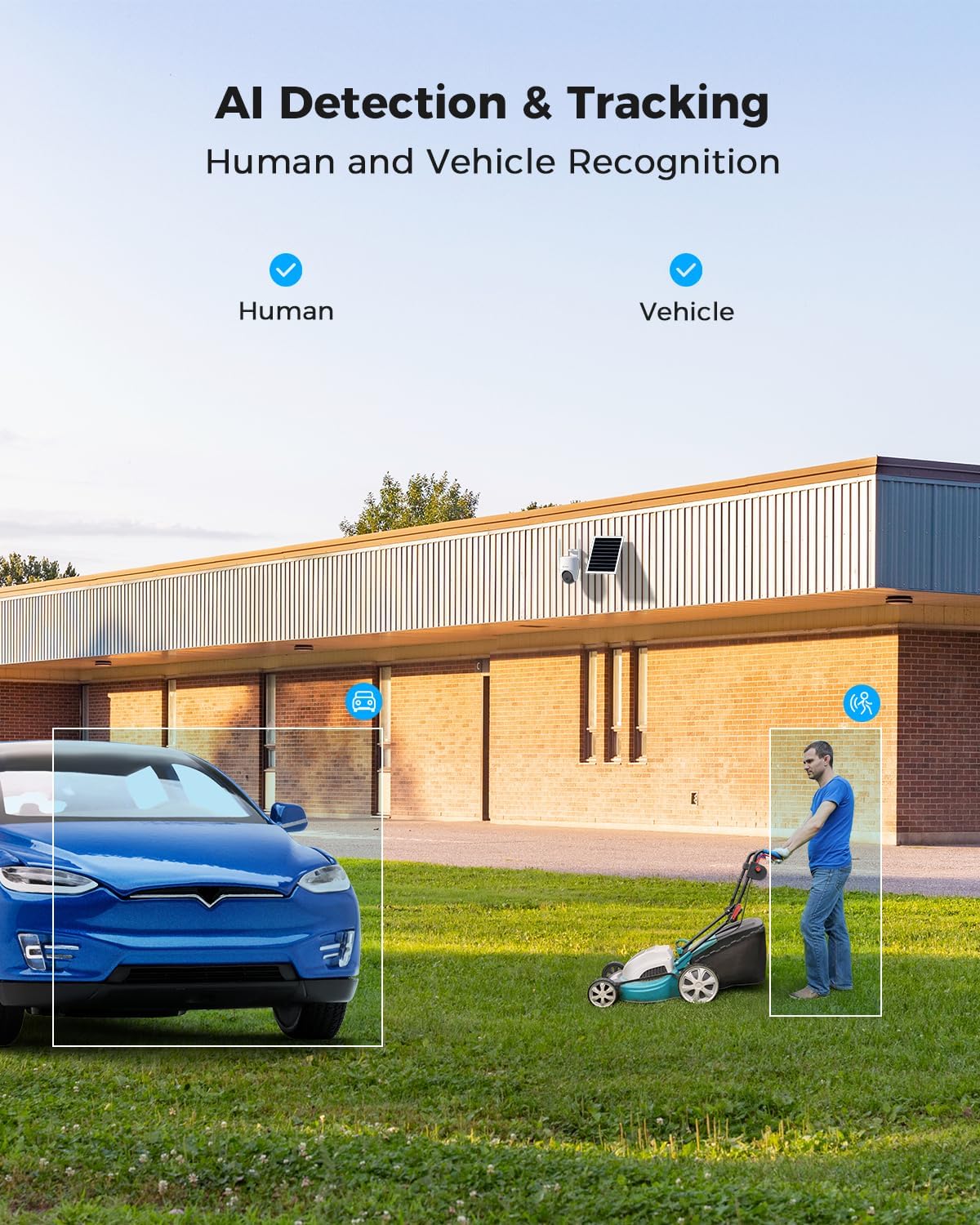
Figure 5.2: AI Detection & Tracking for Human and Vehicle Recognition. The image shows a security camera monitoring an outdoor area, with highlighted boxes indicating detected human and vehicle subjects, demonstrating its AI capabilities.
5.4 เสียงสองทาง
สื่อสารกับผู้มาเยือนหรือป้องกันผู้บุกรุกโดยใช้ไมโครโฟนและลำโพงในตัว
- Access the two-way audio feature through the COCOCAM app.
- พูดเข้าไปที่ไมโครโฟนของโทรศัพท์ของคุณเพื่อส่งเสียงผ่านลำโพงของกล้อง
- ฟังเสียงจากบริเวณรอบๆ กล้องผ่านโทรศัพท์ของคุณ
5.5 การมองเห็นตอนกลางคืน
The camera provides clear visibility up to 30 meters in complete darkness.
- อินฟราเรดคืนวิสัยทัศน์: Automatically activates in low-light conditions for black and white video.
- การมองเห็นตอนกลางคืนแบบสีเต็มรูปแบบ: Utilizes white light LEDs to provide color video at night when activated or upon detection.

Figure 5.3: 30m Night Vision and 2K Full Color Night Vision. This image compares standard black and white night vision with the camera's full-color night vision capability, showing enhanced detail and color in low light.
6. การบำรุงรักษา
6.1 การดูแลรักษาแบตเตอรี่และแผงโซลาร์เซลล์
The integrated 15000mAh battery is continuously charged by the 8W solar panel. To ensure optimal performance:
- ตรวจสอบให้แน่ใจว่าแผงโซลาร์เซลล์อยู่ในตำแหน่งที่รับแสงแดดโดยตรงสูงสุดตลอดทั้งวัน
- Regularly clean the surface of the solar panel to remove dust, dirt, or debris that may obstruct sunlight.
- Avoid placing the solar panel in shaded areas.

Figure 6.1: 8W Solar Panel for continuous power. This image focuses on the solar panel, highlighting its 8W power output and the 3-meter cable length for flexible installation.
6.2 การทำความสะอาดกล้อง
- ใช้แบบนุ่มๆamp cloth to wipe the camera lens and body.
- อย่าใช้สารเคมีรุนแรงหรือน้ำยาทำความสะอาดที่มีฤทธิ์กัดกร่อน
- Ensure the camera is dry before prolonged exposure to the elements.
การอัปเดตเฟิร์มแวร์ 6.3 รายการ
Periodically check the COCOCAM app for available firmware updates. Keeping your camera's firmware updated ensures optimal performance, new features, and security enhancements.
7 การแก้ไขปัญหา
| ปัญหา | สาเหตุที่เป็นไปได้ | สารละลาย |
|---|---|---|
| Camera not connecting to app. | Incorrect pairing process, weak 4G signal, camera not powered on. | Ensure camera is powered on. Re-attempt pairing process. Check 4G signal strength at installation location. |
| คุณภาพวิดีโอไม่ดี | Dirty lens, low light conditions, weak 4G signal. | Clean the camera lens. Ensure adequate lighting or verify night vision is active. Check 4G signal strength. |
| แบตเตอรี่ไม่ชาร์จ | Solar panel obstructed, faulty connection, insufficient sunlight. | Ensure solar panel is clean and receives direct sunlight. Check cable connection between solar panel and camera. |
| AI detection not working or too many false alarms. | Incorrect sensitivity settings, detection area not configured. | Adjust AI detection sensitivity in the app. Configure specific detection zones to exclude irrelevant areas. |
| Two-way audio issues. | Microphone/speaker obstruction, app permissions, network delay. | Ensure nothing is blocking the camera's microphone or speaker. Check app permissions for microphone access. Verify stable 4G connection. |
8. ข้อมูลจำเพาะ
| คุณสมบัติ | รายละเอียด |
|---|---|
| ชื่อรุ่น | AOV 4G Camera with 7x24 Recording |
| หมายเลขรุ่นสินค้า | ZY-Q6 |
| ยี่ห้อ | โคโคแคม |
| ความละเอียดในการจับภาพวิดีโอ | 1440p (3MP, 2304*1296) |
| ช่วงแพน/เอียง | แพน 355° / เอียง 90° |
| ช่วงการมองเห็นตอนกลางคืน | 30 Meters (Infrared & White Light) |
| เทคโนโลยีการเชื่อมต่อ | ระบบไร้สาย (4G LTE) |
| แหล่งพลังงาน | Battery Powered (15000mAh) with 8W Solar Panel |
| ตัวเลือกการจัดเก็บข้อมูล | การ์ด TF (สูงสุด 128GB), ที่เก็บข้อมูลบนคลาวด์ |
| ทนทานต่อสภาพอากาศ | IP66 |
| วัสดุ | อะคริโลไนไตรล์ บิวทาไดอีน สไตรีน (ABS) |
| ขนาดรายการ (ยาว x กว้าง x สูง) | 20 x 15 x 12 ซม. |
| น้ำหนักสินค้า | 620 กรัม |
| แบตเตอรี่ | แบตเตอรี่ AA 2 ก้อน (รวมอยู่ด้วย) |
9. การรับประกันและการสนับสนุน
COCOCAM provides a รับประกันตลอดอายุการใช้งาน for this product, ensuring long-term reliability and customer satisfaction.
For technical support, troubleshooting assistance, or warranty claims, please contact COCOCAM customer service:
- ผู้ผลิต: โคโคแคม
- เป็นทางการ Webเว็บไซต์: www.cococamtech.com
- อีเมล: บริการ@cococamtech.com
Please have your model number (ZY-Q6) and purchase information ready when contacting support.


