สินค้าเกินview
The PETLIBRO Space Automatic Pet Feeder is an innovative two-in-one solution designed for convenient pet feeding and optimal food storage. It combines an automatic feeder with a vacuum-sealed food storage container, ensuring fresh and nutritious meals for your pets. This feeder supports both 5GHz and 2.4GHz Wi-Fi networks for smart app control, allowing you to manage feeding schedules remotely.
It features a large 8L (34-cup) food tank suitable for both cats and dogs, accommodating kibble sizes from 2mm to 18mm. The vacuum sealing technology creates a low-pressure, low-oxygen environment to preserve food freshness, prevent oxidation, and deter pests. Users can set up to 10 meals per day with up to 48 portions per meal, and monitor feeding logs through the PETLIBRO app.

Image: The PETLIBRO Automatic Pet Feeder in white, with a dog eating from its bowl and a smartphone displaying the feeder's app interface.
คู่มือการติดตั้ง
1. การแกะกล่องและการประกอบ
Carefully remove all components from the packaging. Ensure you have the main feeder unit, stainless steel food bowl, power adapter, and user guide kit. Place the feeder on a stable, level surface.
2. การเชื่อมต่อไฟฟ้า
Connect the original power adapter to the feeder and plug it into a wall outlet. The feeder is designed to support both 2.4GHz and 5GHz Wi-Fi networks. It is recommended to change batteries every 6 months if the unit is not in use for a long period, though the primary power source is the adapter.
3. การเติมอาหารลงในถังอาหาร
Open the lid of the food tank. Fill the tank with dry pet food only. The feeder accommodates kibble sizes between 2mm and 18mm in diameter. The large 8L (34-cup) capacity reduces the frequency of refills.

Image: The large 34-cup food tank of the PETLIBRO feeder, illustrating its capacity for extended use.
4. การติดตั้งและการเชื่อมต่อแอป
Download the PETLIBRO App from your iOS or Android smartphone's app store. Follow the in-app instructions to connect your feeder to your home Wi-Fi network. This will enable smart control and monitoring features.
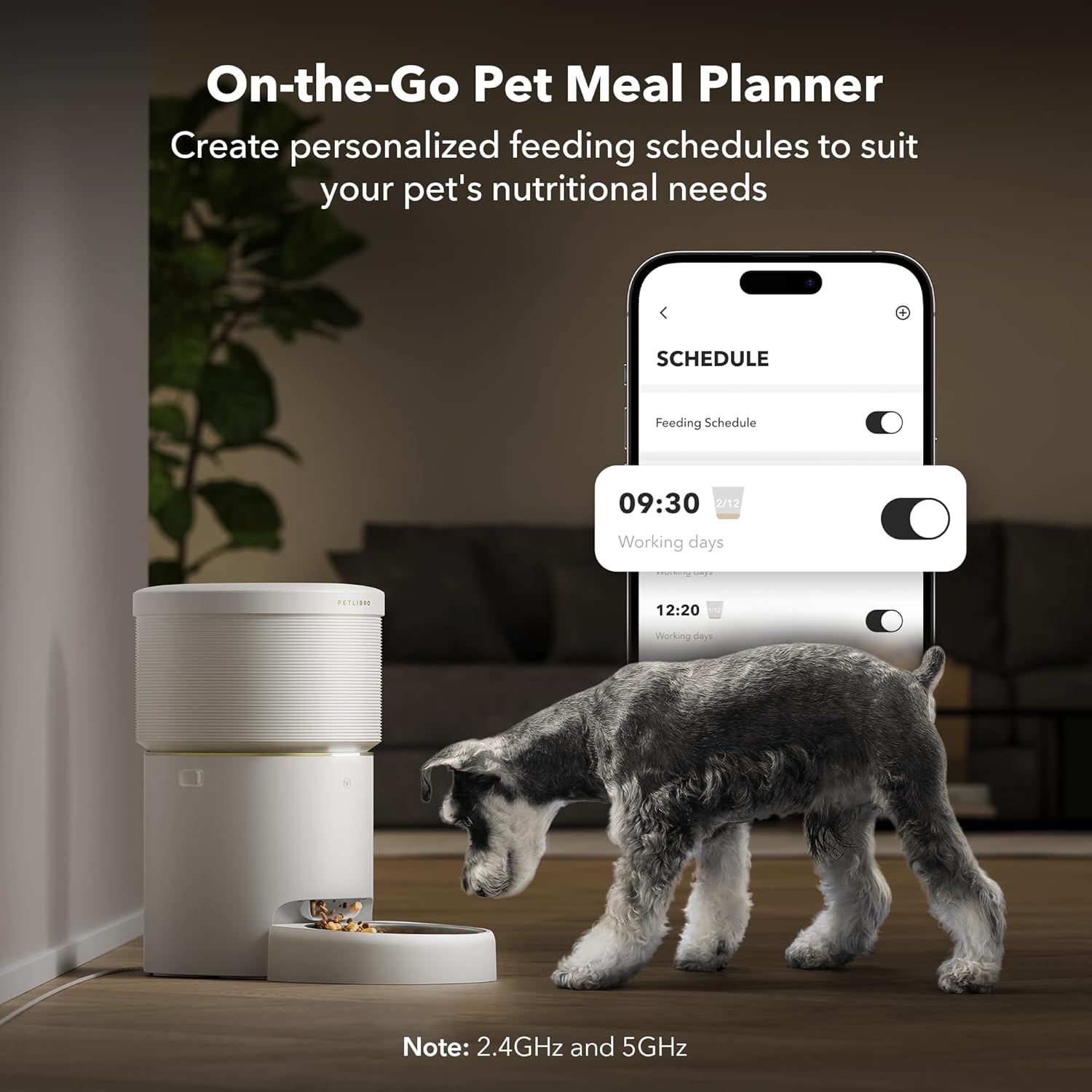
Image: A smartphone displaying the PETLIBRO app's meal planning interface, with the feeder and a dog in the background, indicating remote control capabilities.
5. Initial Vacuum Sealing
After filling the tank, the feeder's unique vacuum sealing technology will activate, creating a -20KPa low-pressure, low-oxygen environment. This inhibits oxidation and keeps the food fresh. You can also manually initiate vacuum sealing via the app or a button on the feeder.

Image: An internal diagram of the PETLIBRO feeder, highlighting the vacuum-sealing mechanism that preserves food freshness.
คำแนะนำการใช้งาน
1. Setting Feeding Schedules via App
Use the PETLIBRO App to program your pet's meals. You can set up 1 to 10 meals per day, with each meal consisting of up to 48 portions (1/12 cup each). The app allows for flexible scheduling from anywhere, anytime.
- Open the PETLIBRO App and select your feeder.
- ไปที่ส่วน "ตารางเวลา"
- เพิ่มเวลาให้อาหารใหม่และระบุจำนวนส่วนสำหรับแต่ละมื้อ
- บันทึกตารางเวลาของคุณ เครื่องให้อาหารจะจ่ายอาหารโดยอัตโนมัติตามเวลาที่ตั้งโปรแกรมไว้

Image: The PETLIBRO app interface on a smartphone, displaying the daily feeding schedule and logs of dispensed meals.
2. การให้อาหารด้วยตนเอง
You can manually dispense food at any time using the app's "Feed Now" function. This is useful for extra treats or if your pet needs an unscheduled meal.
3. การบันทึกเสียง
Record a personalized voice message (up to 10 custom recordings) through the app. This message will play at each scheduled feeding time to entice your pet to eat.
4. Monitoring and Notifications
The app provides real-time monitoring of feeding status and sends smart notifications for events such as successful feedings, low food alerts, or any system malfunctions (e.g., air pump failure).
Video: An official product video demonstrating the features and operation of the PETLIBRO Space Automatic Pet Feeder, including its vacuum-sealing function and app control.
การซ่อมบำรุง
1. Cleaning the Food Bowl
The stainless steel food bowl is removable for easy cleaning. It is recommended to hand wash the bowl regularly with mild soap and water, then dry thoroughly before reattaching.
2. Cleaning the Feeder Unit
เช็ดทำความสะอาดด้านนอกของที่ให้อาหารด้วยผ้าเนื้อนุ่มและแห้งamp cloth. Do not submerge the main unit in water. Ensure the food outlet and internal components are free from kibble residue to prevent blockages.
3. Battery Replacement (if applicable)
If using backup batteries, replace them every 6 months to ensure continuous operation during power outagใช่
การแก้ไขปัญหา
- อาหารไม่ไหลออกมา:
Check if the food tank is empty. Ensure kibble size is within the 2-18mm range. Large or irregularly shaped kibble can cause blockages. Clear any obstructions in the food outlet. If dispensing very small amounts, the feeder might report success without actual dispensing; manually check the bowl.
- Vacuum Pump Failure:
If you receive an "Air pump failure" notification, ensure the lid is properly sealed and there are no foreign objects obstructing the vacuum mechanism. Contact customer support if the issue persists.
- ปัญหาการเชื่อมต่อแอพ:
Ensure your Wi-Fi network is stable and both 2.4GHz and 5GHz bands are supported. Restart your router and the feeder. Re-pair the device with the app if necessary.
- Low Food Monitor Not Working:
Regularly check the food level manually. If the sensor is consistently inaccurate, ensure the food tank is clean and free of debris that might interfere with the sensor.
For persistent issues not covered here, please refer to the detailed troubleshooting section in the full user guide or contact PETLIBRO customer support.
ข้อมูลจำเพาะผลิตภัณฑ์
| น้ำหนักสินค้า | 11.53 ปอนด์ |
| ขนาดรายการ (LxWxH) | 10.8 x 12 x 19.8 นิ้ว |
| ความจุถังอาหาร | 8L (34 ถ้วย) |
| ความเข้ากันได้ของขนาด Kibble | เส้นผ่านศูนย์กลาง 2-18 มม |
| วัสดุ | ชามสแตนเลส |
| สี | สีขาว |
| การเชื่อมต่อ | 5G Wi-Fi, 2.4GHz Wi-Fi |
| ผู้ผลิต | เพทลิโบร |
| ชื่อรุ่น | Automatic Cat Feeder Space |
การรับประกันและการสนับสนุน
The PETLIBRO Automatic Pet Feeder comes with a รับประกัน 24 เดือน นับจากวันที่ซื้อ การรับประกันนี้ครอบคลุมถึงข้อบกพร่องจากการผลิตและการทำงานผิดปกติภายใต้การใช้งานปกติ
For warranty claims, technical support, or any product-related inquiries, please contact PETLIBRO customer service. Keep your purchase receipt as proof of purchase for warranty validation.
You can often find contact information on the official PETLIBRO website or through the PETLIBRO App.


