1. บทนำ
This manual provides essential instructions for the safe and efficient operation of your SolaMr CM120A MPPT Solar Charge Controller. Please read this manual thoroughly before installation and use to ensure proper functionality and longevity of the product. This controller is designed to optimize power harvesting from solar panels and manage battery charging for 12V, 24V, 36V, and 48V systems, supporting various battery types including Gel, Sealed, Flooded, and Lithium (LiFePO4).

Figure 1: SolaMr CM120A MPPT Solar Charge Controller.
2. คำแนะนำด้านความปลอดภัย
ปฏิบัติตามข้อควรระวังด้านความปลอดภัยต่อไปนี้เสมอระหว่างการติดตั้งและการใช้งาน:
- ตรวจสอบให้แน่ใจว่าการเชื่อมต่อทั้งหมดถูกต้องและแน่นหนาดีแล้วก่อนที่จะจ่ายไฟ
- ห้ามถอดประกอบหรือพยายามซ่อมแซมตัวควบคุมด้วยตนเอง โปรดติดต่อช่างผู้ชำนาญการเพื่อขอรับบริการ
- ติดตั้งตัวควบคุมในบริเวณที่มีอากาศถ่ายเทสะดวก ห่างจากวัสดุไวไฟและแสงแดดโดยตรง
- สวมอุปกรณ์ป้องกันส่วนบุคคล (PPE) ที่เหมาะสม เช่น ถุงมือและอุปกรณ์ป้องกันดวงตาในระหว่างการติดตั้ง
- Ensure the battery bank is properly fused and protected.
- ปริมาณสูงtages can be present at the solar panel input terminals; exercise extreme caution.

Figure 2: The controller features an 8-in-1 protection system for enhanced safety.
3. คุณสมบัติของผลิตภัณฑ์
The SolaMr CM120A MPPT Solar Charge Controller offers advanced features for efficient solar power management:
- High Efficiency MPPT Tracking: Achieves up to 99.9% tracking efficiency, boosting energy utilization by 25%-30% compared to traditional PWM controllers.
- ระบบอัตโนมัติ Vol.tagการรับรองทางอิเล็กทรอนิกส์: Automatically detects 12V, 24V, 36V, or 48V system voltage.
- ความเข้ากันได้กับแบตเตอรี่หลากหลายประเภท: Supports 5 battery modes (USER, FLD, GEL, SLD, Li) for Gel, Sealed, Flooded, and Lithium (LiFePO4) batteries. Customizable charging parameters for USER/Li modes.
- Comprehensive Protection System: Includes 8 protection functions: Short Circuit, Over Discharge, Overcharge, Overcurrent, Open Circuit, Reverse Connection, Over Temperature, and TVS lightning protection.
- การออกแบบที่แข็งแกร่ง: Operates reliably in temperatures from -10℃ to +65℃, featuring a robust metal casing and dual high-speed fans for heat dissipation.
- จอแสดงผล LCD ที่ชัดเจน: Provides real-time data, battery status, and fault alerts for easy monitoring and troubleshooting.
- การจัดการโหลดอัจฉริยะ: Offers 3 working modes: Light Control (auto on/off), 24H Always-On, and Manual mode, with Low Voltage Disconnect protection.
- 0V Lithium Battery Activation: Supports activation of 0V lithium batteries.

Figure 3: Key features including 99% efficiency, IP21 waterproof rating, and low no-load loss.
4. สินค้าหมดview
The SolaMr CM120A controller is designed for ease of use and durability. Below are diagrams illustrating its physical dimensions and internal structure.
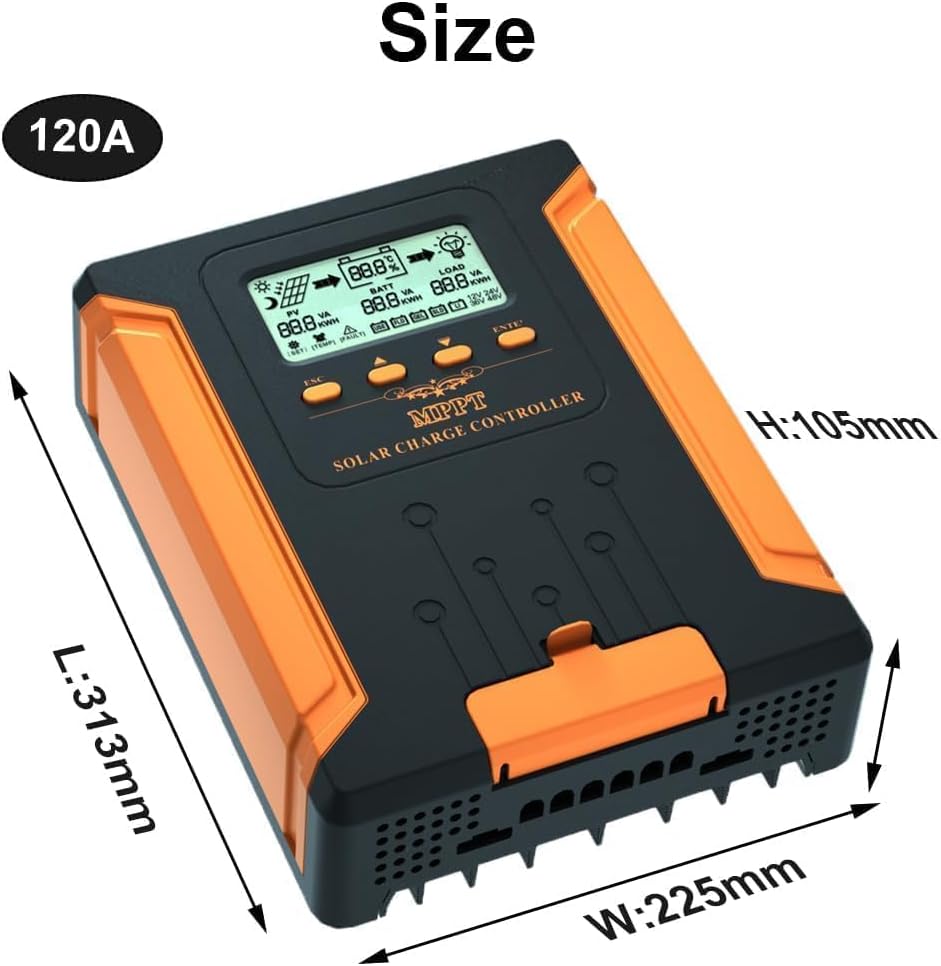
Figure 4: Dimensions of the CM120A controller (L: 313mm, W: 225mm, H: 105mm).

รูปที่ 5: ระเบิด view showing the internal components and robust construction.
5. การตั้งค่าและการติดตั้ง
Follow these steps for proper installation of your SolaMr CM120A MPPT Solar Charge Controller:
- การติดตั้ง: Choose a suitable location for mounting the controller. Ensure it is a dry, well-ventilated area, protected from direct sunlight and moisture. Leave adequate space around the controller for air circulation and heat dissipation.
- Wiring the Battery: Connect the battery to the controller first. Ensure correct polarity (+ to + and - to -). This step is crucial for the controller to detect the system voltage.
- Wiring Solar Panels: Connect the solar panels to the controller. Ensure correct polarity. Do not exceed the maximum open circuit voltage (Voc) or maximum input power specified in the technical parameters.
- การเชื่อมต่อโหลด: Connect your DC loads to the load terminals of the controller. Ensure correct polarity. The load output is protected by the controller's internal circuitry.
Always connect the battery first, then the solar panels, and finally the load. Disconnect in the reverse order.

Figure 6: Step-by-step wiring diagram for battery, solar panels, and load connections.
6. คู่มือการใช้งาน
Once installed, the controller will automatically detect the system voltage and begin charging. The LCD screen provides real-time system status.
อินเทอร์เฟซหน้าจอ LCD 6.1
The LCD displays various parameters including PV voltage, ปริมาณแบตเตอรี่tage, load current, charging status, and fault indicators.

รูปที่ 7: รายละเอียด view of the LCD main interface, showing icons for PV, battery, load, and various parameters.
6.2 ฟังก์ชันปุ่ม
The controller features four buttons for navigation and settings adjustment:
- เอสซีเอส: Main interface page up parameters; parameters are added upwards in setup mode.
- สวิตช์โหลด: Manual switch for load output; exits settings interface.
- Enter/Set: Main interface page look down parameters; setting up mode parameters.
- Confirm/Save: Enters settings/confirms/saves changes. Exits setup after 10 seconds of no key operation.

Figure 8: Illustration of the controller's buttons and their respective functions.
7. Battery Modes and Settings
The controller supports various battery types and allows for custom parameter settings.
7.1 ประเภทแบตเตอรี่ที่รองรับ
The CM120A automatically recognizes system voltage and supports the following battery types:
- เอฟแอลดี: แบตเตอรี่แบบเปียก
- เจล: แบตเตอรี่เจล
- เลื่อน: Sealed (AGM) batteries
- หลี่: Lithium (LiFePO4) batteries
- ผู้ใช้: User-defined settings for custom battery types.
In USER and Li modes, you can customize charging parameters such as Floating Voltage for optimal battery health. Refer to your battery manufacturer's specifications for recommended settings.

Figure 9: Supported battery types and the smart 4-stage charging process (Boost, Bulk, Floating, Equalize).
8. การจัดการภาระงาน
The controller offers intelligent load management with three distinct working modes:
- Light Control (01H-23H): The load automatically turns on at dusk and off at dawn. The 'H' value sets the duration the load remains on after dusk.
- 24H Always-On: The load output is continuously active (24 hours).
- โหมดแมนนวล (0 ชั่วโมง): The load can be manually switched on or off using the Load Switch button on the controller.
The controller also includes Low Voltage Disconnect (LVD) protection to safeguard your battery from over-discharge when powering loads.
9. การบำรุงรักษา
Regular maintenance ensures optimal performance and extends the lifespan of your solar charge controller:
- ตรวจสอบการเชื่อมต่อ: ตรวจสอบการเชื่อมต่อสายไฟทั้งหมดเป็นระยะๆ เพื่อความแน่นหนาและการกัดกร่อน การเชื่อมต่อที่หลวมอาจทำให้เกิดความร้อนสูงเกินไปและเกิดความเสียหายได้
- ทำความสะอาดตัวควบคุม: Keep the controller clean and free from dust and debris. Ensure the cooling fans and vents are unobstructed to maintain proper heat dissipation.
- ตรวจสอบความเสียหาย: Inspect the controller for any physical damage, such as cracks or loose parts.
- ประสิทธิภาพการทำงานของจอภาพ: Regularly check the LCD display for normal operation and any fault indicators.
- การตรวจสอบแบตเตอรี่: Ensure batteries are well-maintained according to their manufacturer's guidelines.
10 การแก้ไขปัญหา
หัวข้อนี้ให้แนวทางแก้ไขปัญหาทั่วไปที่คุณอาจพบเจอ
| ปัญหา | สาเหตุที่เป็นไปได้ | สารละลาย |
|---|---|---|
| คอนโทรลเลอร์ไม่เปิดเครื่อง | แบตเตอรี่ไม่ได้เชื่อมต่อหรือระดับเสียงต่ำtage; ขั้วกลับด้าน | Ensure battery is connected first with correct polarity and sufficient voltage. |
| ไม่มีกระแสชาร์จ | Solar panels not connected; low sunlight; PV reverse polarity; PV voltage ต่ำ/สูงเกินไป | Check solar panel connections and polarity. Verify adequate sunlight. Ensure PV voltage อยู่ภายในช่วงการทำงานของตัวควบคุม |
| โหลดไม่ทำงาน | Load output disabled; battery low voltage disconnect (LVD); load reverse polarity. | Check load settings (manual/auto). Ensure battery voltage is above LVD. Verify load connections and polarity. |
| เตือนอุณหภูมิเกิน | Poor ventilation; overloaded controller. | Ensure adequate airflow around the controller. Reduce load or solar input if consistently overheating. |
11. ข้อมูลจำเพาะ
Technical specifications for the SolaMr CM120A MPPT Solar Charge Controller:
| พารามิเตอร์ | Value (CM120A) |
|---|---|
| เล่มระบบtage | อัตโนมัติ 12V/24V/36V/48V |
| แม็กซ์ อินพุตพลังงานแสงอาทิตย์Voltage | 180V (25℃), 150V (-25℃) |
| ปริมาณแบตเตอรี่tagอี เรนจ์ | 9-64โวลต์ |
| แม็กซ์ พาวเวอร์พอยต์ เล่มtagอี เรนจ์ | ปริมาณแบตเตอรี่tage +2V ~ 150V |
| จัดอันดับการชาร์จปัจจุบัน | 120เอ |
| จัดอันดับโหลดปัจจุบัน | 40เอ |
| Max. Photovoltaic System Input Power | 12V: 1440W; 24V: 2880W; 36V: 4320W; 48V: 5760W |
| ประสิทธิภาพการแปลง | ≤98% |
| ประสิทธิภาพการติดตาม MPPT | >99% |
| ปัจจัยการชดเชยอุณหภูมิ | -2mV/℃/2V (ค่าเริ่มต้น) |
| อุณหภูมิในการทำงาน | -10℃ ถึง +65℃ |
| ระดับการกันน้ำ | IP21 |
| ไม่มีการสูญเสียโหลด | ≤0.4วัตต์ |
| ขนาด (กว้าง x ยาว x สูง) | 313มม. x 225มม. x 105มม. |
| น้ำหนักสินค้า | 7 ปอนด์ |
12. การรับประกันและการสนับสนุน
SolaMr stands behind the quality of its products. For any questions regarding your charge controller, system sizing, wiring, or troubleshooting, please contact our professional after-sales support team. We are committed to providing prompt assistance and ensuring your satisfaction.
Please refer to your purchase documentation for specific warranty terms and conditions. For support, visit the official SolaMr store or contact customer service through your retailer.
วิดีโอ 1: จบแล้วview of the SolaMr MPPT Solar Charge Controller, demonstrating its features and benefits.
Video 2: A demonstration of the controller's functionality and user interface.
Video 3: Detailed explanation of the installation process and wiring connections.