การแนะนำ
This user manual provides comprehensive instructions for the VITCOCO Wireless 360° Visible Otoscope Ear Cleaner. This device is designed to assist in ear wax removal and visual inspection of the ear canal, suitable for use by adults, children (with adult supervision), and even pets. It features a high-definition camera, LED illumination, and broad compatibility with mobile devices.
สินค้าเกินview และบรรจุภัณฑ์
The VITCOCO Ear Wax Removal Kit includes the main otoscope device, various ear cleaning tools, and a charging cable. Familiarize yourself with all components before use.

ภาพ: เหนือview of the VITCOCO Ear Wax Removal Kit, showing the otoscope, various ear cleaning tools, charging cable, and a mobile phone displaying the camera feed.
คุณสมบัติหลัก:
- กล้อง HD: Equipped with 6 high-brightness LED lights, a 3.5mm inner diameter lens, and a 1080P full HD camera for improved brightness and clarity within the ear canal.
- 360° Wide Angle & IP67 Waterproof: Features a transparent optical refraction design with 6 adjustable LED lights for clear and bright images. The lens is IP67 waterproof for easy cleaning.
- การใช้งานอเนกประสงค์: Beyond ear wax removal, the camera can be used to observe other body parts such as nasal passages, throat, and teeth.
- Type-C Rechargeable & Safe: Built-in fast Type-C charging port for quick charging (30 minutes for ultra-long standby). An intelligent temperature control chip prevents overheating of the lens.
- การเชื่อมต่อที่ง่ายดาย: Compatible with Android and iOS systems, connecting via Wi-Fi through a dedicated application.
คู่มือการติดตั้ง
Follow these steps to set up your VITCOCO Ear Wax Removal Kit:
- ดาวน์โหลดใบสมัคร: Scan the QR code provided in the product manual or search for the official VITCOCO app on your device's app store (compatible with Android and iOS). Install the application.
- เปิดเครื่อง: Press and hold the power button on the otoscope until the indicator light turns on.
- เชื่อมต่อกับ Wi-Fi: On your mobile device, go to Wi-Fi settings and connect to the Wi-Fi network broadcast by the otoscope. The network name typically starts with "VITCOCO" or similar.
- เปิดแอป: Launch the VITCOCO application. The live view from the otoscope camera should appear.

Image: The otoscope demonstrating its high compatibility with various mobile devices, including smartphones and tablets, for easy connection.
คำแนะนำการใช้งาน
Once connected, you can begin using your otoscope:
- การตรวจสอบภาพ: Gently insert the otoscope into the ear canal. Observe the live feed on your connected device to inspect the ear.
- การกำจัดขี้หู: Attach an appropriate ear spoon or tool to the otoscope. Using the live visual guide, carefully and gently remove ear wax. Always exercise extreme caution to avoid injury.
- การบันทึกภาพ/วิดีโอ: The application allows you to capture still images or record videos of the ear canal for later review or consultation with a medical professional.
- การใช้งานอเนกประสงค์: The device can also be used for inspecting other areas such as the nasal passages, throat, or teeth.

Image: An otoscope in use, showing the internal view of an ear canal displayed on a smartphone, highlighting its visual inspection capability.

Image: The otoscope being used near a baby's ear, illustrating its safe design with soft silicone tips suitable for sensitive users.
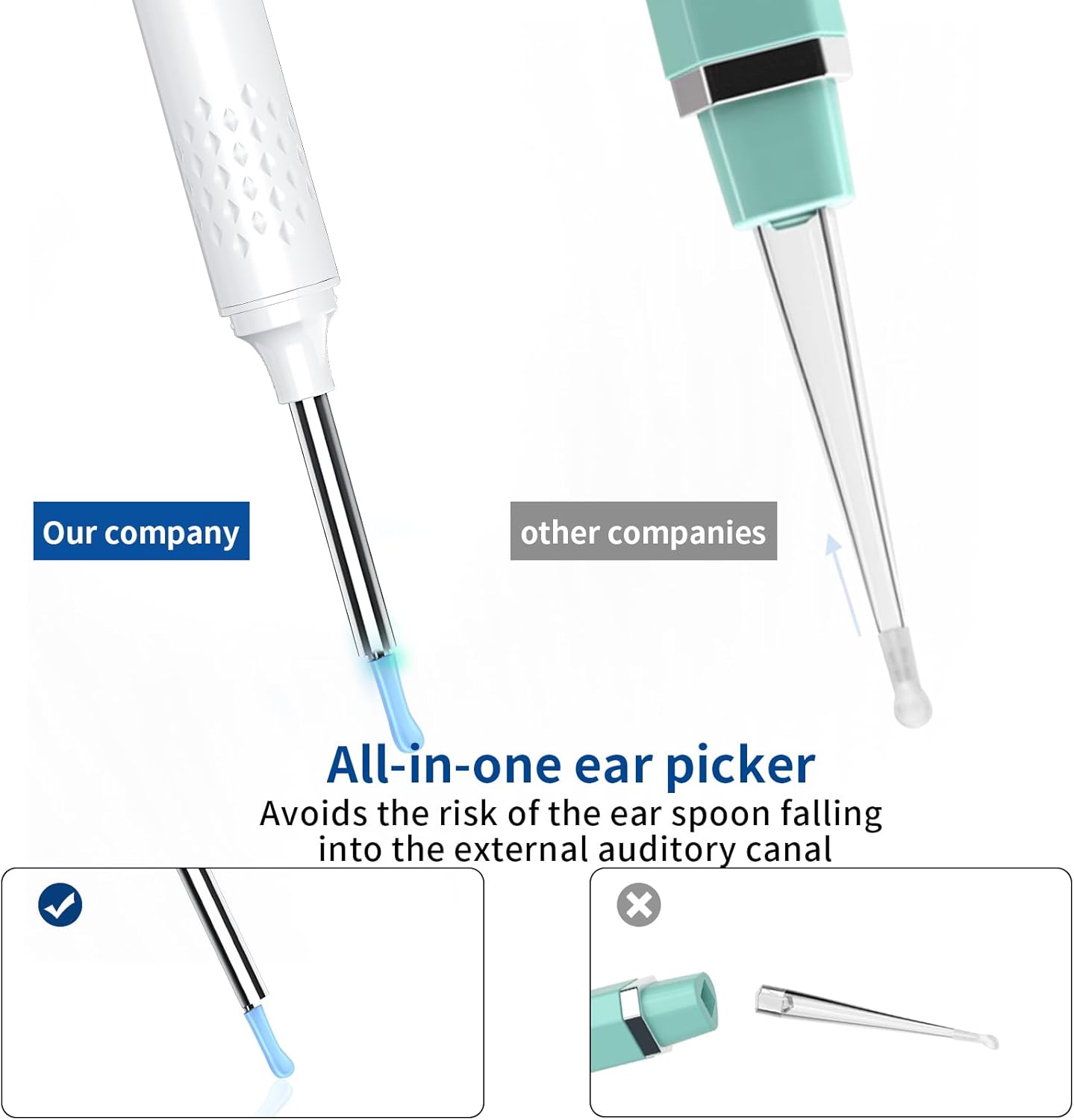
Image: A visual comparison highlighting the "all-in-one ear picker" design of the VITCOCO otoscope, which integrates the ear spoon to prevent it from falling into the ear canal, unlike other designs.
การซ่อมบำรุง
การบำรุงรักษาอย่างถูกวิธีจะช่วยให้เครื่องมือของคุณใช้งานได้ยาวนานและสะอาดถูกสุขอนามัย:
- การทำความสะอาดเลนส์: The otoscope lens is IP67 waterproof. After each use, the lens can be wiped clean with water or alcohol.
- หมายเหตุสำคัญ: Only the lens part of the device is waterproof. The main body of the otoscope is not waterproof. Avoid submerging the entire device in water.
- พื้นที่จัดเก็บ: เก็บอุปกรณ์ไว้ในที่สะอาดและแห้ง หลีกเลี่ยงแสงแดดโดยตรงและอุณหภูมิที่สูงหรือต่ำเกินไป
- การชาร์จ: Recharge the device using the provided Type-C cable when the battery is low.

Image: The otoscope lens being cleaned with water, illustrating its IP67 waterproof rating. A note below clarifies that only the lens is waterproof, not the entire body.
การแก้ไขปัญหา
If you encounter issues with your VITCOCO Ear Wax Removal Kit, refer to the following common problems and solutions:
| ปัญหา | สาเหตุที่เป็นไปได้ / วิธีแก้ไข |
|---|---|
| อุปกรณ์ไม่เปิดเครื่อง | Battery may be depleted. Charge the device using the Type-C cable for at least 30 minutes. |
| ไม่สามารถเชื่อมต่อ Wi-Fi ได้ |
|
| No image or blurry image in the app. |
|
| แอปพลิเคชันขัดข้องหรือหยุดทำงาน |
|
ข้อมูลจำเพาะ
| คุณสมบัติ | รายละเอียด |
|---|---|
| หมายเลขรุ่น | AX-DE-N30-W |
| ความละเอียดของกล้อง | 1080P Full HD |
| เส้นผ่านศูนย์กลางเลนส์ | 3.5มม. |
| ไฟ LED | ไฟ LED ความสว่างสูง 6 ดวง |
| ระดับการกันน้ำ | มาตรฐาน IP67 (เฉพาะเลนส์) |
| พอร์ตชาร์จ | ประเภทซี |
| เวลาในการชาร์จ | ประมาณ 30 นาที |
| ประเภทแบตเตอรี่ | แบตเตอรี่ลิเธียมไอออน 1 ก้อน (จำเป็น) |
| ความเข้ากันได้ | แอนดรอยด์, ไอโอเอส |
| ขนาดพัสดุ | 28.8 x 6.5 x 1.9 ซม.; 70 กรัม |
| ผู้ผลิต | วิทโคโค่ |

Image: A detailed diagram illustrating the 3.5mm camera diameter of the otoscope and a cutaway view of its internal lens components, highlighting its 1920 HD quality.
ข้อมูลด้านความปลอดภัย
โปรดอ่านและปฏิบัติตามแนวทางความปลอดภัยต่อไปนี้:
- การดูแลผู้ใหญ่: Children must use the otoscope only when accompanied and supervised by an adult.
- การใช้งานอย่างอ่อนโยน: Always insert the otoscope and ear tools gently into the ear canal. Avoid excessive force or deep insertion to prevent injury.
- การควบคุมอุณหภูมิ: The device features an intelligent temperature control chip to prevent the lens from overheating. However, if the device feels uncomfortably warm, discontinue use immediately.
- Not for Medical Diagnosis: This device is for personal inspection and ear wax removal. It is not intended for medical diagnosis or treatment of ear conditions. Consult a healthcare professional for any ear pain, discomfort, or suspected medical issues.
- ความสะอาด : Ensure the ear spoons and otoscope lens are clean before and after each use to prevent infection.
- หลีกเลี่ยงการแช่น้ำ: Only the lens is waterproof. Do not immerse the main body of the device in water.
การรับประกันและการสนับสนุน
For warranty information or technical support, please refer to the contact details provided with your product packaging or visit the official VITCOCO webไซต์ โปรดเก็บใบเสร็จรับเงินของคุณไว้เป็นหลักฐานการซื้อสำหรับการเรียกร้องการรับประกันใดๆ


