1. บทนำ
This manual provides essential instructions for the installation, operation, and maintenance of your Seagate Exos X18 ST18000NM000J 18 TB Hard Drive. Please read this manual thoroughly before using the product to ensure proper functionality and to prevent data loss or damage.
2. ข้อมูลด้านความปลอดภัย
Observe the following safety precautions to prevent injury or damage to the drive and connected equipment:
- การป้องกันไฟฟ้าสถิต (ESD): Always handle the hard drive by its edges. Wear an anti-static wrist strap or frequently touch a grounded metal object before handling the drive to discharge static electricity.
- การตัดการเชื่อมต่อไฟฟ้า: Ensure all power to the computer system is disconnected before installing or removing the hard drive.
- การจัดการทางกายภาพ: Avoid dropping or subjecting the drive to impact. Hard drives are delicate precision instruments.
- การระบายอากาศ : Ensure adequate airflow around the drive when installed to prevent overheating.
- แหล่งจ่ายไฟ: Use a power supply that meets the specifications required by your computer system and the hard drive.
3. เนื้อหาบรรจุภัณฑ์
ตรวจสอบว่าแพ็คเกจของคุณมีรายการต่อไปนี้:
- Seagate Exos X18 ST18000NM000J 18 TB Hard Drive
- Documentation (this user manual, if provided in print)

Image 3.1: Seagate Exos X18 18 TB Hard Drive sealed in an anti-static bag, as typically received in packaging.
4. การตั้งค่า
4.1 การติดตั้งทางกายภาพ
The Seagate Exos X18 is a 3.5-inch internal hard drive designed for desktop computers or server enclosures. Follow these general steps for installation:
- Prepare System: Power down your computer and disconnect the power cable. Open the computer case.
- ค้นหาอ่าว: ตรวจสอบหาช่องใส่ไดรฟ์ขนาด 3.5 นิ้วที่ว่างอยู่ภายในเคสคอมพิวเตอร์ของคุณ
- ติดตั้งไดรฟ์: Slide the hard drive into the drive bay. Secure it with screws on both sides, ensuring it is firmly seated.

ภาพที่ 4.1: ด้านบนและด้านล่าง view of the Seagate Exos X18 18 TB Hard Drive, showing the label side and the circuit board side with connectors.
4.2 การเชื่อมต่อระบบ
Connect the drive to your motherboard and power supply:
- SATA Data Cable: Connect one end of a SATA data cable to the smaller port on the hard drive and the other end to an available SATA port on your motherboard.
- SATA Power Cable: Connect a SATA power cable from your power supply to the larger port on the hard drive.
- ปิดคดี: Once connections are secure, close your computer case and reconnect the power cable.
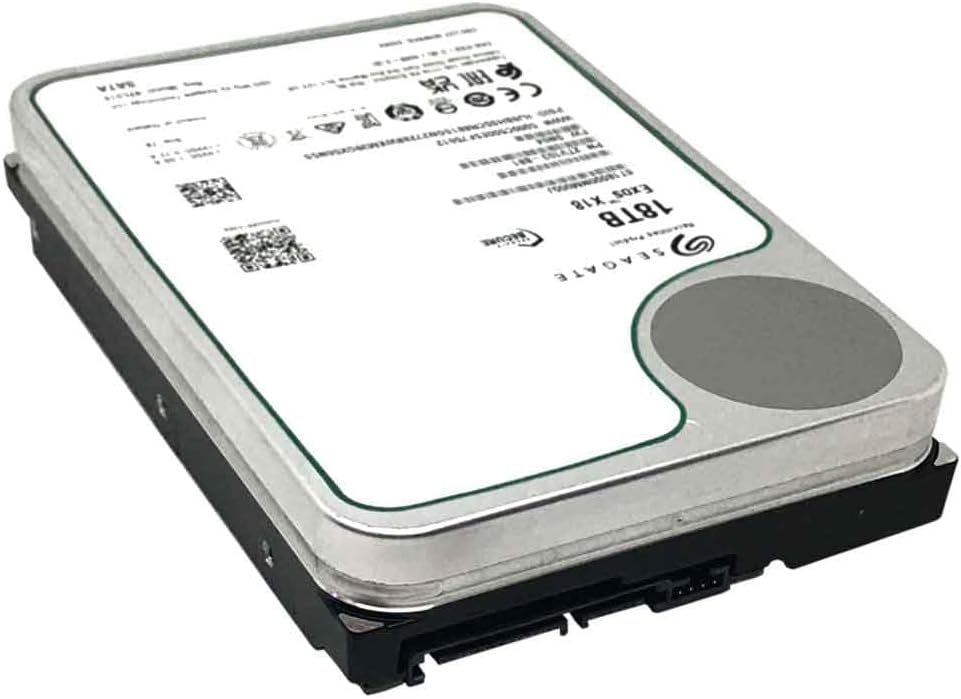
ภาพที่ 4.2: มุม view of the Seagate Exos X18 18 TB Hard Drive, highlighting the SATA data and power connectors at the rear.

ภาพที่ 4.3: ด้านหน้า view of the Seagate Exos X18 18 TB Hard Drive, clearly showing the standard SATA data and power interface.
5. ปฏิบัติการ
5.1 การตั้งค่าและการจัดรูปแบบเบื้องต้น
After physical installation, the drive needs to be initialized and formatted by your operating system before use.
- หน้าต่าง: Boot your computer. Right-click on the Start button, select "Disk Management." Locate the new drive (it will likely appear as "Unallocated Space"). Right-click on it, select "Initialize Disk," then "New Simple Volume" to format it with a file ระบบ (เช่น NTFS)
- ลินุกซ์: Use utilities like
fdisk,gparted, หรือpartedto partition and format the drive. Common file systems include ext4, XFS. - MacOS: Open "Disk Utility" (Applications > Utilities). Select the new drive, then click "Erase" to format it with a suitable file system (e.g., APFS, HFS+).
5.2 การถ่ายโอนข้อมูล
Once formatted, the drive will appear as a new storage volume. You can now drag and drop files, install applications, or configure it for server storage roles as needed.
6. การบำรุงรักษา
Regular maintenance helps ensure the longevity and reliability of your hard drive:
- การสำรองข้อมูล: Regularly back up critical data to another storage device. No storage device is infallible.
- การติดตามสุขภาพไดรฟ์: ใช้เครื่องมือ SMART (Self-Monitoring, Analysis and Reporting Technology) ที่มีอยู่ในระบบปฏิบัติการของคุณหรือซอฟต์แวร์ของบริษัทอื่นเพื่อตรวจสอบสถานะสุขภาพของไดรฟ์
- ปิดระบบ: Always shut down your computer properly to prevent data corruption.
- สภาพแวดล้อมทางกายภาพ: Maintain a stable operating environment, avoiding extreme temperatures, humidity, and vibrations.
7 การแก้ไขปัญหา
หากคุณพบปัญหา โปรดดูปัญหาทั่วไปและวิธีแก้ไขต่อไปนี้:
| ปัญหา | สาเหตุที่เป็นไปได้ | สารละลาย |
|---|---|---|
| Drive not detected by BIOS/UEFI or OS. | Loose cables, incorrect BIOS settings, faulty drive. | Check SATA data and power cable connections. Verify BIOS/UEFI settings for SATA port enablement. Test drive in another system if possible. |
| Drive detected but shows "Unallocated Space." | Drive not initialized or formatted. | Initialize and format the drive using Disk Management (Windows), Disk Utility (macOS), or partitioning tools (Linux). |
| ประสิทธิภาพการทำงานช้า | Fragmented data, failing drive, incorrect SATA mode. | Defragment the drive (if applicable). Check S.M.A.R.T. status. Ensure SATA controller is in AHCI mode in BIOS/UEFI. |
| Unusual noises from the drive. | ความล้มเหลวทางกล | Immediately back up all data. The drive may be failing. Contact Seagate support. |
8. ข้อมูลจำเพาะ
Key technical specifications for the Seagate Exos X18 ST18000NM000J 18 TB Hard Drive:
| หมายเลขรุ่น | ST18000NM000J |
| ความจุ | 18TB |
| อินเทอร์เฟซ | SATA 6Gb/s (SATA/600) |
| ฟอร์มแฟกเตอร์ | 3.5 นิ้ว |
| ความเร็วในการหมุน | 7200 รอบต่อนาที |
| ขนาด (กว้าง x ยาว x สูง) | 5 x 6 x 1 นิ้ว (147 x 101.85 x 26.1 มม.) |
| น้ำหนัก | 1.75 ปอนด์ (794 กรัม) |
| ระยะเวลาเฉลี่ยระหว่างความล้มเหลว (MTBF) | 2.5 ล้านชั่วโมง |
For product authenticity verification, visit the official Seagate verification page: Seagate Product Verification
9. การรับประกันและการสนับสนุน
This product is covered by a limited warranty provided by Seagate. For detailed warranty terms, conditions, and to register your product, please visit the official Seagate website. Technical support and additional resources are also available through their support portal.
- ฝ่ายสนับสนุนของ Seagate: www.seagate.com/support/
- ข้อมูลการรับประกัน: Refer to the warranty statement provided with your purchase or on the Seagate webเว็บไซต์.
10. การปฏิบัติตามกฎข้อบังคับ
This device complies with relevant regulatory standards for electronic equipment. For specific compliance information, please refer to the product packaging or the official Seagate webเว็บไซต์.


