1. บทนำ
This manual provides essential information for the safe and efficient use of your DOOGEE T10W Android 14 Tablet. Please read this manual thoroughly before operating the device and retain it for future reference.

The DOOGEE T10W tablet features a sleek design with a light blue finish, showcasing its 10.1-inch display and rear camera module.
2. เนื้อหาบรรจุภัณฑ์
ตรวจสอบว่ามีสินค้าทั้งหมดอยู่ในกล่องผลิตภัณฑ์ของคุณ:
- DOOGEE T10W Tablet
- อะแดปเตอร์แปลงไฟ
- สายเคเบิล USB Type-C
- เครื่องมือถอดซิม
- คู่มือการใช้งาน
- บัตรรับประกัน
- Screen Protector Accessories (film)
This video demonstrates the unboxing process and the items included with the DOOGEE T10W Tablet, such as the tablet itself, charger, cable, and documentation.
3. อุปกรณ์โอเวอร์view
ลักษณะทางกายภาพ
- แสดง: 10.1-inch IPS HD (1280x800 pixels)
- กล้องถ่ายรูป: ด้านหน้า 5MP, ด้านหลัง 2MP
- พอร์ต: USB Type-C (charging/data), 3.5mm Audio Jack
- ปุ่ม: ปุ่มเปิด/ปิด, ปุ่มเพิ่ม/ลดเสียง
- วิทยากร: ลำโพงคู่
- ช่องใส่ซิมการ์ด/การ์ด SD: Supports 2 Nano SIMs or 1 Nano SIM + 1 TF Card (up to 1TB)
The tablet's physical features include a Type-C port, 3.5mm headphone jack, and dual speakers.
4. การตั้งค่า
4.1. การเปิด/ปิดเครื่อง
- การเปิดเครื่อง: Press and hold the Power Button until the DOOGEE logo appears.
- วิธีปิดเครื่อง: Press and hold the Power Button, then select 'Power Off' from the options.
- ในการรีสตาร์ท: Press and hold the Power Button, then select 'Restart' from the options.
4.2. การติดตั้งซิมการ์ดและการ์ด TF
The tablet supports dual Nano SIM cards or one Nano SIM card and one TF (Micro SD) card for storage expansion.
- หาช่องใส่ซิมการ์ด/การ์ด TF ที่ด้านข้างของแท็บเล็ต
- Insert the SIM Ejector Tool into the small hole next to the tray to open it.
- ใส่ซิมการ์ดนาโนและ/หรือการ์ด TF ลงในช่องที่กำหนดบนถาด ตรวจสอบให้แน่ใจว่าใส่ในทิศทางที่ถูกต้อง
- ค่อยๆ ดันถาดกลับเข้าไปในแท็บเล็ตจนกระทั่งล็อคเข้าที่

The SIM tray supports either two Nano SIM cards or one Nano SIM card and one TF card for flexible connectivity and storage options.
4.3. การกำหนดค่าเริ่มต้น
เมื่อเปิดเครื่องครั้งแรก ให้ทำตามคำแนะนำบนหน้าจอดังนี้:
- เลือกภาษาของคุณ
- เชื่อมต่อกับเครือข่าย Wi-Fi
- ลงชื่อเข้าใช้ด้วยบัญชี Google ของคุณหรือสร้างบัญชีใหม่
- ตั้งค่าการล็อคหน้าจอ (PIN, รูปแบบ, รหัสผ่าน หรือปลดล็อคด้วยใบหน้า)
5. คู่มือการใช้งาน
5.1. ระบบปฏิบัติการ Android 14
The DOOGEE T10W runs on the Android 14 operating system, offering features such as enhanced privacy controls, optimized multitasking, and a customizable user interface.

Running the latest Android 14 operating system, the tablet offers enhanced privacy controls, efficient multitasking with parallel view and taskbar, and an optimized landscape experience.
5.2. การเชื่อมต่อ
- 4G แอลทีอี: Insert a Nano SIM card to access 4G LTE mobile data and VoLTE calling.
- ไวไฟ : เชื่อมต่อกับเครือข่าย Wi-Fi 2.4GHz หรือ 5GHz เพื่อเข้าถึงอินเทอร์เน็ต
- Bluetooth 5.0: จับคู่กับอุปกรณ์บลูทูธ เช่น หูฟังหรือลำโพง
- จีพีเอส: Utilize GPS, Beidou, Galileo, and Glonass for navigation.

Stay connected with 4G LTE, dual-band Wi-Fi, and Bluetooth 5.0 for reliable communication and data transfer.
5.3. Multimedia and Display
- The 10.1-inch IPS HD display provides clear visuals for videos and browsing.
- Widevine L1 support allows for high-definition streaming from compatible services.
- Dual speakers deliver clear audio output. A 3.5mm audio jack is available for headphones.

The 10.1-inch IPS HD display offers a 1280x800 resolution and a wide viewปรับมุมมองเพื่อให้เห็นภาพชัดเจน

Widevine L1 certification enables secure playback of high-definition content from streaming services.
6. คุณสมบัติของกล้อง
The tablet is equipped with a 5MP front camera and a 2MP rear camera for photography and video calls.
- เปิดแอปกล้องจากหน้าจอหลักหรือลิ้นชักแอป
- สลับใช้งานระหว่างกล้องหน้าและกล้องหลังตามต้องการ
- แตะปุ่มชัตเตอร์เพื่อถ่ายภาพหรือเริ่ม/หยุดบันทึกวิดีโอ

The tablet features a 5MP main camera for capturing photos and a 2MP front camera for selfies and video calls.
7. การจัดการแบตเตอรี่
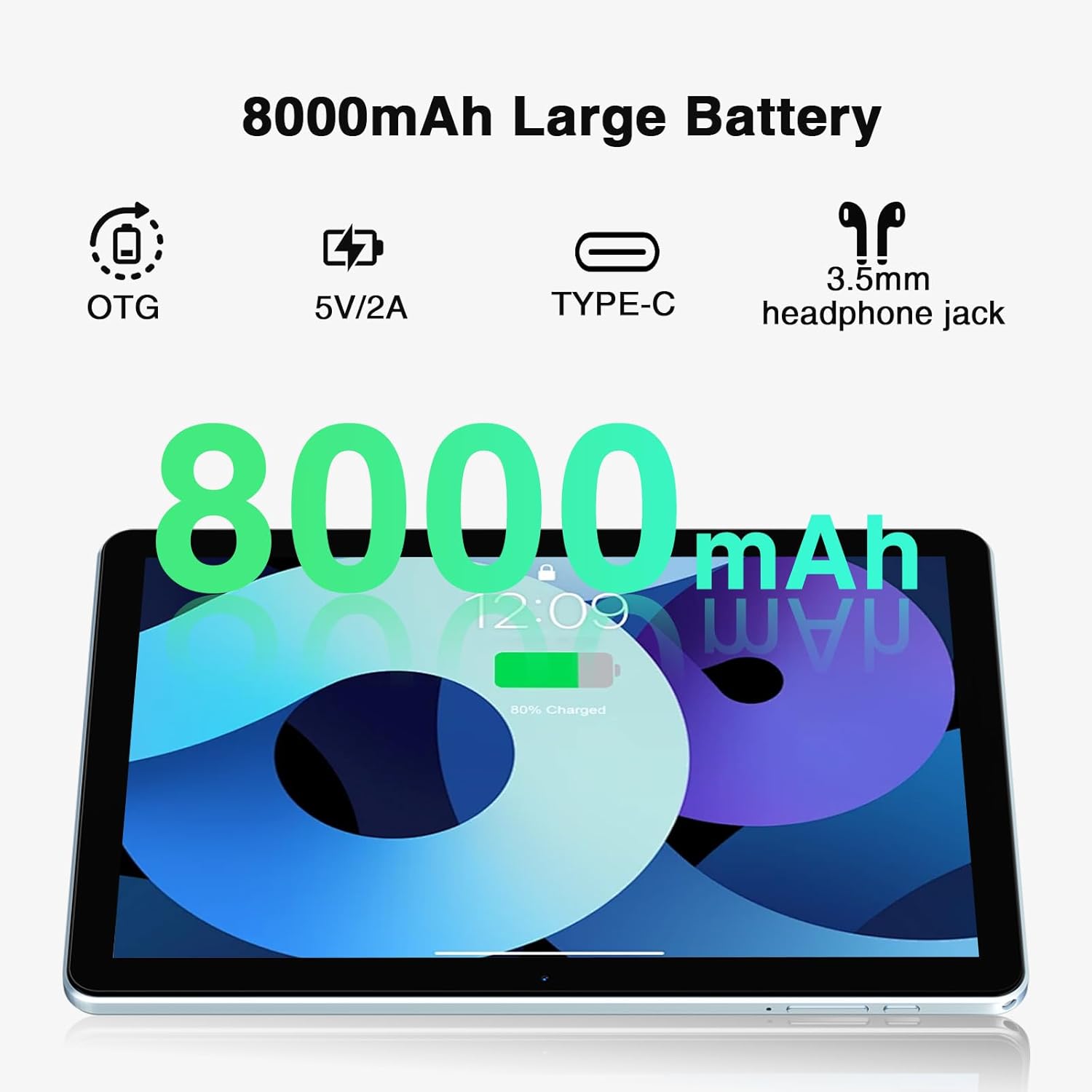
The DOOGEE T10W is powered by an 8000mAh battery.
- การชาร์จ: Use the provided power adapter and USB Type-C cable to charge the tablet.
- อายุการใช้งานแบตเตอรี่: The 8000mAh battery provides up to 700 hours of standby time, 16 hours of talk time, and 58 hours of music playback.
- การชาร์จแบบย้อนกลับ: The tablet supports reverse charging, allowing it to charge other devices.

The 8000mAh large capacity battery provides extended usage times, including up to 10 hours of gaming, 11 hours of video, and 720 hours of standby.
This video highlights the large battery capacity of the DOOGEE T10W Tablet and its ability to provide extended usage.
8. ข้อมูลจำเพาะ
| คุณสมบัติ | ข้อมูลจำเพาะ |
|---|---|
| แบบอย่าง | T10W |
| ระบบปฏิบัติการ | แอนดรอยด์ 14 |
| ขนาดจอแสดงผล | 10.1 นิ้ว |
| ความละเอียดหน้าจอ | 1280 x 800 พิกเซล (IPS HD) |
| โปรเซสเซอร์ | Octa-Core (Spreadtrum T310) |
| แรม | 9GB (4GB ทางกายภาพ + ขยาย 5GB) |
| การจัดเก็บข้อมูลภายใน | รอม 128GB |
| พื้นที่เก็บข้อมูลแบบขยายได้ | Up to 1TB (Micro SD/TF Card) |
| ความจุของแบตเตอรี่ | ลิเธียมไอออน 8000mAh |
| กล้องหลัง | 2MP |
| กล้องหน้า | 5MP |
| การเชื่อมต่อ | 4G LTE, 2.4GHz/5GHz Wi-Fi (802.11ac), Bluetooth 5.0 |
| การนำทาง | GPS, GLONASS, BDS, Galileo |
| ขนาด | 9.6 x 6.4 x 0.38 inches (9mm slim body) |
| น้ำหนัก | 1.96 ปอนด์ (555 กรัม) |
| คุณสมบัติเพิ่มเติม | Face Unlock, OTG, Widevine L1 Support |
9. การบำรุงรักษา
- ควรเก็บแท็บเล็ตให้ห่างจากอุณหภูมิที่สูงจัดและแสงแดดโดยตรง
- หลีกเลี่ยงการทำอุปกรณ์หล่นหรือกระแทกอย่างรุนแรง
- เช็ดหน้าจอด้วยผ้าเนื้อนุ่มที่ไม่เป็นขุย ห้ามใช้สารเคมีรุนแรง
- สำรองข้อมูลสำคัญเป็นประจำเพื่อป้องกันการสูญหาย
- Keep the software updated to the latest version for optimal performance and security.
10 การแก้ไขปัญหา
10.1. อุปกรณ์ไม่เปิด
- ตรวจสอบให้แน่ใจว่าแบตเตอรี่ชาร์จเต็มแล้ว เสียบแท็บเล็ตเข้ากับเครื่องชาร์จอย่างน้อย 30 นาที
- กดปุ่มเปิด/ปิดค้างไว้ 10-15 วินาทีเพื่อบังคับรีสตาร์ท
10.2. Poor Wi-Fi Connection
- Check if the Wi-Fi is enabled in Settings.
- ขยับเข้าไปใกล้เราเตอร์ Wi-Fi มากขึ้น
- รีสตาร์ทเราเตอร์ Wi-Fi และแท็บเล็ตของคุณ
10.3. แอปขัดข้องหรือหยุดทำงาน
- ปิดและเปิดแอปใหม่อีกครั้ง
- ล้างแคชและข้อมูลของแอปใน การตั้งค่า > แอป
- ตรวจสอบให้แน่ใจว่าแอปได้รับการอัปเดตเป็นเวอร์ชันล่าสุด
- รีสตาร์ทแท็บเล็ต
11. การรับประกันและการสนับสนุน
- รับประกันคืนเงินภายใน 30 วัน: สามารถคืนสินค้าได้ฟรีภายใน 30 วันนับจากวันที่ซื้อ
- การรับประกันจำกัด 2 ปี: ผลิตภัณฑ์ได้รับการคุ้มครองโดยการรับประกันแบบจำกัดเงื่อนไข 2 ปี
- การสนับสนุนออนไลน์ 24/7: For technical assistance or further inquiries, please contact DOOGEE customer support.


