1. บทนำ
Thank you for choosing the ecomoment GT801 Dash Cam. This device is designed to record your driving journey in high definition, providing crucial evidence in unexpected situations and enhancing your overall driving safety. This manual provides detailed instructions for installation, operation, maintenance, and troubleshooting to ensure optimal performance of your dash cam.
2. ข้อมูลด้านความปลอดภัย
- ตรวจสอบให้แน่ใจว่าติดตั้งกล้องติดรถยนต์ในตำแหน่งที่ไม่กีดขวางการขับขี่ view หรือรบกวนระบบความปลอดภัยของยานพาหนะ
- Use only the provided power cable and accessories to prevent damage to the device or vehicle.
- Do not attempt to disassemble or modify the dash cam. Unauthorized modifications will void the warranty.
- หลีกเลี่ยงการให้เครื่องสัมผัสกับอุณหภูมิที่สูงหรือต่ำเกินไป แสงแดดโดยตรงเป็นเวลานาน หรือความชื้นที่มากเกินไป
- Regularly check that the dash cam is securely mounted and functioning correctly.
3. เนื้อหาบรรจุภัณฑ์
โปรดตรวจสอบว่าสินค้าทั้งหมดที่ระบุไว้ด้านล่างนี้มีอยู่ในแพ็คเกจของคุณ:
- กล้องติดรถยนต์ ×1
- Rear camera (6M/20ft) ×1
- ฟิล์มไฟฟ้าสถิตx4
- Car Charging Cable (5V/1.5A) ×1
- Storage card x1 (64GB MicroSD card)
- คลิปหนีบสายไฟ ×5
- เครื่องมือแงะ ×1
- คู่มือการใช้งาน ×1
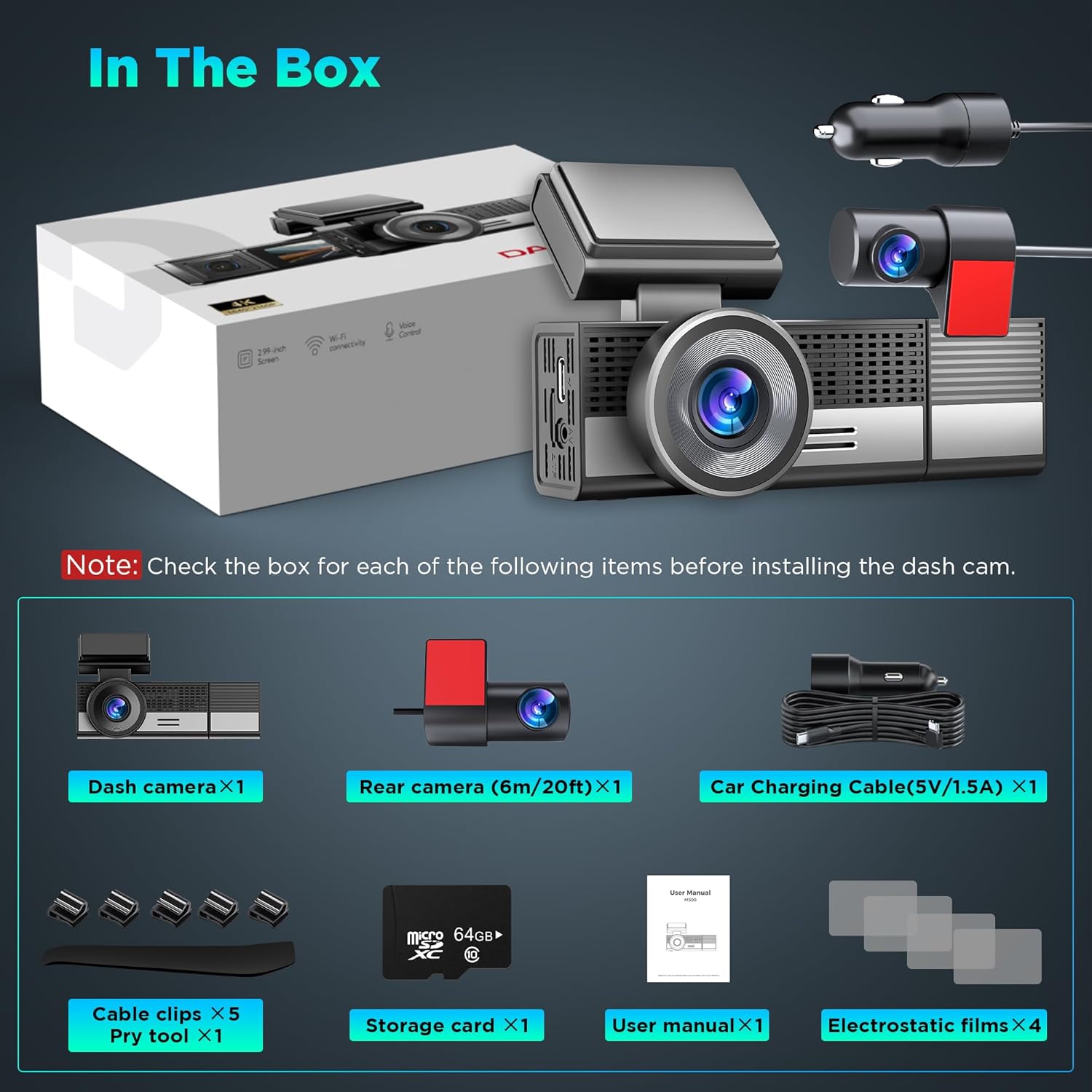
รูปที่ 3.1: All components included in the ecomoment GT801 Dash Cam package, including the main dash camera, rear camera, charging cable, MicroSD card, electrostatic films, cable clips, pry tool, and user manual.
4. สินค้าหมดview
The ecomoment GT801 is a dual dash camera system featuring a front camera with 4K resolution and a rear camera with 1080P resolution. It includes advanced features such as built-in Wi-Fi, GPS functionality, G-sensor, loop recording, night vision, and parking monitoring.

รูปที่ 4.1: โอเวอร์view of the ecomoment GT801 Dash Cam, showing the main front camera unit, rear camera, car charger, and included 64GB MicroSD card.

รูปที่ 4.2: The compact design of the dash cam, highlighting the 39° vertical rotation for the cabin camera and 360° horizontal rotation for the rear camera, allowing comprehensive coverage.
5. การตั้งค่าและการติดตั้ง
5.1 การติดตั้งการ์ด MicroSD
Insert the provided MicroSD card into the designated slot on the dash cam. Ensure the card is inserted correctly until it clicks into place. A 64GB MicroSD card is included, and the device supports up to 128GB.

รูปที่ 5.1: Illustration of how to insert the MicroSD card into the dash camera's slot. The image also shows the USB-C and AV ports.
5.2 การติดตั้งกล้องติดรถยนต์
ปฏิบัติตามขั้นตอนเหล่านี้เพื่อการติดตั้งที่ถูกต้อง:
- Front Cam Mounting: Position the main dash cam unit on your windshield using the provided electrostatic sticker. Choose a location that does not obstruct your driving view.
- Rear Cam Placement: Attach the rear camera to the rear window using its electrostatic sticker. Ensure a clear view ของถนนด้านหลัง
- การเดินสายเคเบิล: Carefully tuck the power cable and rear camera cable under the vehicle's weatherstrip and trim using the included pry tool. This keeps the cables neat and out of the way.
- เพิ่มพลัง: Plug the car charging cable into your vehicle's cigarette lighter outlet to activate the dash cam.
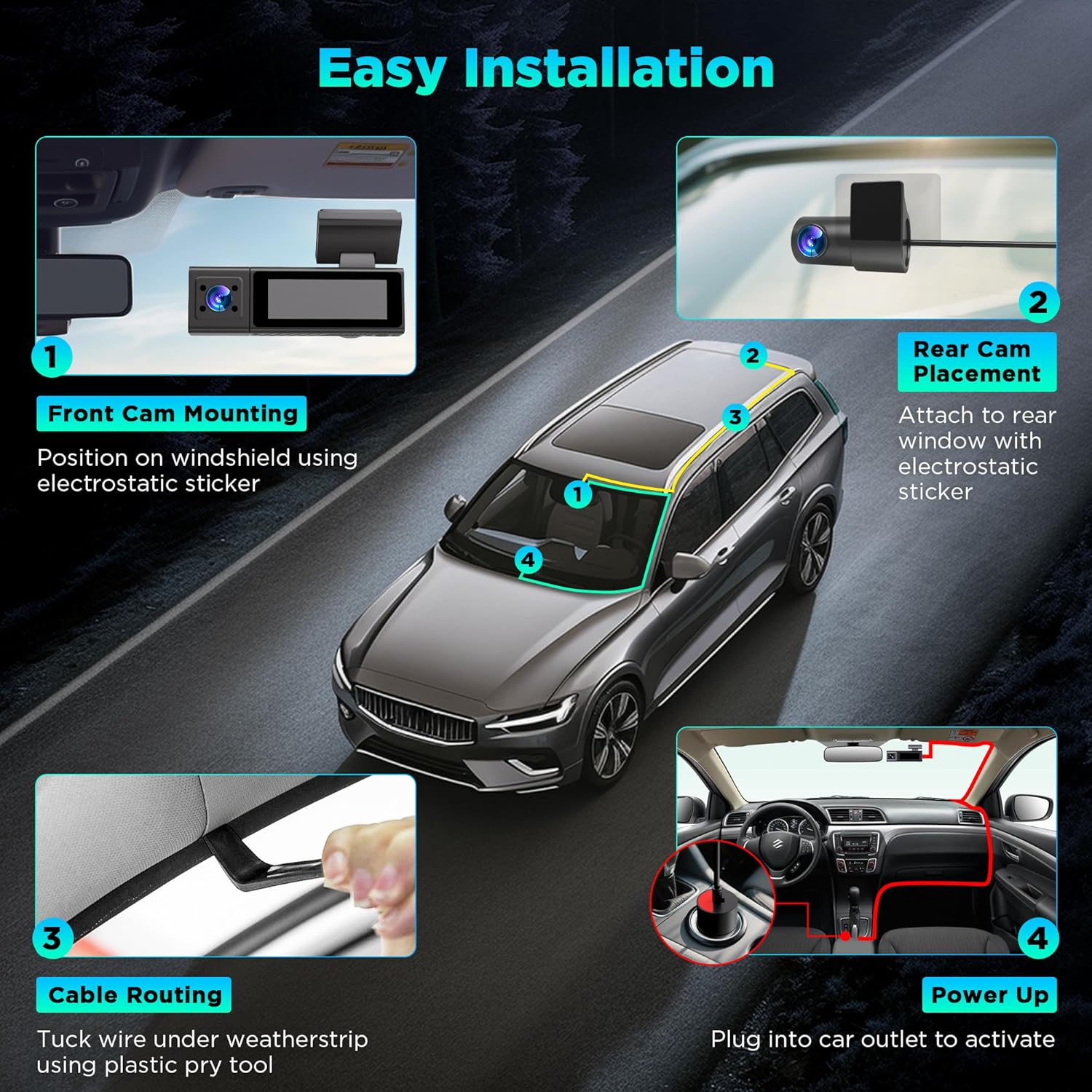
รูปที่ 5.2: Visual guide for installing the dash cam, showing front camera mounting, rear camera placement, cable routing, and connecting to the car's power outlet.
6. คู่มือการใช้งาน
6.1 การทำงานพื้นฐาน
- เปิด/ปิดเครื่อง: กล้องติดรถยนต์จะเปิดและเริ่มบันทึกโดยอัตโนมัติเมื่อสตาร์ทรถ และจะปิดโดยอัตโนมัติเมื่อดับเครื่องยนต์
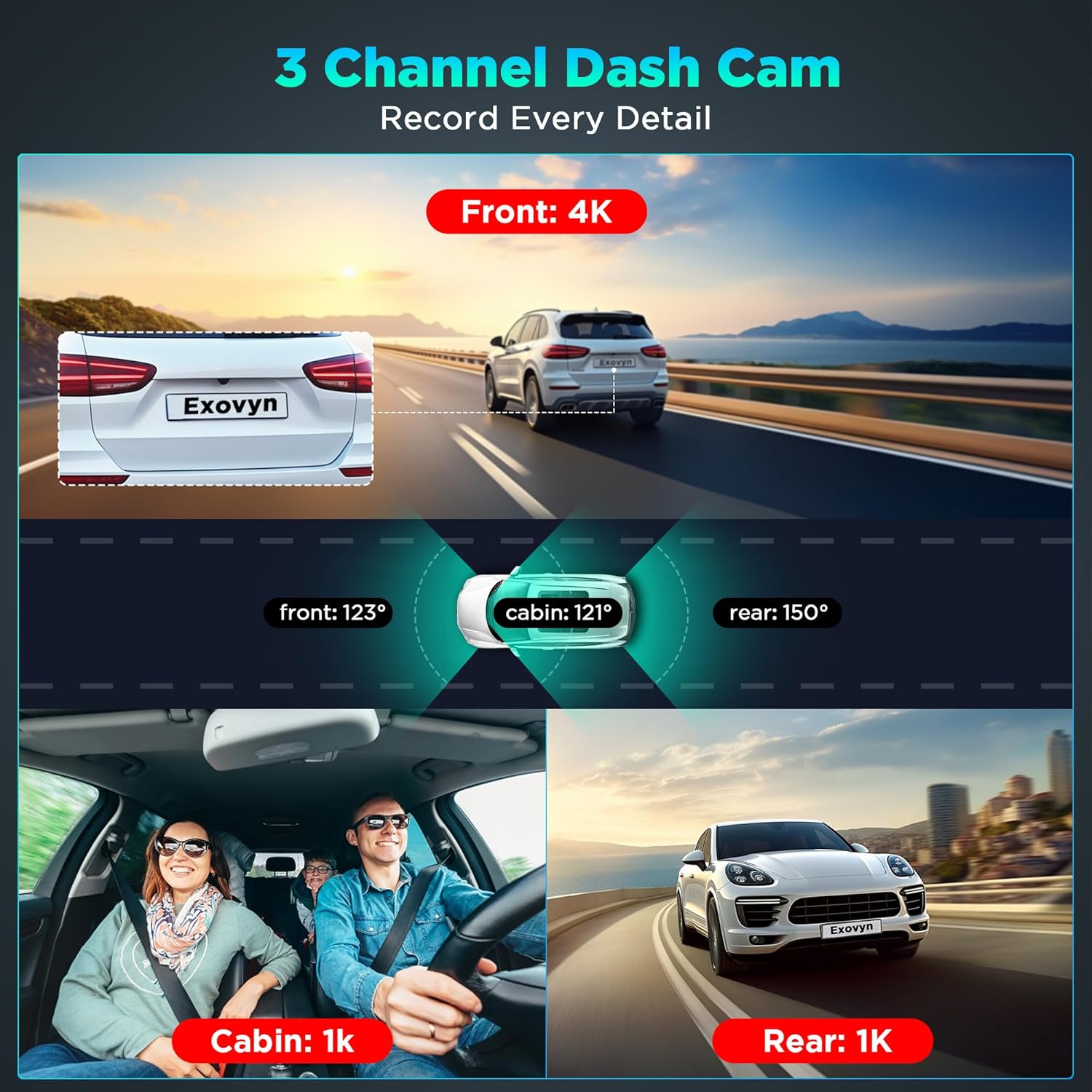
- การบันทึก: The dash cam continuously records video from the front and rear cameras. The front camera records in 4K, and the rear camera records in 1080P.

รูปที่ 6.1: Display showing simultaneous recording from the front (4K), cabin (1K), and rear (1K) cameras, illustrating the wide-angle coverage.
6.2 การบันทึกแบบวนซ้ำ
The dash cam utilizes loop recording. When the MicroSD card is full, the oldest unlocked video fileจะถูกเขียนทับด้วยการบันทึกใหม่ วิธีนี้ช่วยให้มั่นใจได้ว่าการบันทึกจะต่อเนื่องโดยไม่ต้องมีการแทรกแซงจากผู้ใช้
6.3 G-Sensor and Emergency Lock
The built-in G-sensor detects sudden impacts or collisions. When an event is detected, the current video segment is automatically locked and saved to a protected folder, preventing it from being overwritten by loop recording. This feature ensures critical footagค่า e ถูกรักษาไว้

รูปที่ 6.2: The Emergency Lock function, which automatically saves critical footage upon collision detection or via voice command, ensuring important video evidence is secured.
6.4 การตรวจสอบที่จอดรถ
The GT801 offers 24-hour parking monitoring with two modes:
- การตรวจจับการชน: Records a 1-minute locked emergency video after a collision is detected while parked.
- การบันทึกไทม์แลปส์: Provides continuous 1fps recording after parking, condensing long recordings into accelerated clips.
บันทึก: Parking Monitoring requires a hardwire kit (not included) for continuous power connection to the vehicle battery.

รูปที่ 6.3: Illustration of the 24-hour parking monitoring feature, detailing collision detection and time-lapse recording, both activated by the built-in G-sensor.
6.5 Advanced GPS Functionality
The integrated GPS functionality allows for accurate tracking and playback of your driving routes. You can monitor speed, location, and route history on compatible computers and mobile phones, providing additional context for recorded footage.
6.6 Superior Night Vision
The GT801 dash cam features a starlight night vision sensor and a 170° ultra-wide angle 6-layer glass lens. This technology ensures clear and detailed footage even in low-light conditions, enhancing visibility during nighttime driving.

รูปที่ 6.4: The dash cam's display showing clear night vision footage, highlighting its ability to capture details in low-light environments.

รูปที่ 6.5: A close-up of the dash cam's lens assembly, emphasizing the 6-layer glass lens and starlight night vision sensor for enhanced low-light performance.
6.7 Wi-Fi and Smart App Control
Connect the GT801 dash cam to your smartphone via Wi-Fi using the "VeeCar" app (available on App Store and Google Play). The app allows you to:
- View อยู่ footage.
- เล่นวิดีโอที่บันทึก
- จัดการการตั้งค่ากล้องติดรถยนต์
- Download and edit videos.
- Share content directly from the app.
รูปที่ 6.6: A smartphone displaying the "Kacam APP" interface, demonstrating how to wirelessly access real-time footage, download clips, and adjust settings via Wi-Fi.
6.8 การควบคุมด้วยเสียง
The dash cam supports voice commands for hands-free operation. Commands include:
- "Emergency recording" to lock current video.
- "แสดงภาพจากกล้องหลัง"
- "Show front camera"
- "Look the video"
- "ถ่ายรูป"
- "เปิดเสียง"
- "เปิดหน้าจอ"

รูปที่ 6.7: A driver interacting with the dash cam using voice commands, illustrating the hands-free control for various functions.
7. การบำรุงรักษา
7.1 การทำความสะอาด
Gently wipe the camera lenses and screen with a soft, dry cloth. Avoid using abrasive cleaners or solvents that could damage the device.
7.2 การจัดการการ์ด MicroSD
It is recommended to format the MicroSD card periodically (e.g., once a month) to maintain optimal recording performance and prevent data corruption. This can usually be done through the dash cam's settings menu or the mobile app.
7.3 การอัปเดตเฟิร์มแวร์ (OTA)
The dash cam supports Over-the-Air (OTA) firmware updates. To update, save the official firmware file (provided by ecomoment) directly to the MicroSD card. The device will automatically initiate the upgrade process upon power-up.
8 การแก้ไขปัญหา
- กล้องติดรถยนต์ไม่เปิดใช้งาน:
Ensure the car charger is securely plugged into both the dash cam and the vehicle's power outlet. Check the vehicle's power outlet for functionality. - การบันทึกหยุดหรือ footage เสียหาย:
Format the MicroSD card. Ensure you are using a high-speed (Class 10 or U3 recommended) MicroSD card. Replace the MicroSD card if the issue persists. - ปัญหาการเชื่อมต่อ Wi-Fi:
Ensure Bluetooth is turned off on your smartphone as it may interfere with the Wi-Fi connection. Make sure you are within 10 feet of the dash cam. Restart both the dash cam and your smartphone. - ระบบตรวจสอบการจอดรถใช้งานไม่ได้:
Verify that a hardwire kit is correctly installed and connected to your vehicle's battery. Ensure parking monitoring is enabled in the dash cam settings. - ไม่พบสัญญาณ GPS:
ตรวจสอบให้แน่ใจว่ากล้องติดรถยนต์มีสัญญาณที่ชัดเจน view of the sky. Move the dash cam away from any metallic objects or electronic devices that might interfere with the GPS signal. - คุณภาพวิดีโอไม่ดี:
Clean the camera lenses. Ensure the protective film has been removed from the lenses. Check the video resolution settings in the app or on the device.
9. ข้อมูลจำเพาะ
| ชื่อรุ่น | GT801 |
| ขนาดสินค้า | 1.6 x 2.2 x 4 นิ้ว |
| น้ำหนักสินค้า | 3.52 ออนซ์ |
| ความละเอียดในการจับภาพวิดีโอ | Front: 4K, Rear: 1080P |
| ที่ดินของ View | 135 Degrees (Front), 170° (Lens) |
| เทคโนโลยีการเชื่อมต่อ | ยูเอสบี, ไวไฟ |
| คุณสมบัติพิเศษ | Loop Recording, Built-In WiFi, Night Vision, G-Sensor, Emergency Lock, Parking Monitor, App Control, Voice Control, Built-In Supercapacitor, Built-In Microphone, Compact Design, Built-In Display |
| ประเภทการติดตั้ง | ที่ยึดกระจกหน้า |
| สี | Vivid Black |
| ผู้ผลิต | ecomoment |
10. การรับประกันและการสนับสนุน
ecomoment provides a รับประกันฟรี 10 ปี for the GT801 Dash Cam. Additionally, lifetime professional technical support is available to assist you with any questions or issues you may encounter. For support, please refer to the contact information provided with your product or visit the official ecomoment webเว็บไซต์.


