1. บทนำ
This manual provides detailed instructions for the safe and efficient operation of your HANLIM Portable CD Player, Model HL-108. Please read this manual thoroughly before using the product and retain it for future reference.

รูปที่ 1: ด้านหน้า view of the HANLIM Portable CD Player HL-108. This image displays the main unit with its control panel, LCD screen, and integrated handle.
2. คำแนะนำด้านความปลอดภัย
- อย่าให้เครื่องโดนฝน ความชื้น หรืออุณหภูมิที่สูงหรือต่ำเกินไป
- หลีกเลี่ยงการวางเครื่องไว้ใกล้แหล่งความร้อนหรือโดนแสงแดดโดยตรง
- อย่าเปิดcasinง. ส่งต่อการบริการทั้งหมดให้กับบุคลากรที่มีคุณสมบัติ
- เก็บเครื่องให้ห่างจากสนามแม่เหล็กแรงสูง
- ใช้สายไฟที่ให้มาเท่านั้น
- ตรวจสอบให้แน่ใจว่ามีการระบายอากาศที่เหมาะสมเพื่อป้องกันภาวะความร้อนมากเกินไป
3. เนื้อหาบรรจุภัณฑ์
โปรดตรวจสอบว่ามีสิ่งของครบถ้วนหรือไม่:
- HANLIM Portable CD Player HL-108
- สายไฟ (1.2ม.)
- รีโมทคอนโทรล (ไม่รวมแบตเตอรี่)
- คู่มือการใช้งาน

รูปที่ 2: The HANLIM Portable CD Player HL-108 shown with its included accessories: the power cable, remote control, and user manual.
4. สินค้าหมดview
The HANLIM Portable CD Player HL-108 features a compact design with multiple playback options and connectivity ports.
4.1 แผงควบคุมด้านหน้า
- จอแสดงผล LCD: Shows current mode, track information, and FM frequency.
- ปุ่มโหมด: สามารถสลับโหมดระหว่าง CD, FM, Bluetooth, USB และ AUX ได้
- ปุ่มสแตนด์บาย: เปิดหรือปิดเครื่อง
- ปุ่มเล่น/หยุดชั่วคราว/สแกน: เล่น/หยุดสื่อ หรือค้นหาสถานีวิทยุ FM
- Previous/CH- Button: Skips to previous track/station.
- Next/CH+ Button: Skips to next track/station.
- ปุ่มปรับระดับเสียง: ปรับระดับเสียง
- พอร์ต USB: สำหรับการเล่นไดรฟ์ USB
- แจ็คหูฟัง (3.5 มม.): สำหรับการฟังส่วนตัว
4.2 การเชื่อมต่อแผงด้านหลัง
- AUX IN (3.5 มม.): เชื่อมต่ออุปกรณ์เสียงภายนอก
- พอร์ต MIC: Connect a microphone for singing.
- อินพุตไฟ AC: Connect the power cable for charging or continuous power.
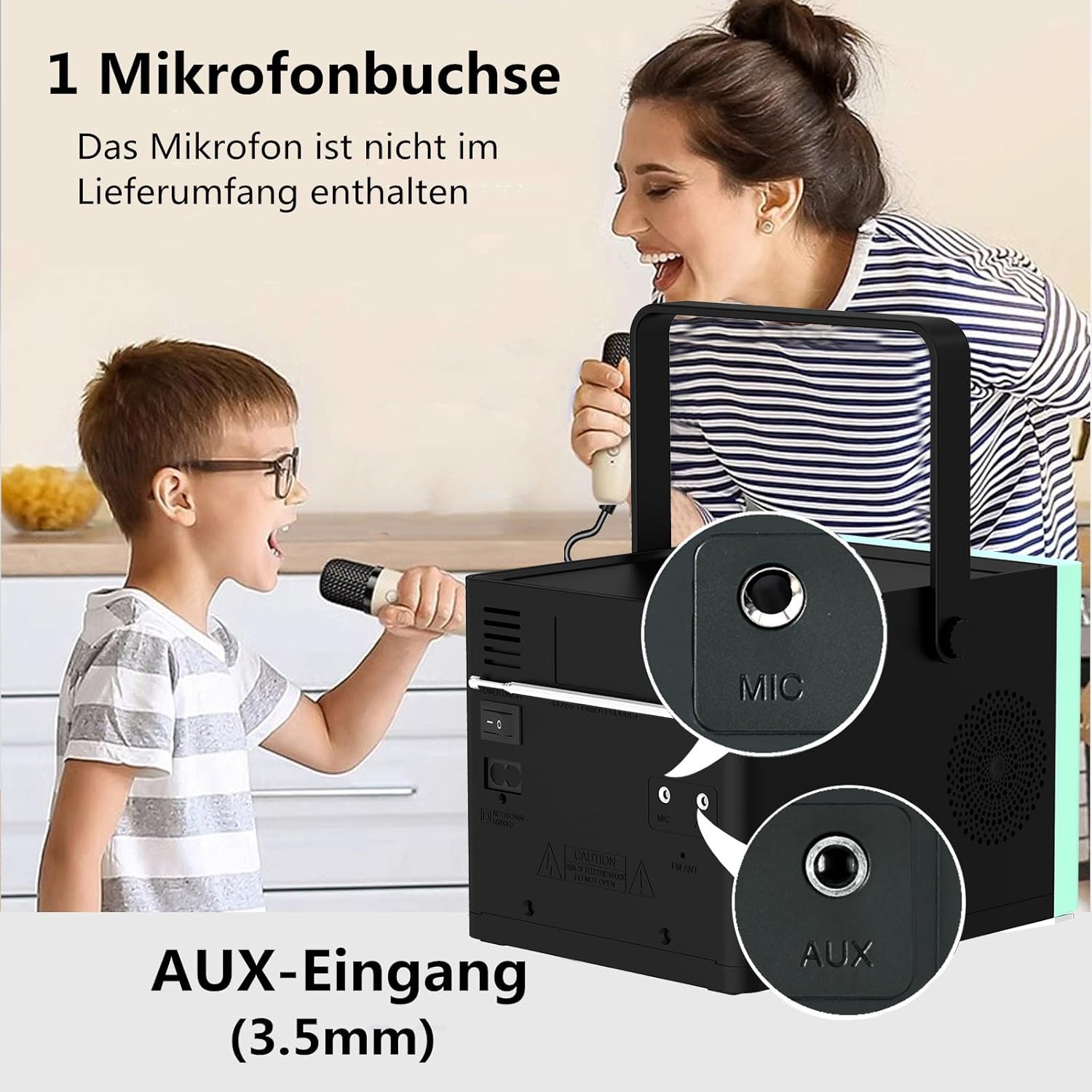
รูปที่ 3: หลัง view of the HANLIM Portable CD Player HL-108, highlighting the microphone input and AUX input ports.
5. การตั้งค่า
5.1 การเปิดเครื่องและการชาร์จ
- Connect the provided power cable to the AC power input on the rear of the unit and plug it into a wall outlet.
- The built-in 2000mAh battery will begin charging automatically. A full charge provides approximately 4.5 to 5 hours of playback at maximum volume.
- กดปุ่ม รอ ปุ่มเพื่อเปิดเครื่อง
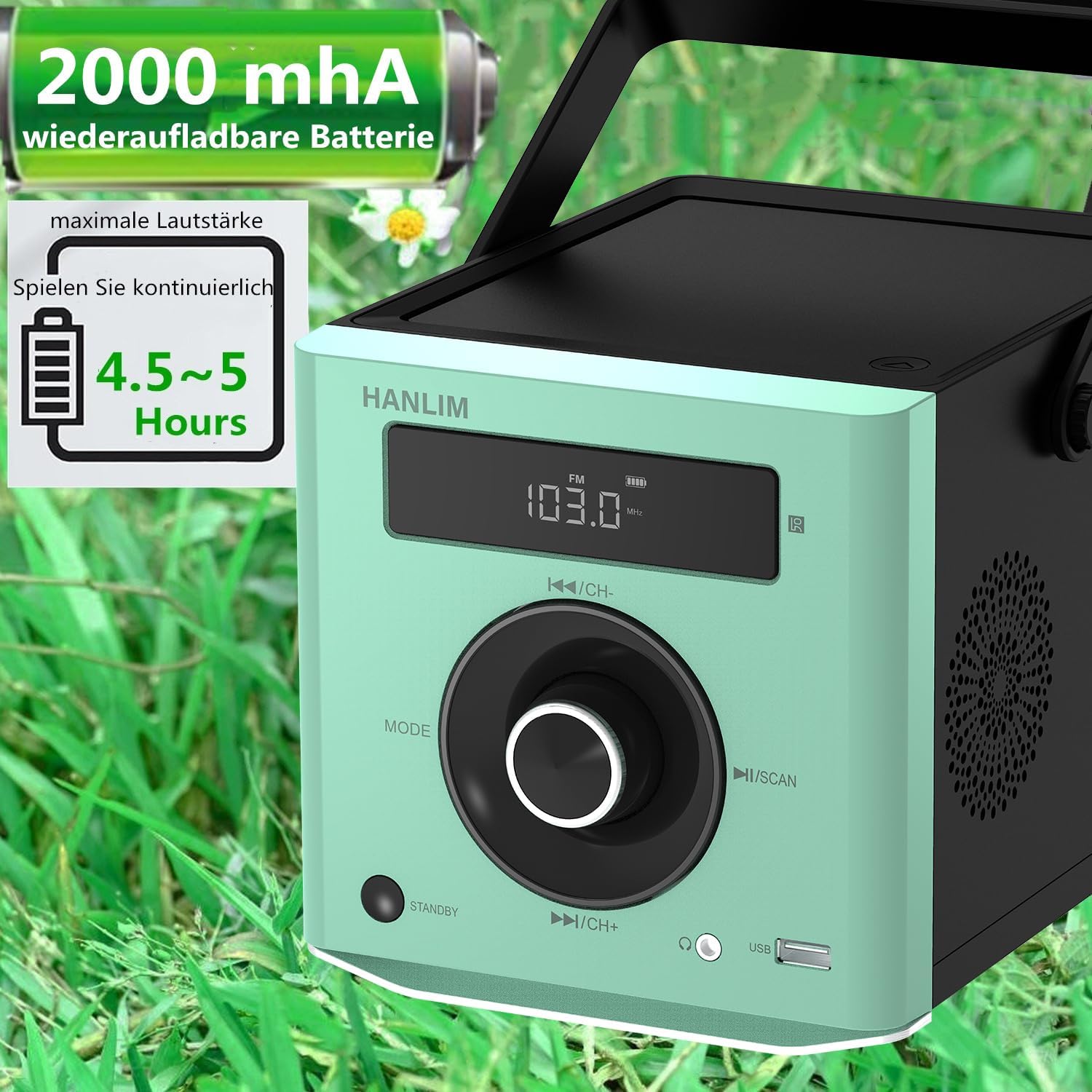
รูปที่ 4: The HANLIM Portable CD Player HL-108 displaying battery charge status and indicating 4.5-5 hours of continuous playback.
6. คู่มือการใช้งาน
6.1 การเล่นแผ่นซีดี
- เปิดฝาช่องใส่ซีดี
- Place a CD (CD/CD-R/CD-RW/MP3 format) onto the spindle, label side up.
- ปิดฝาช่องใส่ซีดี
- กดปุ่ม โหมด กดปุ่มไปเรื่อยๆ จนกว่าจะแสดงคำว่า "CD"
- กดปุ่ม เล่น/หยุดชั่วคราว ปุ่มเพื่อเริ่มเล่น
- ใช้ ก่อนหน้า/ถัดไป ปุ่มสำหรับข้ามเพลง
- ทำซ้ำฟังก์ชัน: Press the repeat button on the remote control to cycle through repeat one, repeat all, or random play.
- Continue Playback: The unit will resume playback from where it was last stopped, useful for language learning.
6.2 วิทยุ FM
- กดปุ่ม โหมด กดปุ่มไปเรื่อยๆ จนกว่าจะแสดงคำว่า "FM"
- กดปุ่มค้างไว้ สแกน button to automatically scan and store available FM stations (87.5-108MHz). Up to 20 stations can be stored.
- ใช้ ช- และ CH+ buttons to navigate through stored stations.

รูปที่ 5: The HANLIM Portable CD Player HL-108 showing the FM radio frequency on its display.
6.3 การเชื่อมต่อบลูทูธ
- กดปุ่ม โหมด button until "Bluetooth" is displayed. The unit will enter pairing mode.
- On your device (phone, tablet, computer), enable Bluetooth and search for "HANLIM HL-108".
- Select the device to pair. Once connected, you will hear a confirmation sound.
- Note: Bluetooth headphones are not supported for connection to this CD player.

รูปที่ 6: The HANLIM Portable CD Player HL-108 illustrating its Bluetooth connectivity, USB port, and headphone jack.
6.4 การเล่น USB
- Insert a USB flash drive (up to 32GB, supporting MP3/WMA formats) into the USB port.
- กดปุ่ม โหมด กดปุ่มจนกระทั่งหน้าจอแสดงคำว่า "USB"
- Playback will start automatically. Use the ก่อนหน้า/ถัดไป ปุ่มสำหรับการนำทางเพลง
อินพุต AUX 6.5 ช่อง
- Connect an external audio device (e.g., phone, computer) to the AUX IN port using a 3.5mm audio cable (not included).
- กดปุ่ม โหมด กดปุ่มไปเรื่อยๆ จนกระทั่งหน้าจอแสดงคำว่า "AUX"
- ควบคุมการเล่นจากอุปกรณ์ที่เชื่อมต่อของคุณ
แจ็คหูฟัง 6.6
For private listening, connect 3.5mm headphones to the headphone jack on the front panel.
6.7 Microphone Port
Connect a microphone (not included) to the MIC port on the rear panel for singing along to music.
6.8 Sound Settings (Equalizer)
The unit offers 5 sound qualities: Pop, Jazz, Rock, Classical, and Flat. Use the EQ button on the remote control to cycle through these modes and adjust the audio output to your preference.
7. การบำรุงรักษา
- การทำความสะอาด: เช็ดตัวเครื่องด้วยผ้านุ่มและแห้ง ห้ามใช้น้ำยาทำความสะอาดที่มีฤทธิ์กัดกร่อนหรือตัวทำละลาย
- การดูแลรักษาซีดี: จับแผ่นซีดีที่ขอบ ทำความสะอาดแผ่นซีดีที่สกปรกด้วยผ้าเนื้อนุ่มที่ไม่เป็นขุย โดยเช็ดจากตรงกลางออกไปด้านนอก
- การดูแลแบตเตอรี่ เพื่อให้แบตเตอรี่ใช้งานได้นานที่สุด ควรหลีกเลี่ยงการปล่อยให้แบตเตอรี่หมดจนเกลี้ยงบ่อยๆ หากเก็บรักษาไว้เป็นเวลานาน ควรชาร์จแบตเตอรี่ให้ได้ประมาณ 50% ทุกๆ สองสามเดือน
8 การแก้ไขปัญหา
| ปัญหา | สาเหตุที่เป็นไปได้ | สารละลาย |
|---|---|---|
| เครื่องไม่เปิด | Battery is depleted or power cable is not connected. | Connect the power cable and allow the battery to charge, or operate directly from AC power. |
| ไม่มีเสียง. | Volume is too low, headphones connected, or incorrect mode selected. | Increase volume, disconnect headphones, or ensure the correct input mode (CD, FM, BT, USB, AUX) is selected. |
| แผ่นซีดีเล่นไม่ได้หรือเล่นสะดุด | ซีดีสกปรก มีรอยขีดข่วน หรือใส่ไม่ถูกต้อง | Clean the CD, try a different CD, or reinsert the CD correctly. Ensure the CD compartment is fully closed. |
| การจับคู่บลูทูธล้มเหลว | Device is too far, Bluetooth is off on the device, or unit is not in pairing mode. | Ensure the unit is in Bluetooth mode, your device's Bluetooth is on, and they are within range. Try restarting both devices. |
| การรับสัญญาณวิทยุ FM ไม่ดี | Weak signal or antenna position. | Adjust the unit's position or extend the antenna for better reception. |
9. ข้อมูลจำเพาะ
| คุณสมบัติ | ข้อมูลจำเพาะ |
|---|---|
| ยี่ห้อ | ฮันลิม |
| แบบอย่าง | เอชแอล-108 |
| ขนาดสินค้า | 15.5 x 20.5 x 16 ซม. (6.1 x 8.1 x 6.3 นิ้ว) |
| น้ำหนักสินค้า | 1.7 กก. (3.75 ปอนด์) |
| กำลังขับ | 20วัตต์ |
| แบตเตอรี่ | Built-in 2000mAh rechargeable Lithium Ion |
| อายุการใช้งานแบตเตอรี่ | สูงสุด 5 ชั่วโมง (ที่ระดับเสียงสูงสุด) |
| รูปแบบซีดีที่รองรับ | ซีดี, CD-R, CD-RW, MP3 |
| ความถี่วิทยุ FM | 87.5-108 เมกะเฮิรตซ์ |
| สนับสนุน USB | Up to 32GB, MP3/WMA formats |
| การเชื่อมต่อ | Bluetooth, USB, AUX (3.5mm), Headphone Jack (3.5mm), Microphone Port |
| ประเภทจอภาพ | จอแอลซีดี |
| คุณสมบัติพิเศษ | Bluetooth, CD-R/RW Compatible, Equalizer, Portable, Rechargeable |
10. การรับประกันและการสนับสนุน
This HANLIM product comes with a รับประกันหนึ่งปี นับจากวันที่ซื้อ การรับประกันนี้ครอบคลุมข้อบกพร่องในการผลิตและฝีมือการผลิตภายใต้การใช้งานปกติ
For technical support, warranty claims, or service inquiries, please contact your retailer or the HANLIM customer service department through the contact information provided at the point of purchase.


