การแนะนำ
The GiiKER Intelligent Sudoku Puzzle Game is an interactive and engaging game console designed to challenge and improve cognitive skills through Sudoku puzzles. It features an auto-timer, hints, and supports 1-on-1 battles, offering 2500 puzzles from beginner to master levels. This manual provides detailed instructions for setup, operation, maintenance, and troubleshooting to ensure an optimal user experience.

Image: The GiiKER Intelligent Sudoku Puzzle Game console shown alongside its retail packaging.
มีอะไรอยู่ในกล่อง
Upon opening your GiiKER Intelligent Sudoku Puzzle Game package, please verify that all the following components are included:
- 1 x Intelligent Sudoku Console
- 36 x Chess Pieces (colored number tiles)
- 1 x 4x4 Grid Lid
- 1 x ฝาครอบ
- 1 x Instructions (English language)

Image: A visual representation of all items included in the GiiKER Smart Sudoku package: the console, colored number pieces, 4x4 grid cover, and user manual.
การตั้งค่า
Follow these steps to set up your GiiKER Intelligent Sudoku Puzzle Game for the first time:
- แกะส่วนประกอบ: Carefully remove the Intelligent Sudoku console, the 36 colored chess pieces, the 4x4 grid lid, and the cover from the packaging.
- เปิดเครื่อง: The device is powered by a rechargeable battery. Ensure it is charged before first use. There are no external batteries required.
- Familiarize with the Console:
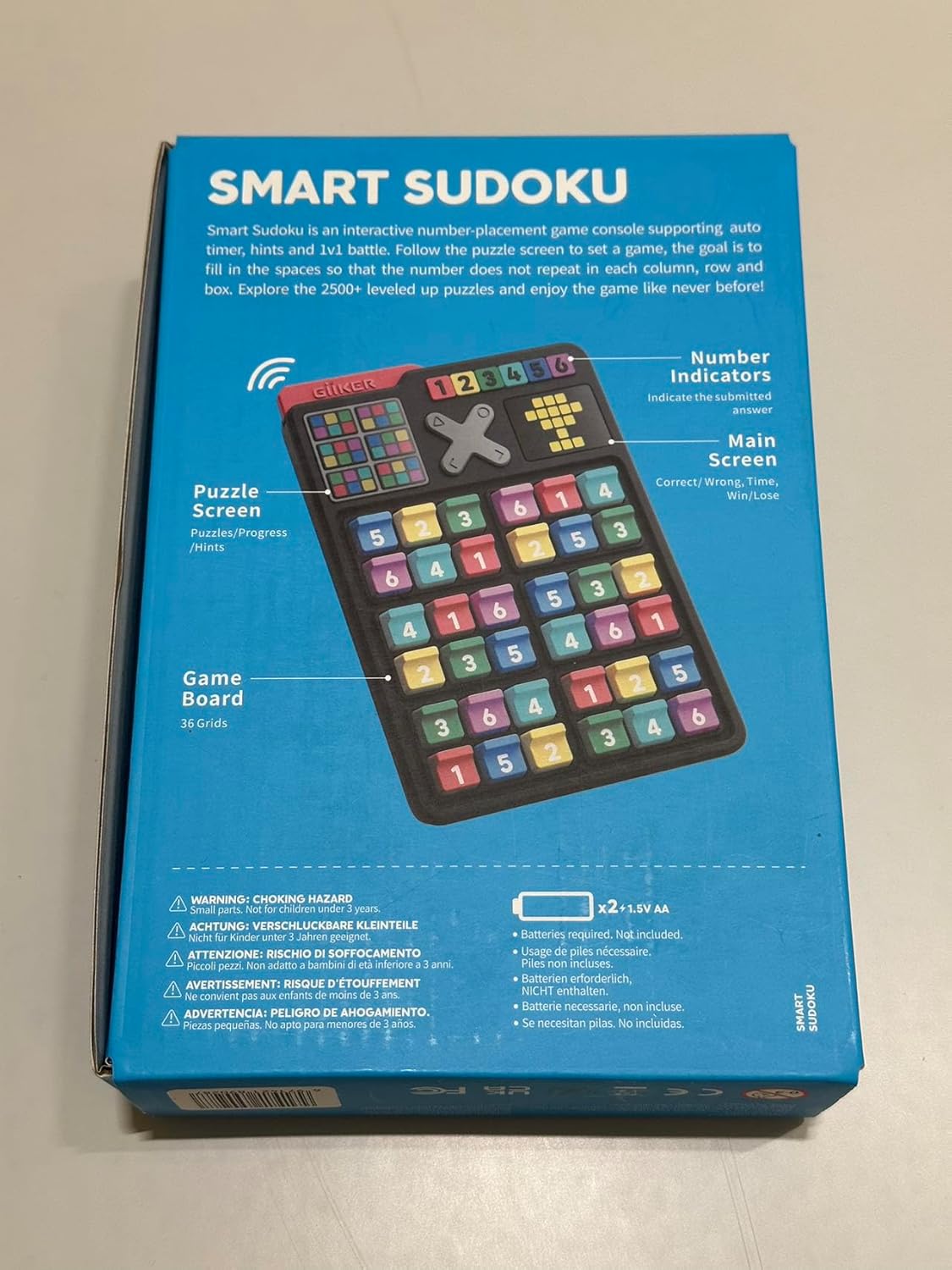
Image: The back of the product box illustrating key features of the console, including the puzzle screen, number indicators, and game board.
- Puzzle Screen: Displays puzzles and progress.
- Number Indicators: Indicate the solution answer.
- หน้าจอหลัก: Shows correct/wrong answers, time, and score.
- Game Board: The 36 grids where the chess pieces are placed.
- Place Chess Pieces: Insert the colored number pieces into the grid slots as required by the specific puzzle challenge you choose.
คำแนะนำการใช้งาน
The GiiKER Intelligent Sudoku Puzzle Game offers various modes and features to enhance your Sudoku experience.
การเล่นเกมขั้นพื้นฐาน
The objective is to fill the game board so that each column, row, and designated box contains all numbers from 1 to 6 (for 6x6 grids) or 1 to 4 (for 4x4 grids) without repetition. Follow the puzzle displayed on the screen to set up the initial numbers using the colored chess pieces.
Removing Pieces
To remove a chess piece from the game board, gently pull it upwards and towards yourself. Do not force or twist the pieces.

Image: A visual guide demonstrating the correct method to remove a game piece by pulling it up and towards the user.
ตั้งเวลาอัตโนมัติ
The console features an integrated auto-timer that tracks your progress and completion time for each challenge. This allows you to monitor your improvement over time.

Image: The GiiKER Smart Sudoku console showing the digital auto-timer display, indicating time elapsed during a puzzle.
Instant Referee & Hints Function
The "Instant Referee" feature provides immediate feedback on your moves. If you place a piece incorrectly, the console will indicate it. To get a hint or check an answer, you may need to interact with the console's buttons. For example, to input an answer like "6", you might tap the corresponding button 6 times.
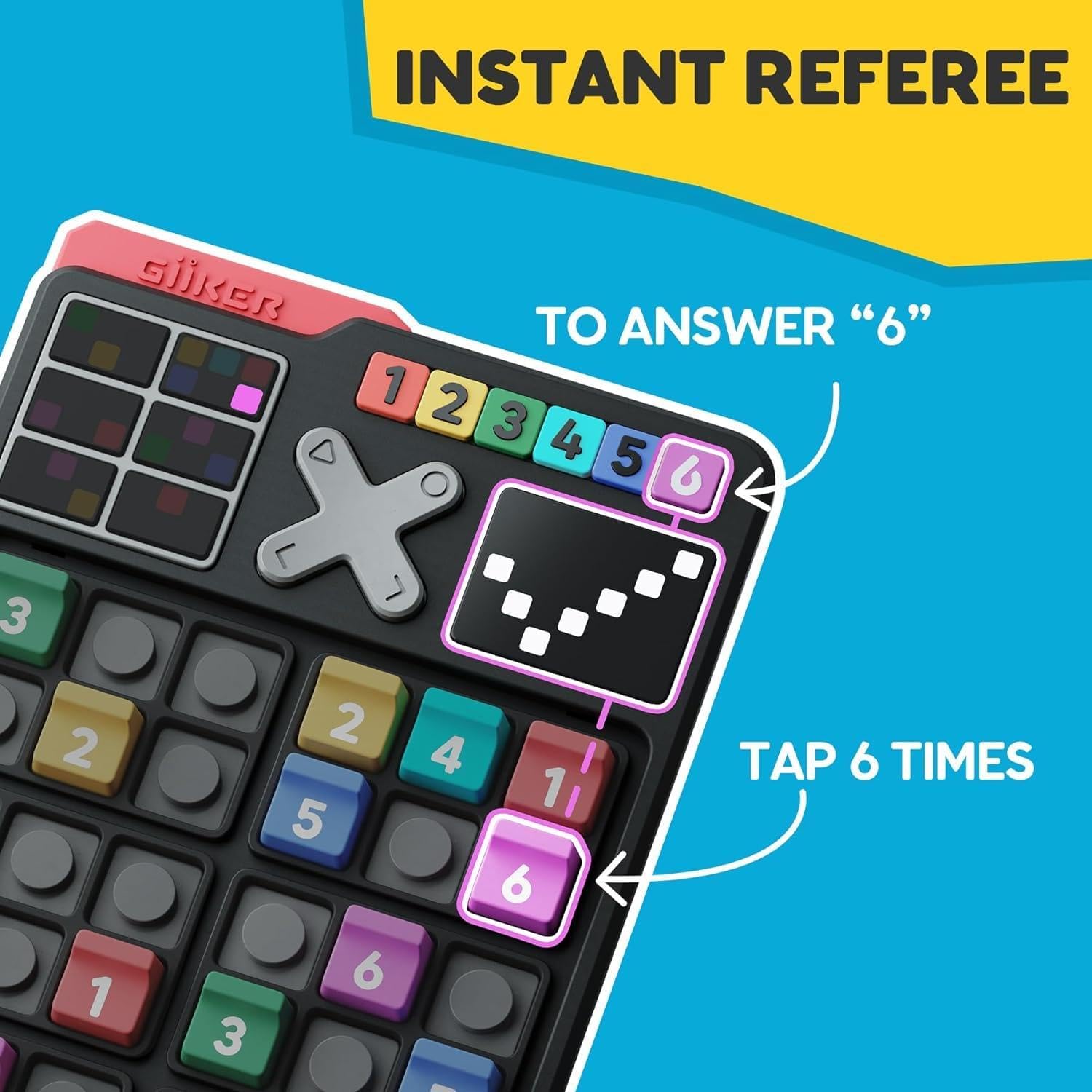
Image: The GiiKER Smart Sudoku console highlighting how the "Instant Referee" function works, showing an example of tapping to input an answer.
ระดับความท้าทาย
The game includes 2500 unique Sudoku challenges, ranging from beginner to master levels. You can switch between 4x4 and 6x6 Sudoku grids depending on your skill level and preference. The challenges provide a progressive learning curve.
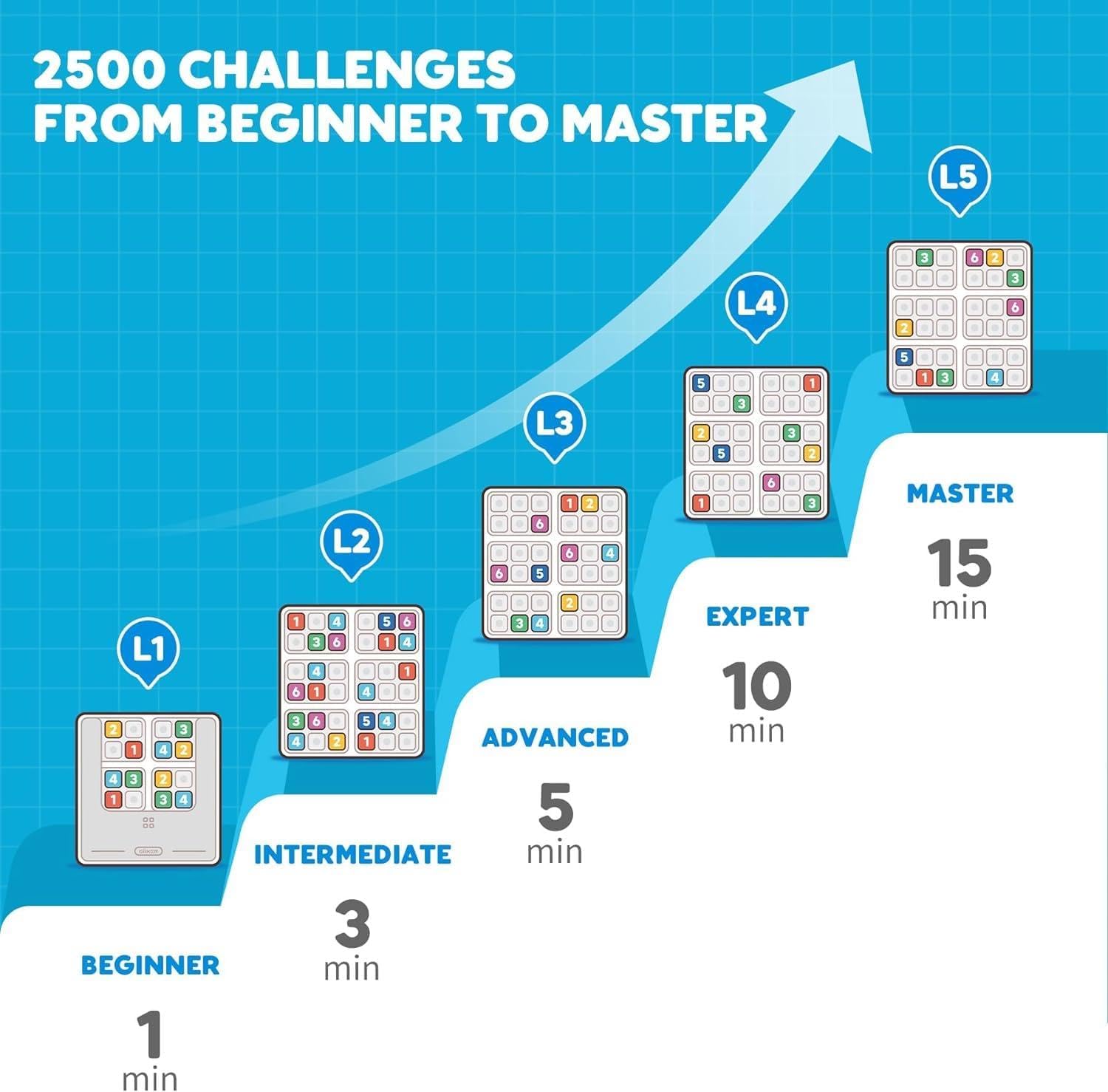
Image: A graphic illustrating the progression through 2500 Sudoku challenges, from beginner to master levels, with estimated completion times.
โหมดการต่อสู้ 1 ต่อ 1
For competitive play, the GiiKER Intelligent Sudoku console supports 1v1 battles. This mode allows two devices to link via Bluetooth for head-to-head Sudoku challenges.

Image: Two GiiKER Smart Sudoku consoles depicted side-by-side, illustrating the 1v1 battle mode where devices can be linked for competitive play.
การซ่อมบำรุง
To ensure the longevity and proper functioning of your GiiKER Intelligent Sudoku Puzzle Game, follow these maintenance guidelines:
- การทำความสะอาด: Use a soft, dry cloth to wipe the console and chess pieces. Do not use abrasive cleaners or solvents, as they may damage the plastic material.
- พื้นที่จัดเก็บ: Store the game in a cool, dry place away from direct sunlight and extreme temperatures. Keep all pieces together to prevent loss.
- การจัดการ: Handle the console and pieces with care. Avoid dropping the device or applying excessive force to the buttons or grid slots.
- การดูแลแบตเตอรี่ While the device has a rechargeable battery, avoid prolonged periods of complete discharge or overcharging to maintain battery health.
การแก้ไขปัญหา
If you encounter any issues with your GiiKER Intelligent Sudoku Puzzle Game, refer to the following common problems and solutions:
| ปัญหา | สาเหตุที่เป็นไปได้ | สารละลาย |
|---|---|---|
| อุปกรณ์ไม่เปิดเครื่อง | แบตเตอรี่เหลือน้อยหรืออุปกรณ์ทำงานผิดปกติ | ตรวจสอบให้แน่ใจว่าอุปกรณ์ชาร์จเต็มแล้ว หากปัญหายังคงอยู่ โปรดติดต่อฝ่ายสนับสนุนลูกค้า |
| Pieces do not fit or are loose. | Incorrect piece orientation or damaged piece/slot. | Ensure pieces are inserted correctly. Check for any physical damage to pieces or slots. |
| หน้าจอไม่ตอบสนองหรือค้าง | ซอฟต์แวร์มีปัญหา | Try restarting the device (if a reset button is available, otherwise let battery drain and recharge). |
| 1v1 Battle mode not connecting. | Bluetooth interference or incorrect pairing. | Ensure both devices are within range and Bluetooth is enabled. Re-attempt pairing. |
ข้อมูลจำเพาะ
- หมายเลขรุ่น: เจเคเอสดี001
- แหล่งพลังงาน: แบตเตอรี่แบบชาร์จไฟได้
- วัสดุ: พลาสติก (ABS)
- ขนาดสินค้า : 5.91 x 3.94 x 7.87 นิ้ว
- น้ำหนักสินค้า: 1.1 ปอนด์
- ผู้ผลิต: Giiker
- อายุที่แนะนำ: 4 ปีขึ้นไป
- หมายเลขประจำตัวการค้าสากล (GTIN): 08720892449047
ข้อมูลด้านความปลอดภัย
คำเตือน: อันตรายจากการสำลัก - Small parts. Not for children under 3 years. Adult supervision is recommended during play, especially for younger children.
การรับประกันและการสนับสนุน
For warranty information or technical support, please refer to the contact details provided in your product packaging or visit the official GiiKER webไซต์ โปรดเก็บใบเสร็จรับเงินของคุณไว้เป็นหลักฐานการซื้อสำหรับการเรียกร้องการรับประกันใดๆ
ผู้ผลิต: Giiker
Webเว็บไซต์: www.giiker.com
อีเมลสนับสนุน: support@giiker.com


