1. บทนำ
This manual provides comprehensive instructions for the setup, operation, maintenance, and troubleshooting of your HP 24-inch FHD IPS Monitor, Model 94C21AA#ABA. Please read this manual thoroughly before using your monitor to ensure proper functionality and to maximize your user experience. This monitor features a 24-inch Full HD (1920x1080) IPS display with a 100Hz refresh rate, 300 nits brightness, and includes a Docztorm Hub USB Port Expander.
2. เนื้อหาบรรจุภัณฑ์
ตรวจสอบว่ามีรายการทั้งหมดอยู่ในแพ็คเกจของคุณ:
- HP 24-inch FHD IPS Monitor
- ขาตั้งจอมอนิเตอร์ (ฐานและคอ)
- Docztorm Hub USB Port Expander
- อะแดปเตอร์แปลงไฟ
- สายไฟ AC
- สาย HDMI
- Document Kit (includes this user manual and warranty information)
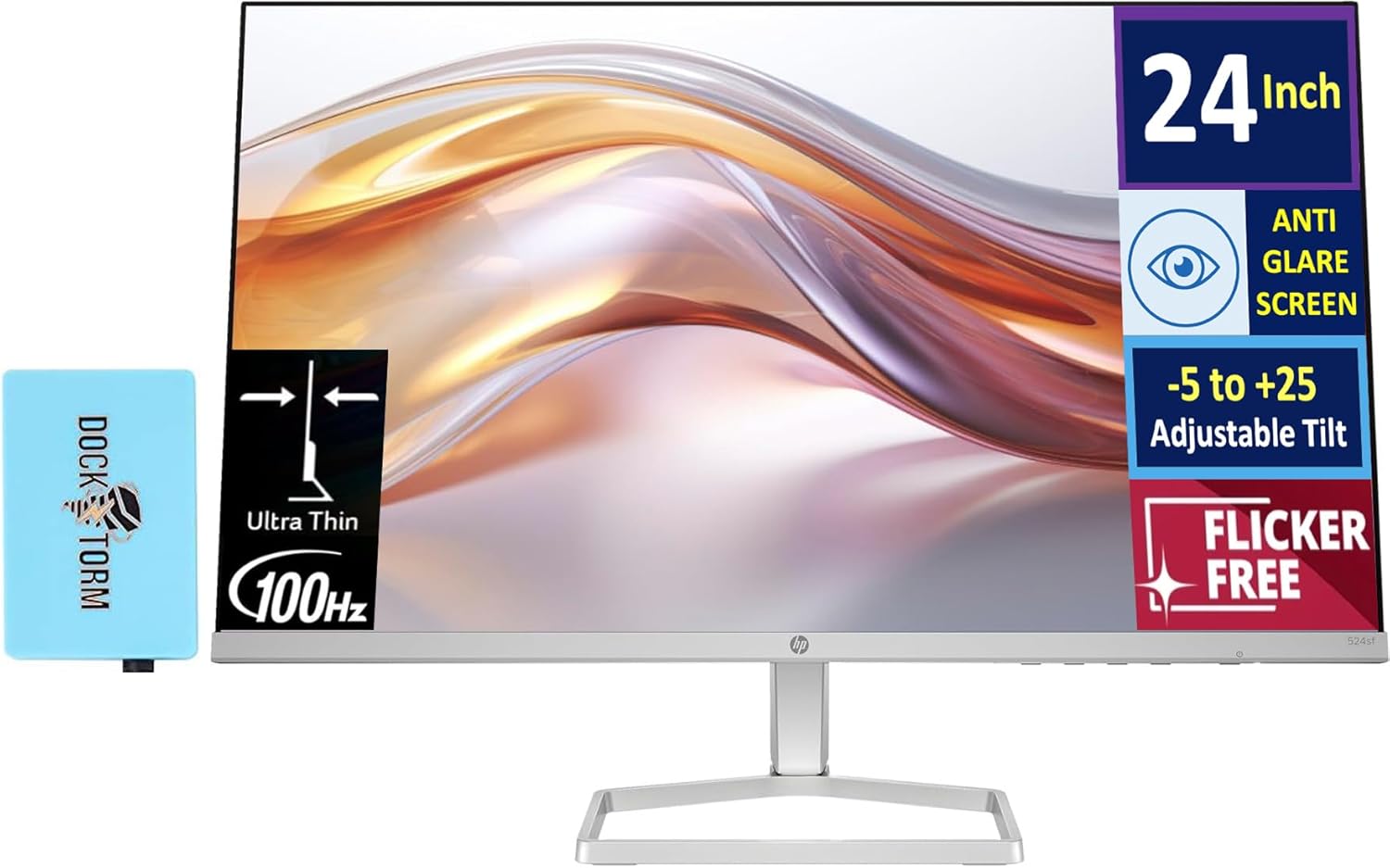
Image: The HP 24-inch FHD IPS Monitor shown with the included Docztorm Hub USB Port Expander.
3. คำแนะนำในการตั้งค่า
3.1 การประกอบขาตั้งจอภาพ
- วางจอภาพคว่ำหน้าลงบนพื้นผิวที่นุ่มและสะอาดอย่างระมัดระวังเพื่อป้องกันรอยขีดข่วน
- ติดส่วนคอของขาตั้งเข้ากับด้านหลังของจอภาพ ตรวจสอบให้แน่ใจว่าล็อคเข้าที่อย่างแน่นหนา
- Attach the stand base to the stand neck. Tighten any screws if provided, usually by hand or with a coin.
- Gently lift the assembled monitor and place it upright on a stable desk or surface.

ภาพ: ด้านข้าง view of the HP 24-inch monitor, illustrating its slim profile and stand attachment.
3.2 สายเชื่อมต่อ
- การเชื่อมต่อไฟฟ้า: Connect the power adapter to the monitor's power input, then plug the AC power cord into the adapter and a wall outlet.
- การเชื่อมต่อวิดีโอ:
- For optimal display quality, connect the included HDMI cable from your computer's HDMI output to the monitor's HDMI input.
- Alternatively, if your computer has a VGA port, connect a VGA cable (not included) from your computer to the monitor's VGA input.
- Docztorm Hub Connection: Connect the Docztorm Hub USB Port Expander to an available USB port on your computer. This hub provides additional USB connectivity.

ภาพ: ด้านหลัง view of the HP 24-inch monitor, highlighting the HDMI, VGA, and power input ports.
4. คู่มือการใช้งาน
4.1 การเปิด/ปิดเครื่อง
กดปุ่มเปิด/ปิดที่ด้านขวาล่างของจอภาพเพื่อเปิดหรือปิดเครื่อง ไฟแสดงสถานะเปิด/ปิดเครื่องจะสว่างขึ้นเมื่อจอภาพเปิดอยู่
4.2 การปรับความเอียง
The monitor supports an adjustable tilt range of -5 to +25 degrees. Gently hold the top and bottom edges of the monitor and tilt it to your desired viewing angle. Avoid applying excessive force.

Image: The HP 24-inch monitor tilted to demonstrate its adjustable viewมุมอิง
4.3 เมนูการแสดงผลบนหน้าจอ (OSD)
Use the buttons on the bottom right bezel of the monitor to navigate the OSD menu. The OSD menu allows you to adjust various display settings such as brightness, contrast, color temperature, input source, and more.
- Press any OSD button to activate the menu.
- ใช้ปุ่มนำทางเพื่อเลื่อนดูตัวเลือกในเมนู
- Press the 'Select' or 'OK' button to confirm a selection.
- กดปุ่ม 'ออก' หรือ 'ย้อนกลับ' เพื่อกลับไปยังเมนูก่อนหน้าหรือออกจากเมนู OSD
5. คุณสมบัติหลัก
- จอแสดงผล IPS ความละเอียด Full HD ขนาด 24 นิ้ว: Enjoy vibrant colors and wide viewing angles with the Full High Definition (1920x1080) In-Plane Switching panel.
- อัตราการรีเฟรช 100Hz: Experience smoother visuals, especially during fast-paced content or general use.
- 300 nits Brightness: Provides a bright and clear display suitable for various lighting conditions.
- เทคโนโลยีปราศจากการสั่นไหว: Reduces screen flickering to minimize eye strain during extended use.
- HP Eye Ease (Low-Blue Light Filter): An always-on hardware solution that reduces blue light emissions without impacting color accuracy, enhancing eye comfort.
- Anti-glare Screen: Minimizes reflections for better visibility in brightly lit environments.
- Docztorm Hub USB Port Expander: A portable USB hub included to expand your device's connectivity with super speedy data sync rates up to 5Gbps.
- การเชื่อมต่อ: Features 1x HDMI 1.4 and 1x VGA port for versatile connection options.

Image: A visual comparison demonstrating the effect of HP Eye Ease, showing reduced yellow color shift for improved eye comfort.

Image: Two HP 24-inch monitors set up side-by-side, demonstrating the thin bezels ideal for a seamless dual-screen experience.
6. การบำรุงรักษา
6.1 การทำความสะอาดจอภาพ
- ปิดเครื่องจอภาพและถอดสายไฟออกทุกครั้งก่อนทำความสะอาด
- ใช้ผ้านุ่มไม่เป็นขุยค่อยๆ งampเคลือบด้วยน้ำหรือน้ำยาทำความสะอาดหน้าจอที่ไม่กัดกร่อน
- Wipe the screen gently. Avoid pressing hard or using harsh chemicals, which can damage the display.
- ทำความสะอาดจอภาพคasinก. ด้วยผ้าแห้งนุ่มๆ
6.2 พื้นที่จัดเก็บ
If storing the monitor for an extended period, ensure it is powered off, unplugged, and stored in a cool, dry place away from direct sunlight and extreme temperatures. It is recommended to use the original packaging for protection.
7 การแก้ไขปัญหา
- ไม่มีไฟฟ้า:
- ตรวจสอบให้แน่ใจว่าสายไฟเชื่อมต่อกับจอภาพและเต้ารับไฟฟ้าอย่างแน่นหนาแล้ว
- ตรวจสอบว่าเต้ารับไฟฟ้าใช้งานได้โดยเสียบอุปกรณ์อื่น
- ตรวจสอบอะแดปเตอร์ไฟฟ้าเพื่อดูว่ามีการชำรุดเสียหายหรือไม่
- ไม่มีสัญญาณ / หน้าจอว่างเปล่า:
- Confirm the video cable (HDMI or VGA) is securely connected to both the monitor and your computer.
- ตรวจสอบให้แน่ใจว่าคอมพิวเตอร์ของคุณเปิดอยู่และไม่ได้อยู่ในโหมดสลีป
- Use the OSD menu to manually select the correct input source (HDMI or VGA).
- ลองเชื่อมต่อจอภาพกับคอมพิวเตอร์เครื่องอื่นหรือใช้สายวิดีโออื่นเพื่อตัดปัญหาเรื่องสายเคเบิลหรือคอมพิวเตอร์
- คุณภาพของภาพต่ำ:
- ปรับความสว่าง ความคมชัด และการตั้งค่าสีผ่านเมนู OSD
- ตรวจสอบให้แน่ใจว่าความละเอียดหน้าจอของคอมพิวเตอร์ของคุณตั้งค่าตรงกับความละเอียดดั้งเดิมของจอภาพ (1920 x 1080)
- Check for any physical damage to the screen or cable.
8. ข้อมูลจำเพาะ
| คุณสมบัติ | รายละเอียด |
|---|---|
| ขนาดหน้าจอ | 24 นิ้ว |
| ประเภทแผง | ไอพีเอส |
| ปณิธาน | ความละเอียด Full HD 1080p (1920 x 1080 พิกเซล) |
| อัตราการรีเฟรช | 100เฮิรตซ์ |
| ความสว่าง | 300 nits (300 Lux) |
| อัตราส่วนภาพ | 16:9 น. |
| พื้นผิวหน้าจอ | Flat, Anti-glare |
| การเชื่อมต่อ | HDMI 1.4 1 ช่อง, VGA 1 ช่อง |
| การปรับเปลี่ยน | Adjustable Tilt (-5 to +25 degrees) |
| คุณสมบัติพิเศษ | Flicker-Free, HP Eye Ease (Low-Blue Light Filter), Docztorm Hub USB Port Expander |
| ขนาดสินค้า | 1.33 x 21.09 x 12.42 นิ้ว |
| น้ำหนักสินค้า | 5.51 ปอนด์ |
| หมายเลขรุ่น | 94C21AA#ABA |
| ผู้ผลิต | HP |
9. การรับประกันและการสนับสนุน
Your HP 24-inch FHD IPS Monitor is covered by a manufacturer's warranty. Please refer to the warranty card included in your document kit for detailed terms and conditions, including warranty period and coverage. For technical support, product registration, or further assistance, please visit the official HP support webเข้าชมเว็บไซต์หรือติดต่อฝ่ายบริการลูกค้าของ HP
ฝ่ายสนับสนุน HP Webเว็บไซต์: www.hp.com/support