1. บทนำ
The NIIMBOT D11H is a compact, portable, and inkless thermal label printer designed for various labeling needs. It connects wirelessly via Bluetooth to your smartphone, allowing for easy creation and printing of high-resolution labels. This manual provides essential information for setting up, operating, and maintaining your device.
2. เนื้อหาบรรจุภัณฑ์
ตรวจสอบว่ารายการทั้งหมดที่ระบุไว้ด้านล่างนี้รวมอยู่ในแพ็คเกจของคุณ:
- 1x NIIMBOT D11H Label Printer
- 1x Label Roll (pre-installed or included)
- สายชาร์จ USB Type-C 1 เส้น
- 1x User Manual (Japanese)

3. การตั้งค่า
3.1. การโหลดกระดาษฉลาก
- Slide the cover button on the side of the printer to open the paper compartment.
- Insert the label roll into the compartment with the labels facing upwards, ensuring it is correctly aligned.
- Pull a small portion of the label paper out through the printer's exit slot.
- ปิดฝาให้แน่น

3.2. เปิดเครื่อง
Press and hold the power button located on the front of the printer for 3 seconds until the indicator light turns green, indicating the device is powered on.
3.3. การดาวน์โหลดแอปและการเชื่อมต่อบลูทูธ
- Download the "NIIMBOT" app from the App Store (iOS) or Google Play Store (Android).
- เปิดใช้งานบลูทูธบนสมาร์ทโฟนของคุณ
- Open the NIIMBOT app and tap on the "Connect" or "Printer Connection" option. The app will automatically scan for nearby devices.
- Select your NIIMBOT D11H printer from the list of available devices to establish a Bluetooth connection.

4. คู่มือการใช้งาน
4.1. การสร้างป้ายกำกับ
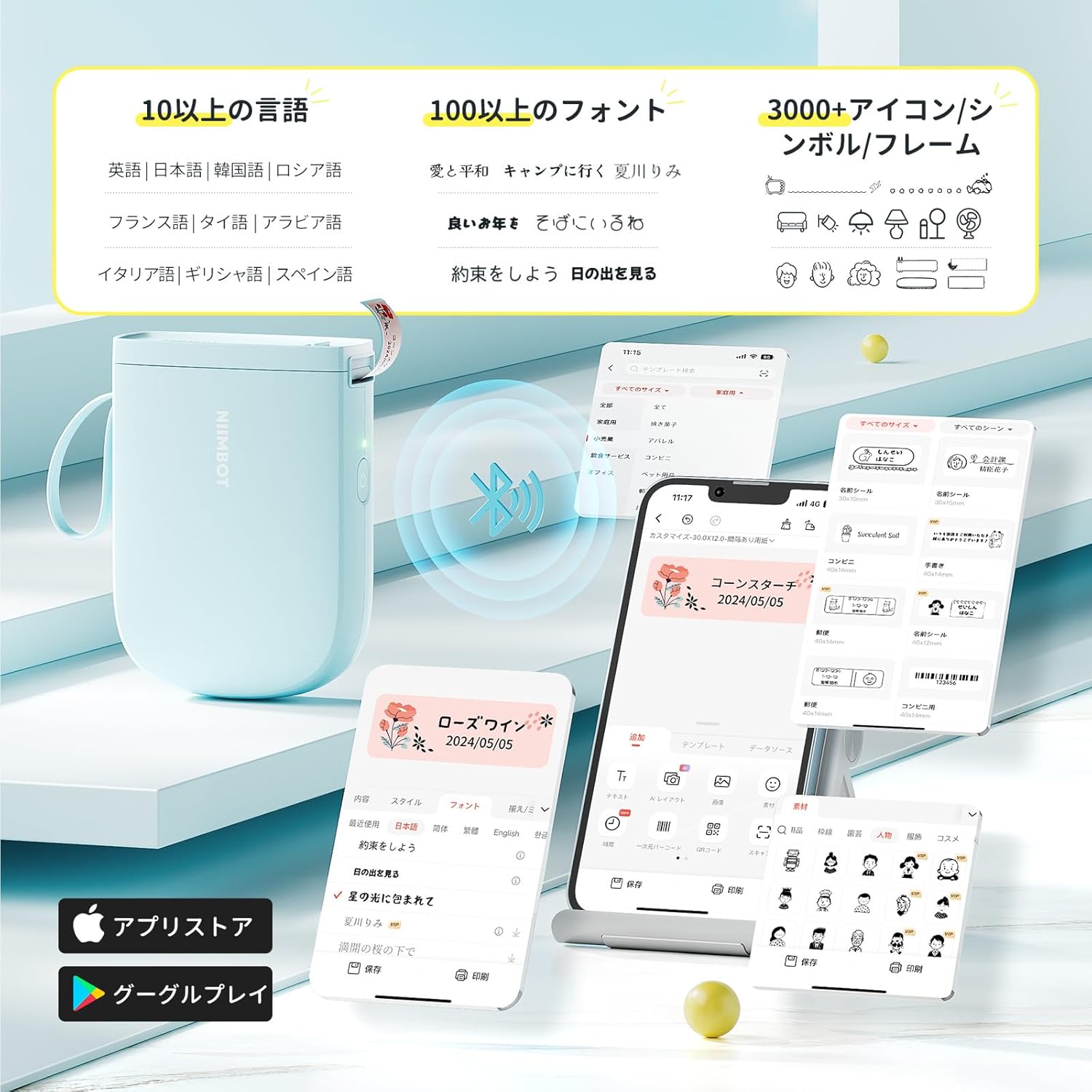
The NIIMBOT app offers a wide range of features for label creation:
- การป้อนข้อความ: Easily type and customize text with over 20 fonts and various styles.
- เทมเพลต: Utilize automatic template matching and thousands of image elements for quick design.
- การจดจำภาพ: Import images for printing.
- บาร์โค้ด/คิวอาร์โค้ด: สร้างและพิมพ์บาร์โค้ดและคิวอาร์โค้ด
- การพิมพ์แบทช์: พิมพ์ฉลากหลายแผ่นได้อย่างมีประสิทธิภาพ

4.2. การพิมพ์ฉลาก
Once your label design is complete in the app, tap the "Print" button. You can adjust the number of copies and print density before confirming. The printer will automatically feed and cut the labels.
4.3. การใช้งานที่หลากหลาย
The NIIMBOT D11H is suitable for a wide range of uses, including organizing documents, creating name tags, price tags, date reminders for food, and labeling items in the kitchen, office, or warehouse.


5. การบำรุงรักษา
To ensure optimal performance and longevity of your NIIMBOT D11H label printer, follow these maintenance guidelines:
- การทำความสะอาด: Regularly clean the print head with a soft, lint-free cloth moistened with alcohol. Ensure the printer is off before cleaning.
- พื้นที่จัดเก็บ: เก็บเครื่องพิมพ์ไว้ในที่แห้งและเย็น หลีกเลี่ยงแสงแดดโดยตรงและอุณหภูมิที่สูงหรือต่ำเกินไป
- แบตเตอรี่: ควรชาร์จเครื่องพิมพ์เป็นประจำ แม้ว่าจะไม่ได้ใช้งานบ่อย เพื่อรักษาอายุการใช้งานของแบตเตอรี่
6 การแก้ไขปัญหา
If you encounter issues with your NIIMBOT D11H, refer to the following common troubleshooting steps:
- เครื่องพิมพ์ไม่เชื่อมต่อ: Ensure Bluetooth is enabled on your smartphone and the printer is powered on. Try restarting both devices and reconnecting through the app.
- คุณภาพการพิมพ์ไม่ดี: Check if the label paper is loaded correctly and is a genuine NIIMBOT thermal label. Clean the print head if necessary. Adjust print density in the app settings.
- กระดาษติด: Open the paper compartment, carefully remove any jammed paper, and reload the label roll correctly.
- เครื่องพิมพ์ไม่ตอบสนอง: Ensure the battery is charged. If the device is unresponsive, try resetting it by holding the power button for an extended period (e.g., 10-15 seconds).
7. ข้อมูลจำเพาะ
| คุณสมบัติ | ข้อมูลจำเพาะ |
|---|---|
| ยี่ห้อ | นิมบ็อต |
| ชื่อรุ่น | ดี11เอช |
| เทคโนโลยีการเชื่อมต่อ | บลูทูธ |
| เทคโนโลยีการพิมพ์ | เทอร์มอล |
| ความละเอียดการพิมพ์สูงสุด (ขาวดำ) | 300 จุดต่อนิ้ว |
| ความเร็วในการพิมพ์สูงสุด (ขาวดำ) | 40.0 มม./วินาที |
| ขนาดสื่อ (กระดาษ) สูงสุด | 15 มม. (กว้าง) |
| ขนาดสินค้า | 11 x 3 x 7 ซม. |
| น้ำหนักสินค้า | 360 กรัม |
| อุปกรณ์ที่รองรับ | สมาร์ทโฟน (แอนดรอยด์และไอโอเอส) |
| สี | สีฟ้า |
8. การรับประกันและการสนับสนุน
For warranty information or technical support, please refer to the official NIIMBOT webหรือติดต่อผู้ค้าปลีกของคุณ เก็บใบเสร็จรับเงินไว้เป็นหลักฐานการซื้อ


