คำแนะนำด้านความปลอดภัยที่สำคัญ
Please read this manual carefully before operating your Pro Breeze 2500W Smart Oil Filled Radiator. Keep these instructions for future reference.
- ควรวางเครื่องใช้ไฟฟ้าบนพื้นผิวที่มั่นคงและเรียบเสมอกัน
- Do not cover the heater. Covering the heater can lead to overheating.
- เก็บวัสดุไวไฟให้ห่างจากเครื่องทำความร้อนอย่างน้อย 1 เมตร (3 ฟุต)
- ห้ามใช้เครื่องทำความร้อนนี้บริเวณบริเวณใกล้เคียงอ่างอาบน้ำ ฝักบัว หรือสระว่ายน้ำ
- เครื่องทำความร้อนนี้ติดตั้งมาพร้อมกับ ระบบป้องกันความร้อนสูงเกินไป และก สวิตช์พลิกคว่ำ เพื่อความปลอดภัยที่เพิ่มขึ้น
- ถอดปลั๊กฮีตเตอร์เมื่อไม่ใช้งาน
- ห้ามใช้งานเครื่องทำความร้อนด้วยสายไฟหรือปลั๊กที่ชำรุด

Image: Safety features of the Pro Breeze Oil Filled Radiator, including overheat protection, child lock, and tip-over protection.

Image: Internal mechanism for overheat protection, ensuring safe operation by automatically adjusting heat or shutting down.

Image: The radiator's automatic shut-off feature, which activates if the unit is tilted or knocked over, preventing accidents.
คำแนะนำการตั้งค่า
การแกะกล่องและการประกอบ
- Carefully remove the radiator from its packaging.
- Inspect the appliance for any signs of damage. If damaged, do not use and contact customer support.
- Attach the castor wheels to the base of the radiator. Ensure they are securely fastened for stability and portability.
- Place the radiator on a stable, level surface, ensuring adequate clearance from walls and furniture (at least 1 meter).

Image: The Pro Breeze 2500W Smart Oil Filled Radiator, showcasing its main unit, remote control, and smartphone app interface.
การเพิ่มพลังเริ่มต้น
- เสียบสายไฟเข้ากับเต้ารับไฟฟ้าที่เหมาะสม (230V)
- The heater will emit a short beep, and the display will illuminate briefly.
คำแนะนำการใช้งาน
การทำงานของแผงควบคุม
The radiator features a touch-sensitive control panel for direct adjustments.
- ปุ่มเปิด/ปิด: กดเพื่อเปิดหรือปิดเครื่องทำความร้อน
- ปุ่มโหมด (M): Cycle through available heating modes (e.g., Low, Medium, High, Eco).
- การปรับอุณหภูมิ (+/-): เพิ่มหรือลดอุณหภูมิตามต้องการ
- ปุ่มตั้งเวลา: ตั้งเวลา 24 ชั่วโมงสำหรับการทำงานอัตโนมัติ

ภาพ: รายละเอียด view of the radiator's touch control panel and the included remote control, illustrating manual operation.
การควบคุมการทำงานด้วยรีโมทคอนโทรล
The included remote control allows for convenient operation from a distance of up to 5 meters.
- Functions mirror those on the control panel (Power, Mode, Temperature, Timer).
- Ensure the remote control has working batteries (1 Lithium metal battery included).
Smart App Control (Wi-Fi)
Control your radiator remotely using the dedicated smartphone application, compatible with Amazon Alexa and Google Home.
- Download the Pro Breeze Smart App from your device's app store (iOS or Android).
- Follow the in-app instructions to connect your radiator to your home Wi-Fi network.
- Once connected, you can power the heater on/off, adjust temperature, select modes, and set schedules from anywhere.
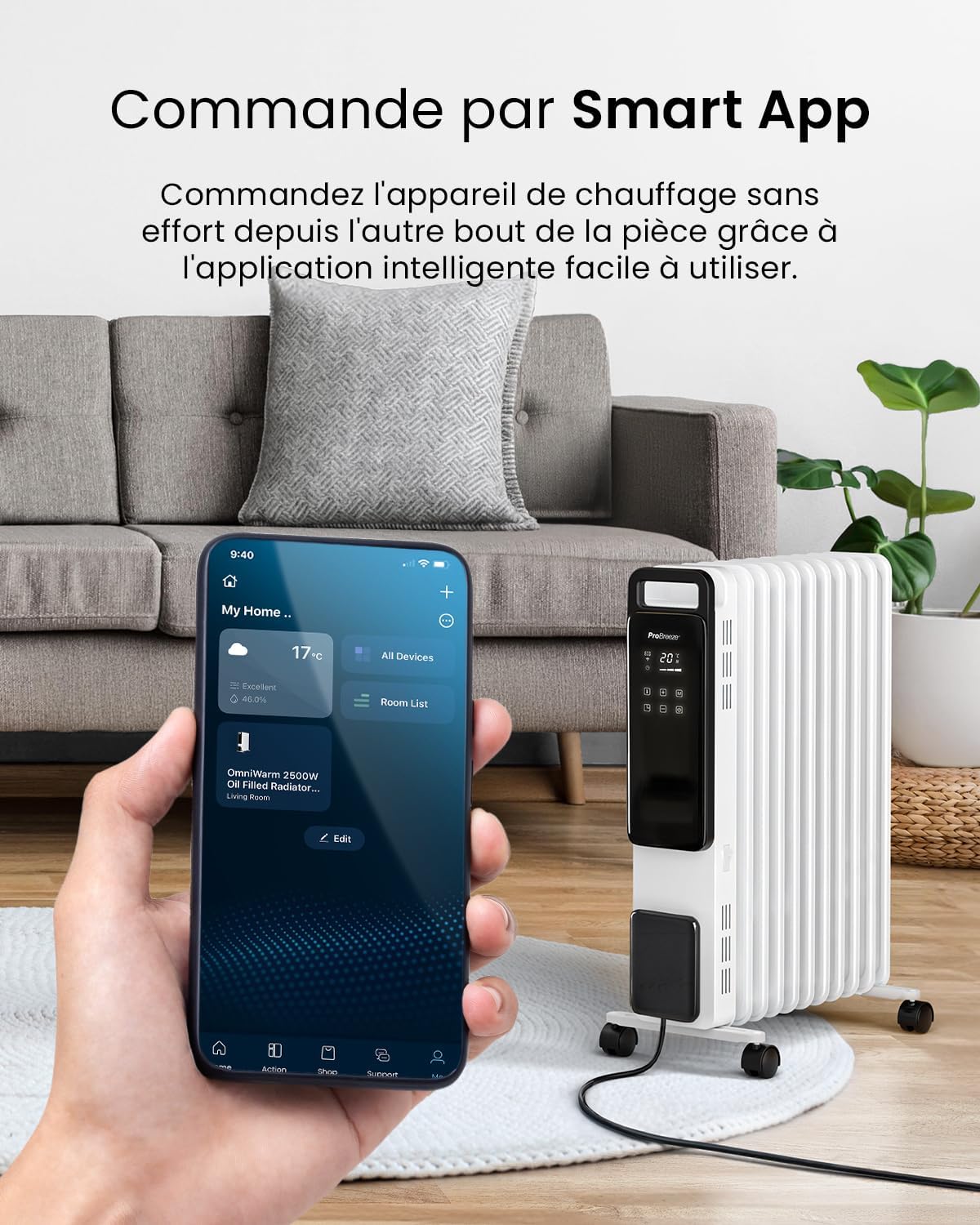
Image: A smartphone showing the Pro Breeze Smart App, demonstrating remote control capabilities for the radiator.
Heating Modes and Temperature Settings
- ระดับความร้อน: Choose from 1000W (Low), 1500W (Medium), or 2500W (High) to suit your heating needs.
- โหมดอีโค: This energy-saving mode intelligently adjusts power output to maintain your desired temperature efficiently, potentially reducing energy consumption.
- เทอร์โมสตัทปรับได้: Set your preferred room temperature. The heater will automatically turn off once the set temperature is reached and reactivate if the temperature drops.

Image: The radiator's control panel displaying the three power levels: 1000W (Low), 1500W (Medium), and 2500W (High).

Image: A visual representation of the Eco Mode's energy-saving benefits, showing a comparison of energy consumption.
ฟังก์ชั่นจับเวลา 24 ชั่วโมง
Utilize the 24-hour digital timer to program the heater's operating hours, optimizing energy efficiency.
- Set specific times for the heater to turn on and off automatically.
- This feature is accessible via the control panel, remote control, and the smart app.

Image: The smart app's scheduling feature, demonstrating how to set the 24-hour timer and activate the mute function for quiet operation.
การซ่อมบำรุง
การทำความสะอาด
- ควรถอดปลั๊กเครื่องทำความร้อนออกและปล่อยให้เย็นลงสนิทก่อนทำความสะอาด
- เช็ดพื้นผิวภายนอกด้วยผ้านุ่ม damp ผ้า ห้ามใช้สารทำความสะอาดที่มีฤทธิ์กัดกร่อนหรือตัวทำละลาย
- ตรวจสอบให้แน่ใจว่าไม่มีน้ำเข้าไปในส่วนประกอบภายใน
- Dry thoroughly before plugging back in.
พื้นที่จัดเก็บ
- When not in use for extended periods, store the heater in a cool, dry place.
- Utilize the cable tidy feature to wrap the power cord neatly.

Image: The compact design of the radiator, highlighting its dimensions (Height 61.8cm, Length 28cm, Depth 45.6cm) for easy placement and storage.
การแก้ไขปัญหา
| ปัญหา | สาเหตุที่เป็นไปได้ | สารละลาย |
|---|---|---|
| เครื่องทำความร้อนไม่เปิด | No power supply; Tip-over switch activated; Overheat protection activated. | Check power plug and outlet. Ensure heater is upright. Unplug and allow to cool for 30 minutes before restarting. |
| เครื่องทำน้ำอุ่นทำงานไม่ร้อนอย่างมีประสิทธิภาพ | Incorrect heat setting; Room too large; Doors/windows open. | Increase heat setting. Ensure room is adequately sealed. Consider heater placement. |
| ปัญหาการเชื่อมต่อ Wi-Fi | รหัสผ่าน Wi-Fi ไม่ถูกต้อง; เราท์เตอร์อยู่ไกลเกินไป; สัญญาณรบกวนเครือข่าย | Verify Wi-Fi password. Move heater closer to router. Restart router and heater. |
หากปัญหายังคงมีอยู่หลังจากพยายามแก้ไขปัญหาเหล่านี้แล้ว โปรดติดต่อฝ่ายสนับสนุนลูกค้า
ข้อมูลจำเพาะ
| คุณสมบัติ | รายละเอียด |
|---|---|
| หมายเลขรุ่น | พีบี-เอช-24-ดับบลิวเอฟ |
| กำลังขับ | 2500วัตต์ |
| จำนวนครีบ | 11 |
| ขนาด (กว้าง x ยาว x สูง) | 28 x 44.2 x 61.8 ซม. |
| น้ำหนัก | 11.26 กก. |
| เล่มที่tage | 230V (ไฟฟ้ากระแสสลับ) |
| วิธีการควบคุม | Touch Control Panel, Remote Control, Smart App (Wi-Fi) |
| คุณสมบัติพิเศษ | Eco Mode, 24-Hour Timer, Adjustable Thermostat, Overheat Protection, Tip-over Switch, Child Lock |
| ส่วนประกอบที่รวมอยู่ | Remote Control (with 1 Lithium metal battery) |
การรับประกันและการสนับสนุน
การรับประกันของผู้ผลิต
This Pro Breeze product comes with a การรับประกันจากผู้ผลิต 1 ปี นับจากวันที่ซื้อ โปรดเก็บหลักฐานการซื้อไว้เพื่อใช้ในการเคลมประกัน
การสนับสนุนลูกค้า
For technical assistance, warranty claims, or general inquiries, please contact Pro Breeze customer support:
- Webเว็บไซต์: www.probreeze.com/support (อดีตampลิงค์จริงอาจแตกต่างกัน)
- Refer to the product packaging or the Pro Breeze webเว็บไซต์สำหรับข้อมูลการติดต่อล่าสุด


