คู่มือผู้ใช้ ProtoArc คีย์บอร์ดพับได้ตามหลักสรีรศาสตร์ XK03
รุ่น : XK03
1. บทนำ
This manual provides detailed instructions for the setup, operation, and maintenance of your ProtoArc Ergonomic Foldable Keyboard XK03. Please read this manual thoroughly before using the product to ensure optimal performance and longevity.

Image 1.1: ProtoArc XK03 Ergonomic Foldable Keyboard in various states, including a smartphone stand.
2. คุณสมบัติของผลิตภัณฑ์
- การออกแบบแยกส่วนตามหลักสรีรศาสตร์: Features a V-shape with a 166-degree angle and split keyset to promote a natural typing posture and reduce strain on hands and wrists.
- Ultra-Slim & 360° Foldable: Designed for portability, easily folds for storage and transport. The magnetic adsorption design prevents accidental opening.
- การเชื่อมต่อหลายอุปกรณ์: Connects to up to 3 Bluetooth devices simultaneously, allowing for easy switching between them.
- ความเข้ากันได้กว้าง: Compatible with iOS, Android, Windows, and Mac OS, suitable for iPads, iPhones, tablets, cellphones, laptops, and PCs.
- ชาร์จไฟได้แบบ Type-C: Built-in lithium battery offers 250 hours of standby time on a single charge. Convenient power on/off by unfolding/folding.
- หนัง PU คุณภาพสูง: Features a soft-touch, anti-skid, anti-scratch, and anti-fingerprint exterior.

Image 2.1: Demonstrating the ergonomic split design for natural typing.
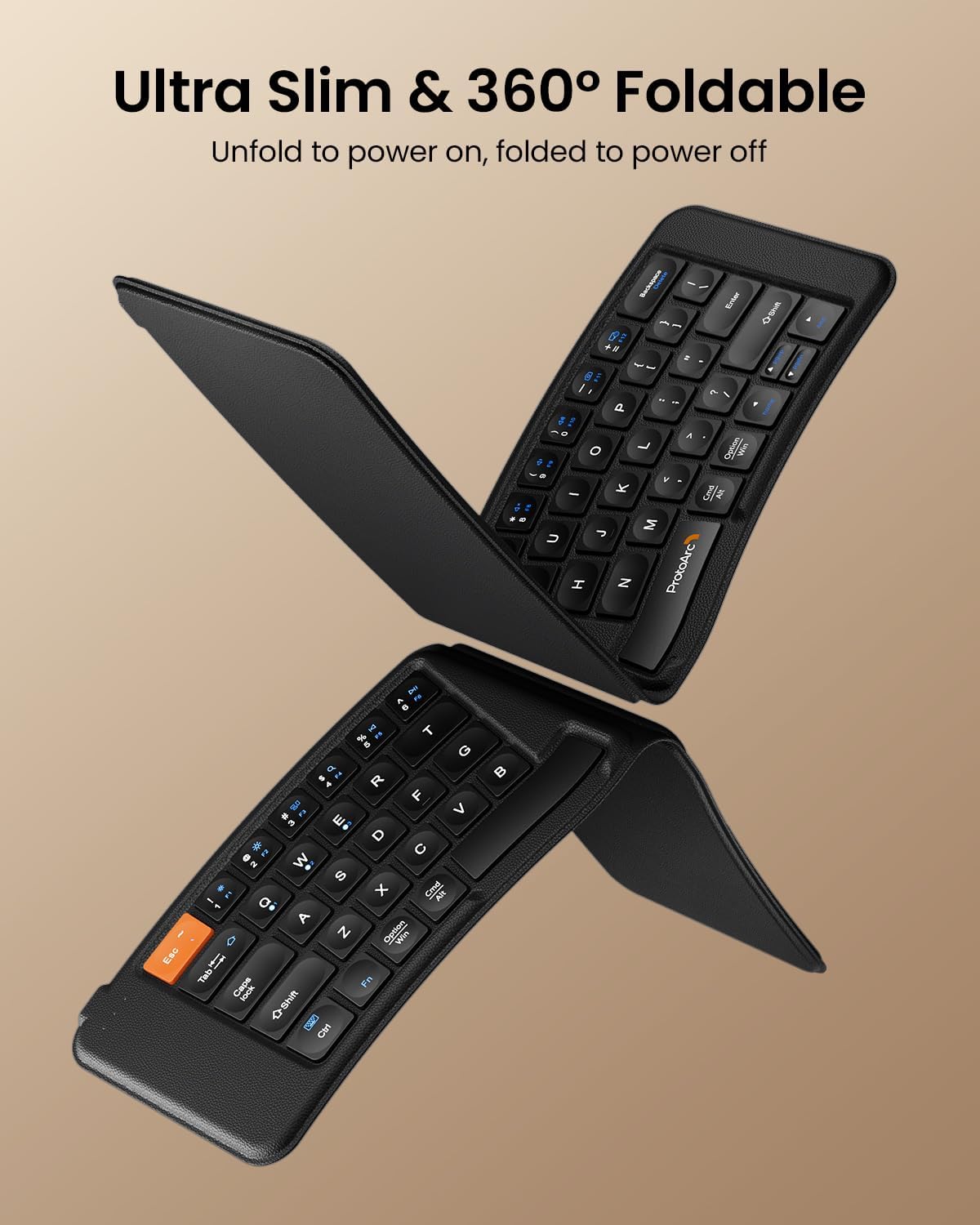
Image 2.2: The keyboard's ultra-slim and foldable design.
3. เนื้อหาบรรจุภัณฑ์
กรุณาตรวจสอบแพ็คเกจสำหรับรายการต่อไปนี้:
- ProtoArc Ergonomic Foldable Keyboard XK03
- สายชาร์จ USB-C
- คู่มือการใช้งาน (เอกสารนี้)
4. การตั้งค่า
4.1 การชาร์จคีย์บอร์ด
- ค้นหาพอร์ตชาร์จ USB-C บนแป้นพิมพ์
- Connect the provided USB-C cable to the keyboard and a power source (e.g., computer USB port, USB wall adapter).
- The charging indicator light will illuminate (typically red) during charging and turn off or change color when fully charged. A full charge takes approximately 2 hours.

Image 4.1: Connecting the USB-C charging cable to the keyboard.
4.2 การเปิด/ปิดเครื่อง
The keyboard automatically powers on when unfolded and powers off when folded. Ensure the keyboard is fully unfolded for operation.

Image 4.2: The magnetic closure ensures the keyboard stays securely folded.
4.3 การจับคู่บลูทูธ
The ProtoArc XK03 keyboard supports connection to up to three Bluetooth devices.
- Unfold the keyboard to power it on. The Bluetooth indicator lights (BT1, BT2, BT3) will be visible.
- เลือกช่องสัญญาณบลูทูธ: กดปุ่ม Fn key simultaneously with BT1, BT2, หรือ BT3 to select a channel. The corresponding indicator will flash rapidly, indicating it is in pairing mode.
- เปิดใช้งานบลูทูธบนอุปกรณ์ของคุณ: Go to your device's Bluetooth settings (e.g., smartphone, tablet, laptop).
- ค้นหา อุปกรณ์: Look for "ProtoArc XK03" in the list of available Bluetooth devices.
- เชื่อมต่อ: Select "ProtoArc XK03" to initiate pairing. Your device may prompt you to enter a code displayed on the screen. Type the code on the keyboard and press เข้า.
- การยืนยัน: Once paired, the indicator light for the selected channel will stop flashing and remain solid for a few seconds before turning off, indicating a successful connection.

Image 4.3: The keyboard connected to multiple devices via Bluetooth.

Image 4.4: Bluetooth indicator lights for multi-device pairing.
4.4 การสลับระหว่างอุปกรณ์ที่จับคู่กัน
To switch between devices that are already paired:
- กด เอฟเอ็น + บีที1, เอฟเอ็น + บีที2, หรือ เอฟเอ็น + บีที3 to instantly switch to the corresponding paired device.
5. คู่มือการใช้งาน
5.1 การพิมพ์ขั้นพื้นฐาน
The ProtoArc XK03 keyboard functions like a standard QWERTY keyboard. The ergonomic split design may require a brief adaptation period for some users.
5.2 ปุ่มฟังก์ชันมัลติมีเดีย
The keyboard includes multimedia function keys accessible by pressing the Fn key in combination with other keys. Refer to the diagram below for specific functions:

Image 5.1: Multimedia Function Keys layout.
- กด Fn+F1-F10 to get numbers 1-0.
- กด Fn + 'F1-F12' (blue icons) to activate multimedia functions (e.g., volume control, media playback).
- กด Shift + 'F1-F12' เพื่อให้ได้สัญลักษณ์ต่างๆ เช่น !, @, #
- กด Fn + Shift + 'F1-F12' for F1-F12 functions.
5.3 ความเข้ากันได้ของระบบปฏิบัติการ
The keyboard is designed to work seamlessly with various operating systems. It automatically detects the connected OS (iOS, Android, Windows, Mac OS) and adjusts key functions accordingly. For specific OS-related key behaviors, refer to your device's operating system documentation.
6. การบำรุงรักษา
6.1 การทำความสะอาด
- ในการทำความสะอาดแป้นพิมพ์ ให้เช็ดพื้นผิวเบาๆ ด้วยผ้าเนื้อนุ่มและแห้งamp ผ้า.
- หลีกเลี่ยงการใช้สารเคมีรุนแรง น้ำยาทำความสะอาดที่มีฤทธิ์กัดกร่อน หรือความชื้นมากเกินไป เพราะสิ่งเหล่านี้อาจทำให้พื้นผิวและส่วนประกอบภายในของแป้นพิมพ์เสียหายได้
- สำหรับการทำความสะอาดระหว่างคีย์ ให้ใช้ลมอัดเพื่อกำจัดฝุ่นและเศษต่างๆ
6.2 พื้นที่จัดเก็บ
- เมื่อไม่ใช้งาน ให้พับแป้นพิมพ์เพื่อป้องกันปุ่มและประหยัดแบตเตอรี่
- เก็บแป้นพิมพ์ไว้ในที่แห้งและเย็น หลีกเลี่ยงแสงแดดโดยตรงและอุณหภูมิที่สูงหรือต่ำเกินไป
6.3 การดูแลแบตเตอรี่
- Charge the keyboard regularly, even if not in frequent use, to maintain battery health.
- หลีกเลี่ยงการปล่อยแบตเตอรี่จนหมดบ่อยครั้ง
- If the keyboard will not be used for an extended period, charge it to about 50% before storing.
7 การแก้ไขปัญหา
7.1 Keyboard Not Pairing
- ตรวจสอบแบตเตอรี่: ตรวจสอบให้แน่ใจว่าแป้นพิมพ์มีประจุไฟเพียงพอ
- เข้าสู่โหมดการจับคู่ใหม่อีกครั้ง: กด เอฟเอ็น + บีที1/บีที2/บีที3 to put the desired channel back into pairing mode (indicator will flash rapidly).
- อุปกรณ์บลูทูธ: Confirm Bluetooth is enabled on your device and it is discoverable.
- ลืมอุปกรณ์: If previously paired, try removing or "forgetting" the keyboard from your device's Bluetooth list and then re-pairing.
- รีสตาร์ทอุปกรณ์: Restart both the keyboard (by folding and unfolding) and your host device.
7.2 คีย์ไม่ตอบสนอง
- ตรวจสอบการเชื่อมต่อ: Ensure the keyboard is actively connected to your device (the selected BT indicator should not be flashing). Switch channels if necessary.
- ระดับแบตเตอรี่: A low battery can cause intermittent key response. Charge the keyboard.
- การรบกวน: ย้ายออกห่างจากอุปกรณ์ไร้สายอื่นๆ ที่อาจก่อให้เกิดการรบกวน
- เริ่มต้นใหม่อีกครั้ง: Fold and unfold the keyboard to restart it, then reconnect.
7.3 ความล่าช้าของอินพุตหรือการตัดการเชื่อมต่อ
- ระยะทาง: Ensure the keyboard is within the effective Bluetooth range of your device (typically up to 10 meters).
- การรบกวน: Reduce potential interference from other electronic devices.
- แบตเตอรี่: Ensure the keyboard has adequate battery charge.
- โหลดอุปกรณ์: If your device is under heavy load, it might affect Bluetooth performance.
8. ข้อมูลจำเพาะ
| แบบอย่าง | XK03 |
| เทคโนโลยีการเชื่อมต่อ | บลูทูธ |
| อุปกรณ์ที่รองรับ | Laptop, Smartphone, Tablet, iPad, iPhone |
| คำอธิบายแป้นพิมพ์ | Foldable, Ergonomic Split Design |
| คุณสมบัติพิเศษ | Ergonomic, Foldable, Portable, Rechargeable, Split Keyset Design |
| น้ำหนักสินค้า | 1.12 ปอนด์ (ประมาณ 508 กรัม) |
| ขนาดแพ็คเกจ | 9.84 x 8.7 x 1.42 นิ้ว |
| แบตเตอรี่ | 1 Nonstandard Battery (included), Rechargeable |
| เวลาสแตนด์บาย | 250 ชั่วโมง |
| เวลาชาร์จเต็ม | ประมาณ 2 ชั่วโมง |

ภาพที่ 8.1: ขนาดของแป้นพิมพ์
9. ข้อมูลการรับประกัน
ProtoArc products are designed for reliability and performance. The ProtoArc XK03 Ergonomic Foldable Keyboard typically comes with a 2-year warranty from the date of purchase, covering manufacturing defects. Please retain your proof of purchase for warranty claims. For specific warranty terms and conditions, refer to the warranty card included with your product or visit the official ProtoArc webเว็บไซต์.
10. การสนับสนุน
If you encounter any issues or have questions regarding your ProtoArc Ergonomic Foldable Keyboard XK03 that are not addressed in this manual, please contact ProtoArc customer support. You can usually find contact information (email, phone, or support portal) on the official ProtoArc webไซต์หรือบนบรรจุภัณฑ์ผลิตภัณฑ์
When contacting support, please have your product model (XK03) and purchase details readily available.


