1. บทนำ
This manual provides detailed instructions for the setup, operation, and maintenance of your DANFI AUDIO DF TE-103 Vinyl Record Player. This versatile audio system features a 3-speed turntable, Bluetooth input, USB/SD card playback and recording, FM radio, and auxiliary input/output options. Please read this manual thoroughly before use to ensure proper function and longevity of your device.
2. ข้อมูลด้านความปลอดภัย
- อย่าให้เครื่องโดนฝนหรือความชื้น
- ห้ามปิดกั้นช่องระบายอากาศใดๆ
- ตรวจสอบให้แน่ใจว่าสายไฟไม่ได้ถูกหนีบหรือเดินทับ
- ถอดปลั๊กเครื่องในระหว่างที่เกิดพายุฝนฟ้าคะนองหรือเมื่อไม่ได้ใช้งานเป็นเวลานาน
- ส่งต่อการบริการทั้งหมดไปยังบุคลากรบริการที่มีคุณสมบัติเหมาะสม
- ควรวางอุปกรณ์ให้ห่างจากแสงแดดโดยตรง แหล่งความร้อน และสนามแม่เหล็กแรงสูง
3. เนื้อหาบรรจุภัณฑ์
ตรวจสอบว่ารายการทั้งหมดที่ระบุไว้ด้านล่างนี้รวมอยู่ในแพ็คเกจของคุณ:
- DANFI AUDIO DF TE-103 Vinyl Record Player
- หน่วยกำลัง
- อะแดปเตอร์ 45 RPM
- สลิปแมท
- Backup Needle
4. สินค้าหมดview
Familiarize yourself with the main components and controls of your record player.

รูปที่ 4.1 : ด้านหน้า view of the DANFI AUDIO DF TE-103 Vinyl Record Player.
4.1 การควบคุมและการเชื่อมต่อที่แผงด้านหน้า

รูปที่ 4.2: รายละเอียด view of the front panel with USB, AUX IN, LED Display, and Mode Switch key.
- จอแสดงผล LED: แสดงโหมดปัจจุบัน ข้อมูลเส้นทาง หรือความถี่วิทยุ FM
- ปุ่มสวิตช์โหมด: Toggles between Turntable, Bluetooth, USB/SD, FM Radio, and AUX modes.
- พอร์ต USB: For USB flash drives for playback and recording.
- ช่องรับสัญญาณเสียงเข้า: ช่องต่อขนาด 3.5 มม. สำหรับเชื่อมต่ออุปกรณ์เสียงภายนอก
- การควบคุมระดับเสียง: ปรับระดับเสียงเอาท์พุต
- ปุ่ม EQ: Selects sound equalizer presets (Jazz, Pop, Classical, Rock, Vocal).
4.2 การเชื่อมต่อแผงด้านหลัง

Figure 4.3: Rear panel with RCA Line Out connections.
- อาร์ซีเอ ไลน์เอาท์: เชื่อมต่อกับภายนอก amplifiers หรือลำโพงขับเคลื่อน
- กำลังไฟเข้า: เชื่อมต่อกับอะแดปเตอร์ไฟฟ้าที่ให้มา
5. การตั้งค่า
- การแกะกล่อง: นำเครื่องเล่นแผ่นเสียงและอุปกรณ์เสริมทั้งหมดออกจากบรรจุภัณฑ์อย่างระมัดระวัง เก็บรักษาบรรจุภัณฑ์ไว้สำหรับการขนส่งหรือจัดเก็บในอนาคต
- การจัดวาง: Place the unit on a stable, level surface away from direct sunlight, heat sources, and excessive dust.
- ฝาปิดป้องกันฝุ่น: Attach the dust cover to the hinges at the back of the unit.
- การเชื่อมต่อไฟฟ้า: Connect the power unit to the DC input on the rear of the record player, then plug the power adapter into a wall outlet.
- เปิดเครื่องครั้งแรก: Press the power button to turn on the unit. The LED display will illuminate.
6. คู่มือการใช้งาน
6.1 การเล่นแผ่นเสียงไวนิล

Figure 6.1: The turntable supports 3 speeds for various record types.
- ตรวจสอบให้แน่ใจว่าเครื่องเปิดอยู่
- ยกฝาครอบกันฝุ่นขึ้น
- Place a vinyl record on the platter. If playing a 45 RPM single, use the included 45 RPM adaptor.
- เลือกความเร็วที่เหมาะสม (33, 45 หรือ 78 รอบต่อนาที) โดยใช้สวิตช์เลือกความเร็ว
- Gently move the tonearm to the desired position on the record. The platter will begin to spin automatically.
- ปรับระดับเสียงตามที่คุณต้องการ
- The AUTO STOP function will automatically stop the turntable when the record finishes playing.
6.2 Bluetooth Connection (Input Only)
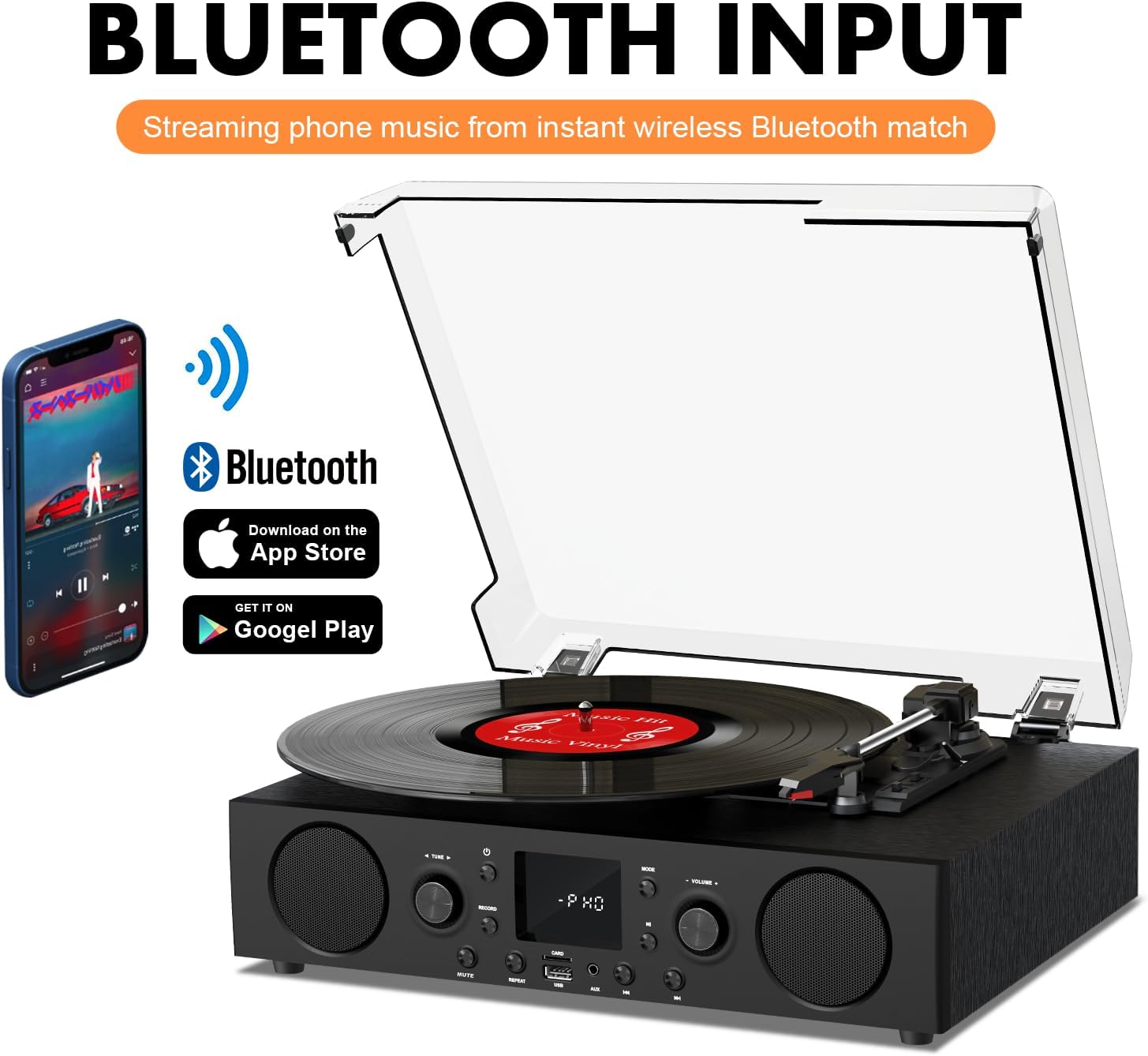
Figure 6.2: Connecting a smartphone via Bluetooth to the turntable.
- กดปุ่ม โหมด button until "Bluetooth" or a similar indicator appears on the LED display. The unit will enter pairing mode.
- บนสมาร์ทโฟน แท็บเล็ต หรือคอมพิวเตอร์ของคุณ ให้เปิดใช้งานบลูทูธ แล้วค้นหาอุปกรณ์ที่ใช้งานได้
- Select "DANFI AUDIO DF TE-103" (or similar name) from the list of devices to pair.
- Once paired, you can stream audio wirelessly from your device to the record player.
- บันทึก: This turntable supports Bluetooth input only and cannot transmit audio to Bluetooth headphones or speakers.
6.3 USB/SD Input and MP3 Encoding

Figure 6.3: Vinyl to MP3 encoding process using a USB flash drive.
- การเล่น USB/SD: Insert a USB flash drive or SD card into the respective port. Press the โหมด button to select USB/SD mode. The unit will automatically play compatible audio files.
- การแปลงไฟล์เสียงไวนิลเป็น MP3:
- Insert a USB flash drive or SD card into the port.
- เริ่มเปิดแผ่นเสียงไวนิล
- กดปุ่ม บันทึก button. The LED display will indicate recording is in progress.
- กดปุ่ม บันทึก button again to stop recording. The recorded audio will be saved as an MP3/WAV file on the USB drive/SD card.
6.4 วิทยุ FM
- กดปุ่ม โหมด button to select FM Radio mode. The current frequency will appear on the LED display.
- Use the tuning controls (often the Skip/Search buttons) to scan for radio stations.
- The unit can store approximately 20 stations.
6.5 RCA Line Out and AUX Input

Figure 6.4: Connecting to external speakers using RCA Line Out.
- อาร์ซีเอ ไลน์เอาท์: Connect RCA cables from the rear of the record player to the audio input of an external amplifier or powered speakers. This allows for boosted volume and playback through a larger sound system. The turntable's internal speakers will not be muted automatically when using RCA output.
- อินพุต AUX: Connect an external audio source (e.g., MP3 player, smartphone) to the 3.5mm AUX IN port on the front panel using an audio cable. Press the โหมด button to select AUX mode to play audio from the connected device.
6.6 อีควอไลเซอร์ (EQ)

Figure 6.5: Available equalizer presets for audio customization.
กดปุ่ม EQ button to cycle through the available sound equalizer presets: Jazz, Pop, Classical, Rock, and Vocal. Select the preset that best suits your audio preference.
7. การบำรุงรักษา
- การทำความสะอาด: ใช้ผ้าแห้งนุ่มเช็ดทำความสะอาดภายนอกตัวเครื่อง สำหรับฝาครอบกันฝุ่น ให้ใช้ผ้าที่แห้งเล็กน้อยเช็ดทำความสะอาดamp เช็ดด้วยผ้าแล้วเช็ดให้แห้งสนิท หลีกเลี่ยงการใช้สารทำความสะอาดที่มีฤทธิ์กัดกร่อน
- การดูแลสไตลัส: Periodically check the stylus (needle) for wear or damage. A worn stylus can damage records and degrade sound quality. Replace the stylus with a compatible backup needle when necessary.
- การดูแลรักษาเอกสาร: ควรดูแลรักษาแผ่นเสียงไวนิลให้สะอาดและจัดเก็บในแนวตั้งภายในซองเพื่อป้องกันฝุ่นละอองและการบิดเบี้ยว
8 การแก้ไขปัญหา
| ปัญหา | สาเหตุที่เป็นไปได้ | สารละลาย |
|---|---|---|
| ไม่มีไฟฟ้า | ไม่ได้เสียบสายไฟ; ปลั๊กไฟไม่ทำงาน | ตรวจสอบให้แน่ใจว่าเสียบสายไฟแน่นหนา ทดสอบเต้ารับกับอุปกรณ์อื่น |
| ไม่มีเสียง | ระดับเสียงต่ำเกินไป; เลือกโหมดไม่ถูกต้อง; ไม่ได้เชื่อมต่อ/ไม่ได้เปิดลำโพงภายนอก | Increase volume; Press Mode button to select correct source; Check RCA connections and external speaker power |
| เครื่องเล่นแผ่นเสียงไม่หมุน | Unit not powered on; Tonearm not moved over record | Ensure power is on; Gently move tonearm over the record to activate platter |
| บลูทูธไม่เชื่อมต่อ | Not in Bluetooth mode; Device too far; Already paired with another device | เลือกโหมดบลูทูธ; ขยับอุปกรณ์ให้ใกล้ขึ้น; ตัดการเชื่อมต่อจากอุปกรณ์อื่นแล้วลองจับคู่ใหม่อีกครั้ง |
| Poor sound quality from vinyl | Dirty record; Worn stylus; Incorrect speed selected | Clean record; Replace stylus; Select correct RPM speed |
9. ข้อมูลจำเพาะ
| คุณสมบัติ | รายละเอียด |
|---|---|
| ชื่อรุ่น | TE-103 |
| ยี่ห้อ | แดนฟี ออดิโอ DF |
| ขนาดสินค้า | 14.37 x 10.82 x 5.28 นิ้ว |
| น้ำหนักสินค้า | 6.2 ปอนด์ |
| วัสดุ | Acrylic, Engineered Wood |
| ความเร็วของแผ่นเสียง | 33 1/3, 45, 78 รอบต่อนาที |
| ส่วนประกอบที่รวมอยู่ | Power unit, 45 rpm adaptor, Slipmat, Backup needle |
| คุณสมบัติพิเศษ | Equalizer (EQ), FM Radio, USB Input, USB/SD Card Recording, Bluetooth Input |
| การเชื่อมต่อ | Bluetooth (Input only), USB, SD Card, AUX Input, RCA Line Out |
| อุปกรณ์ที่รองรับ | Headphones, MP3 Players, Personal Computers, Smartphones, Speakers, Tablets |
| การใช้พลังงาน (โหมดเปิด) | 5 วัตต์ |
10. การรับประกันและการสนับสนุน
For warranty information or technical support, please refer to the documentation provided with your purchase or contact DANFI AUDIO DF customer service through their official channels. Keep your purchase receipt as proof of purchase for warranty claims.


