1. คำแนะนำด้านความปลอดภัยที่สำคัญ
Please read these safety instructions carefully before using your SENCOR SRV 6450BK Robot Vacuum Cleaner. Keep this manual for future reference.
- เด็กอายุตั้งแต่ 8 ปีขึ้นไป รวมไปถึงบุคคลที่มีความบกพร่องทางร่างกาย ประสาทสัมผัส หรือจิตใจ หรือขาดประสบการณ์และความรู้ สามารถใช้เครื่องใช้ไฟฟ้านี้ได้ หากมีการดูแลหรือได้รับคำแนะนำเกี่ยวกับการใช้เครื่องใช้ไฟฟ้าในลักษณะที่ปลอดภัย และเข้าใจถึงอันตรายที่อาจเกิดขึ้น
- เด็กไม่ควรเล่นเครื่องใช้ไฟฟ้านี้ ไม่ควรทำความสะอาดและบำรุงรักษาเครื่องโดยเด็กโดยไม่มีผู้ดูแล
- Only use the original power adapter and charging dock provided by the manufacturer.
- Do not use the robot vacuum cleaner in wet environments or on wet surfaces.
- Ensure all loose cables, rugs, and small objects are removed from the floor before operation to prevent entanglement.
- Do not operate the robot vacuum near open flames or flammable materials.
- Do not use the appliance to pick up large debris, sharp objects, or liquids.
- Always turn off the robot vacuum and disconnect it from the power source before cleaning or maintenance.
- อย่าพยายามซ่อมแซมเครื่องใช้ไฟฟ้าด้วยตนเอง โปรดติดต่อช่างผู้ชำนาญการที่ได้รับอนุญาตเพื่อทำการซ่อมแซม
2. เนื้อหาบรรจุภัณฑ์
แกะกล่องอย่างระมัดระวังและตรวจสอบให้แน่ใจว่าสินค้าทั้งหมดอยู่ในสภาพดี หากสินค้าใดสูญหายหรือเสียหาย โปรดติดต่อผู้ค้าปลีกของคุณ
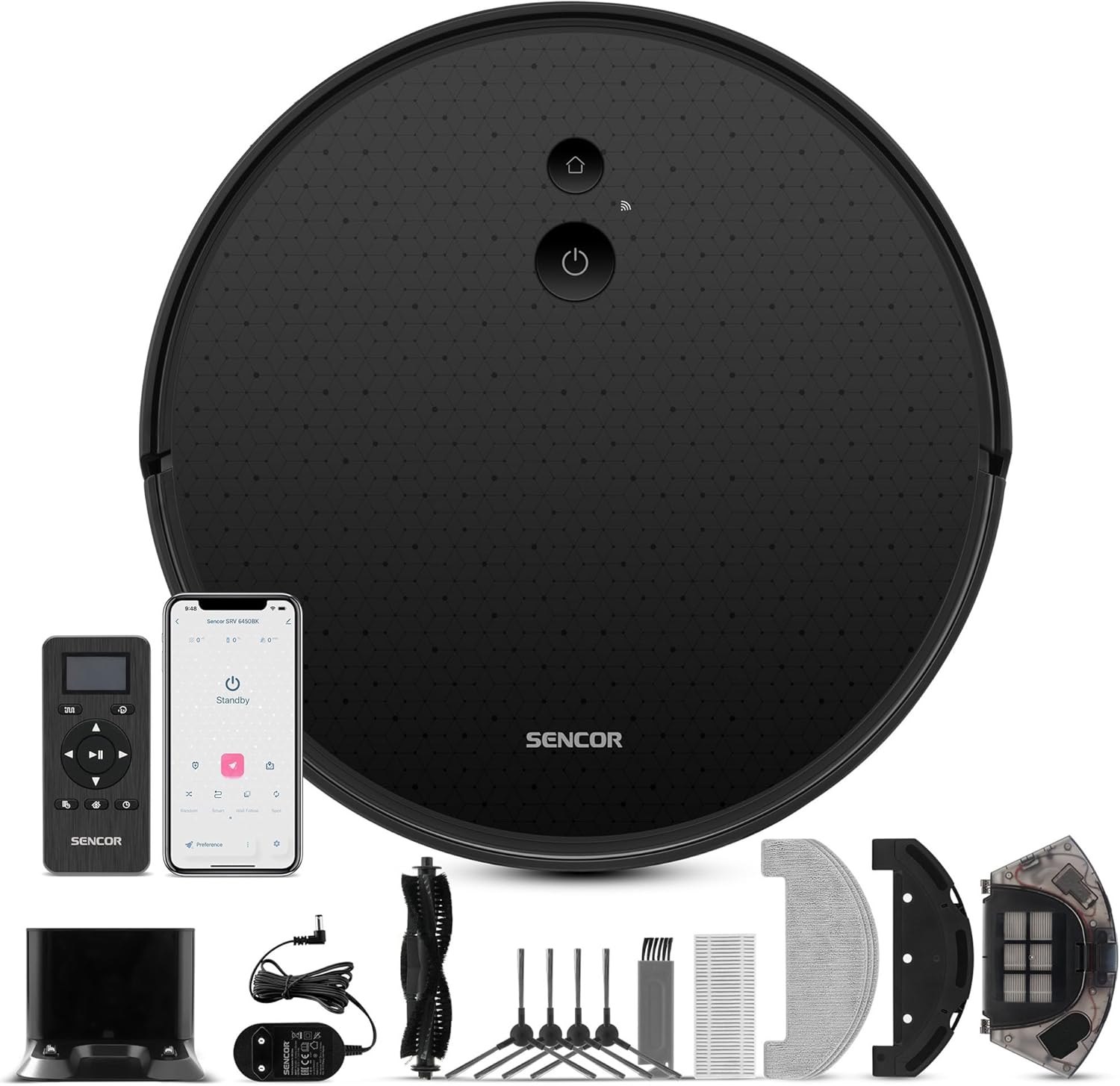
Image: The SENCOR SRV 6450BK Robot Vacuum Cleaner shown with its full set of accessories, including the charging dock, remote control, side brushes, main brush, mop pads, and cleaning tools.
- Robot Vacuum Cleaner Body (with two side brushes and filters installed)
- แท่นชาร์จ
- Cleaning Attachment (Mop Module)
- 3x Mop Pads
- รีโมทคอนโทรล
- แบตเตอรี่ AAA 2 ก้อน (สำหรับรีโมทคอนโทรล)
- 2x Spare Side Rotating Brushes
- อะแดปเตอร์แปลงไฟ
- 1x Spare HEPA Filter
- 1x Spare Foam Filter
- แปรงทำความสะอาด
- คู่มือการใช้งาน

ภาพ: ภาพระยะใกล้ view of all individual accessories included with the SENCOR SRV 6450BK, such as the remote, charging base, brushes, filters, and mop pads.
3. สินค้าหมดview
The SENCOR SRV 6450BK is a versatile robot vacuum cleaner designed for efficient cleaning of various floor types. It combines vacuuming and mopping functions for comprehensive floor care.
- พลังดูด: 3,000 Pa for effective dirt removal.
- ฟังก์ชั่นคู่: ดูดฝุ่นและถูพื้นพร้อมกันได้
- โหมดการทำความสะอาด: 4 suction levels and 3 mopping intensity levels.
- การนำทาง: Sencor Smart Gyro navigation for efficient movement.
- เซ็นเซอร์: Equipped with intelligent impact and fall sensors to prevent collisions and drops.
- การเพิ่มพรม: Automatic performance increase on carpets for deeper cleaning.
- แบตเตอรี่: High-end 2,600 mAh Li-Ion battery providing up to 140 minutes of operation.
- การออกแบบที่กะทัดรัด: Robot height of only 7.5 cm and diameter of 32 cm allows easy movement under furniture and in tight spaces.
- ตัวเลือกการควบคุม: Can be controlled via the included remote control or the Sencor Home mobile application.

Image: The SENCOR SRV 6450BK robot vacuum demonstrating its low profile by cleaning effectively under a glass table, highlighting its ability to access hard-to-reach areas.
4. การตั้งค่า
4.1 การวางตำแหน่งแท่นชาร์จ
Place the charging dock against a wall in an open area, ensuring there are no obstacles within 1 meter (3 feet) to the sides and 2 meters (6 feet) in front of the dock. Connect the power adapter to the charging dock and plug it into a power outlet.
4.2 การชาร์จเริ่มต้น
Place the robot vacuum onto the charging dock. Ensure the charging contacts on the robot align with those on the dock. The indicator light on the robot will illuminate to show it is charging. For first-time use, charge the robot for at least 6 hours or until fully charged.
4.3 การติดตั้งแปรงด้านข้าง
Press the side brushes onto the square posts at the bottom of the robot until they click into place. Ensure the L and R markings on the brushes match the corresponding markings on the robot.
4.4 Remote Control Batteries
เปิดช่องใส่แบตเตอรี่ด้านหลังของรีโมทคอนโทรล แล้วใส่แบตเตอรี่ AAA สองก้อน โดยสังเกตขั้วให้ถูกต้อง
4.5 Sencor Home App (Optional)
For advanced control and scheduling, download the "Sencor Home" app from your smartphone's app store. Follow the in-app instructions to connect your robot vacuum to your home Wi-Fi network.
5. คู่มือการใช้งาน
5.1 การเริ่มรอบการทำความสะอาด
- เริ่มต้นด้วยตนเอง: Press the power button on the robot or the "Start/Pause" button on the remote control. The robot will begin cleaning in Auto mode.
- การเริ่มแอป: Open the Sencor Home app, select your robot, and tap "Start" to initiate a cleaning cycle.

Image: The SENCOR SRV 6450BK robot vacuum systematically cleaning a carpeted area, illustrating its efficient navigation pattern.
5.2 การหยุดชั่วคราวและการดำเนินการต่อ
Press the power button on the robot or the "Start/Pause" button on the remote/app to pause the cleaning cycle. Press again to resume.
5.3 Returning to Charging Dock
Press the "Home" button on the robot, remote control, or app to send the robot back to its charging dock.
โหมดทำความสะอาด 5.4 โหมด
The robot offers various cleaning modes, selectable via the remote control or Sencor Home app:
- โหมดอัตโนมัติ: หุ่นยนต์จะนำทางและทำความสะอาดพื้นที่ทั้งหมดอย่างชาญฉลาด
- โหมดเฉพาะจุด: ทำความสะอาดบริเวณเฉพาะอย่างได้อย่างเข้มข้นยิ่งขึ้น
- โหมดขอบ: ทำความสะอาดตามผนังและขอบเฟอร์นิเจอร์
- การทำความสะอาดตามกำหนดเวลา: Set specific times for the robot to automatically start cleaning.

Image: The SENCOR SRV 6450BK robot vacuum effectively cleaning a hard floor, with a visible clean path behind it, demonstrating its dirt removal capability.
5.5 ฟังก์ชันถูพื้น
To use the mopping function, fill the water tank (part of the cleaning attachment) with clean water and attach a mop pad. Slide the cleaning attachment into the designated slot on the robot. The robot will then vacuum and mop simultaneously. Adjust mopping intensity via the app or remote.

Image: A hand holding the remote control for the SENCOR SRV 6450BK robot vacuum, with the robot and its charging dock visible in the background, illustrating the control options.
6. การบำรุงรักษา
การบำรุงรักษาตามปกติจะช่วยให้หุ่นยนต์ดูดฝุ่นของคุณทำงานได้อย่างเหมาะสมที่สุดและยืดอายุการใช้งาน
6.1 การล้างถังขยะ
เปิดฝาครอบด้านบนของหุ่นยนต์ นำถังขยะออกมา และเทขยะลงในถังขยะ ขอแนะนำให้เทขยะออกจากถังขยะหลังการทำความสะอาดแต่ละรอบ
6.2 การทำความสะอาดตัวกรอง
Remove the HEPA filter and foam filter from the dustbin. Tap them gently to remove dust. Do not wash HEPA filters with water. The foam filter can be rinsed with water and air-dried completely before reinstallation. Replace filters every 3-6 months, or as needed.
6.3 การทำความสะอาดแปรงหลัก
Remove the main brush cover and lift out the main brush. Use the provided cleaning tool to remove hair and debris tangled around the brush. Reinstall the main brush and cover.
6.4 การทำความสะอาดแปรงด้านข้าง
Periodically check the side brushes for tangled hair or debris. Pull them off their posts to clean. If brushes are worn or damaged, replace them with the spare brushes provided.
6.5 การทำความสะอาดเซ็นเซอร์และหน้าสัมผัสการชาร์จ
Wipe the anti-drop sensors, bumper sensors, and charging contacts on both the robot and the charging dock with a clean, dry cloth to ensure proper function.
6.6 Cleaning Mop Pads
After each mopping session, remove the mop pad and rinse it thoroughly with water. Allow it to air dry completely before reuse. Mop pads are washable and reusable.
7 การแก้ไขปัญหา
If your robot vacuum cleaner encounters an issue, refer to the following common problems and solutions:
| ปัญหา | สาเหตุที่เป็นไปได้ | สารละลาย |
|---|---|---|
| หุ่นยนต์ไม่เริ่มต้นหรือตอบสนอง | Low battery; Power switch off; Remote control batteries dead. | ชาร์จหุ่นยนต์ ตรวจสอบให้แน่ใจว่าสวิตช์เปิดปิดอยู่ในตำแหน่งเปิด และเปลี่ยนแบตเตอรี่รีโมทคอนโทรล |
| หุ่นยนต์ไม่สามารถค้นหาแท่นชาร์จได้ | ท่าเทียบเรือถูกกีดขวาง ท่าเทียบเรือถูกถอดปลั๊ก หุ่นยนต์อยู่ห่างจากท่าเทียบเรือมากเกินไป | Clear obstacles around dock; Plug in dock; Manually place robot near dock. |
| ประสิทธิภาพการทำความสะอาดไม่ดี | Dustbin full; Filters clogged; Brushes tangled or worn. | เทถังฝุ่น; ทำความสะอาด/เปลี่ยนแผ่นกรอง; ทำความสะอาด/เปลี่ยนแปรงปัดฝุ่น |
| หุ่นยนต์ติดขัดบ่อยครั้ง | Loose cables, rugs, or small objects on floor; Robot stuck under furniture. | Clear floor area before cleaning; Use boundary strips (if available) or block off problematic areas. |
| เสียงรบกวนที่ผิดปกติระหว่างการทำงาน | Main brush or side brushes tangled; Debris in wheels. | Clean main brush and side brushes; Check wheels for obstructions. |
If the problem persists, please contact SENCOR customer support.
8. ข้อมูลจำเพาะ
| ยี่ห้อ | SENCOR |
| หมายเลขรุ่น | เอสอาร์วี 6450BK |
| สี | สีดำ |
| ขนาด (กว้าง x ยาว x สูง) | 32 x 32 x 7.5 ซม. (12.6 x 12.6 x 3 นิ้ว) |
| น้ำหนักสินค้า | 2.8 กิโลกรัม (6.17 ปอนด์) |
| ความจุของถังขยะ | 340 มิลลิลิตร |
| เล่มที่tage | 240 โวลต์ |
| วัสดุ | พลาสติก |
| ฟังก์ชันหยุดอัตโนมัติ | ใช่ |
| ระดับเสียง | 65 เดซิเบล |
| ประเภทแบตเตอรี่ | ลิเธียมไอออน (2600 mAh) |
| ประเภทตัวกรอง | แผ่นกรอง HEPA |
| คำแนะนำด้านพื้นผิว | พรม, พื้นแข็ง |
9. การรับประกันและการสนับสนุน
Warranty information for the SENCOR SRV 6450BK Robot Vacuum Cleaner is typically provided with the product packaging or on the manufacturer's official webไซต์ โปรดดูข้อกำหนดและเงื่อนไขการรับประกันโดยละเอียดจากแหล่งข้อมูลเหล่านี้
For technical support, service, or spare parts, please contact SENCOR customer service through their official webไซต์หรือข้อมูลการติดต่อที่ระบุไว้ในเอกสารผลิตภัณฑ์ของคุณ
Note: The product data indicates a 30-day return policy from the seller (Amazon), which is separate from the manufacturer's warranty.


