1. บทนำ
Welcome to the Koiiko Wireless Gaming Controller Z01 user manual. This guide provides detailed instructions for setting up, operating, maintaining, and troubleshooting your new gaming controller. The Koiiko Z01 is designed for multi-platform compatibility, offering an enhanced gaming experience across various devices.
2. สินค้าหมดview
2.1 คุณสมบัติหลัก
- ความเข้ากันได้กับหลายแพลตฟอร์ม: Compatible with iOS (iPhone, iPad), Android (phones, tablets), PC, Nintendo Switch/Switch OLED/Switch Lite, PlayStation 4/3, and various cloud gaming services (Steam Link, Play Space, Nvidia GeForce Now, Xbox Game Pass, Amazon Luna, Google Stadia, Rainway, Moonlight). Note: Not compatible with Apple TV, iPod, Fire TV/TV Box.
- การควบคุมขั้นสูง: Features clickable thumbsticks, turbo function, 6-axis gyro, responsive Hall Effect linear triggers, and Hall Effect rockers for precise input.
- แสงไฟที่ปรับแต่งได้: Dazzling 7-color RGB breathing light with 5 adjustable RGB light modes.
- ปุ่มที่สามารถตั้งโปรแกรมได้: Equipped with LB, RB, M1, M2 buttons, offering up to 30 customizable actions.
- การเชื่อมต่อไร้สาย: Connects via Bluetooth, eliminating the need for a 2.4G adapter.
- แบตเตอรี่ใช้งานได้ยาวนาน: Built-in 600mAh lithium battery provides over 10 hours of continuous gameplay.
- การออกแบบพกพา: Small and lightweight for easy carrying and storage.
2.2 เนื้อหาบรรจุภัณฑ์
- 1 x Koiiko Wireless Gaming Controller Z01
- สายชาร์จ USB 1 เส้น
- 1 x คู่มือผู้ใช้
3. ข้อมูลจำเพาะ

Product Information Table for Koiiko Wireless Gaming Controller Z01
| คุณลักษณะ | รายละเอียด |
|---|---|
| ชื่อสินค้า | คอนโทรลเลอร์เกมไร้สาย |
| แบบอย่าง | Z01 |
| ระยะการส่งสัญญาณบลูทูธ | ≤ 8 เมตร |
| ฉบับทำงานtage | กระแสตรง3.7โวลต์ |
| กระแสไฟฟ้าทำงาน | <35มิลลิแอมป์ |
| ระยะเวลาการใช้งาน | ประมาณ 10-15 ชั่วโมง |
| เวลาในการชาร์จ | ประมาณ 2 ชั่วโมง |
| ความจุของแบตเตอรี่ | 600mAh |
| ขนาด | 143มม. x 90มม. x 49มม. |
| น้ำหนักสินค้า | 4 ออนซ์ |
4. การตั้งค่าและการเชื่อมต่อ
Before connecting, ensure your Koiiko Wireless Gaming Controller Z01 is powered off.
4.1 PC Wireless Connection
- Hold down the 'R' key and then press the 'Home' key for 2 seconds. The 'Home' key will show a BLUE light and flash quickly, indicating pairing mode.
- On your PC, turn on the Bluetooth function.
- ค้นหา and select the Bluetooth device named "Xbox Wireless Controller".
- Once connected, the 'Home' key will remain BLUE.
Video demonstrating how to connect the Koiiko Wireless Gaming Controller to a PC via Bluetooth and how to set up Steam Link for PC streaming.
4.2 iOS Wireless Connection (iPhone/iPad)
- Hold down the 'R' key and then press the 'Home' key for 2 seconds. The 'Home' key will show a BLUE light and flash quickly, indicating pairing mode.
- On your iOS device, turn on the Bluetooth function.
- ค้นหา and select the Bluetooth device named "Xbox Wireless Controller".
- Once connected, the 'Home' key will remain BLUE.
Video guide for connecting the Koiiko Wireless Gaming Controller to an iOS device (iPhone/iPad) via Bluetooth.
4.3 Android Wireless Connection
- Hold down the 'Y' key and then press the 'Home' key for 2 seconds. The 'Home' key will show an ORANGE light and flash quickly, indicating pairing mode.
- On your Android device, turn on the Bluetooth function.
- ค้นหา and select the Bluetooth device named "Z01".
- Once connected, the 'Home' key will remain ORANGE.
Video tutorial on connecting the Koiiko Wireless Gaming Controller to an Android device via Bluetooth.
4.4 Nintendo Switch Wireless Connection
- On your Nintendo Switch, navigate to System Settings > Controllers and Sensors > Change Grip/Order.
- Hold down the 'ZR' key and then press the 'Home' key for 2 seconds. The 'Home' key will show a GREEN light and flash quickly, indicating pairing mode.
- The controller will automatically connect to the console. Once connected, the 'Home' key will remain GREEN.
Video instructions for pairing the Koiiko Wireless Gaming Controller with a Nintendo Switch console.
4.5 PC Streaming (Steam Link)
- Ensure your PC and iOS/Android device are connected to the same network.
- Download and open the Steam Link app on your mobile device.
- Sign in to your Steam account on both your PC and the Steam Link app.
- The app will automatically scan for connectable computers. After selecting your PC, enter the PIN code displayed in the app into Steam on your PC.
- Once the connection and speed test are complete, click 'Start Running' in the app to access your Steam library and play games.
5. คู่มือการใช้งาน
5.1 ฟังก์ชันปุ่ม
- ปุ่ม ABXY: ปุ่มการดำเนินการมาตรฐาน
- ดี-แพด: การป้อนข้อมูลแบบทิศทาง
- จอยสติ๊กซ้าย/ขวา: การเคลื่อนไหวและการควบคุมกล้องแบบอนาล็อก
- LB/RB Buttons: ปุ่มกันกระแทกซ้ายและขวา
- LT/RT Triggers: Left and Right Analog Triggers (Hall Effect for precision).
- ปุ่มโฮม: เปิด/ปิดเครื่อง กลับสู่หน้าจอหลัก
- ปุ่มเลือก/เริ่ม: Menu navigation and in-game actions.
- ปุ่ม M1/M2: ปุ่มด้านหลังที่สามารถตั้งโปรแกรมได้
5.2 ABXY Key-Value Interchange
To switch the ABXY key values between Xbox and Switch layouts, press the 'Y + A + HOME' keys simultaneously. This allows you to adapt the button mapping without physically removing buttons.

ABXY Key-Value Interchange Diagram
5.3 การควบคุมแสง RGB
The controller features a dedicated light adjustment button. Press this button to cycle through 7-color RGB breathing light effects and 5 different RGB light modes, allowing you to choose your preferred lighting style.

RGB Lighting Modes Illustration
5.4 ฟังก์ชันเทอร์โบ
The turbo function allows for rapid, continuous input of a button press. Refer to the detailed instructions in the included physical user manual for specific button combinations to activate and customize turbo settings.
5.5 ปุ่มย้อนกลับที่ตั้งโปรแกรมได้ (M1, M2)
The M1 and M2 back buttons are highly customizable, supporting up to 30 action keys. Consult the included physical user manual for detailed programming instructions to set up your preferred macros and functions.
5.6 6-Axis Gyro and Vibration
The controller features 6-axis gyro and vibration feedback for immersive gameplay. Please note that these functions are supported only on PC, PlayStation 3, PlayStation 4, and Nintendo Switch platforms.
5.7 จอยสติ๊กและไกปืนแบบ Hall Effect
The Koiiko Z01 is equipped with e-sports level Hall Effect 3D joysticks and linear triggers. This technology greatly reduces joystick drift, providing smooth handling and precise positioning for an enhanced gaming experience.
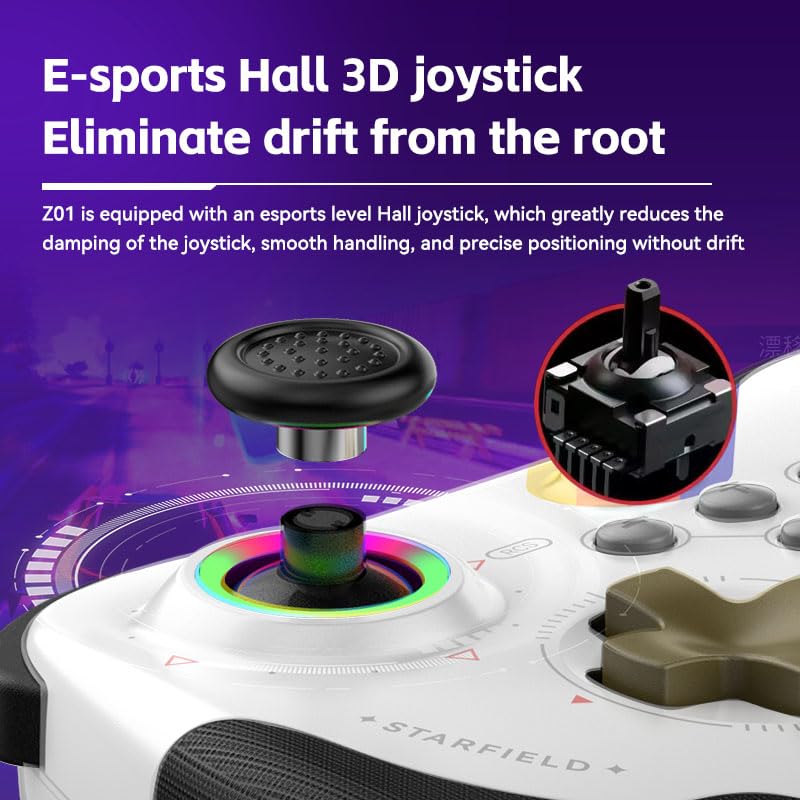
Hall Effect 3D Joystick Detail
6. การบำรุงรักษา
- การทำความสะอาด: ใช้ผ้านุ่มและแห้งทำความสะอาดคอนโทรลเลอร์ หลีกเลี่ยงการใช้สารเคมีรุนแรงหรือวัสดุที่มีฤทธิ์กัดกร่อน
- พื้นที่จัดเก็บ: เก็บตัวควบคุมไว้ในที่แห้งและเย็น ห่างจากแสงแดดโดยตรงและอุณหภูมิที่สูงหรือต่ำมาก
- การดูแลแบตเตอรี่ เพื่อยืดอายุการใช้งานแบตเตอรี่ ควรหลีกเลี่ยงการปล่อยประจุแบตเตอรี่จนหมดบ่อยๆ ควรชาร์จเป็นประจำ แม้จะไม่ได้ใช้งานเป็นเวลานานก็ตาม
- หลีกเลี่ยงการหยด: แม้จะทนทาน แต่การทำตกซ้ำๆ อาจทำให้ชิ้นส่วนภายในเสียหายได้ โปรดใช้งานด้วยความระมัดระวัง
7 การแก้ไขปัญหา
- ตัวควบคุมไม่เชื่อมต่อ:
- ตรวจสอบให้แน่ใจว่าตัวควบคุมมีประจุไฟเต็ม
- Verify you are using the correct button combination for your device's pairing mode (e.g., 'R + Home' for PC/iOS, 'Y + Home' for Android, 'ZR + Home' for Switch).
- ตรวจสอบให้แน่ใจว่าได้เปิดใช้งานบลูทูธบนอุปกรณ์ของคุณแล้ว
- ลบการจับคู่คอนโทรลเลอร์ก่อนหน้านี้ทั้งหมดออกจากการตั้งค่าบลูทูธของอุปกรณ์ของคุณและลองจับคู่ใหม่อีกครั้ง
- รีสตาร์ททั้งคอนโทรลเลอร์และอุปกรณ์ของคุณ
- ปุ่มไม่ตอบสนอง:
- ตรวจสอบว่าตัวควบคุมเชื่อมต่อกับอุปกรณ์ของคุณอย่างถูกต้องหรือไม่
- Ensure the game you are playing supports controller input.
- If playing on PC, ensure 'Xbox Configuration Support' is enabled in Steam settings if using Steam.
- Test the controller with another game or device to isolate the issue.
- ปัญหาการชาร์จ:
- ใช้สายชาร์จ USB ที่ให้มา
- Ensure the charging port on the controller and the USB port on your power source are clean and free of debris.
- ลองใช้พอร์ต USB หรืออะแดปเตอร์จ่ายไฟอื่น
- จอยสติ๊กดริฟท์:
- The Koiiko Z01 uses Hall Effect joysticks designed to minimize drift. If you experience drift, try recalibrating the controller through your device's settings if available.
- Ensure the controller's firmware is up to date (check the manufacturer's web(ดูเว็บไซต์สำหรับการอัปเดต)
8. การรับประกันและการสนับสนุน
Your Koiiko Wireless Gaming Controller Z01 comes with a standard manufacturer's warranty. Please refer to the warranty card included in your package for specific terms and conditions.
For any questions, technical support, or assistance with your product, please contact our dedicated technology team. We are committed to providing comprehensive support to ensure your satisfaction.
ข้อมูลติดต่อ: Please refer to the contact details provided on the product packaging or the official Koiiko webเว็บไซต์.


