การแนะนำ
The Edifier W830NB Wireless Over Ear Headphones offer a premium audio experience with advanced features designed for comfort and performance. These headphones are equipped with cutting-edge technology to deliver high-resolution sound, effective noise cancellation, and extended playtime, making them ideal for various listening environments.

Figure 1: Edifier W830NB Wireless Over Ear Headphones.
คุณสมบัติหลัก:
- ระบบเสียงความละเอียดสูงด้วย LDAC: Features 40mm large dynamic drivers and supports LDAC high-definition decoding for Hi-Res Wireless audio, transmitting at a transfer rate of 990kbps, offering 3X music detail of standard Bluetooth codes.
- -45dB Active Noise Cancellation: Upgraded hybrid digital noise-canceling technology achieves noise reduction of up to -45dB, with four selectable ANC modes.
- เสียงเชิงพื้นที่ที่ดื่มด่ำ: Utilizes a three-dimensional sound stage algorithm for a cinema-level surround atmosphere.
- Extended Playtime & Fast Charging: Offers up to 94 hours of continuous music playback with ANC off, and 10 hours of use from a 15-minute charge.
- DNN Noise Reduction for Clear Calls: Deep Neural Network (DNN) technology intelligently separates human voices from noise for clear conversations.
- All-day Comfort & Foldable Design: Ergonomic design with soft earpads and an adjustable headband, weighing approximately 265g, with a fully foldable design for portability.
- เทคโนโลยีบลูทูธ V5.4 ล่าสุด: Ensures a more stable and smooth connection.
- การเชื่อมต่อแบบหลายจุด: Capable of connecting to two Bluetooth audio devices simultaneously (feature disabled by default, enable via EDIFIER ConneX App).
- การตั้งค่าที่กำหนดเองได้: Three preset EQs available in the EDIFIER ConneX App, which also supports custom EQs.
การตั้งค่า
การชาร์จหูฟัง
Before first use, fully charge your Edifier W830NB headphones. Connect the included USB-C audio cable to the charging port on the headphones and the other end to a compatible USB power source. A full charge provides up to 94 hours of playback with Active Noise Cancellation (ANC) off, or 54 hours with ANC on. For quick power, a 15-minute charge can provide up to 10 hours of listening time.

Figure 2: Charging and Playtime Overview.
จับคู่บลูทู ธ
วิธีจับคู่หูฟังของคุณกับอุปกรณ์:
- ตรวจสอบให้แน่ใจว่าหูฟังได้รับการชาร์จและเปิดอยู่
- Activate Bluetooth on your source device (e.g., smartphone, laptop).
- The headphones should appear in the list of available Bluetooth devices as "EDIFIER W830NB". Select it to connect.
- เมื่อเชื่อมต่อแล้ว จะมีเสียงแจ้งเตือนยืนยันการจับคู่สำเร็จ
The W830NB headphones feature the latest Bluetooth V5.4 technology for a stable and smooth connection. They also support multipoint connection, allowing simultaneous connection to two devices. This feature can be enabled via the EDIFIER ConneX App.

Figure 3: Bluetooth V5.4 and Multipoint Connection.
การใช้งานหูฟัง
ควบคุมมากกว่าview
The Edifier W830NB headphones feature intuitive button controls located on the earcup. Refer to the diagram below for specific functions:

Figure 4: Headphone Control Diagram.
โหมดตัดเสียงรบกวนแบบแอคทีฟ (ANC)
The W830NB headphones offer upgraded hybrid digital noise-canceling technology, reducing noise by up to -45dB. You can switch between four ANC modes to suit your environment:
- การตัดเสียงรบกวนสูง: เพื่อลดเสียงรบกวนให้ได้มากที่สุดในสภาพแวดล้อมที่มีเสียงดังมาก
- ระบบตัดเสียงรบกวนต่ำ: สำหรับลดเสียงรบกวนระดับปานกลาง
- การลดลม: ออกแบบมาเป็นพิเศษเพื่อลดเสียงลมรบกวน
- เสียงรอบข้าง: ช่วยให้คุณได้ยินเสียงรอบข้างขณะยังเพลิดเพลินกับเสียงของคุณได้
Press the dedicated ANC button on the earcup to cycle through these modes.

Figure 5: Active Noise Cancellation Features.
เสียงเชิงพื้นที่
Experience immersive audio with the three-dimensional sound stage algorithm. This feature creates a cinema-level surround atmosphere, enhancing your listening experience for movies, games, and music.

Figure 6: Immersive Spatial Audio.
คุณภาพการโทรคมชัดใส
The integrated Deep Neural Network (DNN) noise reduction technology ensures your calls are crystal clear, even in noisy environments. It intelligently recognizes speech and precisely separates human voices from background noise.

Figure 7: DNN Noise Reduction for Calls.
โหมดเกม
Activate Game Mode for a more immersive gaming experience. With a low latency of 0.08 seconds and enhanced game sound effects, you'll enjoy responsive and engaging gameplay.

Figure 8: Game Mode for Enhanced Experience.
การซ่อมบำรุง
การดูแลทั่วไปและการทำความสะอาด
- เช็ดหูฟังด้วยผ้าแห้งนุ่มๆ ห้ามใช้สารเคมีรุนแรงหรือวัสดุที่มีฤทธิ์กัดกร่อน
- หลีกเลี่ยงการให้หูฟังสัมผัสกับอุณหภูมิที่สูงหรือความชื้นสูงหรือแสงแดดโดยตรง
- The headphones are not water resistant. Avoid contact with liquids.
- Store the headphones in their folded position in a protective case when not in use to prevent damage.
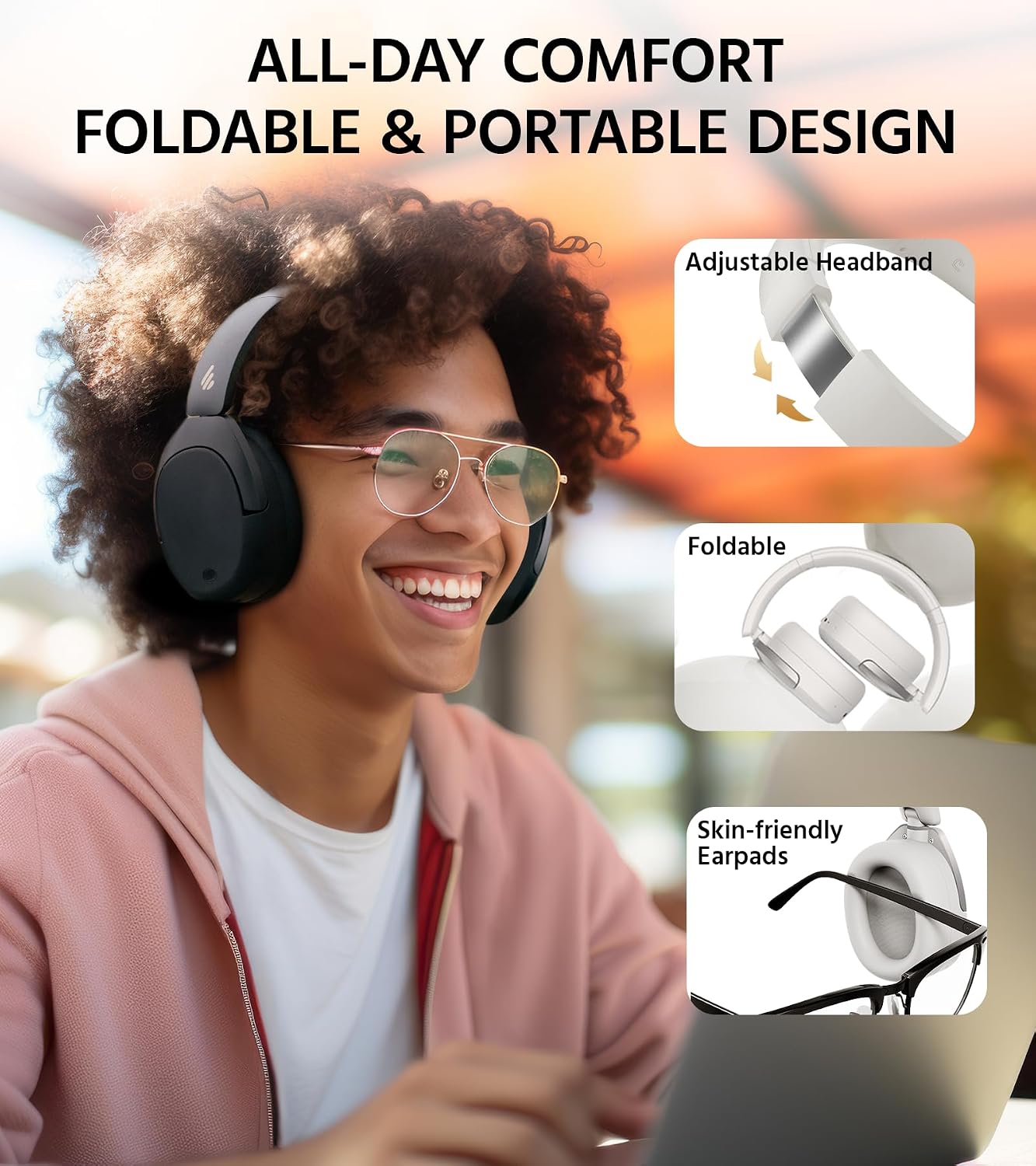
Figure 9: Comfort and Foldable Design.
การแก้ไขปัญหา
ปัญหาทั่วไปและแนวทางแก้ไข
- ไม่มีไฟฟ้า: ตรวจสอบให้แน่ใจว่าหูฟังชาร์จเต็มแล้ว
- ไม่สามารถจับคู่ได้: ตรวจสอบให้แน่ใจว่าได้เปิดใช้งานบลูทูธบนอุปกรณ์ของคุณและหูฟังอยู่ในโหมดจับคู่แล้ว ลองรีสตาร์ทอุปกรณ์ทั้งสองดู
- ไม่มีเสียง: ตรวจสอบระดับเสียงของทั้งหูฟังและอุปกรณ์ที่เชื่อมต่อ ตรวจสอบให้แน่ใจว่าหูฟังจับคู่กันอย่างถูกต้อง
- คุณภาพเสียงไม่ดี: Ensure there are no obstructions between the headphones and the device. Try moving closer to the device. Check if LDAC is enabled in the app for Hi-Res audio.
- ANC ไม่มีประสิทธิผล: Ensure the earcups form a good seal around your ears. Adjust the ANC mode via the controls or the EDIFIER ConneX App.
แอป EDIFIER ConneX
The EDIFIER ConneX App allows you to personalize your listening experience and manage various settings. It offers features such as:
- Adjusting ANC modes.
- Selecting from three preset EQs or creating custom EQs.
- Accessing the 'find my product' feature.
- Controlling other settings and features.

Figure 10: EDIFIER ConneX App Interface.
ข้อมูลจำเพาะ
| คุณสมบัติ | ข้อมูลจำเพาะ |
|---|---|
| ชื่อรุ่น | W830NB |
| การควบคุมเสียงรบกวน | ระบบตัดเสียงรบกวนแบบแอคทีฟ |
| เทคโนโลยีการเชื่อมต่อ | ไร้สาย (บลูทูธ V5.4) |
| ขนาดไดร์เวอร์เสียง | 40 มิลลิเมตร (ไดรเวอร์ไดนามิก) |
| ช่วงความถี่ | 20 เฮิรตซ์ - 40,000 เฮิรตซ์ |
| อายุการใช้งานแบตเตอรี่ | 94 Hours (ANC Off) |
| เวลาในการชาร์จ | 15 minutes (for 10 hours use) |
| แจ็คหูฟัง | ประเภทซี |
| น้ำหนักสินค้า | 267 กรัม (9.4 ออนซ์) |
| วัสดุ | พลาสติก, โลหะ |
| ระดับความต้านทานต่อน้ำ | ไม่ทนน้ำ |
| ประเภทการควบคุม | APP, Button |
| การวางตำแหน่งหู | ครอบหู |
การรับประกันและการสนับสนุน
การรับประกันสินค้า
This product comes with a one-year warranty, guaranteeing its performance and providing you with reliable support. Please retain your proof of purchase for warranty claims.
การสนับสนุนลูกค้า
For any inquiries, technical assistance, or warranty claims, please contact Edifier customer support through their official webคุณสามารถดูข้อมูลติดต่อได้จากเว็บไซต์หรือข้อมูลติดต่อที่ระบุไว้ในบรรจุภัณฑ์สินค้า นอกจากนี้ คุณยังสามารถเยี่ยมชมเว็บไซต์ได้อีกด้วย ร้าน Edifier บน Amazon สำหรับข้อมูลและทรัพยากรเพิ่มเติม


