1. บทนำ
Thank you for choosing the Spacekey QIG-D01 Dehumidifier. This manual provides essential information for the safe and efficient operation of your new appliance. Please read it thoroughly before use and retain it for future reference. This dehumidifier is designed to reduce excess moisture in areas up to 850 square feet, such as basements, bedrooms, bathrooms, RVs, and closets, improving air quality and comfort.

รูปที่ 1 : ด้านหน้า view of the Spacekey QIG-D01 Dehumidifier, showing its white and black design with a digital display and visible water tank.

Figure 2: Visual representation of the dehumidifier's effectiveness in reducing room humidity.

Figure 3: Common issues resolved by maintaining optimal humidity levels with the dehumidifier.
2. คำแนะนำด้านความปลอดภัยที่สำคัญ
เพื่อลดความเสี่ยงจากการเกิดไฟไหม้ ไฟฟ้าช็อต หรือการบาดเจ็บ ควรปฏิบัติตามข้อควรระวังพื้นฐานเหล่านี้เสมอ:
- อ่านคำแนะนำทั้งหมดก่อนใช้เครื่องใช้ไฟฟ้า
- ห้ามใช้งานเครื่องลดความชื้นหากสายไฟหรือปลั๊กชำรุด
- ตรวจสอบให้แน่ใจว่าเต้ารับไฟฟ้ามีการต่อสายดินอย่างถูกต้อง
- ห้ามปิดกั้นช่องรับหรือช่องระบายอากาศ
- ควรเก็บเครื่องใช้ไฟฟ้าให้ห่างจากน้ำและของเหลวอื่นๆ
- ถอดปลั๊กเครื่องลดความชื้นก่อนทำความสะอาดหรือดำเนินการบำรุงรักษาใดๆ
- อย่าปล่อยให้เด็กใช้งานเครื่องโดยไม่ได้รับการดูแล
- This appliance is equipped with a 45° tip-over protection feature. If the unit is tilted beyond 45 degrees, it will automatically shut off to prevent damage or spills.

Figure 4: Illustration of the dehumidifier's 45° tip-over protection, demonstrating automatic shutdown for safety.
3. สินค้าหมดview
3.1 Components and Design Features
- ยูนิตหลักพร้อมแผงควบคุม
- Water Tank (3.0L / 106 oz capacity)
- แผ่นกรองอากาศล้างทำความสะอาดได้
- สายไฟ
- Integrated Handles for portability
- Visual Water Tank for easy monitoring
- 45° Tip-over Protection
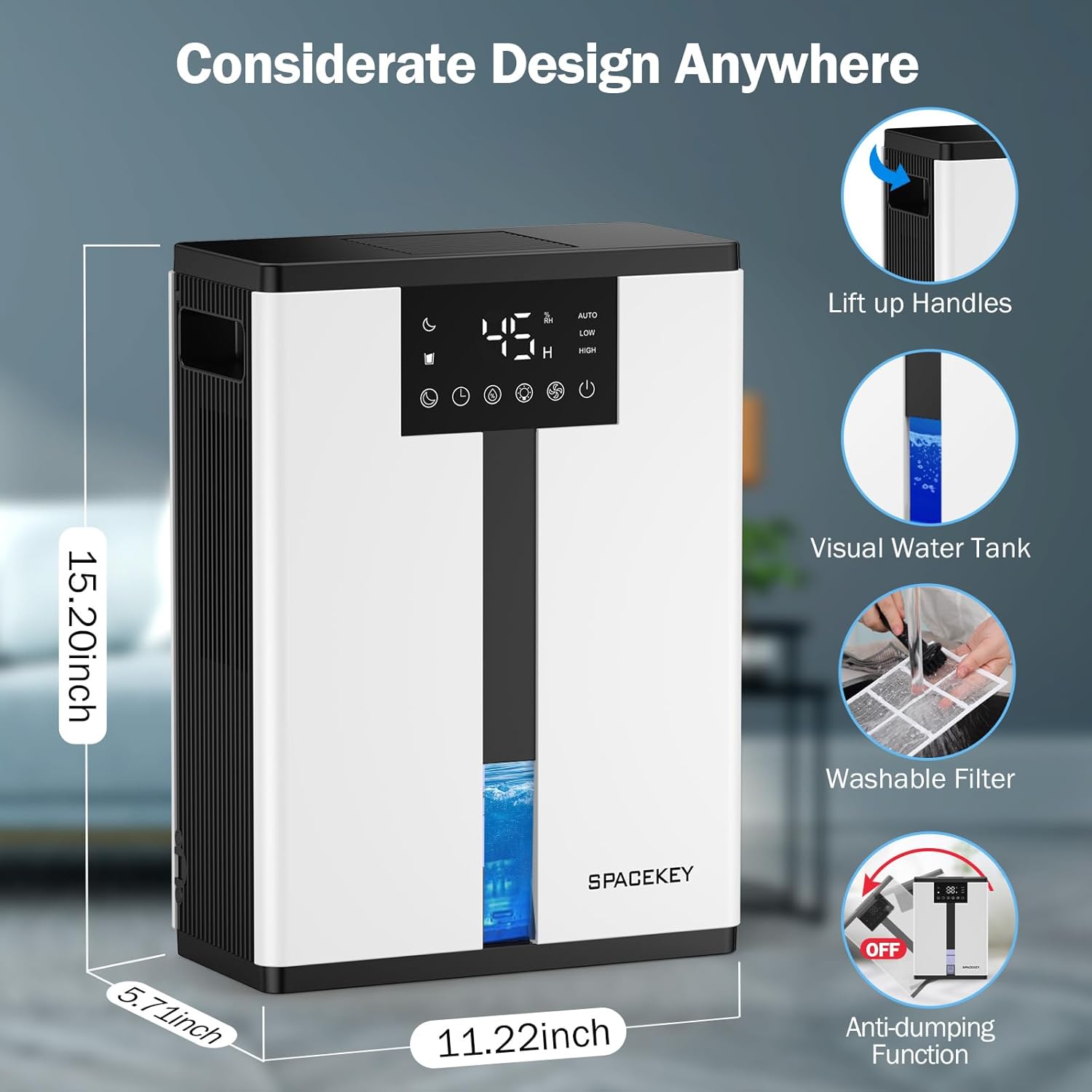
Figure 5: Key design elements and dimensions of the Spacekey QIG-D01 Dehumidifier.
3.2 Advanced Dehumidification Technology
The Spacekey QIG-D01 utilizes semiconductor condensation technology with dual fans and dual semiconductor condensers for enhanced efficiency in moisture removal.
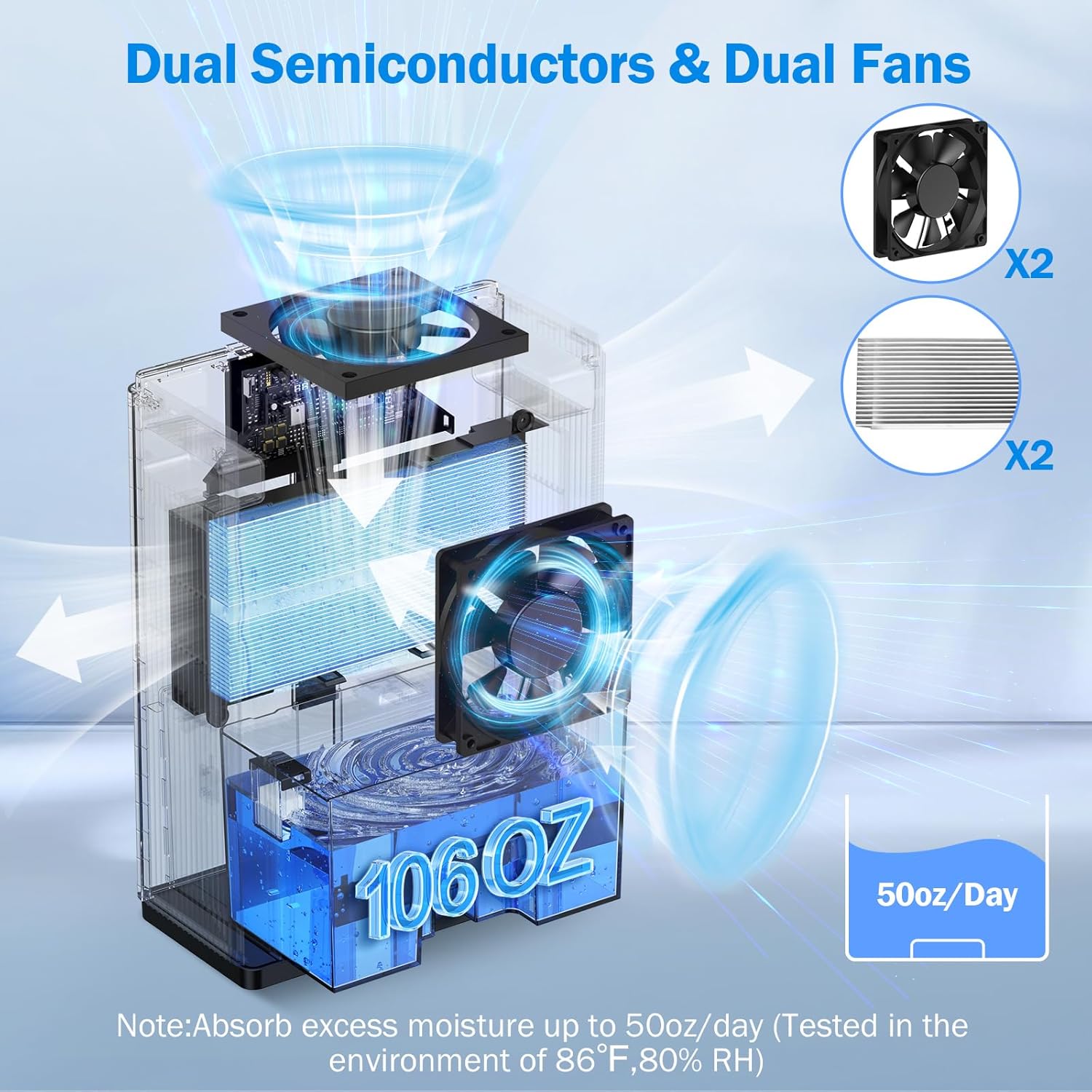
รูปที่ 6: ภายใน view of the dual semiconductor and dual fan system for efficient dehumidification.
3.3 แผงควบคุม
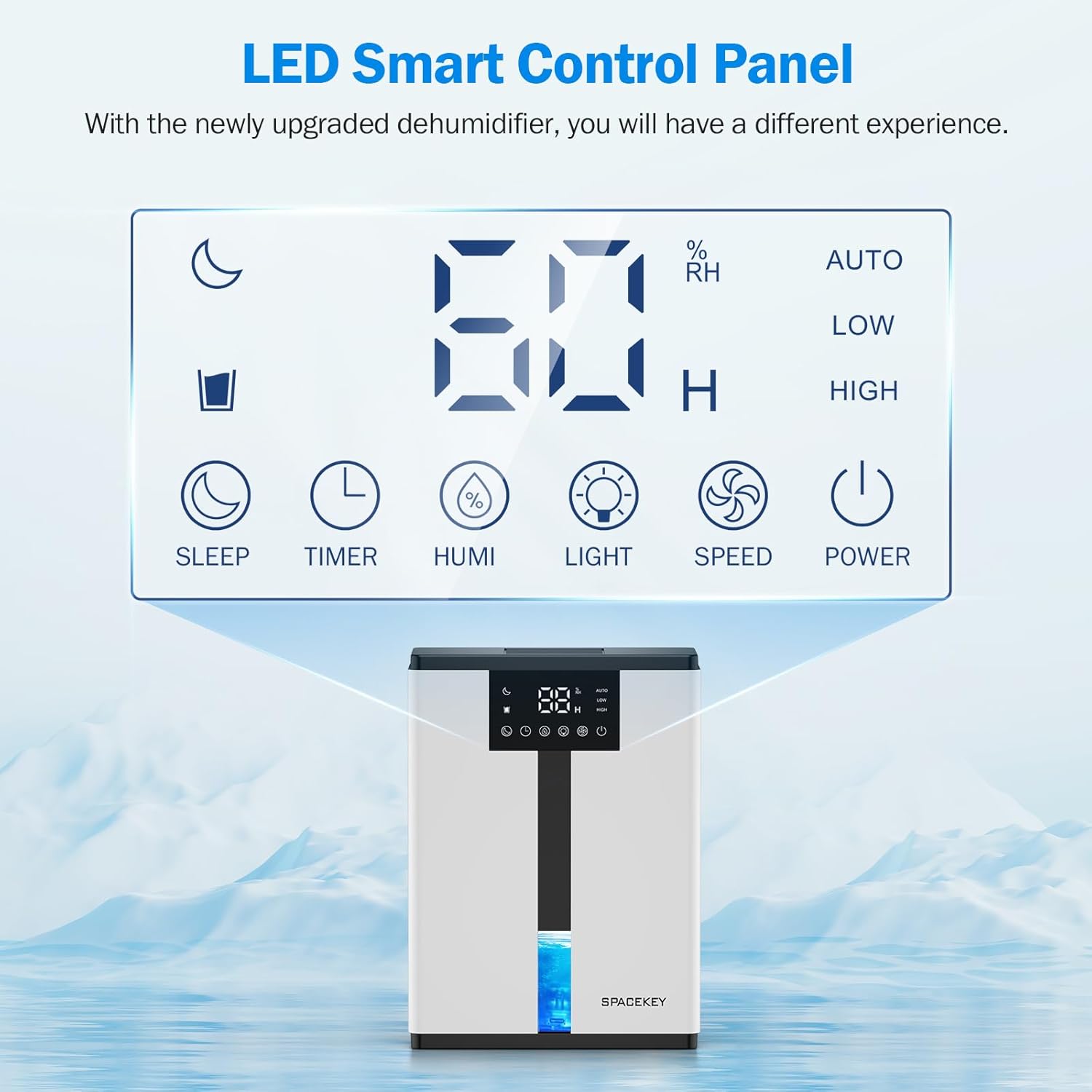
Figure 7: The LED Smart Control Panel, displaying current humidity and various function buttons.
The intuitive LED display shows real-time humidity. Buttons include:
- โหมดสลีป: Activates quiet operation and can be used with colorful lights.
- ตัวจับเวลา: Sets operating duration (2H, 4H, 6H, 8H, 12H).
- HUMI: Adjusts target humidity (45%, 55%, 65%, or continuous '00').
- แสงสว่าง: Controls the 7-color ambient light.
- ความเร็ว: Selects fan speed (Auto, Low, High).
- พลัง: เปิด/ปิดเครื่อง
4. คำแนะนำในการตั้งค่า
- แกะ: นำเครื่องลดความชื้นออกจากบรรจุภัณฑ์อย่างระมัดระวัง
- การจัดวาง: Place the unit on a flat, stable surface in the desired location. Ensure there is at least 8 inches (20 cm) of space around the air inlets and outlets for proper airflow.
- การเชื่อมต่อไฟฟ้า: เสียบสายไฟเข้ากับเต้ารับไฟฟ้าที่มีสายดิน
- การตรวจสอบเบื้องต้น: Ensure the water tank is correctly inserted and empty before starting operation.

Figure 8: Recommended placement areas for the dehumidifier, highlighting its suitability for various indoor environments.
5. คู่มือการใช้งาน
5.1 เปิด/ปิดเครื่อง
กดปุ่ม พลัง ปุ่มเพื่อเปิดหรือปิดเครื่องลดความชื้น
5.2 การตั้งค่าระดับความชื้น
กดปุ่ม ฮูมิ button to cycle through desired humidity levels: 45%, 55%, 65%. The unit will operate until the set humidity is reached, then pause. If set to '00', the unit will operate continuously.

Figure 9: Setting the target humidity level using the HUMI button.
5.3 การปรับความเร็วพัดลม
กดปุ่ม ความเร็ว button to select between Auto, Low, and High fan speeds. Auto mode adjusts fan speed based on current humidity.
5.4 ฟังก์ชั่นจับเวลา
กดปุ่ม ตัวจับเวลา button to set an operating duration of 2, 4, 6, 8, or 12 hours. The unit will automatically turn off after the set time.

Figure 10: Using the Timer function to set the operating duration.
5.5 Sleep Mode & Colorful Lights
กดปุ่ม นอน button to activate sleep mode for ultra-quiet operation (approx. 30dB). Press the แสงสว่าง button to cycle through 7 colorful ambient lights or select a static color. This feature can be used independently or in conjunction with sleep mode.
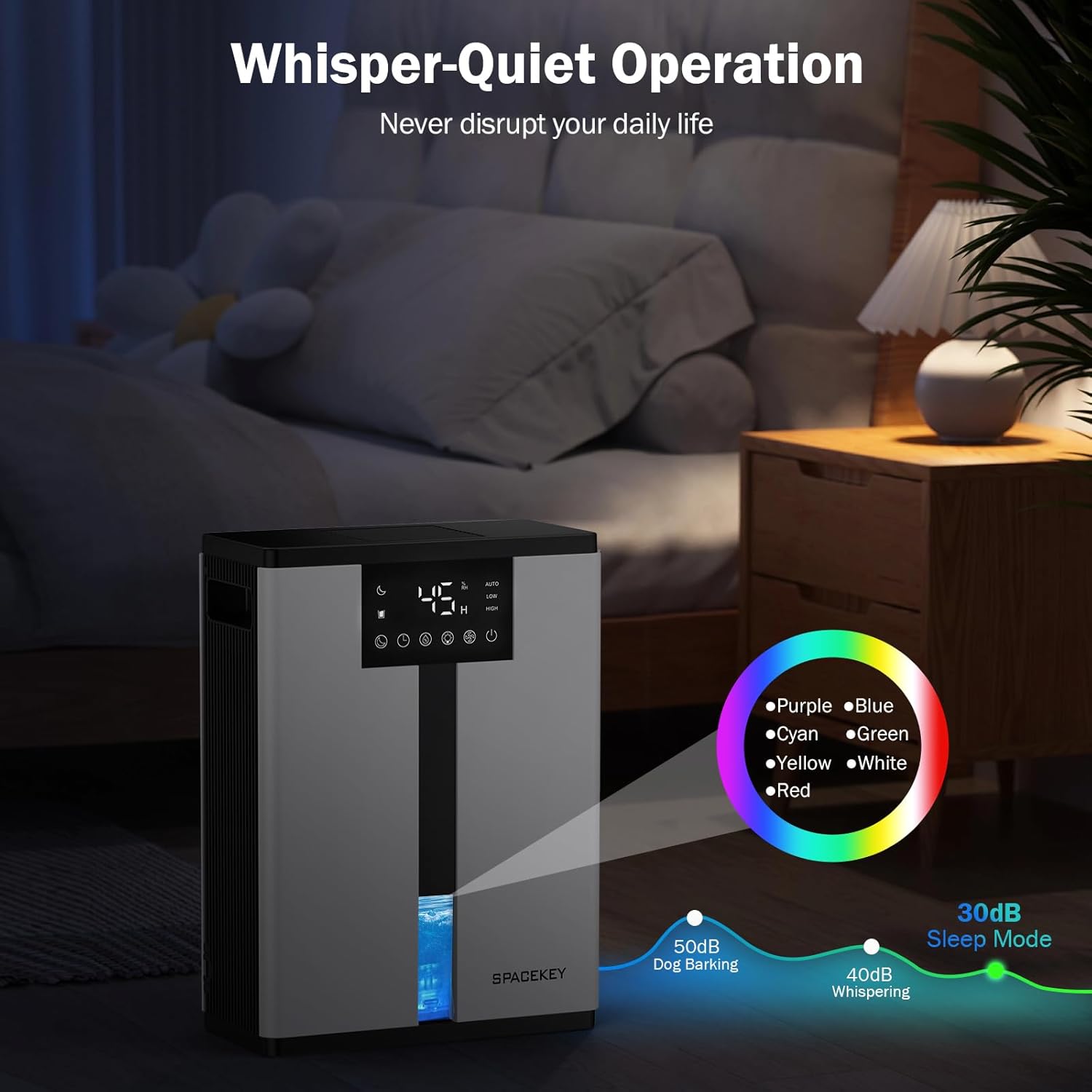
Figure 11: Dehumidifier in Sleep Mode with ambient lighting for a peaceful environment.
5.6 การปิดเครื่องอัตโนมัติ
The dehumidifier will automatically shut off and flash a red light with an audible beep when the water tank is full. Empty the water tank to resume operation.
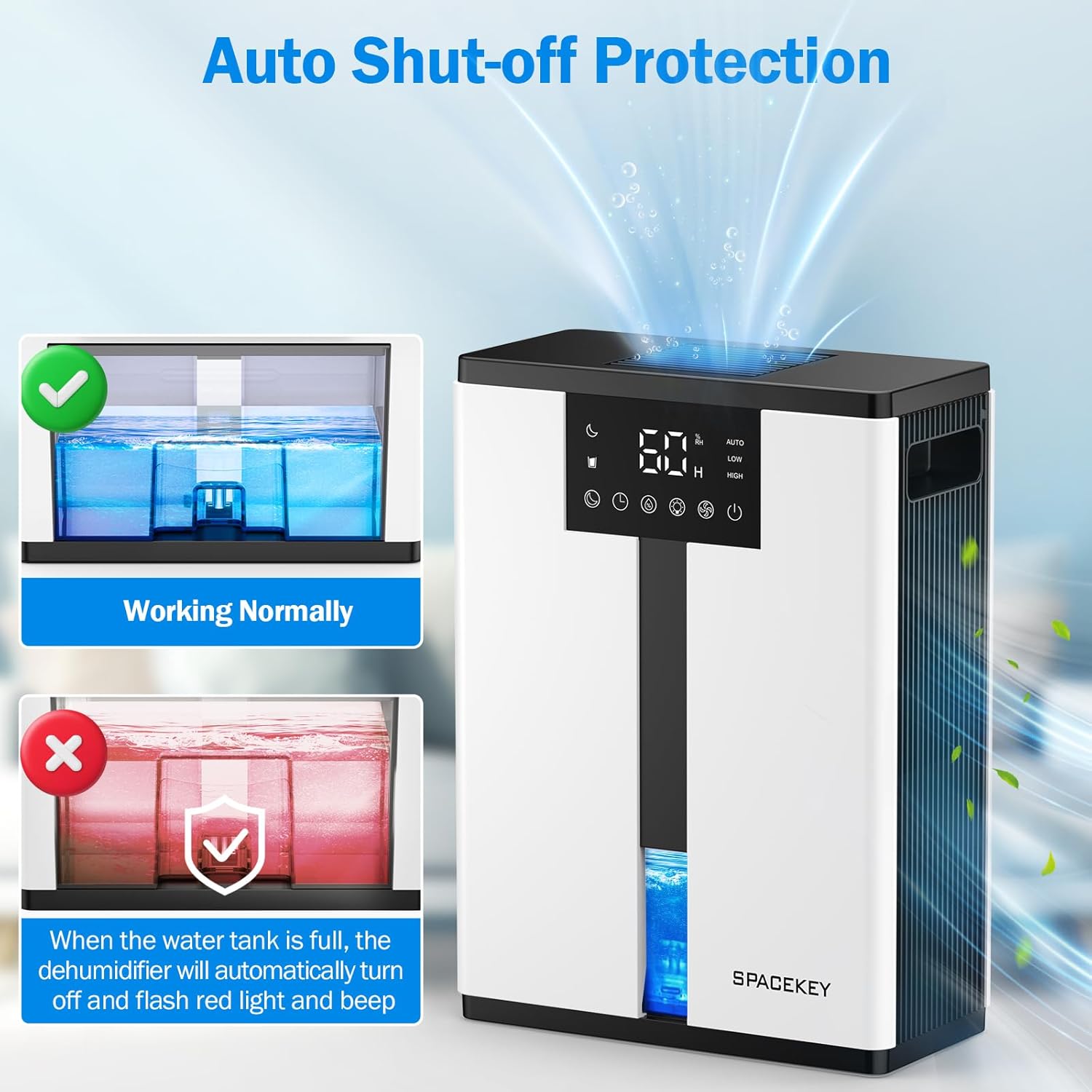
Figure 12: Automatic shut-off mechanism when the water tank is full.
6. การบำรุงรักษา
6.1 การระบายน้ำออกจากถังน้ำ
- ค่อยๆ ดึงถังน้ำออกจากด้านหน้าของเครื่อง
- ถอดฝาถังออก
- เทน้ำที่เก็บกักไว้ออกไป
- Replace the lid and reinsert the water tank firmly into the dehumidifier.

Figure 13: Step-by-step guide to emptying the water tank.
6.2 การทำความสะอาดแผ่นกรองอากาศ
The washable filter should be cleaned regularly (every 2-4 weeks, depending on usage) to maintain optimal performance.
- ถอดปลั๊กเครื่องลดความชื้น
- ถอดแผ่นกรองออกจากด้านหลังของตัวเครื่อง
- ล้างตัวกรองใต้น้ำไหลเพื่อขจัดฝุ่นและเศษซาก
- ปล่อยให้ตัวกรองแห้งสนิทก่อนจะใส่กลับเข้าไป
- ห้ามใช้งานเครื่องลดความชื้นโดยไม่มีตัวกรอง

Figure 14: Instructions for removing and washing the air filter.
6.3 การทำความสะอาดภายนอก
เช็ดด้านนอกของเครื่องลดความชื้นด้วย d . ที่อ่อนนุ่มamp ผ้า ห้ามใช้สารทำความสะอาดที่มีฤทธิ์กัดกร่อนหรือตัวทำละลาย
7 การแก้ไขปัญหา
| ปัญหา | สาเหตุที่เป็นไปได้ | สารละลาย |
|---|---|---|
| เครื่องลดความชื้นไม่เปิด | No power; power cord not plugged in; water tank full or incorrectly inserted. | ตรวจสอบการเชื่อมต่อไฟฟ้า เทน้ำออกจากถังเก็บน้ำแล้วใส่กลับเข้าไปใหม่ให้ถูกต้อง |
| ไม่มีน้ำขังหรือมีการลดความชื้นในระดับต่ำ | Room humidity is already low; air filter is clogged; ambient temperature is too low; unit size is too small for the space. | Ensure humidity is above target; clean air filter; operate in recommended temperature range; consider unit placement or additional units for larger spaces. |
| หน่วยมีเสียงดัง | Fan speed is set to High; unit is not on a flat surface. | Switch to Low or Sleep mode; ensure unit is on a stable, flat surface. |
| Red light flashing and beeping. | แทงค์น้ำเต็มแล้ว | เทน้ำออกจากถังเก็บน้ำแล้วใส่กลับเข้าไปใหม่ |
8. ข้อมูลจำเพาะ
| คุณสมบัติ | รายละเอียด |
|---|---|
| ชื่อรุ่น | QIG-D01 |
| ยี่ห้อ | สเปซคีย์ |
| ลดความชื้นความจุ | Up to 50 oz (approx. 3 pints) per 24 hours (at 86°F, 80% RH) |
| ความจุถังน้ำ | 3.0 ลิตร (106 ออนซ์ของเหลว) |
| พื้นที่ให้บริการ | สูงถึง 850 ตารางฟุต |
| การใช้พลังงาน | 70 Watts (not more than 1.68 kWh/Day) |
| ระดับเสียง | Approx. 30dB (in Sleep Mode) |
| ขนาด (D x W x H) | ลึก 5.71 นิ้ว x กว้าง 11.22 นิ้ว x สูง 15.2 นิ้ว |
| น้ำหนักสินค้า | 8.91 ปอนด์ |
| คุณสมบัติพิเศษ | Automatic Shutoff, Intelligent Humidity Control, 4 Fan Speeds, Timer, 7 Colorful Lights, 45° Tip-over Protection, Washable Filter |
9. การรับประกันและการสนับสนุนลูกค้า
Spacekey offers the following support for your dehumidifier:
- คืนเงินภายใน 30 วัน: For any dissatisfaction.
- รับประกันเปลี่ยนสินค้า 2 ปี: สำหรับผลิตภัณฑ์ที่มีข้อบกพร่องหรือทำงานผิดปกติ
- บริการลูกค้าตลอดอายุการใช้งาน: Dedicated support for any questions or issues.
If you have any questions or require assistance, please do not hesitate to contact Spacekey customer support. We aim to reply within 24 hours.


รูปที่ 15: เกินview of Spacekey's customer support and warranty policies.


