การแนะนำ
This manual provides comprehensive instructions for the safe and effective use of your OVUTEK Professional Smart Scale. Please read this manual thoroughly before first use and retain it for future reference.

Image: The OVUTEK Professional Smart Scale, showcasing its sleek design and digital display, alongside a smartphone and smartwatch demonstrating app integration and data synchronization.
คุณสมบัติผลิตภัณฑ์
- Measures 14 body metrics including Weight, BMI, Body Fat, Muscle Mass, Body Water, Visceral Fat, Bone Mass, Skeletal Muscle, Subcutaneous Fat, Metabolic Age, Protein, BMR, and Fat-Free Body Weight.
- ความแม่นยำสูง: Measures to 0.1lb (0.05kg).
- Large 5.33-inch all-in-one color display.
- Maximum weight capacity: 450 lbs (205 kg / 32 st).
- Syncs with popular fitness apps like Google Fit, Fitbit, and Apple Health.
- Supports unlimited users with individual data tracking.
- Equipped with upgraded ITO technology and shatterproof glass for durability.
- Includes 4*AAA batteries, providing approximately 12 months of use.
- Features specialized modes: Zero-current Mode (for pregnant users), Athletes Mode, and Family Mode.
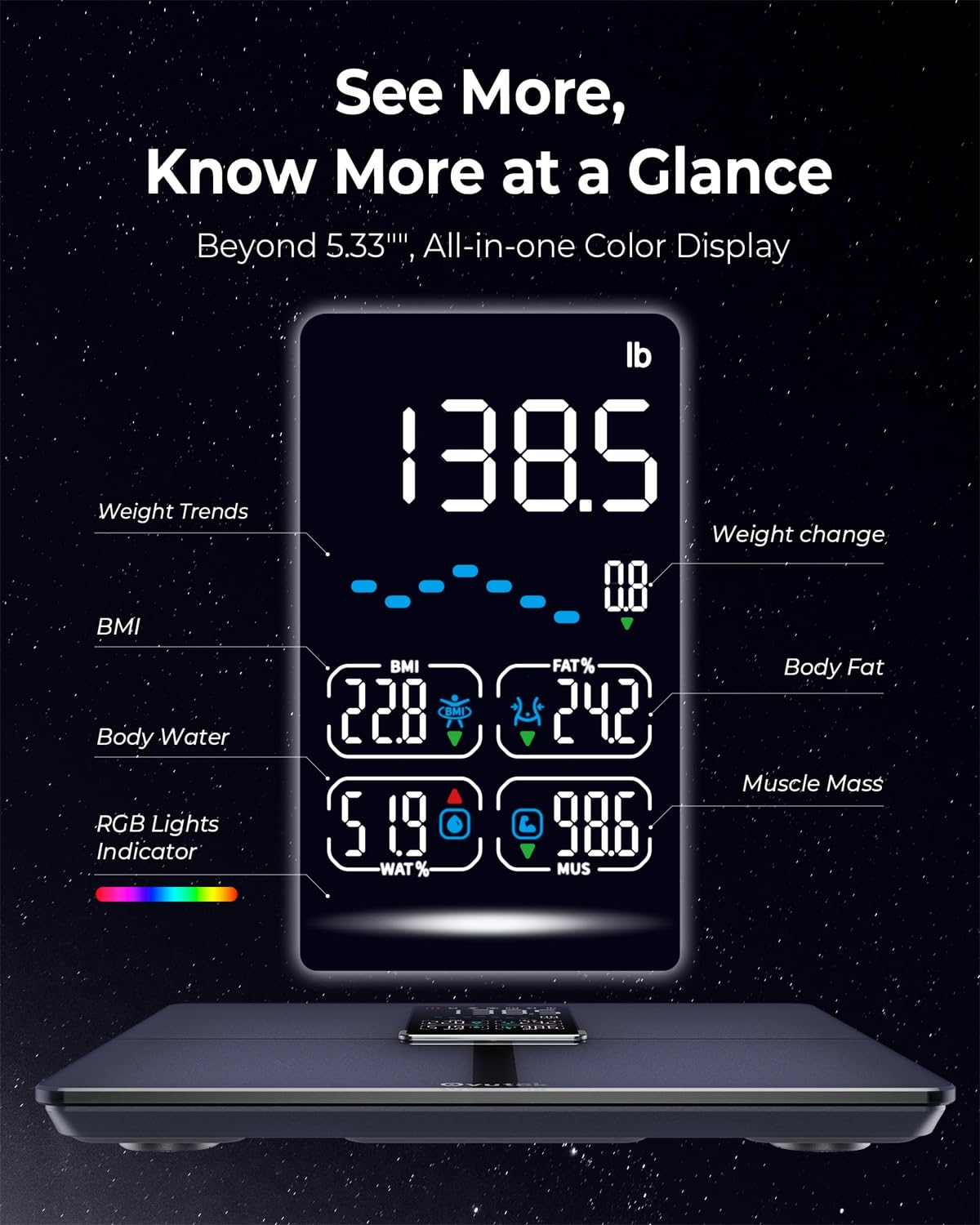
ภาพ: รายละเอียด view of the scale's digital display, highlighting various body composition metrics such as weight, BMI, body fat percentage เปอร์เซ็นต์น้ำในร่างกายtage และมวลกล้ามเนื้อ

Image: An illustration of the precise manufacturing process of the OVUTEK Smart Scale, emphasizing its guaranteed high accuracy and fully automated production, featuring Famicares Patent Technology.
คู่มือการติดตั้ง
- แกะกล่อง: Carefully remove the scale from its packaging. Ensure all components are present: the OVUTEK Smart Scale and 4 AAA batteries.
- การติดตั้งแบตเตอรี่: เปิดช่องใส่แบตเตอรี่ที่ด้านล่างของเครื่องชั่ง ใส่แบตเตอรี่ AAA 4 ก้อน โดยตรวจสอบให้แน่ใจว่าขั้วบวก/ลบถูกต้อง ปิดช่องใส่แบตเตอรี่ให้แน่นสนิท
- การจัดวาง: วางเครื่องชั่งบนพื้นผิวที่แข็ง เรียบ และมั่นคง หลีกเลี่ยงพรมหรือพื้นไม่เรียบ เพราะอาจส่งผลต่อความแม่นยำ
- ดาวน์โหลดแอป: Scan the QR code provided in the manual or on the product packaging, or search for "Ovuteker" in your device's app store (Apple App Store or Google Play Store). Download and install the application.

Image: The Ovuteker app interface on a smartphone, demonstrating the ability to add multiple users and integrate with popular health platforms such as Google Fit, Fitbit, and Apple Health. A QR code for app download is also visible.
- การจับคู่เริ่มต้น:
- เปิดใช้งานบลูทูธบนสมาร์ทโฟนของคุณ
- Open the Ovuteker app and create your user profile.
- Step onto the scale barefoot. The scale will activate and attempt to pair with the app.
- ทำตามคำแนะนำบนหน้าจอในแอปเพื่อทำการจับคู่ให้เสร็จสมบูรณ์
คำแนะนำการใช้งาน
การวัด:
- ตรวจสอบให้แน่ใจว่าเครื่องชั่งอยู่บนพื้นผิวที่แข็งและเรียบ
- Open the Ovuteker app on your smartphone and ensure Bluetooth is enabled.
- Step onto the scale barefoot, ensuring your feet are centered on the electrodes.
- Stand still until your weight is displayed and the app shows all body composition metrics.
- The data will automatically sync to your app profile.
Understanding Your Metrics:
The scale measures 14 key body metrics. Refer to the app for detailed explanations and historical tracking of each metric.

Image: A user tracking their fitness progress with the Ovuteker app, which displays various body metrics like weight, body fat, and BMI, along with historical data and goal setting features.
การใช้โหมดต่างๆ:
- Zero-current Mode: Designed for pregnant users or individuals with medical implants. This mode measures only weight and BMI, avoiding bioelectrical impedance analysis. Select this mode within the Ovuteker app profile การตั้งค่า.
- Athletes Mode: For individuals with a high level of physical activity. This mode adjusts the algorithm for more accurate body composition readings for athletes. Activate this in your app profile.
- โหมดครอบครัว: Allows multiple users to track their data independently within the same app. Each family member can create their own profile.

Image: Visual representation of the scale's versatile modes, including Zero-current Mode for pregnant users, Athletes Mode for highly active individuals, and Family Mode for managing multiple user profiles.
การบำรุงรักษาและการดูแล
- การทำความสะอาด: เช็ดพื้นผิวของเกล็ดด้วยผ้าเนื้อนุ่มและแห้งamp ผ้า ห้ามใช้น้ำยาทำความสะอาดที่มีฤทธิ์กัดกร่อนหรือจุ่มตะกรันลงในน้ำ
- พื้นที่จัดเก็บ: เก็บเครื่องชั่งไว้ในที่แห้งและเย็น หลีกเลี่ยงอุณหภูมิที่สูงหรือต่ำเกินไป หรือแสงแดดโดยตรง
- การเปลี่ยนแบตเตอรี่: Replace batteries when the low battery indicator appears on the display or in the app. Always replace all 4 AAA batteries at the same time.
- การจัดการ: The scale is made with shatterproof glass, but avoid dropping it or subjecting it to strong impacts.

Image: A visual breakdown of the OVUTEK Smart Scale's physical attributes, including its dimensions, the location of the 4*AAA battery compartment, and a close-up illustrating the upgraded ITO technology and shatterproof glass construction.
การแก้ไขปัญหา
| ปัญหา | สาเหตุที่เป็นไปได้ | สารละลาย |
|---|---|---|
| เครื่องชั่งน้ำหนักไม่เปิด | แบตเตอรี่เสียหรือติดตั้งไม่ถูกต้อง | Check battery polarity. Replace all 4 AAA batteries. |
| การอ่านที่ไม่ถูกต้อง | Scale on uneven surface; not standing still; dirty electrodes; initial calibration needed. | Place on hard, flat surface. Stand still. Clean scale surface. Step on and off quickly to calibrate to zero before weighing. |
| แอปไม่สามารถเชื่อมต่อกับเครื่องชั่งได้ | Bluetooth off; app not open; scale not active; interference. | Ensure Bluetooth is on. Open Ovuteker app. Step on scale to activate. Move closer to scale. Restart app/phone. |
| ข้อมูลองค์ประกอบร่างกายไม่แสดง | Not barefoot; feet not making contact with electrodes; Zero-current mode active. | Ensure you are barefoot and feet are centered on the scale. Check app settings to ensure Zero-current mode is not enabled if you wish to see full metrics. |
ข้อมูลจำเพาะ
- แบบอย่าง: VFS535-KUS
- ยี่ห้อ: OVUTEK
- ประเภทจอภาพ: Digital, 5.33-inch Color Display
- ความจุน้ำหนัก: 450 ปอนด์ / 205 กิโลกรัม / 32 สโตน
- การเพิ่มการวัด: 0.1 ปอนด์ / 0.05 กก.
- แหล่งพลังงาน: แบตเตอรี่ AAA 4 ก้อน (รวมอยู่ด้วย)
- การเชื่อมต่อ: บลูทูธ
- ขนาด : 33.71 x 32 x 4.39 ซม. (13.27 x 12.6 x 1.73 นิ้ว)
- วัสดุ: Upgraded ITO technology, Shatterproof Glass
- สี: สีดำ
การรับประกันและการสนับสนุน
For warranty information and customer support, please visit the official OVUTEK website or contact their customer service directly. You can find more information at: www.ovutek.com
Please have your model number (VFS535-KUS) and ASIN (B0D2NYLPVT) ready when contacting support.


