การแนะนำ
The XO Dash Cam XJ03 is a versatile 3-in-1 dash camera designed to provide comprehensive surveillance for your vehicle. Featuring 1080P high-resolution recording, a flexible rotatable lens for front and interior views, 24-hour parking monitoring, seamless loop recording, and G-sensor technology, this device ensures critical moments are captured and preserved. Its compact design and user-friendly interface make it an essential tool for enhancing driving safety and security.
มีอะไรอยู่ในกล่อง

Image: The XO Dash Cam XJ03 with its suction cup mount, rear camera, and car charger cable.
- 1 x XO Dash Cam (Main Unit)
- 1 x คู่มือผู้ใช้
- 1 x ด้านหลังกล้อง
- 1 x Car Charger (Type-C)
- 1 x Mount (Suction Cup)
การตั้งค่า
1. การติดตั้ง Dash Cam

Image: The compact dash cam mounted on a car's windshield, demonstrating its unobtrusive placement.
- Clean the area on your windshield where you intend to mount the dash cam. Ensure it does not obstruct your view.
- ติดตั้งส่วนยึดถ้วยดูดเข้ากับกล้องติดรถยนต์
- Press the suction cup firmly against the cleaned windshield and engage the locking mechanism to secure it.
- Adjust the angle of the dash cam to ensure it captures the desired view ของถนนข้างหน้า
2. การเชื่อมต่อไฟฟ้า
- Connect the Type-C end of the car charger cable to the dash cam's power input port.
- เสียบปลายอีกด้านของที่ชาร์จในรถยนต์เข้ากับช่องเสียบที่จุดบุหรี่ในรถของคุณ
- Route the cable neatly along the windshield trim to avoid interference with driving.
3. การติดตั้งกล้องมองหลัง (ไม่บังคับ)
- เชื่อมต่อสายเคเบิลกล้องหลังเข้ากับพอร์ตที่กำหนดไว้บนตัวกล้องติดรถยนต์หลัก
- ติดตั้งกล้องมองหลังไว้ที่กระจกหลังรถ โดยให้แน่ใจว่ามองเห็นได้ชัดเจน view.
- Route the cable discreetly to the front unit.
4. ใส่ไมโคร SD การ์ด
- Before first use, insert a compatible Micro SD card (not included, maximum support 64GB) into the designated slot on the dash cam. Ensure the card is formatted within the device settings for optimal performance.
คำแนะนำการใช้งาน
1. เปิด/ปิดเครื่อง
- กล้องติดรถยนต์จะเปิดอัตโนมัติและเริ่มบันทึกเมื่อเปิดกุญแจรถ
- มันจะปิดเครื่องอัตโนมัติเมื่อปิดสวิตช์กุญแจ
- หากต้องการเปิด/ปิดเครื่องด้วยตนเอง ให้กดปุ่มเปิด/ปิดค้างไว้
2. 1080P High-Resolution Recording
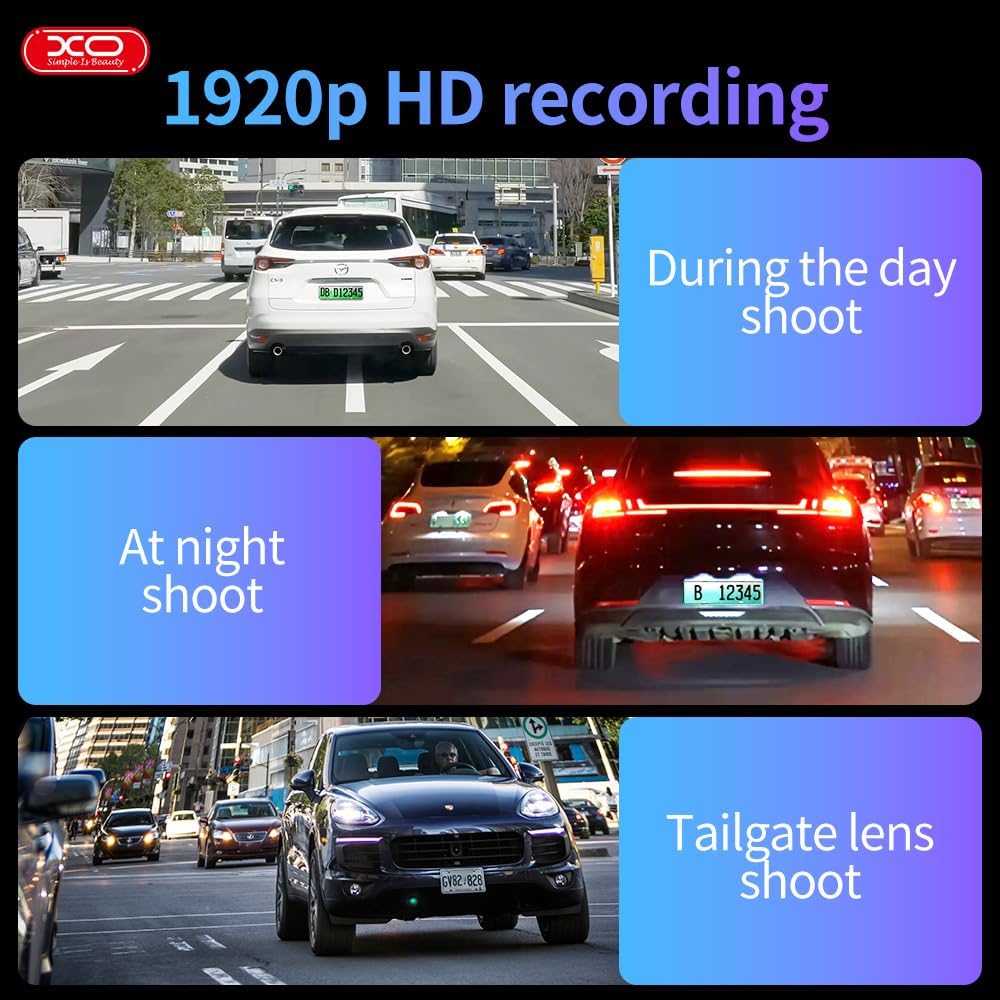
ภาพ: ภาพตัวอย่างamples of the dash cam's 1920p HD recording capability in various lighting conditions and perspectives.
The dash cam records in crystal-clear 1920x1080P resolution at 30 frames per second, ensuring all details like license plates and street signs are captured clearly. This high resolution provides crucial evidence in case of incidents.
3. Flexible Rotatable Lens
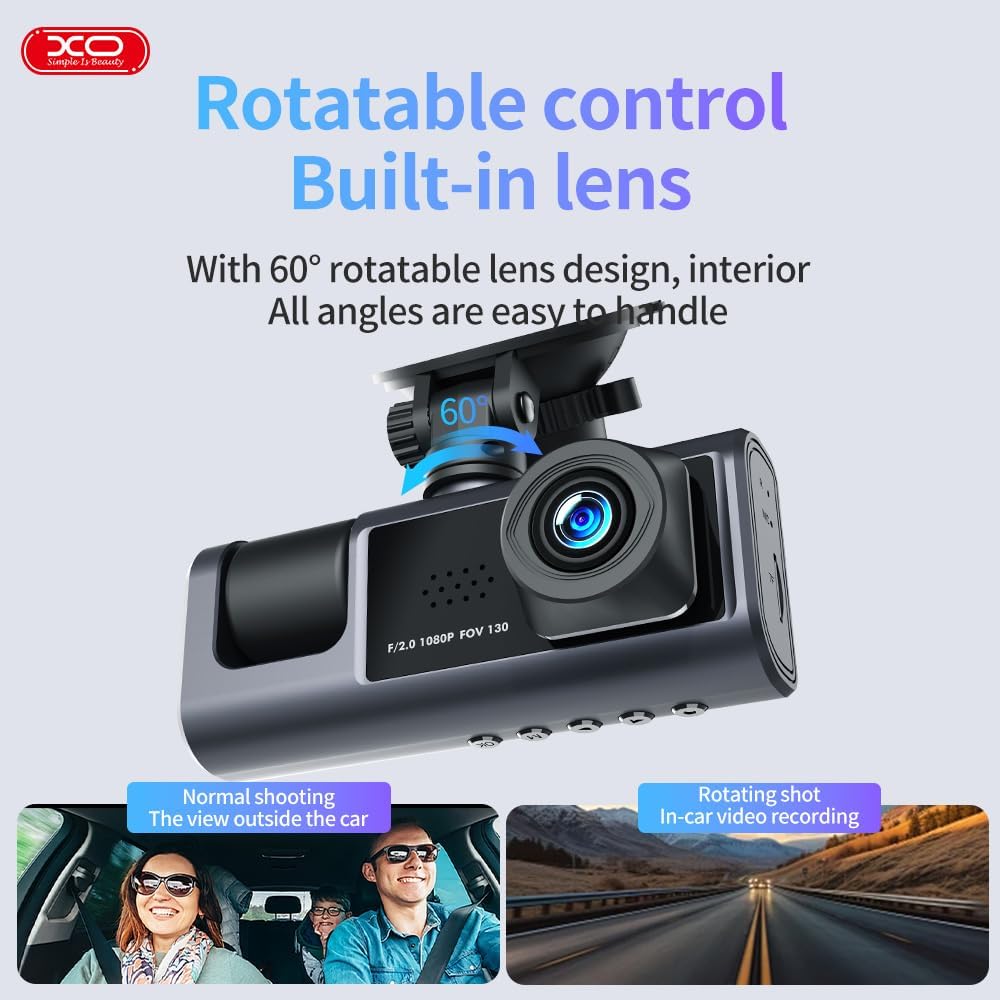
Image: The dash cam unit with an arrow indicating the 60-degree rotation capability of the lens.
The built-in lens can be rotated up to 60 degrees, allowing you to record either the front view of the road or the interior of the vehicle. Adjust the lens manually to suit your recording needs.
4. ระบบตรวจสอบการจอดรถตลอด 24 ชั่วโมง

Image: A graphic illustrating the 24-hour parking monitoring feature, showing the dash cam active while the car is parked.
When your car is parked and the engine is off, the dash cam automatically activates its parking monitor. Using built-in sensors, it detects motion or impact and records footage to a separate file, providing continuous security for your vehicle.
5. Seamless Loop Recording & G-Sensor Technology

Image: A visual representation of loop recording, showing older files being overwritten, and a lock icon symbolizing G-sensor protection.
The loop recording feature ensures uninterrupted recording by automatically overwriting the oldest files when the storage card is full. The built-in G-sensor detects sudden collisions or impacts, automatically locking the current video file to prevent it from being overwritten, preserving it as critical evidence.
6. การตรวจจับการเคลื่อนไหว
When enabled, motion detection allows the dash cam to automatically start recording if it detects movement near the vehicle while parked. Recording stops if no motion is detected, conserving storage space.
7. Time Lapse Functionality (Parking Mode)
In parking mode, the dash cam can utilize a time-lapse feature to record continuously over extended periods at a reduced frame rate. This saves storage and battery power while still providing a detailed, accelerated view of prolonged events.
8. 2" Built-In Display
The integrated 2-inch display allows for convenient management and playback of recordings directly on the device. You can review ฟูtage, adjust settings, and ensure proper functionality without needing external equipment.
การซ่อมบำรุง
- การทำความสะอาด: ใช้ผ้าแห้งนุ่มๆ เช็ดทำความสะอาดเลนส์และหน้าจอของกล้องติดรถยนต์ หลีกเลี่ยงการใช้สารทำความสะอาดที่มีฤทธิ์กัดกร่อนหรือตัวทำละลาย
- พื้นที่จัดเก็บ: If storing the dash cam for an extended period, remove the Micro SD card and store the device in a cool, dry place away from direct sunlight.
- การ์ด Micro SD: Periodically format your Micro SD card (at least once a month) within the dash cam's settings to ensure optimal performance and prevent data corruption. Back up any important recordings before formatting.
- อัพเดตเฟิร์มแวร์: Check the official XO webเว็บไซต์สำหรับการอัปเดตเฟิร์มแวร์ที่มีอยู่เพื่อให้แน่ใจว่ากล้องติดรถยนต์ของคุณมีคุณสมบัติล่าสุดและการแก้ไขข้อบกพร่อง
การแก้ไขปัญหา
| ปัญหา | สาเหตุที่เป็นไปได้ | สารละลาย |
|---|---|---|
| กล้องติดรถยนต์ไม่สามารถเปิดได้ | No power supply; faulty cable; battery drained. | Check car charger connection and vehicle's power outlet. Ensure the car charger is functional. Charge the dash cam if it has an internal battery. |
| การบันทึกหยุดหรือหยุดนิ่ง | Micro SD card full or corrupted; low-quality SD card; firmware issue. | Format the Micro SD card. Use a high-speed (Class 10 or U1/U3) Micro SD card. Update firmware if available. |
| คุณภาพวิดีโอไม่ดี | เลนส์สกปรก; ฟิล์มป้องกันยังติดอยู่บนเลนส์; การตั้งค่าความละเอียดไม่ถูกต้อง | Clean the lens with a soft cloth. Remove any protective film. Check settings to ensure 1080P resolution is selected. |
| เซ็นเซอร์ G ไวเกินไป/ไวไม่พอ | การตั้งค่าความไวของเซ็นเซอร์ G สูง/ต่ำเกินไป | Adjust the G-sensor sensitivity level in the dash cam's settings menu. |
| Parking monitor not working. | Parking monitor feature disabled; insufficient power supply in parking mode. | Ensure parking monitoring is enabled in settings. Check if the dash cam is receiving continuous power (e.g., via hardwire kit for 24H monitoring). |
ข้อมูลจำเพาะ

Image: A diagram detailing the product's dimensions, input, battery, memory, and other technical specifications.
| คุณสมบัติ | รายละเอียด |
|---|---|
| ชื่อรุ่น | XJ03 |
| ความละเอียดวิดีโอ | 1920x1080P (Front Camera) |
| ความละเอียดกล้องหลัง | วีจีเอ (640*480) |
| หน้าจอแสดงผล | 2 นิ้ว |
| การหมุนเลนส์ | 60 degrees (Rotatable) |
| จีเซนเซอร์ | Built-in (Vibration sensor DA 360) |
| การบันทึกแบบวนซ้ำ | รองรับ |
| การตรวจสอบที่จอดรถ | Supported (24-hour) |
| การตรวจจับการเคลื่อนไหว | รองรับ |
| การรองรับการ์ดหน่วยความจำ | Micro SD, 8-64GB (Max 64GB) |
| การเชื่อมต่อ | ประเภทซี |
| ขนาดสินค้า | 4 x 10 x 4 ซม. |
| น้ำหนัก | 500 กรัม |
| แบตเตอรี่ | ลิเธียมโพลีเมอร์ 1 อัน (รวมอยู่ด้วย) |
| ผู้ผลิต | XO |
| ประเทศต้นกำเนิด | จีน |
การรับประกันและการสนับสนุน
The XO Dash Cam XJ03 comes with a 1-Year XOUAE Warranty, providing coverage for repairs and replacements as needed. For any technical support, warranty claims, or inquiries, please contact XOUAE customer service through their official channels.
Extended warranty options are also available:
- การรับประกันเพิ่มเติม 1 ปี โดย Salama Care
- การรับประกันเพิ่มเติม 2 ปี โดย Salama Care
Please refer to the warranty card included in your package or the product listing on Amazon for detailed terms and conditions regarding warranty coverage and support contact information.