การแนะนำ
The FREEWOLF M96 Wireless Gaming Keyboard is designed for versatile use, offering both Bluetooth and 2.4G wireless connectivity. It features a mechanical feel, RGB LED backlighting, a digital display screen, and durable PBT keycaps. This manual provides detailed instructions to help you set up, operate, and maintain your keyboard for optimal performance.
สินค้าเกินview
The FREEWOLF M96 keyboard combines advanced features with a user-friendly design. Key components include:
- การเชื่อมต่อแบบคู่: Supports Bluetooth (BT1, BT2) and 2.4G wireless modes for seamless switching between multiple devices.
- หน้าจอแสดงผลดิจิตอล: Provides real-time information on battery capacity, connection mode, and charging status.
- Multimedia Control Knob: Allows for easy adjustment of volume and backlight settings.
- คีย์แคป PBT: Durable, spherical keycaps designed for comfortable typing and longevity.
- แสงไฟ LED RGB: Customizable lighting effects to enhance your gaming or typing experience.
- แบตเตอรี่ใช้งานได้ยาวนาน: Equipped with a 3000 mAh battery for extended use.
- การออกแบบตามหลักสรีรศาสตร์: Features adjustable feet for optimal typing comfort.

ภาพ: เหนือview of the FREEWOLF M96 Wireless Keyboard, highlighting its 90% US layout, PBT keycaps, Bluetooth/2.4G connectivity, LED backlight, 3000 mAh battery, multimedia knob, LED screen, and compatibility with Win/Mac/Linux/iOS/Android systems.

ภาพ: ระยะใกล้ view of the PBT color blocking keycaps, emphasizing their durability and longer lifespan.
การตั้งค่า
1. การชาร์จคีย์บอร์ด
Before first use, it is recommended to fully charge the keyboard. Connect the provided USB-C cable to the charging port on the keyboard and the other end to a USB power source (e.g., computer USB port, wall adapter).
- The digital display screen will indicate the charging status.
- การชาร์จเต็มโดยปกติจะใช้เวลาหลายชั่วโมง

ภาพ: ด้านข้าง view of the keyboard illustrating the power switch, Type-C charging port, and the 2.4G/BT1/BT2 mode switch. The Type-C port is for charging only and cannot be used for wired connection.
2 การเชื่อมต่อผ่านระบบไร้สาย 2.4G
- Locate the 2.4G wireless receiver (USB dongle), usually stored in a compartment on the keyboard's underside.
- เสียบตัวรับสัญญาณ 2.4G เข้ากับพอร์ต USB ที่ว่างอยู่บนคอมพิวเตอร์ของคุณ
- เลื่อนสวิตช์โหมดบนแป้นพิมพ์ไปที่ตำแหน่ง "2.4G"
- The keyboard should automatically connect to your device. The display screen will show the 2.4G connection status.
3. การเชื่อมต่อผ่าน Bluetooth
The keyboard supports two Bluetooth channels (BT1 and BT2) for connecting to multiple devices.
- Slide the mode switch on the keyboard to either "BT1" or "BT2" position.
- บนอุปกรณ์ของคุณ (คอมพิวเตอร์ แท็บเล็ต สมาร์ทโฟน) เปิดใช้งาน Bluetooth และค้นหาอุปกรณ์ใหม่
- Select "FREEWOLF M96" (or similar name) from the list of available devices.
- If prompted, enter the pairing code displayed on your device.
- Once connected, the digital display screen will show the active Bluetooth channel (BT1 or BT2).
To switch between connected Bluetooth devices, simply slide the mode switch to the desired BT1 or BT2 channel.
Video: Demonstrates the dual-mode connectivity of the FREEWOLF M96 Wireless Gaming Keyboard, showing how to switch between 2.4G wireless and Bluetooth connections (BT1, BT2) for seamless multi-device operation.
คำแนะนำการใช้งาน
1. หน้าจอแสดงผลดิจิตอล
The integrated electronic display provides essential information at a glance:
- ความจุแบตเตอรี่: แสดงเปอร์เซ็นต์แบตเตอรี่ปัจจุบันtage.
- โหมดการเชื่อมต่อ: ระบุว่าแป้นพิมพ์อยู่ในโหมด 2.4G, BT1 หรือ BT2
- สถานะการชาร์จ: Displays an icon when the keyboard is charging.
- ไฟแสดงสถานะแบตเตอรี่ต่ำ: แจ้งเตือนคุณเมื่อแบตเตอรี่เหลือน้อย

ภาพ: รายละเอียด view of the digital display screen on the FREEWOLF M96 keyboard, showing indicators for power display, connection status (2.4G, BT1, BT2), charging, and low battery.
2. ปุ่มควบคุมมัลติมีเดีย
The knob located on the top right of the keyboard offers dual functionality:
- Default Function (Volume Control):
- หมุนตามเข็มนาฬิกาเพื่อเพิ่มระดับเสียง
- หมุนทวนเข็มนาฬิกาเพื่อลดระดับเสียง
- กดปุ่มเพื่อปิด/เปิดเสียง
- การควบคุมแบ็คไลท์:
- Press and hold the knob for five seconds to switch to backlight control mode.
- In backlight control mode:
- Rotate clockwise to increase backlight brightness.
- Rotate counter-clockwise to decrease backlight brightness.
- Press the knob to switch between different backlight effects/modes.

Image: Illustration of the advanced dial control, detailing its default functions for volume (volume up, volume down, mute) and its backlight control functions (backlight brightness up, backlight brightness down, light effect switching) when pressed and held for 5 seconds.
3. Backlight Control (Function Keys)
In addition to the knob, you can control the backlight using function key combinations:
- เอฟเอ็น + เอ็น: สลับโหมดแบ็คไลท์
- FN + Up Arrow / Down Arrow: ปรับความสว่างของแบ็คไลท์
- FN + Left Arrow / Right Arrow: ปรับความเร็วไฟแบ็คไลท์
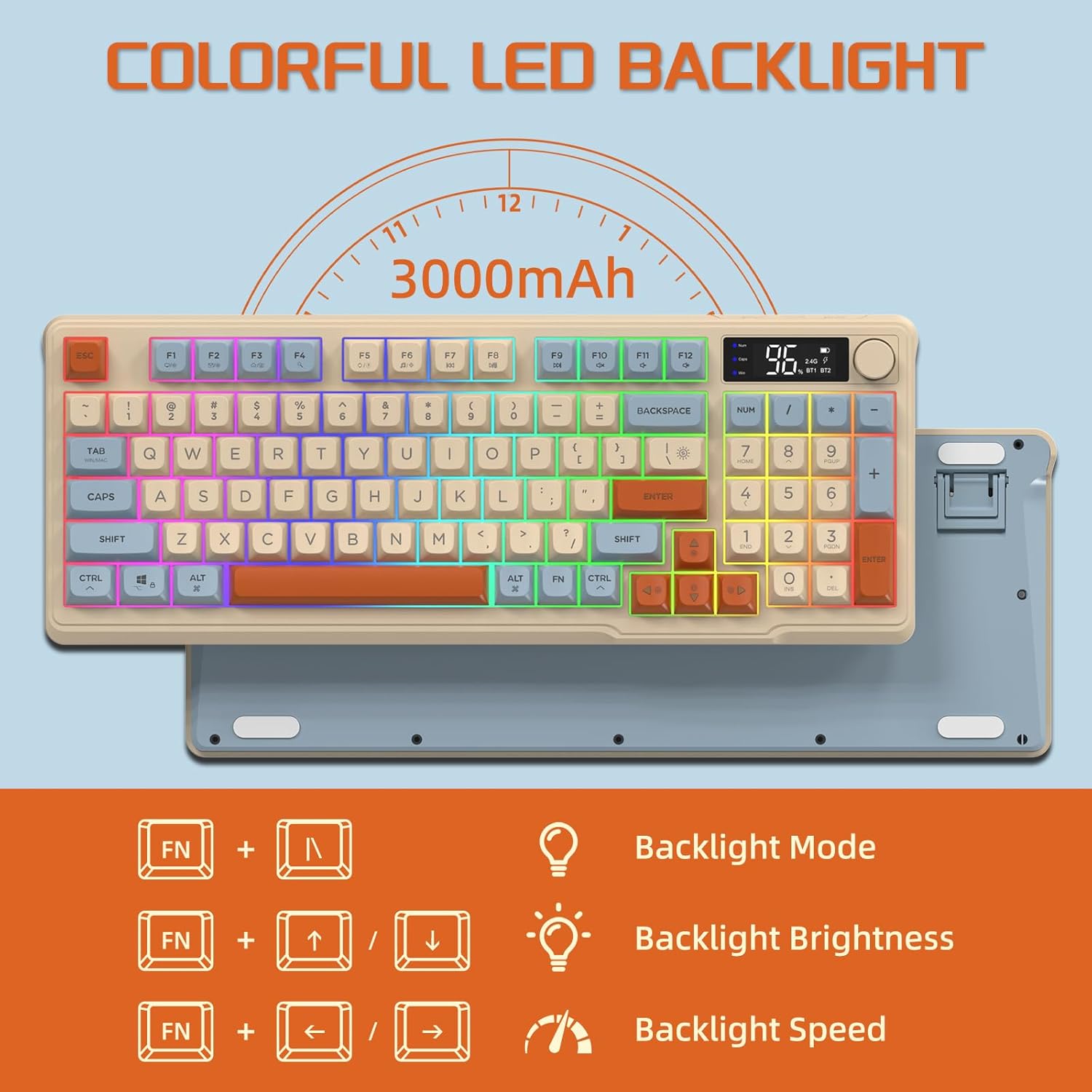
Image: The keyboard displaying the key combinations for controlling the colorful LED backlight, including changing backlight mode, brightness, and speed using the FN key with N, arrow keys.
4. โหมดประหยัดพลังงาน
The keyboard is designed with power-saving features to extend battery life:
- Sleep Mode (3 minutes inactivity): After 3 minutes of inactivity, the keyboard enters sleep mode, and the backlight turns off.
- Deep Sleep Mode (10 minutes inactivity): After 10 minutes in sleep mode, the keyboard enters deep sleep. The first key press will be ignored to wake the keyboard, and the second key press will activate it.
5. ความเข้ากันได้
The FREEWOLF M96 keyboard is compatible with a wide range of operating systems, including Windows, Mac, and Linux, ensuring broad usability.
การซ่อมบำรุง
1. การทำความสะอาด
- ปิดแป้นพิมพ์ก่อนทำความสะอาด
- ใช้ผ้านุ่มไม่เป็นขุยเช็ดเล็กน้อยampชุบน้ำหรือน้ำยาทำความสะอาดอ่อนๆ เพื่อเช็ดพื้นผิว
- For cleaning between keycaps, use compressed air or a small brush.
- หลีกเลี่ยงการใช้สารเคมีรุนแรงหรือวัสดุที่มีฤทธิ์กัดกร่อน
2. การดูแลแบตเตอรี่
- หลีกเลี่ยงการปล่อยแบตเตอรี่จนหมดบ่อยครั้ง
- เก็บแป้นพิมพ์ไว้ในที่แห้งและเย็นเมื่อไม่ได้ใช้งานเป็นเวลานาน
- โปรดใช้เฉพาะสายชาร์จที่ให้มาหรือสาย USB-C ที่ใช้งานร่วมกันได้เท่านั้น
การแก้ไขปัญหา
| ปัญหา | สาเหตุที่เป็นไปได้ | สารละลาย |
|---|---|---|
| แป้นพิมพ์ไม่ตอบสนอง | Low battery; incorrect connection mode; receiver not plugged in (2.4G); Bluetooth not paired. | Charge the keyboard; switch to correct mode (2.4G/BT1/BT2); ensure 2.4G receiver is connected; re-pair Bluetooth. |
| ไฟแบ็คไลท์ไม่ทำงาน | Backlight turned off; low battery; brightness set to minimum. | Check backlight settings using the knob or FN key combinations; charge the keyboard. |
| Keys not registering or ghosting. | Software conflict; low battery; interference. | Restart your device; charge the keyboard; move closer to the receiver/device; check for driver updates. |
| การเชื่อมต่อบลูทูธไม่เสถียร | สัญญาณรบกวน; ระยะห่างจากอุปกรณ์; แบตเตอรี่เหลือน้อย | Reduce interference (other wireless devices); move keyboard closer to device; charge keyboard. |
ข้อมูลจำเพาะ
| คุณสมบัติ | รายละเอียด |
|---|---|
| ยี่ห้อ | ฟรีวูล์ฟ |
| หมายเลขรุ่น | M96 |
| เทคโนโลยีการเชื่อมต่อ | บลูทูธ, ไร้สาย 2.4G |
| คำอธิบายแป้นพิมพ์ | Mechanical feel with PBT keycaps |
| จำนวนคีย์ | 94 keys (US Layout) |
| แสงไฟแบ็คไลท์ | ไฟแบ็คไลท์ LED RGB |
| ความจุของแบตเตอรี่ | 3000 มิลลิแอมป์ |
| คุณสมบัติพิเศษ | Electronic display, multimedia control knob, power saving modes |
| อุปกรณ์ที่รองรับ | PC (Windows, Mac, Linux), iOS, Android |
| สี | Blueberry (Myrtille) |
| ขนาดสินค้า | 385mm (15.16 inch) x 145mm (5.71 inch) x 40mm (1.57 inch) |

Image: Diagram illustrating the product dimensions of the FREEWOLF M96 keyboard: 385mm (15.16 inches) length, 145mm (5.71 inches) width, and 40mm (1.57 inches) height.
การรับประกันและการสนับสนุน
This FREEWOLF M96 Wireless Gaming Keyboard comes with a standard manufacturer's warranty. Please refer to the product packaging or the seller's information for specific warranty terms and conditions. For technical support or further assistance, please contact the retailer or manufacturer directly.
For the latest information and support, visit the official FREEWOLF webเว็บไซต์หรือติดต่อฝ่ายบริการลูกค้าของพวกเขา


