1. บทนำ
The Logitech Keys-to-GO 2 is a slim, portable wireless keyboard designed for on-the-go productivity. It offers a comfortable typing experience across multiple operating systems and features a built-in protective cover.
คุณสมบัติหลัก:
- Types Beautifully: Perfectly spaced scissor keys for a roomy, comfortable typing experience.
- For Any Screen, Any OS: Compatible with Windows, Android, macOS, and ChromeOS.
- Keeps You Covered: Built-in cover protects the compact keyboard from damage.
- Ultra Portable Keyboard: Super slim, lightweight design for easy transport.
- Pair up to Three Devices: Seamlessly switch between three different devices with a single key tap.

Figure 1: Logitech Keys-to-GO 2 Portable Compact Wireless Keyboard with its cover open, showcasing การออกแบบที่เพรียวบาง
2. การตั้งค่าและการเชื่อมต่อ
2.1. การตั้งค่าเริ่มต้น
- แกะแป้นพิมพ์ออกจากบรรจุภัณฑ์
- Ensure the pre-installed coin cell batteries are properly seated.
- Locate the On/Off switch on the keyboard and slide it to the 'On' position.
2.2. การจับคู่บลูทู ธ
The Keys-to-GO 2 can connect to up to three devices simultaneously via Bluetooth. Follow these steps to pair your keyboard:
- เปิดใช้งานแป้นพิมพ์โดยใช้สวิตช์เปิด/ปิด
- Press and hold one of the Easy-Switch keys (labeled 1, 2, or 3) for three seconds until the LED indicator above the key starts blinking rapidly. This indicates the keyboard is in pairing mode.
- On your device (tablet, phone, or computer), navigate to the Bluetooth settings.
- Select "Keys-to-GO 2" from the list of available devices.
- If prompted, enter the pairing code displayed on your screen using the Keys-to-GO 2 keyboard and press Enter.
- Once paired, the LED indicator will glow solid for a few seconds and then turn off, indicating a successful connection.
2.3 การสลับระหว่างอุปกรณ์
To switch between paired devices, simply press the corresponding Easy-Switch key (1, 2, or 3) for the desired device. The keyboard will automatically connect to that device.
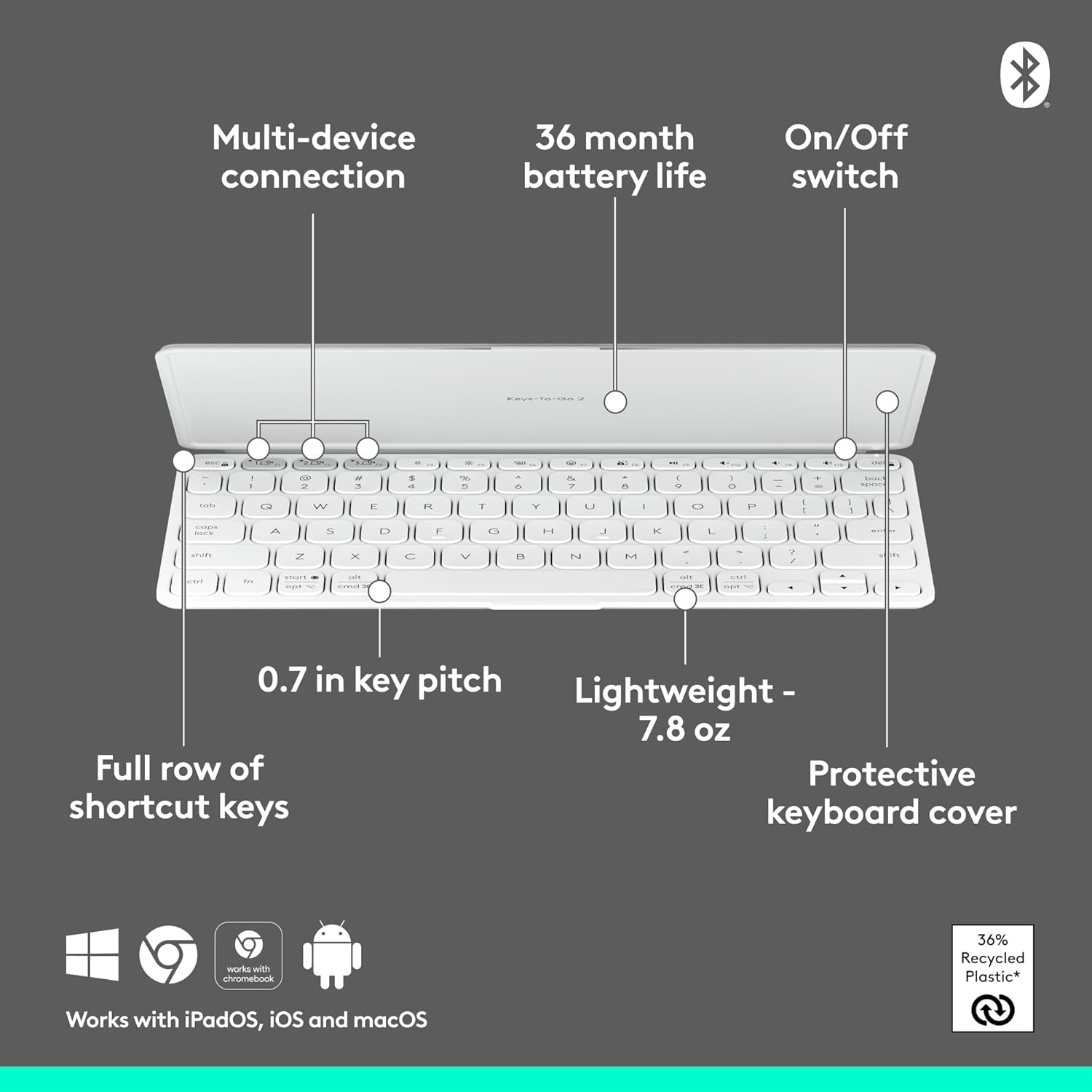
Figure 2: Diagram highlighting key features including multi-device connection and On/Off switch for easy setup.
3. การใช้งานคีย์บอร์ด
3.1. ประสบการณ์การพิมพ์
The Keys-to-GO 2 features well-spaced scissor keys designed for comfortable and efficient typing. The low-profile keys provide a satisfying tactile response, making it ideal for extended use.

Figure 3: User typing comfortably on the Keys-to-GO 2 keyboard, highlighting its ergonomic design.
3.2. ปุ่มทางลัด
The keyboard includes a full row of shortcut keys for quick access to various functions, such as media controls, screen brightness, and more. These keys are customizable on Windows and macOS for personalized workflow.
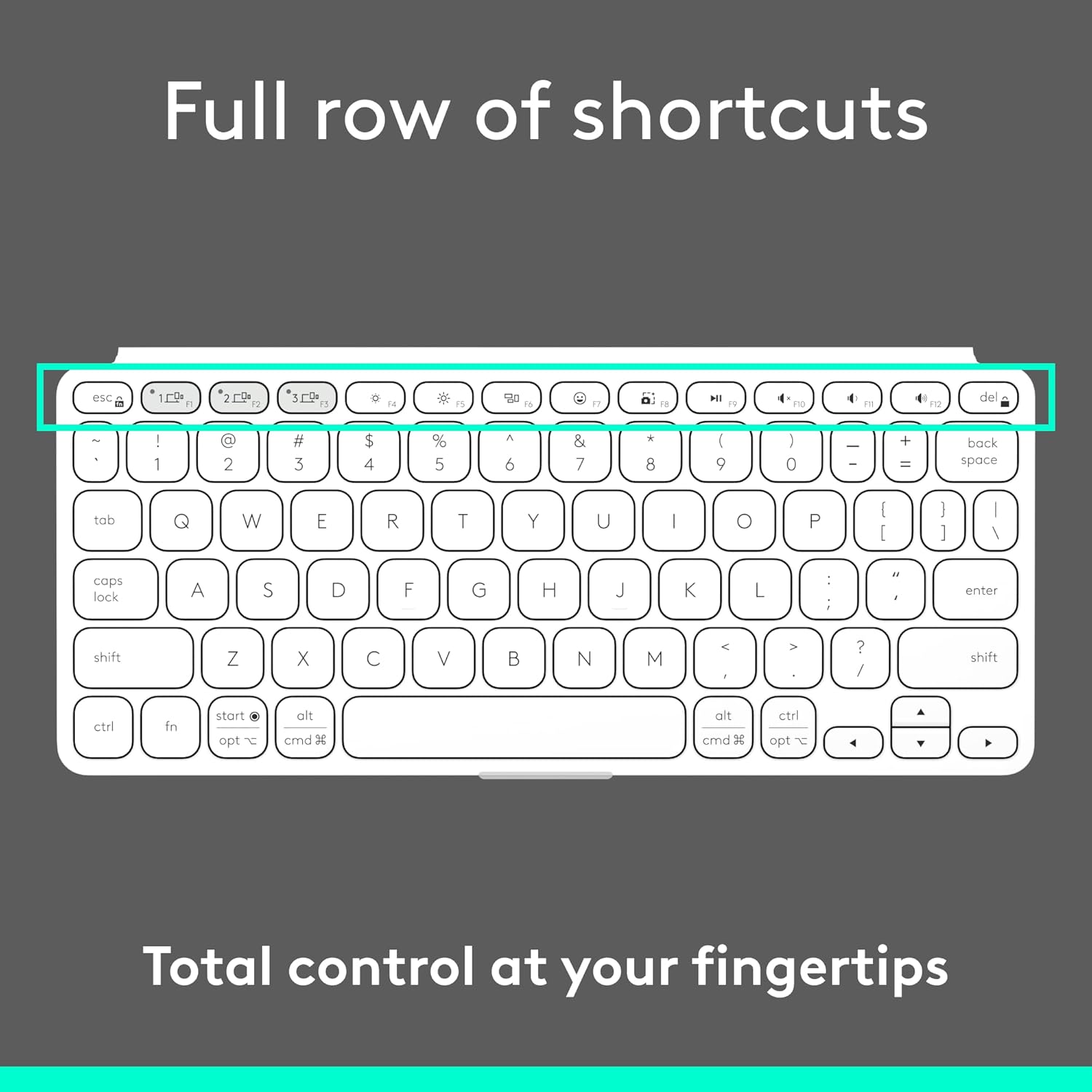
รูปที่ 4: รายละเอียด view of the full row of shortcut keys on the Keys-to-GO 2, offering total control at your fingertips.
3.3. ความเข้ากันได้ของระบบปฏิบัติการหลายระบบ
The Keys-to-GO 2 is designed to work seamlessly with a variety of operating systems, ensuring broad compatibility across your devices:
- แอนดรอยด์
- โครมโอเอส
- หน้าต่าง
- ไอแพดโอเอส
- ไอโอเอส
- แมคโอเอส

Figure 5: The Keys-to-GO 2 keyboard connected to a tablet, illustrating its versatile multi-OS support.
4. การบำรุงรักษา
4.1. อายุการใช้งานและการเปลี่ยนแบตเตอรี่
The Keys-to-GO 2 is powered by pre-installed coin cell batteries, offering up to 3 years of battery life under typical usage conditions. When the battery is low, the LED indicator will signal this. To replace the batteries:
- หาช่องใส่แบตเตอรี่บนแป้นพิมพ์
- You will need a T5 screwdriver to open the battery compartment.
- Carefully remove the old coin cell batteries.
- Insert new coin cell batteries, ensuring correct polarity.
- Securely close the battery compartment using the T5 screwdriver.
Note: Battery life may vary based on usage and computing conditions.

Figure 6: The Keys-to-GO 2 is designed for long battery life, allowing for extended use without frequent battery changes.
4.2. การทำความสะอาด
ในการทำความสะอาดแป้นพิมพ์ ให้เช็ดพื้นผิวเบาๆ ด้วยผ้าเนื้อนุ่มและแห้งamp ผ้า. หลีกเลี่ยงการใช้สารเคมีรุนแรงหรือวัสดุกัดกร่อน
5 การแก้ไขปัญหา
| ปัญหา | สาเหตุที่เป็นไปได้ | สารละลาย |
|---|---|---|
| แป้นพิมพ์ไม่เปิดใช้งาน | Battery is dead or improperly seated. | Check the On/Off switch. Replace batteries if necessary, ensuring they are correctly inserted. |
| ไม่สามารถจับคู่กับอุปกรณ์ได้ | Keyboard not in pairing mode; Bluetooth off on device; device too far. | Ensure keyboard is in pairing mode (blinking LED). Turn on Bluetooth on your device. Move keyboard closer to device. |
| แป้นพิมพ์ไม่ตอบสนองหรือเกิดข้อผิดพลาดในการพิมพ์ | Low battery; interference; software issue on device. | Replace batteries. Move away from other wireless devices. Restart your device. Re-pair the keyboard. |
| แป้นพิมพ์หลุดการเชื่อมต่อบ่อยครั้ง | Low battery; interference; device power saving settings. | Replace batteries. Reduce interference. Check device power saving settings that might disconnect Bluetooth devices. |
6. ข้อมูลจำเพาะ
- ยี่ห้อ: โลจิเทค
- แบบอย่าง: Keys-To-Go 2 Universal Pale Gray
- เทคโนโลยีการเชื่อมต่อ: บลูทูธ
- ความเข้ากันได้ของระบบปฏิบัติการ: Android, iOS, macOS, Windows, ChromeOS
- น้ำหนักสินค้า: 7.8 ออนซ์ (ประมาณ 222 กรัม)
- ขนาดผลิตภัณฑ์ (ยาวxกว้างxสูง): 4.13 x 0.17 x 9.84 นิ้ว
- จำนวนคีย์: 78
- คำอธิบายแป้นพิมพ์: เมมเบรน
- แหล่งพลังงาน: ใช้พลังงานจากแบตเตอรี่ (รวมแบตเตอรี่ที่ไม่ใช่มาตรฐาน 1 ก้อน)
- อายุการใช้งานแบตเตอรี่: Up to 3 years (pre-installed coin cell batteries)
- วัสดุ: Plastic (36% recycled plastic)
- สี: สีเทาอ่อน
7. การรับประกันและการสนับสนุน
สำหรับข้อมูลการรับประกันและการสนับสนุนทางเทคนิค โปรดเยี่ยมชมเว็บไซต์ฝ่ายสนับสนุนอย่างเป็นทางการของ Logitech webหรือติดต่อฝ่ายบริการลูกค้า เก็บใบเสร็จรับเงินไว้เพื่อใช้ในการเคลมประกัน
ฝ่ายสนับสนุน Logitech อย่างเป็นทางการ: www.logitech.com/support


