การแนะนำ
Welcome to the user manual for your new OKAI Electric Scooter with Seat. This manual provides essential information for the safe operation, maintenance, and troubleshooting of your scooter. Please read it thoroughly before your first ride to ensure a safe and enjoyable experience.
The OKAI Electric Scooter with Seat (Model EA10A) is designed for urban commuting and recreational riding, offering a comfortable and efficient way to travel. It features a powerful 350-watt motor, 10-inch tubeless pneumatic tires, a convenient detachable battery, and a robust dual braking system for enhanced safety and control.
แนวทางปฏิบัติเพื่อความปลอดภัย
Your safety is paramount. Always adhere to the following guidelines when operating your electric scooter:
- Always wear a helmet and appropriate safety gear, including knee and elbow pads.
- Familiarize yourself with local traffic laws and regulations regarding electric scooters before riding.
- อย่าขี่ภายใต้ฤทธิ์แอลกอฮอล์หรือยาเสพติด
- Avoid riding in heavy rain, on slippery surfaces, or through standing water.
- Ensure all components, including the handlebars, seat, and wheels, are securely fastened before each ride.
- รักษาระยะห่างที่ปลอดภัยจากยานพาหนะคันอื่น คนเดินถนน และสิ่งกีดขวาง
- สกูตเตอร์คันนี้รับน้ำหนักได้สูงสุด 220 ปอนด์ (100 กิโลกรัม) ห้ามใช้น้ำหนักเกินกว่านี้
- Always use both brakes simultaneously for effective stopping.
สินค้าเกินview
The OKAI Electric Scooter with Seat combines convenience with performance. Key features include:
- มอเตอร์: 350-watt motor with 28N.m of torque, enabling efficient acceleration and hill climbing.
- ความเร็ว: Capable of reaching speeds of up to 15.5 MPH (25 km/h).
- พิสัย: Offers an impressive range of up to 25 miles on a single full charge.
- ยางรถยนต์ : Equipped with 10-inch tubeless pneumatic tires for a smooth and comfortable ride.
- ระบบเบรก: Features a dual braking system with EBS (Electronic Braking System) and a rear-disc brake for reliable stopping power.
- แบตเตอรี่: Comes with a detachable lithium battery, supporting approximately 5.5 hours for a full charge.
- ความปลอดภัย: Includes an NFC key system for convenient locking and unlocking.
- ปลอบโยน: Designed with a large, comfortable saddle and a wide 10.6-inch deck for ample foot space.
- คุณสมบัติเพิ่มเติม: Bright LED headlights and brake lights for visibility, and a practical front basket for carrying personal items.
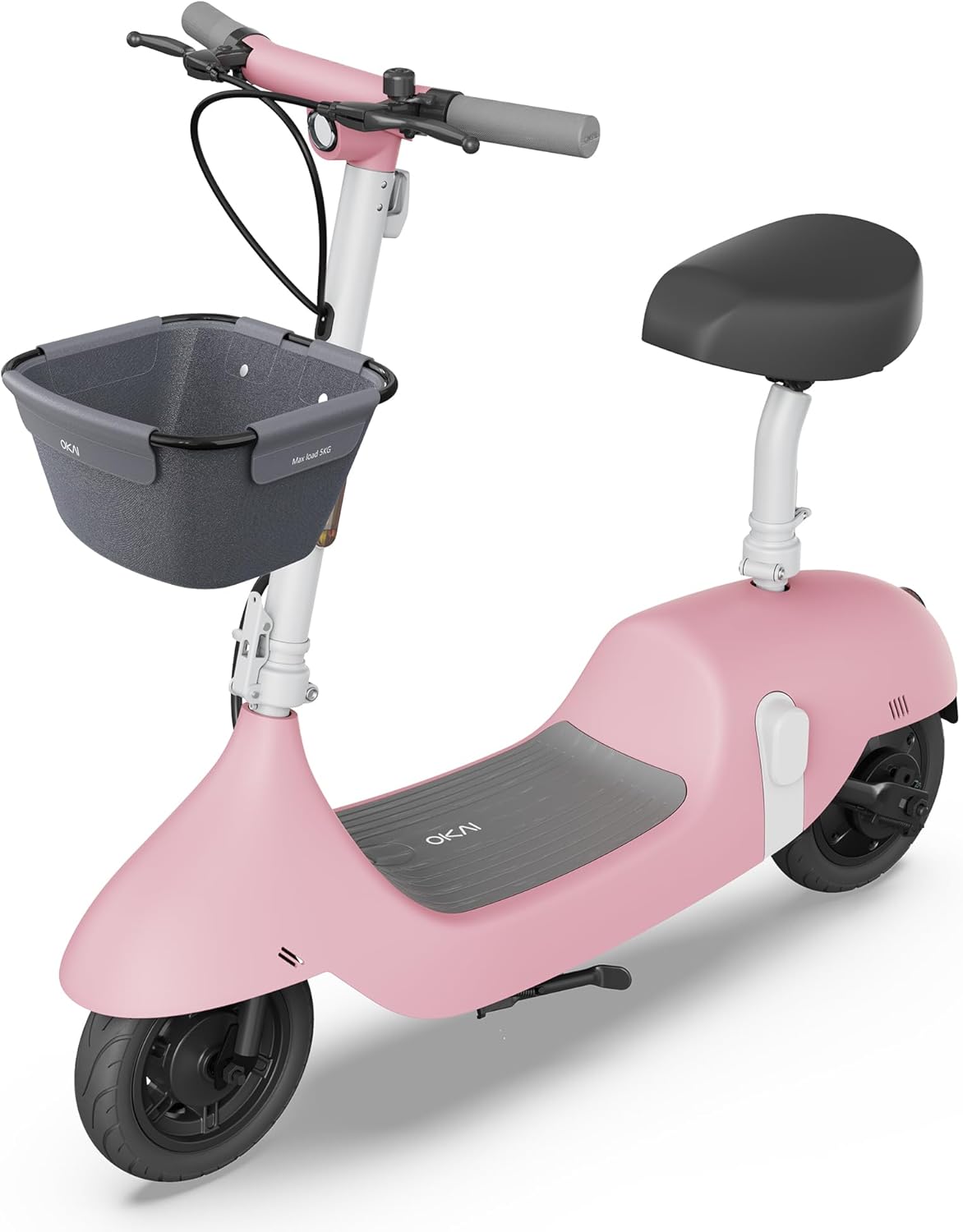
Image: The OKAI Electric Scooter with Seat in pink, showcasing its design with a front basket and comfortable seat.

ภาพ: รายละเอียด view of the 350W power motor and the easily accessible detachable battery compartment.

Image: Illustration highlighting the dual braking system and the practical front-mounted basket.
การติดตั้งและการประกอบ
Your OKAI Electric Scooter requires minimal assembly. Follow these steps to get started:
- แกะกล่อง: นำชิ้นส่วนทั้งหมดออกจากบรรจุภัณฑ์อย่างระมัดระวัง ตรวจสอบให้แน่ใจว่าชิ้นส่วนทั้งหมดที่ระบุไว้ในรายการบรรจุภัณฑ์ครบถ้วนและไม่เสียหาย
- การติดตั้งมือจับ: Attach the handlebar to the scooter's stem. Ensure it is aligned correctly and securely tightened using the provided tools.
- การประกอบที่นั่ง: Insert the seat post into the designated slot on the scooter's frame. Adjust the seat height to a comfortable riding position and secure it firmly with the quick-release lever.
- อุปกรณ์ยึดตะกร้า: If your model includes a front basket, attach it to the handlebar or front frame following the separate instructions provided with the basket.
- ค่าใช้จ่ายเริ่มต้น: Before your first ride, fully charge the battery. Connect the charger to the scooter's charging port or directly to the detachable battery. The charging time is approximately 6 hours. The display will indicate charging status.
- NFC Key Pairing: The NFC key is typically pre-connected. To lock or unlock the scooter, simply tap the NFC key to the designated area on the scooter's display or body.

Image: Illustration showing the two methods of charging the OKAI Electric Scooter: directly via the scooter's port or by removing and charging the detachable battery.
คำแนะนำการใช้งาน
การเปิด/ปิด
- To turn on the scooter, press and hold the power button located on the display until it illuminates.
- To turn off, press and hold the power button again until the display shuts down.
- Alternatively, use the NFC key to lock/unlock the scooter, which also controls power.
การขับขี่สกู๊ตเตอร์
- Place one foot firmly on the scooter's deck and use your other foot to push off the ground to gain initial momentum.
- Once moving, gently press the throttle lever (usually on the right handlebar) to engage the electric motor.
- Adjust your speed by varying the pressure on the throttle. The scooter may have multiple speed modes, which can often be selected via the display or app.
- To brake, release the throttle and gently squeeze the brake levers (on both handlebars). The scooter features both electronic and mechanical drum brakes for effective stopping.

Image: Close-up of the handlebar showing the digital display, throttle, and brake levers, illustrating the scooter's controls.
Using the OKAI App
Download the official OKAI app from your smartphone's app store (available for iOS and Android). The app enhances your riding experience by allowing you to:
- View real-time riding data, including current speed, battery level, and trip distance.
- Adjust riding modes and customize certain scooter settings.
- Lock and unlock the scooter remotely for added convenience and security.
- Access firmware updates and direct customer support.

Image: A user interacting with the OKAI app on a smartphone, demonstrating how the app provides scooter controls and real-time data.
การซ่อมบำรุง
Regular maintenance is crucial for ensuring the longevity, optimal performance, and safe operation of your OKAI Electric Scooter.
- การทำความสะอาด: เช็ดทำความสะอาดสกู๊ตเตอร์เป็นประจำด้วยamp cloth. Do not use high-pressure water jets or immerse the scooter in water, as this can damage electronic components.
- แรงดันลมยาง: Although the tires are tubeless, proper inflation is essential for ride quality, range, and tire lifespan. Check tire pressure periodically and inflate to the recommended PSI (usually found on the tire sidewall).
- เบรค : Inspect the brake levers and cables for proper function and signs of wear. Ensure the brakes engage smoothly and effectively. Adjust brake cable tension if the brakes feel loose or ineffective. If brake pads are worn, they should be replaced by a qualified technician.
- การดูแลแบตเตอรี่
- หลีกเลี่ยงการคายประจุแบตเตอรี่จนหมด
- Charge the battery regularly, ideally keeping it between 20% and 80% for optimal battery health and lifespan.
- Store the scooter in a cool, dry place when not in use for extended periods. If storing for a long time, ensure the battery is charged to about 50-60%.
- ตัวล็อค: Periodically check all screws, bolts, and quick-release mechanisms to ensure they are tight and secure. Loose fasteners can lead to instability and potential hazards.
การแก้ไขปัญหา
This section provides solutions to common issues you might encounter with your OKAI Electric Scooter.
| ปัญหา | สาเหตุที่เป็นไปได้ | สารละลาย |
|---|---|---|
| สกูตเตอร์สตาร์ทไม่ติด | Low or depleted battery; Power button not pressed correctly; NFC key not recognized. | Charge the battery fully; Press and hold the power button firmly for a few seconds; Re-tap NFC key or try another key if available. |
| ระยะทางหรือความเร็วลดลง | Low tire pressure; Overloaded (exceeding weight limit); Battery degradation; Frequent uphill riding or aggressive acceleration. | Check and inflate tires to recommended pressure; Ensure rider weight is within specified limits; Consult customer support for battery health checks; Adjust riding style to be more conservative. |
| เบรกอาจหลวมหรือไม่ทำงานอย่างมีประสิทธิภาพ | Brake cable slack; Worn brake pads; Debris in brake mechanism. | Adjust brake cable tension at the lever or caliper; Replace brake pads if worn (consult a professional); Clean any debris from the brake area. |
| เสียงผิดปกติระหว่างการทำงาน | Loose components (screws, bolts); Debris caught in wheels or motor; Worn bearings. | Check all fasteners and tighten as necessary; Inspect wheels and motor area for obstructions and remove them; If noise persists, contact customer support. |
| Display not working or showing errors. | Loose cable connection; Software glitch; Damage to display unit. | Turn the scooter off and on again; Check connections to the display; If an error code is displayed, refer to the app or contact customer support with the code. |
ข้อมูลจำเพาะ
Detailed technical specifications for the OKAI Electric Scooter with Seat, Model EA10A.
| คุณสมบัติ | รายละเอียด |
|---|---|
| ยี่ห้อ | โอเค |
| ชื่อรุ่น | EA10A |
| สี | สีชมพู |
| กำลังมอเตอร์ | 350-watt (Max 750W) |
| ความเร็วสูงสุด | 15.5 ไมล์ต่อชั่วโมง (25 กม./ชม.) |
| ช่วงสูงสุด | 25 ไมล์ |
| ประเภทแบตเตอรี่ | Detachable Lithium Battery |
| เวลาในการชาร์จ | Approx. 6 Hours (5.5H fast charging) |
| ขนาดยาง | 10 นิ้ว |
| ประเภทยาง | นิวเมติกแบบไม่มียาง |
| สไตล์เบรค | Mechanical Drum Brake + Electronic Brake (EBS) |
| วัสดุกรอบ | อลูมิเนียม |
| ขนาดสินค้า (กxยxส) | ยาว 45.1 นิ้ว x กว้าง 21 นิ้ว x สูง 41 นิ้ว |
| น้ำหนักสินค้า | 58 ปอนด์ |
| จำกัด น้ำหนัก | 220 ปอนด์ |
| ช่วงอายุ | ผู้ใหญ่ |
| คุณสมบัติพิเศษ | Seat, Lights, Basket, Rechargeable, NFC Key |

Image: Diagram illustrating the key dimensions of the OKAI Electric Scooter: 45.1 inches in length, 21 inches in handlebar width, and 41 inches in height.
การรับประกันและการสนับสนุน
ข้อมูลการรับประกัน
The OKAI Electric Scooter comes with a Limited Warranty. Please refer to the warranty card included in your product packaging for specific terms and conditions, including coverage duration, what is covered, and how to make a claim. Retain your proof of purchase for warranty purposes.
การสนับสนุนลูกค้า
For any questions, technical assistance, or warranty claims, please contact OKAI customer support. Our team is ready to assist you with any issues or inquiries.
- การสนับสนุนทางออนไลน์: Visit the official OKAI website for comprehensive FAQs, troubleshooting guides, and support resources.
- อีเมล: Find the customer service email address on your product packaging or the official OKAI webเว็บไซต์.
- โทรศัพท์: A customer service phone number may also be available on your product packaging or the official OKAI webเว็บไซต์.
คุณยังสามารถเยี่ยมชม OKAI Store on Amazon สำหรับข้อมูลผลิตภัณฑ์เพิ่มเติมและการอัปเดตต่างๆ


