การแนะนำ
Thank you for choosing the Primevolve PF11R-G Portable Rechargeable Fan. This versatile fan is designed for convenience and powerful airflow, suitable for various indoor and outdoor settings. Please read this manual carefully before use to ensure proper operation and maintenance.
ข้อมูลด้านความปลอดภัย
ปฏิบัติตามข้อควรระวังด้านความปลอดภัยพื้นฐานอยู่เสมอเมื่อใช้เครื่องใช้ไฟฟ้า เพื่อลดความเสี่ยงต่อการเกิดไฟไหม้ ไฟฟ้าช็อต และการบาดเจ็บ
- Do not immerse the fan or its power cord in water or other liquids.
- เก็บให้พ้นจากมือเด็กและสัตว์เลี้ยง
- ห้ามสอดนิ้วหรือวัตถุแปลกปลอมเข้าไปในตะแกรงพัดลม
- ตรวจสอบให้แน่ใจว่าพัดลมวางอยู่บนพื้นผิวที่มั่นคงและเรียบเพื่อป้องกันการพลิกคว่ำ
- Unplug the fan before cleaning or when not in use for extended periods.
- Use only the provided USB-C cable and a compatible 5V/2A power adapter for charging.
- Do not operate the fan if the cord or plug is damaged, or if the fan malfunctions or has been dropped.
สินค้าเกินview
The Primevolve PF11R-G fan offers a unique foldable and adjustable design, allowing it to function as a desk fan, floor fan, or pedestal fan. It features a rechargeable battery, multiple speed settings, and quiet operation.

Image: The Primevolve PF11R-G fan demonstrating its versatility, showing its compact folded state, a desk fan configuration, and a fully extended pedestal fan configuration. A remote control is also visible.
คุณสมบัติหลัก:
- ใช้พลังงานจากแบตเตอรี่: Rechargeable battery provides 6-21 hours of operation.
- ปรับความสูง: Telescopic design adjusts from 3.54 inches (90mm) to 39.37 inches (1000mm).
- 180-Degree Head Tilt: Allows for flexible airflow direction.
- การตั้งค่าความเร็ว 4: Ranging from gentle breeze to strong airflow (2.3m/s-4m/s).
- การทำงานที่มีเสียงรบกวนต่ำ: Operates quietly at 30-40 dB.
- การชาร์จ USB-C: Compatible with various USB power sources (5V/2A).
- Detachable Fan Hood: เพื่อการทำความสะอาดและบำรุงรักษาที่ง่ายดาย
- รีโมทคอนโทรล: เพื่อการใช้งานที่สะดวกสบาย
การติดตั้งและการประกอบ
The Primevolve PF11R-G fan comes pre-assembled in its folded state. Follow these steps to set it up for use:
- Unfold the Fan: Gently pull the fan head upwards from the base. The telescopic rod will extend. Adjust to your desired height.
- รักษาตำแหน่ง: Ensure the telescopic rod is securely locked at the desired height. The base should be fully unfolded and stable.
- Adjust Fan Head Angle: Tilt the fan head to your preferred angle. The head can rotate up to 180 degrees vertically.
- ค่าใช้จ่ายเริ่มต้น: Before first use, fully charge the fan using the provided USB-C cable and a 5V/2A power adapter. The charging port is located on the base. A full charge takes approximately 5 hours.

Image: Visual guide demonstrating the fan's adjustable height feature, from its compact folded size (2.72 inches) to a desk fan (14.17 inches) and a full-height pedestal fan (39.37 inches).
คำแนะนำการใช้งาน
เปิด/ปิดเครื่อง:
- Press the power button on the fan base or the remote control to turn the fan on or off.
การตั้งค่าความเร็ว:
The fan has 4 speed settings. Press the speed button on the fan base or the remote control to cycle through the speeds:
- ความเร็ว 1 (ต่ำ)
- Speed 2 (Mid)
- ความเร็ว 3 (สูง)
- Speed 4 (Natural Wind Mode)

Image: The fan's battery life at various speed settings: Low (21 hours), Mid (11.5 hours), Natural Wind (11 hours), and High (6 hours).
รีโมทคอนโทรล:
The included remote control allows for convenient operation from a distance. It has buttons for power, speed adjustment, and oscillation control (if applicable, though oscillation is not explicitly mentioned in features, it's common for pedestal fans).

Image: A close-up of the remote control being used to operate the fan, highlighting its convenience.
การชาร์จพัดลม:
Connect the USB-C cable to the fan's charging port and the other end to a 5V/2A USB power source (e.g., wall adapter, power bank, computer USB port). The charging indicator light will show charging status.

Image: The fan being charged via its USB-C port, illustrating various compatible power sources such as a wall adapter, power bank, laptop, and power strip.
การบำรุงรักษาและการทำความสะอาด
การทำความสะอาดเป็นประจำจะช่วยรักษาประสิทธิภาพการทำงานของพัดลมและยืดอายุการใช้งานได้
- ปิดเครื่องและถอดปลั๊ก: Always ensure the fan is turned off and unplugged from its power source before cleaning.
- ทำความสะอาดภายนอก: เช็ดพื้นผิวภายนอกของพัดลมด้วยผ้านุ่มๆamp ผ้า ห้ามใช้สารทำความสะอาดที่มีฤทธิ์กัดกร่อนหรือตัวทำละลาย
- Detachable Fan Hood: The front fan hood can be detached for thorough cleaning of the blades. Turn the front hood counter-clockwise to unlock and remove it.
- ทำความสะอาดใบมีด: Use a soft cloth or brush to gently clean dust and debris from the fan blades. The fan hood can be rinsed with water, but ensure it is completely dry before reattaching.
- ประกอบกลับเข้าที่: Align the fan hood and turn it clockwise to lock it back into place.
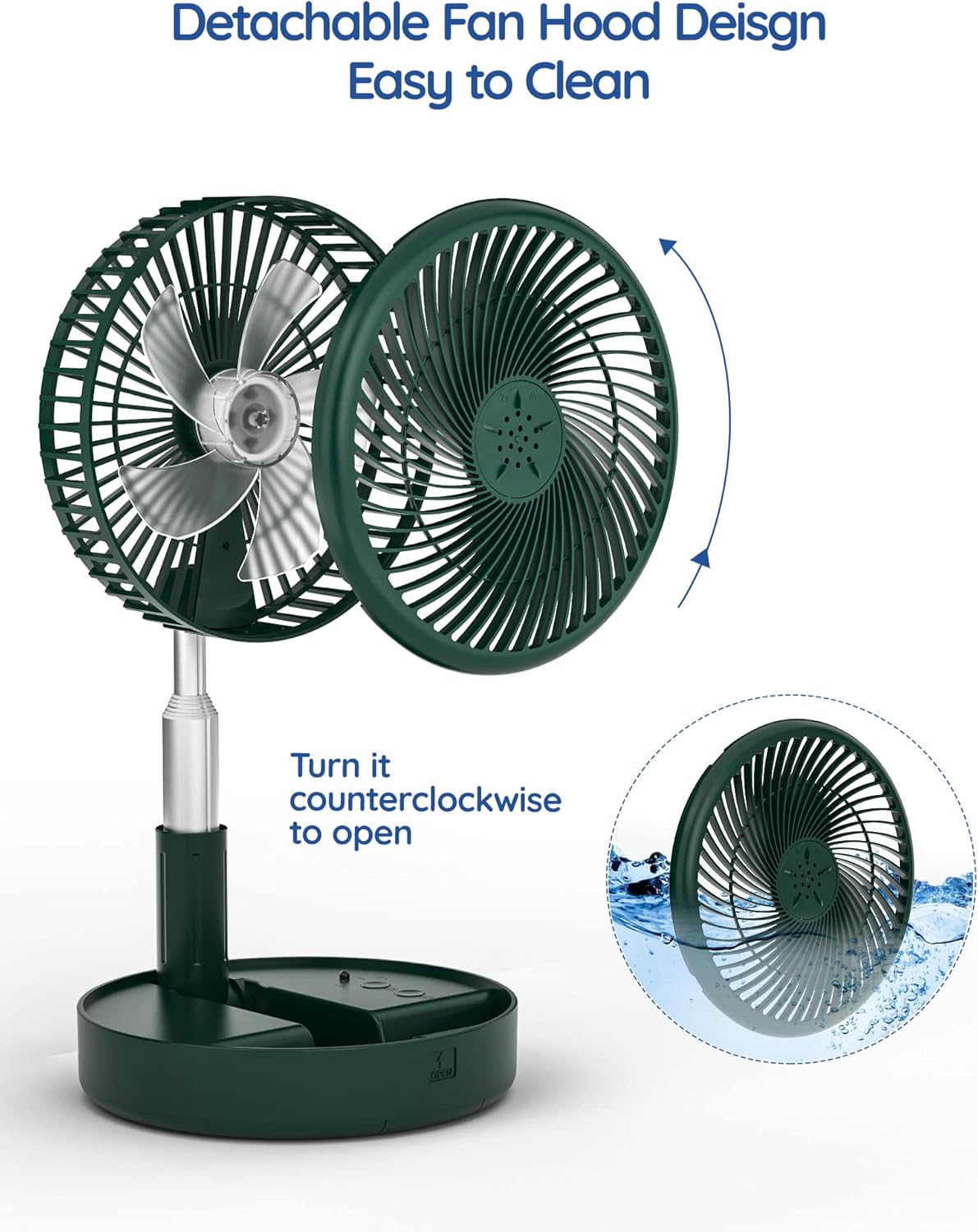
Image: Instructions for detaching the fan hood for cleaning. The hood can be twisted counter-clockwise to remove, allowing access to the blades for washing.
พื้นที่จัดเก็บ:
When not in use, fold the fan back into its compact form and store it in a cool, dry place, away from direct sunlight and extreme temperatures.

Image: The fan's compact folded design, illustrating how easily it can be carried in a bag or stored in small spaces.
การแก้ไขปัญหา
| ปัญหา | สาเหตุที่เป็นไปได้ | สารละลาย |
|---|---|---|
| พัดลมไม่เปิด | แบตเตอรี่หมด ไม่ได้กดปุ่มเปิด/ปิดอย่างถูกต้อง | ชาร์จพัดลมให้เต็ม กดปุ่มเปิดปิดอย่างแน่นหนา |
| Fan stops working unexpectedly. | แบตเตอรี่เหลือน้อย เปิดใช้งานการป้องกันความร้อนสูงเกินไป | ชาร์จพัดลม Turn off the fan, unplug, and allow it to cool down before restarting. |
| การไหลเวียนของอากาศอ่อน | ความเร็วพัดลมต่ำเกินไป Fan grille or blades are dirty. | เพิ่มการตั้งค่าความเร็วพัดลม Clean the fan grille and blades as per maintenance instructions. |
| พัดลมมีเสียงผิดปกติ | มีสิ่งกีดขวางในใบพัดพัดลม พัดลมไม่วางอยู่บนพื้นผิวที่มั่นคง | Turn off and unplug the fan, then check for and remove any obstructions. วางพัดลมบนพื้นผิวที่เรียบและมั่นคง |
| รีโมทคอนโทรลไม่ทำงาน | Battery in remote is dead. สิ่งกีดขวางระหว่างรีโมทและพัดลม | Replace the remote control battery (if applicable, typically button cell). Ensure clear line of sight to the fan's receiver. |
ข้อมูลจำเพาะ
| ยี่ห้อ | ไพรม์วอลฟ์ |
| หมายเลขรุ่น | PF11R-G |
| สี | สีเขียว |
| แหล่งพลังงาน | ใช้แบตเตอรี่ (ลิเธียมไอออนแบบชาร์จไฟได้) |
| เล่มที่tage | 5 โวลต์ |
| วัดtage | 4.3 วัตต์ |
| ระดับเสียง | 30-40 เดซิเบล |
| จำนวนระดับความเร็ว | 4 |
| ช่วงความสูงที่สามารถปรับได้ | 3.54 in (90mm) to 39.37 in (1000mm) |
| ขนาดสินค้า (พับ) | ลึก 7.72 นิ้ว x กว้าง 7.72 นิ้ว x สูง 3.54 นิ้ว |
| ขนาดสินค้า (ขยาย) | ลึก 7.72 นิ้ว x กว้าง 7.72 นิ้ว x สูง 39.37 นิ้ว |
| น้ำหนักสินค้า | 2.42 ปอนด์ |
| ส่วนประกอบที่รวมอยู่ | Remote, USB-C Cord |
| ประเภทขั้วต่อ | USB ประเภท C |
| วัสดุใบมีด | พลาสติก |
การรับประกันและการสนับสนุน
The Primevolve PF11R-G fan comes with a manufacturer's warranty. For specific warranty terms, registration, or technical support, please refer to the warranty card included with your product or visit the official Primevolve webไซต์ โปรดเก็บใบเสร็จรับเงินไว้เป็นหลักฐานการซื้อ
For further assistance, you may contact Primevolve customer service through their official channels.


